No-Show vs Late Cancellation

Charging No-Show and Late-Cancel Fees to a Card on File: What Studios Need Before They Bill

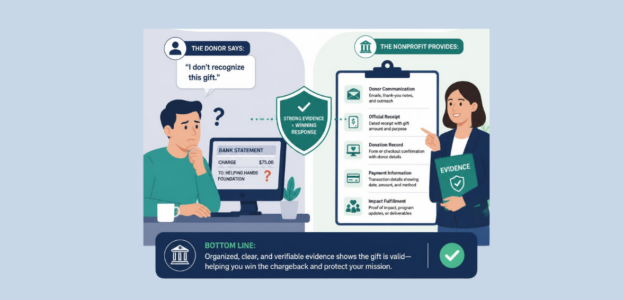
A client books a 6 a.m. appointment and never shows. The instructor waits and the business loses money. The correct response would be to charge the client’s credit card, yet if the client disputes the charge through their banking network, the studio loses money a second time, this time to the chargeback fee.

Automatically charging no-shows is not as simple as turning on a feature. Changing the status quo for studios takes documentation, rules, and agreements that will more often than not be disregarded until a dispute forces the studios to review the agreements. This guide outlines no-Show vs late cancellation and what studios must do before they can bill no-shows automatically and what studios should do when members claim they did not consent.

No-Show vs Late Cancellation: Why the Distinction Matters for Billing
Why the Distinction Matters for Billing

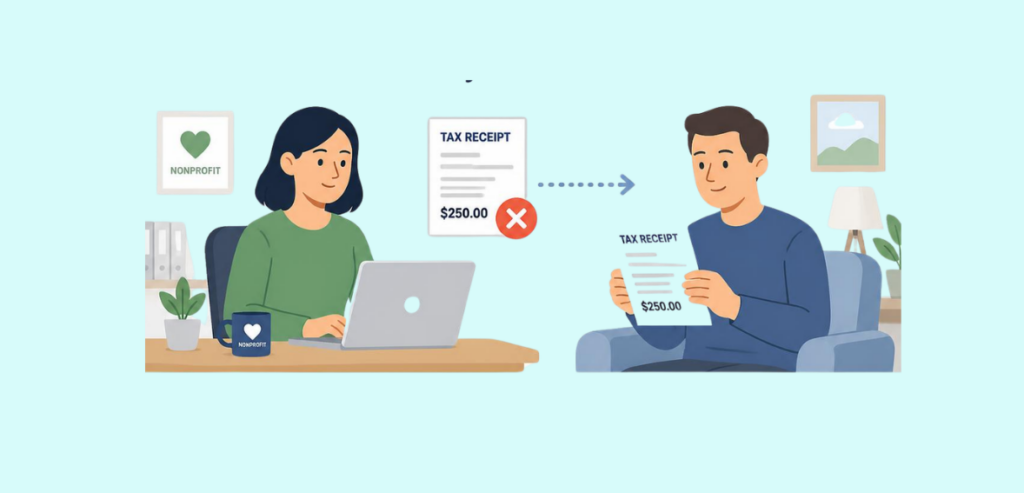
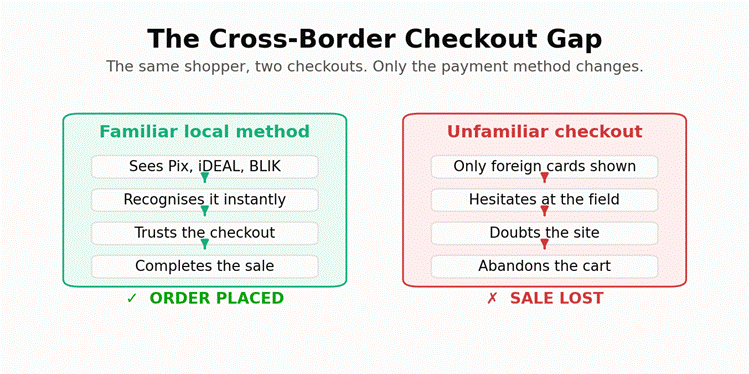
There is a clear distinction between last-minute cancellations and no-shows. Gyms sometimes struggle to differentiate the two financially, but from the scheduling side, they mean different things. A no-show is when a member does not cancel and therefore ruins the attendance sequence. A last-minute cancellation allows the gym to fill the space and is therefore treated differently from a no-show.

Some gyms charge a full attendance class fee for no shows, while last minute cancellations allow the space to be filled and therefore are charged a reduced class fee. There should be a distinction because in case of a dispute the bank will decide for itself whether the no-show fee was justified. A flat fee applied equally to a no-show and a last-minute cancellation is much harder to justify to the cardholder, whereas a fee that is justified by the loss is usually much more acceptable.

Why a No-Show Fee Gets Disputed and How to Make It Stick

When members notice charges on their statements that they did not expect to see, they have a very simple solution: call the bank and dispute the charge. Entire categories have been created by the card networks for this specific situation. Discover uses a services-not-rendered reason code for these disputes and gives card holders an opportunity to tell their bank why they believe they should not have to pay for a service the studio did not provide.

Visa also has a similar track under their Consumer Disputes for merchandise or services not received. Unfortunately, banks do not side with merchants when this happens. Banks leave it to the merchants to defend the claims. This defense comes in three parts.

  • First, a member must have assented to bear the charge.
  • Second, the merchant must have proof to support the charge.


Finally, the charge bearer must be aware of the amount. Studios that win these disputes all have these three components documented. Studios that have only a verbal policy from the day the member signed up lose these disputes.

The Written Policy Members Must Actually See and Accept

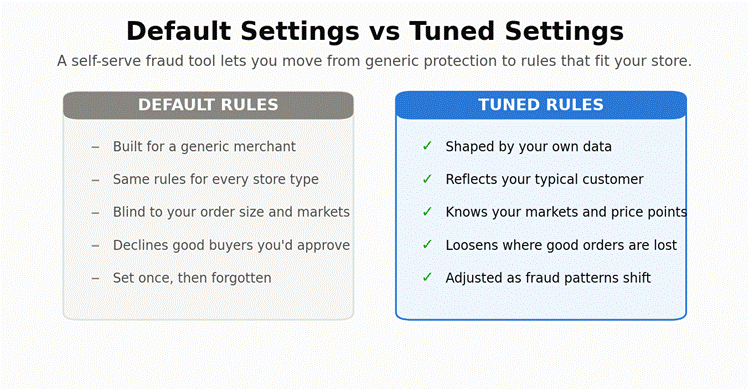
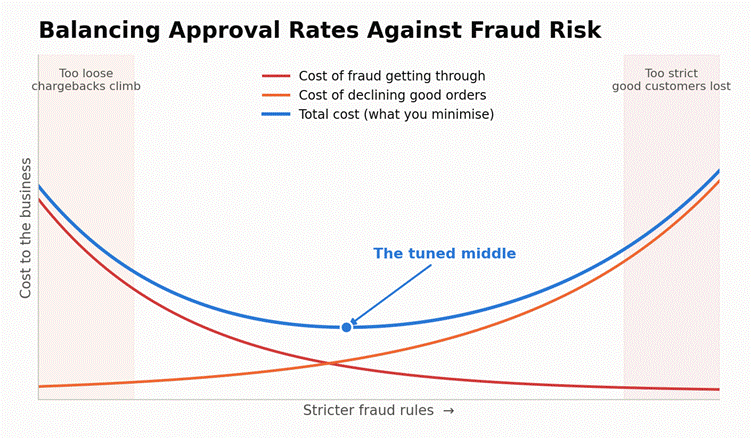
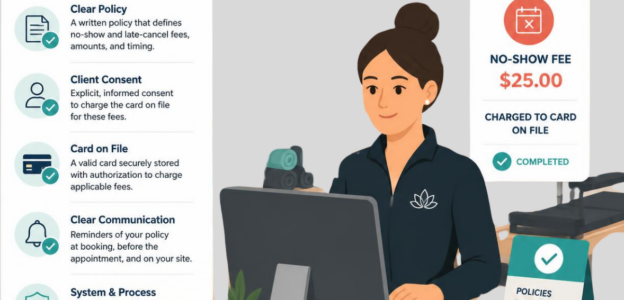
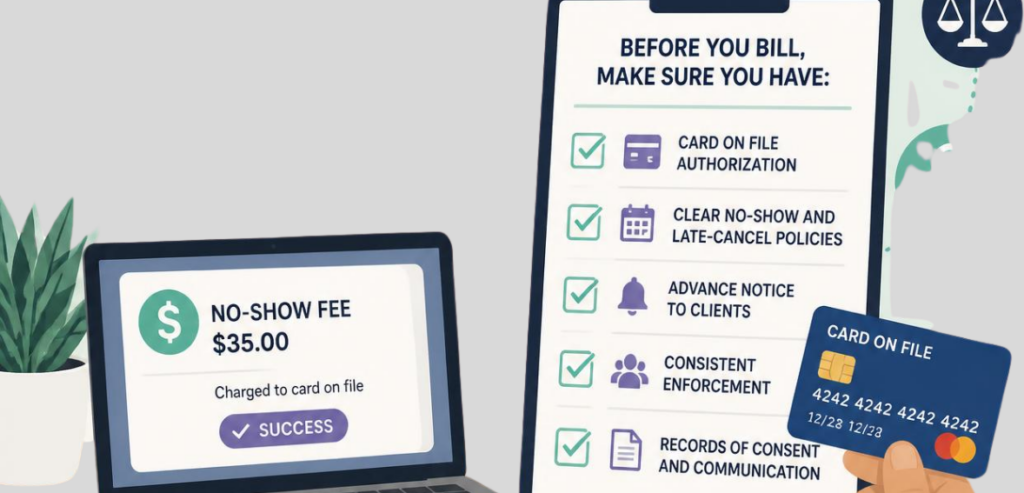
Based on the card network rules, studio contracts must outline stored card terms to the members in a separate contract outside of the general studio terms and conditions, which are usually hidden in the contract sign-up process.

A good no-show policy should show the cancellation deadline and the cut-off time, the processing cost, the payment method, the type of cost (fixed value or percentage), and should state that the policy is subject to change. The studio may use the policy, even if the cost is not defined at the time of signing the contract, as long as the studio uses a clear formula. Policies should be checked by local lawyers because consumer protection rules vary by state.

The policy should be as accessible as possible so that a member can look it up and refer to it in the future (policy will lack legal merit if it only existed on a sign-up page). Most studios send a policy confirmation email, place a policy in the member portal, or post a policy in the studio.

Consent to Store and Charge a Card on File
Consent to Store and Charge a Card on File

Stored cards can be charged without a new checkout, which is why Visa and Mastercard require merchants to obtain cardholder consent for the first charge and retain that consent while the contract is in force and notify the issuing bank of the consent when necessary.

There are several essential contract elements. The contract should include the last four digits of the stored card, the method of storage of the card data, and either the specific amount of the transaction or, if the amount is not fixed, the formula that determines it.

From a technical perspective, there should be a flag for each subsequent charge against a stored card. Each of those charges should be marked as a charge made with card on file. Subsequent charges including no show charges should also be traced back to the original approval and therefore the issuing bank can confirm the consent path.

HMS Pay

When clients book classes, HMS Pay captures that agreement. This means clients agree to the stored card terms at booking, without separate paperwork. HMS Pay time-stamps and records the policy version the client agreed to. Charges for a missed class are made to the credential on file and are linked back to that original agreement. The studio has the agreement on file and has the right to provide this to the bank if the bank should ask for it.

The Attendance and Booking Record That Proves the Miss

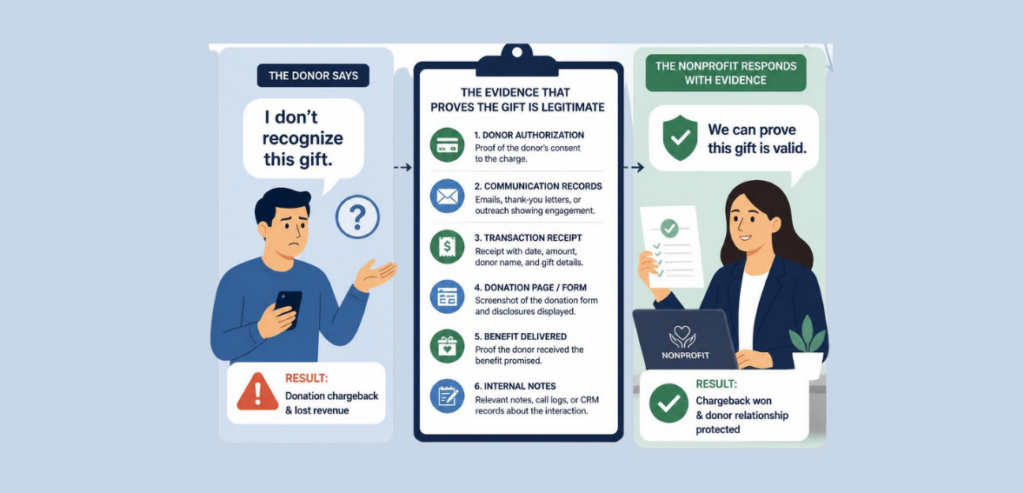
Consent only gives the studio the right to charge the card. It doesn’t prove that the member actually missed the class. The studio’s booking system makes up for that by providing the reservation time, the deadline to cancel class, whether the member canceled class before or after the cancellation deadline, class roster check-in, and the studio’s class roster front desk log.

A waitlist also helps to build this case. If a waitlisted member was turned away while the no-show held the spot, then the studio lost income on a class that could have been full. Studios that keep booking and charge systems integrated can more easily fulfill the information for each class when a dispute is filed. Other studios that keep booking separate from charge information cannot fulfill the requests the banks need within the time given.

Even if a studio uses an app to control all bookings, member sign in logs and employee front desk logs are also important records if a member later shares that the booking system made an error. Studios should track courtesy waivers and keep a record each time a member is granted one. A consistent pattern of courtesy waivers and one enforced class fee is better justified than a record without consistency and no explanation for the waivers.

Setting the Fee Amount and Timing Defensibly

Setting the Fee Amount and Timing Defensibly

If your studio uses punitive no-show fees, expect negative reviews and challenges to the fees. If your studio uses a flat dollar value or small percentage of the class price to calculate your no-show fee, it’s way easier for your members to understand and easier for a bank to justify if a dispute is requested.

If your studio charges a no-show fee, the bank will examine the circumstances surrounding the charge. Generally, a no-show fee should be charged by the following business day. In the event a no-show fee is charged weeks after the class, this practice is considered poor policy and more members will dispute the fee.

If a member is charged multiple times in a given month for a no-show fee, it will definitely increase dissatisfaction and card disputes. A member that feels they have been treated unfairly is far more likely to dispute the charge with the bank than reaching out to your studio.

No-show fees should be capped and waived when an emergency is documented. Members are less likely to dispute the charge if the fee is not charged repeatedly during the length of the contract.

Notifying the Member Before and After the Charge

Network rules state that studios should notify members about stored-card billing transactions and we think the policy should also include no-show fees. Stored-card billing for a membership is a fixed, recurring amount. A no-show fee is not. Reminders sent to members well before the cancellation deadline both reduce no-shows and show, in an evidence packet, that the charge was justified.

After the charge is made, a notification should be sent the same day (or the next) via email, SMS, or in-app messaging. A clear explanation decreases phone calls made to the bank regarding the charge.

Handling the “I Never Agreed to This” Pushback

This objection is rare and is rarely personal. Members can’t remember checking a box several months ago. This objection is easy to solve as all you need to do is pull consent record data including date, version of policy, booking charge, and share that with the member before you get an escalation call from the bank.

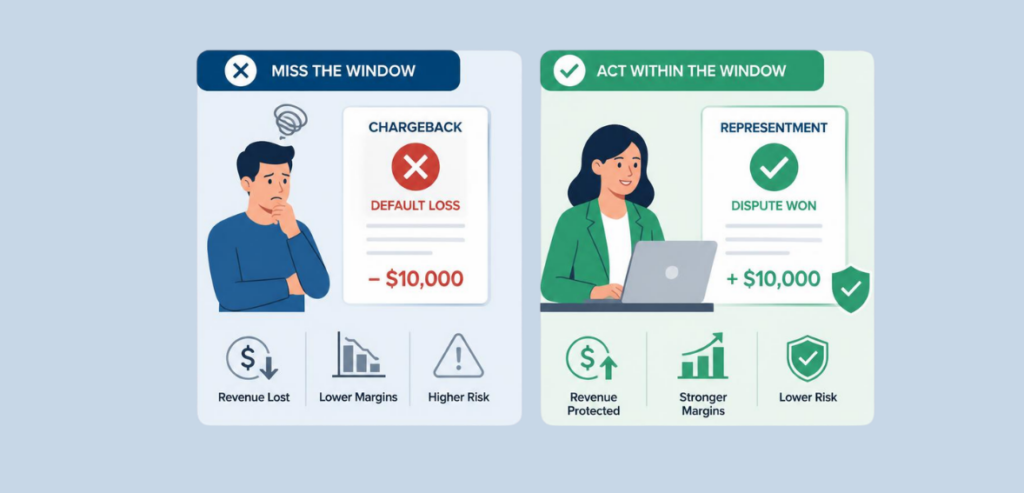
The member can call the bank to dispute the charge. Since this is a race against the clock, Visa and Mastercard will allow members to file a dispute 120 days from the charge, and Visa will give your studio 30 days, Mastercard 45 days, and Amex and Discover about 20 days to respond. After the response window closes, the loss is automatic for your studio.
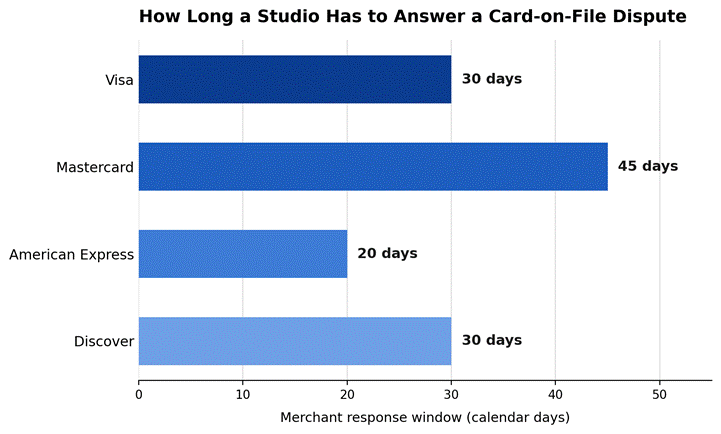
image 35

Figure 1. Card network response windows for card-on-file complaints, by network. Sources: card network dispute rules. Compiled by chargebackgurus.com and chargeflow.io (2026).

Documentation speed and quality determine the outcome of a case. An argument is likely to be more successful if it is submitted by a studio using a complete evidence packet, prepared using an automated evidence-organization tool, rather than a manual document submission.
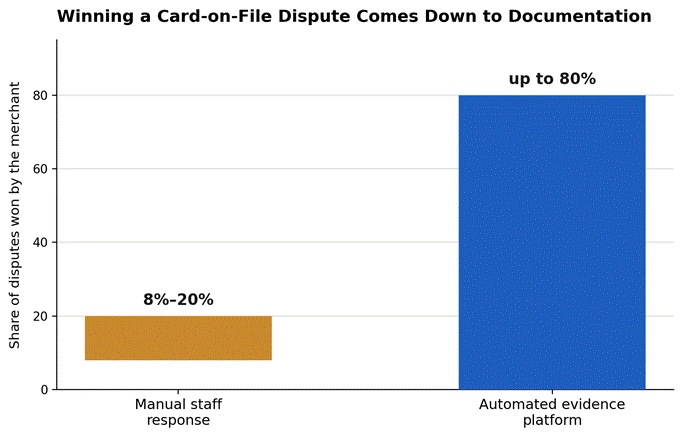
image 36

Figure 2. Merchant win rate on card-on-file disputes by response method. Source: chargeflow.io (2026).

A Card-on-File Setup Audit Before You Turn Fees On

Walk through all the steps a member or a bank would ask about before implementing automatic no-show billing. The following list will not substitute for a payment processor’s compliance review and is not intended to be exhaustive.

Audit itemWhy it matters
Standalone consent captureRequired separately from general terms of service, with a timestamp and IP or device record.
Policy visibility after sign-upMembers should be able to find the fee policy again, not just see it once at checkout.
Fee amount or formula on fileThe agreement must state the exact amount or how it will be calculated.
Correct COF and MIT flaggingEvery follow-up charge must reference the original stored-credential authorization.
Attendance and booking retentionTimestamps, cancellation deadlines, and check-in records need to be pulled quickly.
Pre- and post-charge notificationsA warning before the window closes and a receipt right after the charge posts.
Dispute response workflowA named owner and a process that can meet a 20-to-45-day response deadline.

Conclusion

Unlike direct revenue recovery, collections against a card-on-file occur over time, making it more similar to a compliance program. The studios that collect consent and maintain signed records in a place where members can view and/or access them are the studios that earn the fee on a monthly basis. Other studios end up losing the fee as a result of missing steps or biting off more than they can chew.

The studios that lose the fee for the first time do so as a result of a dispute in which they have to learn the exact step they skipped the hard way. By the time a dispute occurs, there is no step they can take to recover the fee.

Frequently Asked Questions

  1. Can a studio charge an attendee for a missed class?

    The studio can charge the attendee for the missed class as long as the attendee has agreed to the card being stored and the studio has the booking information.

  2. Do I need member consent to store their payment?

    Yes, payment card storage requires the member’s consent. Both Visa and Mastercard require a card to be stored for a future transaction with separate and informed consent.

  3. How can you prove a member is a no-show?

    Bring the timestamp of the booking and, if the member cancelled, the time of the cancellation. Also bring, if applicable, studio records of check-in and the waitlist.

  4. Can a member process a chargeback against the studio for a missed class?

    Yes, a member is able to request a chargeback for a missed class. Studios usually get between 20 and 45 days to present their evidence to the card issuer.

  5. What should a no-show policy have?

    The policy needs to have a deadline for cancellations, the fee for missed classes and how the card on file will be charged.

Fitness and Gym Payment Resources covers charging no-show and late-cancel fees alongside membership billing, declines and disputes, all in one place.
Rent Chargebacks

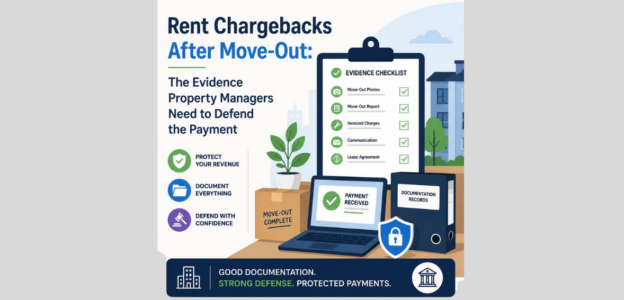
Rent Chargebacks After Move-Out: The Evidence Property Managers Need to Defend the Payment

The lease is signed. The keys are on the hook. The tenant is now in another state. And then a notification comes in that the last payment has been disputed. As a property manager, that has to be the most jarring thing to happen at this particular point during the payment process. The money has been reconciled. The unit has already been listed for rental. A card network wants proof the charge should have been made, and there is a ticking clock.

That dispute is unlikely to be the result of criminal fraud. Most disputes arise from the tenant’s belief that more should have been disclosed to them, that they should not have owed what they did, or that they did not agree to the terms. It has very little to do with what is morally right and everything to do with how well that particular case was documented. This guide provides property managers with a rent chargebacks checklist of what is most important to keep on file in case they need to defend themselves. It also provides tips on how all of this should be organized in order to prepare a case to meet the ticking clock.

Why Rent Chargebacks Dispute Spike Right After Move-Out

Why Rent Chargebacks Dispute Spike Right After Move-Out

Move-out is an especially difficult time for tenants. Some tenants encounter an unexpected cost, whereas others see a charge they feel was not justified, and their banking app makes disputing it easy. Tenants reason that a chargeback is much quicker and is free, so it is worth a try.

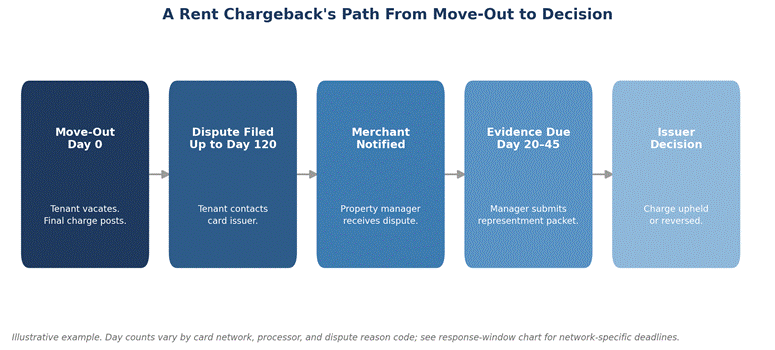
Card issuers encourage this behavior. Tenants typically have 120 days (sometimes more for disputes related to fraud) from the transaction to file a chargeback with their bank. A move out in March allows tenants the option to dispute a charge in June or July. The property manager is notified after the unit was already rented. At this point, the move-out staff has likely worked at other locations, and by the time the staff is able to finish the move-out, the staff will have to be assigned to other units. Therefore, it is important to capture evidence during the actual transaction, as it cannot be done later on.

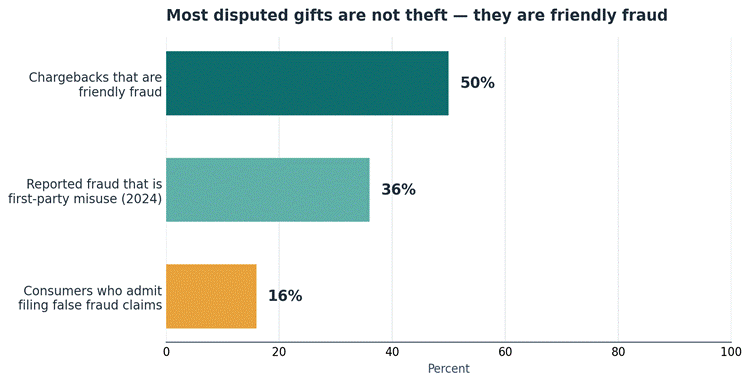
Researchers in the industry document a large volume of friendly fraud. It is believed that 44% of all chargebacks are friendly fraud, and most analysts would agree that this is likely much higher as merchants do not report friendly fraud. Rental payments have the same patterns and issues. Tenants think (and often act) as if they can dispute an incorrect charge on the assumption that the property owner will have to wait and defend the charge. Rather than contacting the property manager, tenants choose to go through the faster option of doing a bank chargeback.

The Rental Dispute Evidence Packet, Item by Item

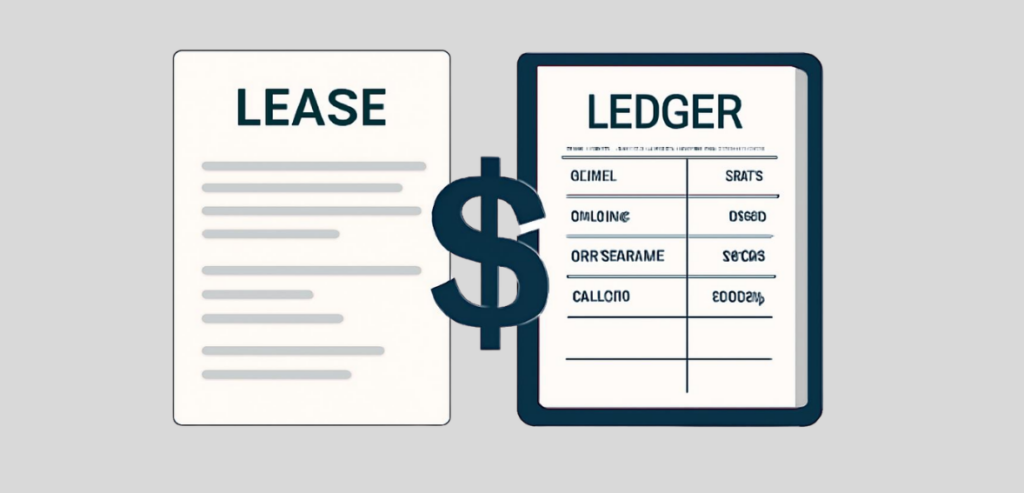
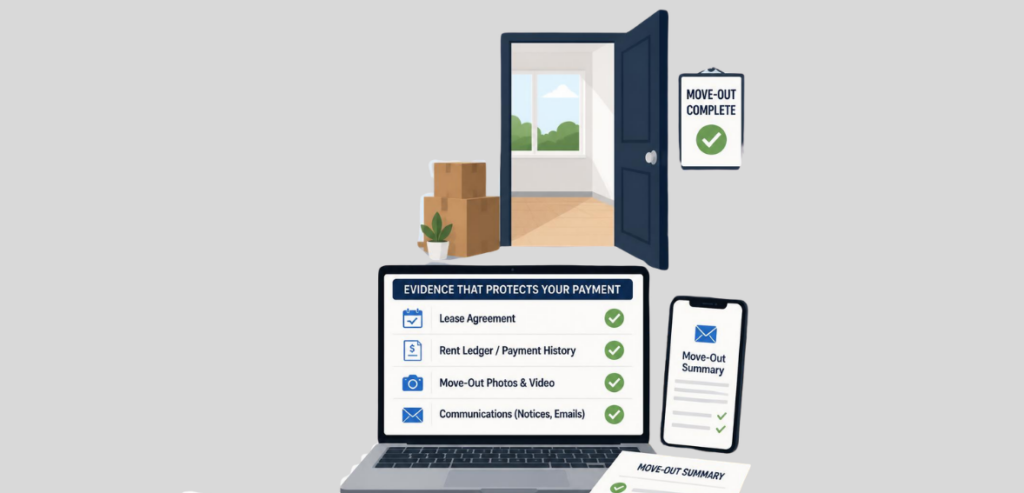
A response to a chargeback request is called a representment. When a tenant initiates a chargeback, the card network wants to see a file with supporting documentation to show that the charge was authorized, disclosed, and corresponds to what the tenant agreed to in the lease. In order to be successful with a chargeback for rent, one or more core documents must be included in the representment, along with the lease and payment ledger. The lease is useful because it has payment terms highlighted, and the payment ledger helps show the tenant’s charges and the credits for that tenancy.

A copy of the authorization on file for the disputed transaction must also be included. Relevant inspection reports must also be included with the representment, along with any notice that was sent to the tenant regarding an unpaid balance, including a photocopy of a balance deduction notice. A short cover letter must be included, which should provide a narrative summary of the documentation in the packet.

A well-organized packet tells a step-by-step account of the facts and ensures the transaction was properly disclosed to the tenant. The reviewers at a bank that acts as an issuer of a card will never see the property or meet the tenant; they render an opinion based only on the documentation within the packet.

Lease and Ledger: Proving the Charge Was Owed

Lease and Ledger

Every representment response must include a copy of the lease, which should show the amount of rent due, the due date, the language regarding any late fees, and the addendum(s) covering security deposit deductions. If the amount to be charged is a result of a lease addendum, e.g. a pet fee or a utility pass-through, then the addendum, signed by the tenant, must be included with the lease.

This information is recorded in the ledger. An accurate ledger includes the opening balance, all rent charges, receipts, late fees, and final balance upon move-out. Ledger gaps or other adjustments that are unaccounted for are problematic because they tip the case in the cardholder’s favor. Property managers who reconcile their ledgers at least monthly are better suited to prepare more strategic and defendable evidence compared to managing a ledger and waiting to face a dispute to reconstruct their ledger.

HMS Pay

Users of HMS Pay no longer have to piece together bank statement lines and spreadsheets to obtain the complete transaction and authorization histories that support their chargeback disputes. A ledger export that corresponds to the payment processor’s record of transactions overcomes one of the most common obstacles in a rent dispute response.

Authorization Records: Proving the Tenant Agreed to Pay

Leases create obligations, and authorization records indicate that a tenant agreed to the charge. For a recurring rent charge, authorization records will capture the agreement and the payment method, amount, and payment term. For a one-time charge like a move-out charge, authorization records will show the tenant provided their payment information through a form or phone call or signed a document.

IP addresses, timestamps, and device information related to an online authorization provide evidence and support to refute tenants who claim they did not provide payment information. It shows that records and evidence of the lease signer authorizing the charge were not created later. They were captured automatically at the time.

Move-Out Inspections and Deposit-Deduction Disputes

Move-Out Inspections and Deposit-Deduction Disputes

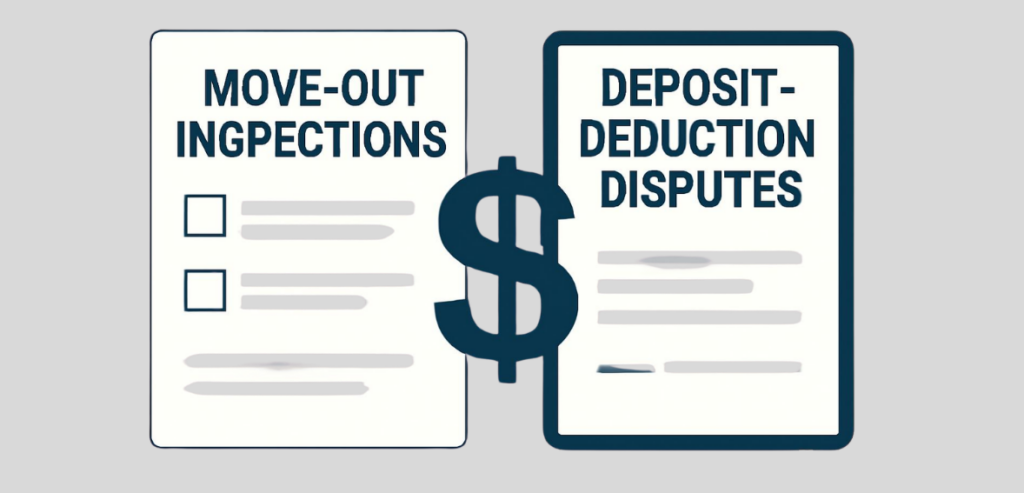
Security deposit chargebacks constitute a majority of post-move-out chargebacks primarily because deductions perceived as unfair cause the greatest disputes among tenants when moving out. The most important part of the defense is a complete, dated move-in inspection report with dated, sequential photographs or video, countered by a complete, dated move-out inspection report. If there is no move-in documentation, it is extremely difficult for a landlord to describe how a tenant caused damage during occupancy.

The time in which the defense is prepared is almost as important as the defense itself. Many states have very strict time frames in which a landlord can return the security deposit and an itemized list of the security deposit deductions. Many property managers reference the security deposit return time frame in California, in which an itemized list must be sent within 21 days after the tenant moves out.

Complying with that law produces a dated, itemized statement within the 21 days, and that statement doubles as dispute evidence. This information is general and not legal advice, and therefore, property managers should confirm the time frame for return of a security deposit and preparation of the itemized list in their state before establishing a policy.

Notices and Communication History That Corroborate

A tenant is more likely to dispute a charge they didn’t see coming. That’s why charges the tenant saw coming are easier to defend. Referencing the particular charge, the amount, and the reason for the charge in email notifications, portal messages, and text confirmations strengthens the property manager’s eventual representment. Habitual documenting leads to a wealth of information at the time documentation is needed to dispute, such as sending a notice each time a fee or charge is posted.

Portal records showing the tenant viewed a statement or confirmed a balance will prove valuable in a dispute, especially if the tenant had access to the information the property manager is using to justify the charges. Having documents organized by tenant and by lease term will make it easy to retrieve a response to a short notice, especially if the information is more organized than in the general email inbox.

Meeting the Representment Deadline

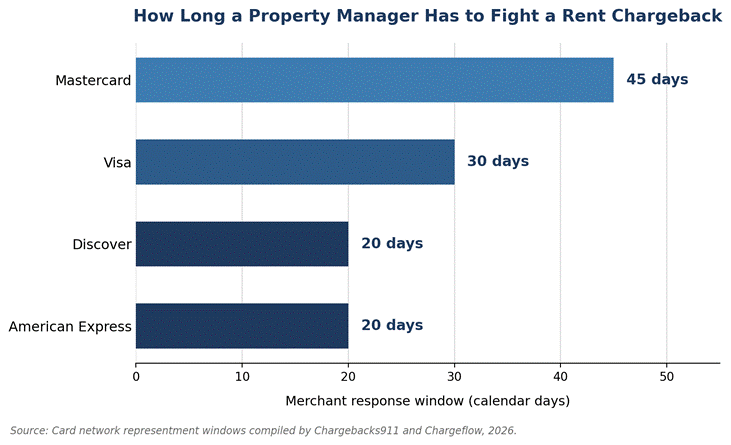
Each card network has its own clock and doesn’t wait for a property manager to collect documents. Of the major networks, Mastercard is the most merchant friendly, giving merchants a 45 day window to respond with evidence to support representment, the longest of the networks. Visa has a 30 day window, Amex and Discover, 20 days. The working time is often shorter than the headline number implies as the deadlines start from the date that the acquirer or processor initiates the dispute. That is, the deadlines are not from the date the property manager finally opens the notification.

image 25

Figure 1. Timeframes Merchants Are Allotted to Present Evidence for Representments, by Card Network. Sources: Chargebacks911 and Chargeflow, 2026.

Missing deadlines automatically means a loss, even for the strongest of cases. Evidence must be collected on a continuous basis. Evidence must never be collected after receiving the Notice of Dispute. Property management teams who have leases, ledgers and inspection photos for each tenant can prepare a representment packet in less than a day. Teams who start from scratch will easily waste the majority of the response time finding the needed documents.

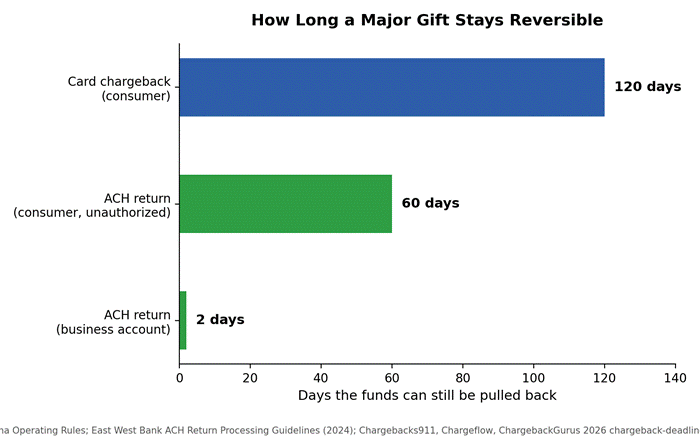
Payment by bank transfer allows a longer time frame for the tenant to file a dispute. In accordance with Nacha’s Operating Rules, consumers have a right to dispute a bank transfer that was unauthorized for a period of 60 days from the settlement date of the bank transfer, and most banks do not process a return of the funds until a Written Statement of Unauthorized Debit is submitted. The 60-day deadline is longer than most of the card network deadlines; however, it only applies to unauthorized ACH transfers.

image 26

Figure 2. Illustrative example of a rent chargeback’s path from move-out to issuer decision. Day counts vary by network, processor, and reason code.

Preventing Move-Out Disputes With Better Documentation Upfront

The best way to avoid paying a rent chargeback is to make it unnecessary. The most efficient way to do that is to provide move-out statements that are clear, itemized, and delivered promptly. This minimizes the instances of tenants being blindsided to the point of disputing instead of calling the office.

Using the same exact payment authorization method for every tenant is even more crucial, as it means there is no hassle of reconstructing evidence at a later date. Taking photographs of the inspection of the housing unit during both the move in and move out eliminates the biggest gap in most deposit-deduction disputes.

Developing a habit of doing these at a portfolio level rather than leaving it up to individual property managers to their own discretion changes taking a necessary response to a chargeback from being a fire drill to being a check in the box. Teams that develop a sense of urgency of the documentation during the move out process instead of waiting for the chargeback notification spend less time on a dispute and win a greater percentage of the disputes.

Conclusion

Rent chargeback disputes after a move-out are rarely about the fairness of the charge. They are about the property manager justifying the charge. A lease creates the tenant’s obligation. A ledger shows the transaction, an authorization record associates the charge with the tenant, and inspection and communication records provide the remaining narrative. Preparing each piece of the narrative does not require much time for the property manager.

The challenge is preparing everything before the notification, because the property manager does not have time to search for the documentation once the clock starts. A standard move-out documentation workflow turns a chargeback response from a scramble into a routine task. The majority of the time, the difference between a chargeback that is successfully defended and one that is lost is preparation.

Frequently Asked Questions

  1. Can tenants still dispute a rent payment after moving out?

    Yes. Tenants generally have a lot of time to file a claim, and most of the time, it’s up to 120 days. So, cardholders may file a dispute regarding the rent payment, even if they have already moved out and the unit has already been re-rented.

  2. What evidence do you need for a rent chargeback?

    You will need to have the signed lease, the ledger showing the full payment history, the charge authorization, the move-in and move-out inspection reports, as well as any charge notifications sent to the tenant.

  3. Can security deposit chargebacks happen?

    Yes, security deposit chargebacks happen frequently. Documented inspections, detailed statements, and a lawful delivery of the deposit all help defend the chargeback.

  4. How much time do I have to respond to a rent dispute?

    The card networks set the windows: 30 days for a Visa dispute, 45 days for Mastercard, and 20 days for American Express or Discover.

  5. What is the best way to document a move out to prevent disputes?

    As soon as a tenant moves out, send a move-out statement with details. Do a photo inspection, keep a copy of the charge authorization, and have the inspection on file.

We keep our property management payment articles together in Property Management Payment Resources; see it for more on rent chargebacks after move-out.

Multi-Property Batch

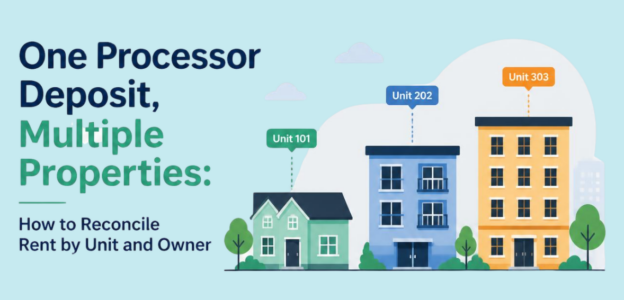
One Processor Deposit, Multiple Properties: How to Reconcile Rent by Unit and Owner

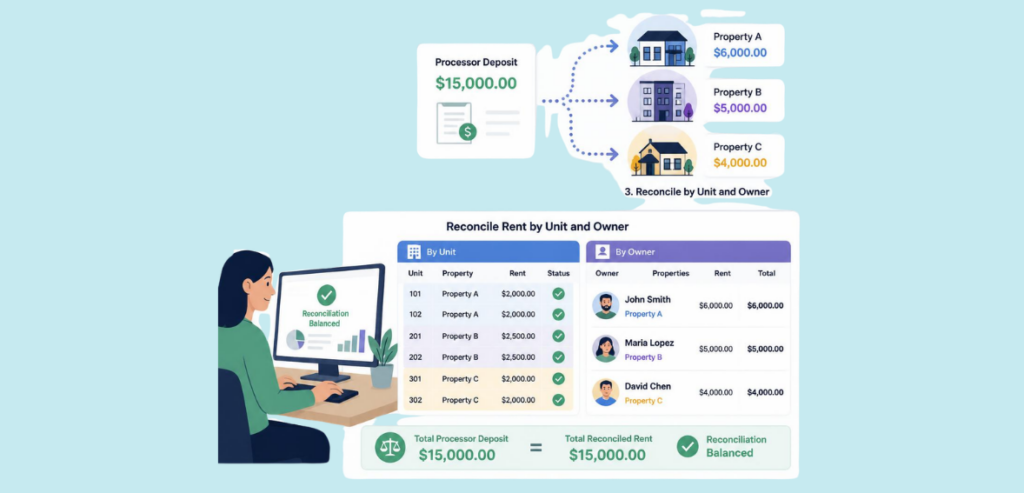
One line on a bank statement represents many net figures, including forty tenants, twelve owners, and three fees. This is what a processing batch deposit looks like when a property management portfolio grows, and it is why rent payment reconciliation teams cannot consider multi-property batch deposits as one-line entries. Each of those deposits contains gross rent, processing, convenience, and refund fees, and must be associated with the correct unit and the correct owner.

Misassociation of fees will result in an unexplained owner statement, an unbalanced trust ledger, and finding notes during audits. This document describes the process of reconciling a single batch deposit for multiple properties, accounting for fees and refunds, and maintaining the scalability of the reconciliation process as a portfolio of a few dozen units grows to a few hundred.

Why One Deposit for Many Properties Is a Reconciliation Problem

Why One Deposit for Many Properties Is a Reconciliation Problem

Most tenants pay property management companies by electronic payment instead of mailing checks. Processors collect payments on a daily basis and perform a single settlement with the bank to net funds. From the perspective of the bank, there is a net deposit of $7,775.

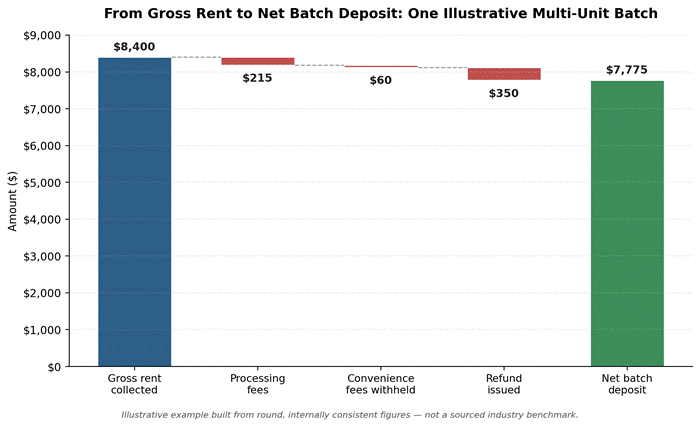
To the property management company, there are potentially 50 individual records. This disparity between transaction collection and recording practice is the crux of reconciling processor deposits for multiple properties. The record of a $7,775 net deposit might include gross rent for five units of $8,400, less processing fees, a convenience fee which was retained, and a refund which was issued.

The bookkeeper requires a clear separation directive. If no such directive exists, the bookkeeper will have to guess as to which part of the record relates to which property. A trust account is not permitted to have guesses.

It is more complicated if different tenants of the same batch make payments using different methods. One tenant may pay using ACH, the other may pay using a debit card, and a third may pay using a credit card with a convenience fee. The cost and timing of settlement for each of these methods are different. Property managers who do batch level versus unit level reconciliations end up dealing with unexplained variances.

Mapping a Net Batch Back to Gross Rent by Unit

Each payment is associated with a tenant, a unit, and a fee amount in a batch in the transaction detail report that is not provided in the bank statement. You must match this detail report with the gross rent collected for each unit for the reporting period in order to determine a paid in full or partial payment status for each property, irrespective of how the batch settled.

image 20

Figure 1: A batch deposit disassembled. Figures are for illustrative purposes and do not contain information from a specific processor.

The waterfall shows how batch-level fees are taken. It shows how the net amount that is deposited is calculated by subtracting the fees charged by the processor and any refund that is issued from the gross rent on the batch, and adding back the convenience fee that was retained.

The gross amount collected is the rent the property manager collects. A property manager trying to reconcile by checking the statement will never see the gross amount collected. This is the reason for accurate unit-level rent accounting to rely on the transaction detail file instead of the deposit total.

Two Ways Software Reconciles the Same Batch

cashThere are several approaches to the math with property management software, but the end goal is the same. In some platforms, the Adjusted Cash Balance is equal to Property ledger balances adjusted for unreconciled deposits and post-period receipts, and ACH batches as well as uncleared checks. These platforms also require the Adjusted Cash Balance to equal the Statement Balance and Cleared Balance for a given period in order to close the period.

Other platforms prefer a more traditional approach of requiring receipts to be batched and deposited before appearing in reconciliation, and then matching the ending balance of the bank statement against cleared items until the difference is zero. Even though there is no “better” logic, think on the batch that reconciled perfectly in one system; it would appear unbalanced in the other. A bookkeeper moving between different software systems needs to understand the different logic being used.

Where Convenience Fees and Surcharges Land

When designing your rental contract, convenience fee allocation decisions have meaning. Even though in the industry convenience fees and surcharges have different definitions, the ways property managers utilize them is the same. A convenience fee is the expense of utilizing an alternate payment method, a payment option other than mail. This convenience fee can be applied regardless of the payment method used.

Surcharge, on the other hand, is utilized to cover credit card processing costs and cannot be used in combination with a debit card. The disclosures and rate limits on surcharges are regulated by the credit card networks and the states.

As a result of these components and restrictions, some states prohibit these surcharges, so the best approach that can be used for a multi-state portfolio is to consult a payments lawyer or compliance group at the processor prior to instituting a fee, as opposed to using the rules related to one state to another.

Operationally, the fee associated with a payment method has to be noted against the rental unit where the payment was made. It cannot be consolidated in a single fee income line. If done correctly, a manager can recover net fees and provide a justification to the tenant for charging a higher card processing fee versus an ACH transaction processing fee.

HMS Pay

HMS Pay captures each convenience fee at a transaction level. Because of this, the system knows the unit and the tenant that created the convenience fee. HMS Pay does not capture fees in a batch totaling all fees. The reason this specific functionality exists is to successfully credit the correct ledger. HMS Pay prevents the bookkeeper from having to unbundle, or break down, a large lump-sum convenience fee across multiple units.

Refunds and Chargebacks Inside a Multi-Property Batch

Refunds and Chargebacks Inside a Multi-Property Batch

Refunds processed in a cycle’s middle part will be handled by the next batch. This means the batch that originally processed the refund will show a negative variance until the next batch reconciles the refund. This will happen for every refund processed and will happen for every unit. A future batch reconciliations user may suspect theft or misconduct for each negative variance and may try to investigate.

Refunds processed in the middle of a cycle are made via a different process for chargebacks. In most cases, card networks will give their customers a maximum of 120 days from the date of the transaction to process a chargeback. In instances like a delivery of goods or services, this can even extend the chargeback window to 180 days.

This means for rental payment chargebacks, it can take months for a tenant to have a chargeback processed and taken from a rental payment batch, even though the rest of that batch does not relate to them.

There is a similar system to ACH payments; however, it is a different system in itself. Per Nacha operating rules, a receiving bank has 60 days to return a consumer ACH transaction because of an unauthorized transaction, compared to 2 business days for most administrative returns like an incorrect account number.

A property manager who understands both systems can differentiate a payment that was returned for a number of administrative reasons, which a manager should have addressed in a few days, from a valid chargeback on an unauthorized transaction, which can claw back a payment that a manager recorded as settled and paid weeks ago.

Each of these events deserve their own entry on the affected unit ledger, which stems back to the original transaction ID, ensuring the audit trail is valid years after the event occurred.

Owner-Level Rollups That Survive an Audit

Before trust accounting is even a consideration, owner statement reconciliation is your first true vetting ground. When a payment, fee, refund, or chargeback is correctly attributed to its respective unit, most of the work is done in preparing the owner-level statement. The owner operating three units should not see one lumped gross statement.

He/she should see three individual summaries and one statement after the processing and convenience fees have been itemized. When an auditor or owner looks at a statement and something doesn’t look right, the first question is, “What is this net figure?” A truly effective reconciliation should identify the individual unit transaction and the date with no explanation needed. It is the true test of ‘systems’-based trust accounting.

This is where trust accounting rules are rigid. Most states have trust account or escrow account reconciliation policies where reconciliations must occur on a monthly basis and records must be maintained to show that such reconciliations have occurred and that the owner/tenant funds have not been commingled with another owner/tenant’s funds.

The specific requirements vary by state and by the type of license; hence, a trust accounting policy that operates across multiple licensing jurisdictions must be clarified by the real estate attorney and CPA practicing in those licensing jurisdictions.

Scaling the Process as You Add Doors

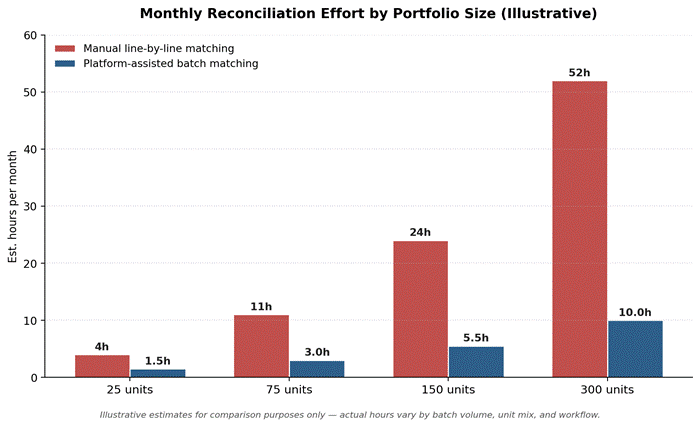
Batch deposit property management reconciliation that functions correctly for twenty-five units usually does not function correctly for three hundred. As the number of transactions increases, the matching on a line-by-line basis that a small portfolio can do manually becomes a bottleneck. As the number of transactions increases so does the risk of missing a variance.

image 21

Figure 2: Estimated monthly reconciliation hours by portfolio size. Figures are illustrative estimates for comparison, not measured benchmark data.

The comparison shows that, across methods, the effort needed for reconciliation increases with portfolio size. With manual matching, that effort scales in a straight line. The batch matching workflow, however, scales across a curve that depends on the level of automation employed. The slope for manual matching is much steeper, but for a batch matching workflow that ties transaction detail to unit ledgers, the effort required for reconciliation can be managed and controlled on the platform.

The eventual workflow to review exceptions will require less effort for a portfolio, but portfolios that wait until they are overwhelmed with volume to develop this workflow will actually end up spending more time on backlog than they would have if they developed the process earlier.

Month-End Close for a Portfolio

Batch reconciliations can be performed daily or weekly rather than being saved for monthly reconciliations in order to achieve portfolio-wide close. Without these daily or weekly batch reconciliations, the last week of the month is fully devoted to the review and validation of unit ledgers, trust bank balance, and roll-up total owner level confirmation and alignment. This review and validation is done under pressure to reconcile unmatched deposits and validate the trust bank balance and unit ledgers.

The standard practice is to ensure that a three-way check is performed prior to closing the books. This check is comprised of the trust bank balance, the total of unit ledger balance, and the internal books.

Any deviation at this point should be tied to a specific unresolved item (e.g. a check that has not posted) or a batch that is in transit. Variance without an explanation is the number one reason for state trust account audits, making this step more than worthwhile even in the busiest month.

Reporting Per-Owner Net Accurately at Tax Time

Tax reporting requires the same effort and discipline as the rest of the year. An owner should receive gross rent received, fees, refunds, and net proceeds for the year in their 1099 or year-end statement. Last minute, year-end recalculations are not reported on this document.

The management company passes on processing or transaction fees to the owner (or management company) and this cost is deductible, but it depends on how the management agreement defines this allocation, and this must be done consistently throughout the year and not in January.

An area where a management company will once again only need to forward clean, itemized information to the owner and will not need to make the final tax call is around the tax treatment of fees and the records needed to support that treatment. This occurs at the owner level and will vary by the owner’s entity type and jurisdiction.

A CPA will be able to apply the correct treatment if the unit-level data is recorded correctly, and will not have to piece together data that was entered in a batch mode from a processor statement after the close of business.

Conclusion

Merging many properties into a single processor deposit creates reconciliation issues, and this is where most of the errors occur. The best long-term solution to this issue is not a managed month-end effort, it’s having a routine of pulling every batch and tagging gross rent, fees, refunds, chargebacks, etc, to the appropriate properties on a continuous basis and bringing unit ledgers to owners on a regular basis in order to avoid slippage.

Portfolios that implement this practice early on will scale it much easier. Portfolios that implement this practice later spend significantly more time reconciling the past than they would have spent the time to regularly reconcile in the present.

Frequently Asked Questions

  1. How do I reconcile one deposit that covers multiple properties?

    Reconcile against the processor’s transaction detail report rather than the bank’s total for each unit. The detail file is the most accurate source for the batch split.

  2. How should convenience fees be allocated to units?

    Allocate convenience fees to a specific unit and tenant rather than collecting them in a single income line at the portfolio level.

  3. How do I prepare accurate owner statements?

    Combine clean, itemized ledgers at the unit and roll them to each owner.

  4. What happens to refunds that are part of a batch deposit?

    A refund offsets a future batch rather than cancelling the prior batch. Document this on the unit ledger to prevent an unexplained variation.

  5. How do I best manage reconciliation for the additional properties?

    Reconcile batches as they settle using the platform to assist in the matching process. Instead of redoing a week of unmatched deposits, month-end totals confirm reconciliation will then be completed.

Related reading on reconciling rent by unit and owner: Property Management Payment Resources.

Negative Trust Balances

Owner Payouts Before Rent Clears: How Property Managers Avoid Negative Trust Balances

Rent payments from tenants are deposited on Tuesday into the trust account. By Thursday, the owner’s disbursement is made. Then, on Friday, the bank takes back the payment and the money the property manager sent is gone. This happens all the time, and it usually has nothing to do with fraud or carelessness.

It has to do with the timing of the banking system. The money you see in your bank account and the money that is truly available once a payment clears are not the same. Trust account balances that fall into the negative are due to this gap along with disbursement practices.

Because of this, any software used for property management has to know how to handle the disbursement of trust account funds.

The Trap: Paying Owners Before the Money Is Truly Cleared

Paying Owners Before the Money Is Truly Cleared

Most property management software marks a payment as received when a tenant submits it. This leads property managers to believe they are able to spend the funds. However, an ACH debit or card charge is still provisional. The tenant’s bank has not verified the funds.

Additionally, the card network has not closed the time period during which the cardholder can contest the charge. Should a property manager pay an owner from this provisional balance, the owner’s trust account goes into the negatives.

Because trust accounts are usually held in a single bank account, a negative balance for one owner creates a shortfall that is effectively covered by the funds of other owners. The foundation of nearly every negative trust balance is the misconception of “posted” versus “cleared.”

ACH Returns and the Window Where Rent Can Still Bounce

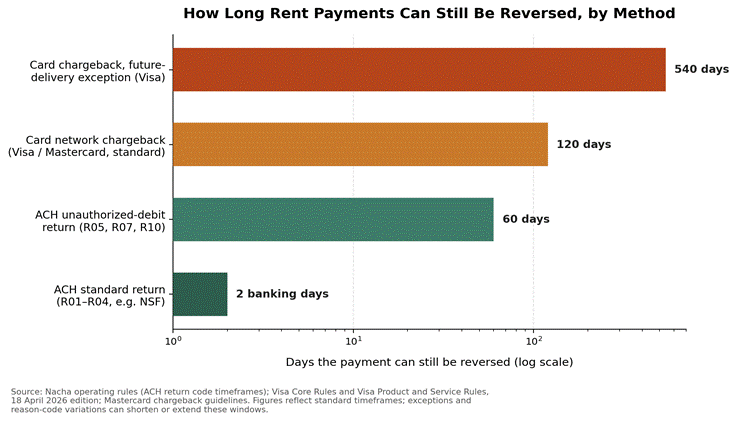
ACH payment is the most frequent rent payment option for landlords. Businesses and consumers believe that once the payment is processed, it is available for withdrawal, but as defined by Nacha operating rules, receiving banks can take up to two banking days to return standard ACH payments. A normal return could be due to insufficient funds, a closed account, or an invalid account number.

The greater risk, however, comes from a much longer window. A receiving bank can take up to 60 calendar days to return a payment if the tenant disputes the authorization. This is known as an unauthorized debit return, caused by a tenant disputing the authorization of the payment or by the authorization being otherwise revoked.

Because of this, ACH rent payments leave landlords exposed well after the funds appear. An ACH payment can appear processed, and the landlord can withdraw the funds, but the payment can still be reversed. No practical hold period covers the full 60-day unauthorized-return window, which is why the exposure must be managed by policy as well as timing.

image 19

Figure 1: Reversal windows by payment method, based on Nacha ACH return rules and Visa/Mastercard chargeback rules. Standard ACH returns close in two banking days, but unauthorized-debit returns and card chargebacks stay open far longer.

Card Chargebacks on Rent and How They Hit the Trust Account Balances

Card Chargebacks on Rent

More tenants are using debit/credit cards to pay rent. The card payment method is very convenient for tenants, but it carries a much longer reversal exposure than an ACH payment. Most debit/credit card companies state that cardholders must submit a dispute request within 120 days from the transaction date in order to dispute the payment.

For most Visa disputes, the 120-day clock runs from the transaction date, with an exception for future delivery of goods and services purchases, where the clock can start at the expected delivery date. Since prepaid rent is a payment for future services, a payment made with a credit card for the prepaid rent may also be protected by Visa’s extended dispute period.

As with an ACH payment reversal, when a card rent payment is disputed, the amount is pulled back from the trust account and returned to the cardholder. In this case, the risk to the landlord is much larger because the exposure window stretches from a few days to several months.

Card Processors and Rent Collection

Card processors embedded in property management systems are the typical front end for card-based rent collection. The key point is that every processor passes the card network’s dispute rules through to the merchant of record. No processor shortens the Visa and Mastercard chargeback windows; when a chargeback is filed, the processor notifies the merchant and holds the contested funds.

Therefore, property managers must consider all card payments as carrying the extended risk of a card-not-present reversal, regardless of the processor handling the transaction.

Unsettled Batches and Bank-Timing Lag

Although payments may be perceived as cleared, funds may not be immediately accessible. ACH transfers are batch processed. The settlement of transactions is dependent on the daily transaction deadline of the bank. As such, it may take 1 to 3 days for transactions to clear.

Funds are not truly available during the clearing time. Settlement of transactions takes even longer over the weekend since ACH does not settle on Saturdays and Sundays. Payments made on a Friday may take until Tuesday or Wednesday for settlement. The fact that a payment has cleared in the software does not mean that the transaction has been completed on the bank’s end.

Property managers have to be aware of the time lags that are associated with the settlement of transactions.

Setting a Disbursement Hold That Owners Will Accept

Setting a Disbursement Hold That Owners Will Accept

The solution isn’t to hold every dollar. It’s to implement disclosed hold periods that match practical return windows. Most firms build their policy around typical ACH return windows with a bit of leeway. This is because that window covers the majority of returns as well as the lag in bank settlement.

A funding schedule that releases money 3-5 business days post-payment, rather than immediately, closes most of the risk cited, with minimal impact on an owner’s cash flow. Owners accept disclosed holds once they understand that the policy protects their own funds from being used to cover the reversal of other owners’ payments.

The policy should be formalized and applied the same way for every owner. It should not be introduced through the back door after a cash shortage crisis, without owner communication, and without formal documentation.

HMS Pay’s Role in Structuring the Hold

HMS Pay lets companies decide the timing of disbursements by configuring hold periods. Without such a tool, property managers have to manually track each disbursement for each of hundreds of property owners to avoid making payments within the window where a payment could still be returned. With the disbursement schedule configured for a firm’s hold period, payments are released after the window of each transaction has passed.

Trust-Accounting Compliance Basics Managers Cannot Ignore

Negative individual owner ledgers are not footnotes for state real estate regulators. They are an indication of one owner sponsoring another owner, probably without either owner’s knowledge. State investigators have described this exact pattern. A broker would disburse from an owner’s ledger and make the payment; however, the underlying rent payment would later be reversed.

This would create a deficit in the trust account for that owner. This means that trust account funding was provided by another owner. The normal mitigating control for this is a three-way reconciliation system. A three-way reconciliation reviews the balance at the bank, the internal balance, and the total of all owner ledgers.

If any of these do not agree, then a state audit is normally the next step. Because of control systems, most firms do not experience the negative owner ledger issues that regulatory bodies are concerned about.

Handling a Reversal That Lands After the Owner Was Paid

Not even the most sophisticated hold period can account for every reversal, especially longer-tail ACH unauthorized-debit returns and card chargebacks, which can take weeks or months to come through. In this instance, the first step is to allocate the reversal to an owner and particular property ledger. Instead of allowing it to impact the overall trust balance (which will then impact the other owners), it should be isolated.

The second step would be to note the date rental income was received, the date rental income was distributed, and the date the reversal was posted. This is what an auditor or an owner will request. The last step would be to recover the loss by offsetting the shortfall against the next rental income disbursement to the owner, or sending the tenant an invoice for the reversal and all related fees per the terms of the lease agreement.

It is unethical for a firm to cover the gap by dipping into the funds of another owner to clean the ledger (this is a practice that would be flagged by the regulators as a license-level violation, even if the intent was to avoid an uncomfortable conversation).

A Payout-Readiness Checklist by Payment Method

Each payment method has a clearing process, and a disbursement policy that treats all payment methods similarly will be excessive for cash payments or insufficient for card payments. A firm disbursing rent that was paid via ACH after the standard 2-day return window and on confirmed settlement takes only a small residual risk, since unauthorized-debit claims can still be made up to 60 days later.

All other payment methods have a shorter exposure period than rent payments made with debit or credit card as a chargeback can be made up to 120 days after the purchase and in some cases, can be extended if the transaction is a future-delivery contract. A lot of firms have a longer hold on disbursing rent that was collected via card payment than on ACH payments.

A process should not disburse against rent paid by check until the check has cleared the depository bank, since a bounced check behaves much like an ACH return. Cash payments do not have a reversal risk if they are deposited, so some firms disburse verified cash rent payments faster than any other payment method.

Settlement Reporting and Disbursement Timing

Most payment platforms provide settlement reports for rent payments. Through these reports, bookkeepers can see how long it takes for a payment to be submitted and settled in the bank. The bookkeeper can then account for this lag and wait for payment to clear in the bank before making disbursements for these payments.

image 18

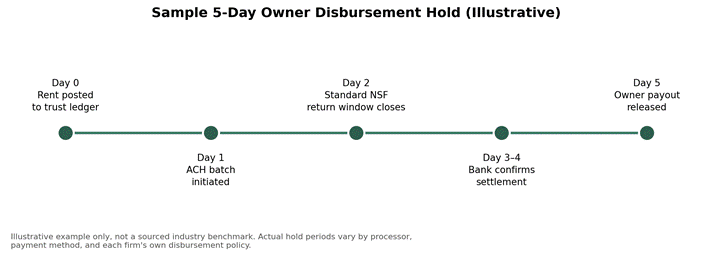
Figure 2: Illustrative example of a five-day disbursement hold aligned to the standard ACH return window. This is a sample policy structure, not a sourced industry benchmark; actual hold periods vary by firm and processor.

Conclusion

Trust account deficits rarely start with an intent to defraud. Instead, they start with a flaw in how the system defines a posted payment. A balance can be disbursed before the underlying payment has truly cleared, and that payment can then come back as an ACH return or card chargeback. The gap creates a situation in which rent was collected, disbursed, and must still be returned.

This gap does not require a permanent hold of the owner’s funds; it does require a disclosed hold that is appropriately long and consistently applied for returns in which the exposure window is significant.

Clear policy and three-way reconciliation ensure that reversals are caught and isolated. Trust account disbursement timing based on actually cleared payments protects owners and the firm from liability under trust account laws.

For more on owner payouts and trust balances and other property management payment questions, see Property Management Payment Resources.

Frequently Asked Questions

  1. How long should I wait before paying owners after collecting rent?

    Most companies hold funds for three to five business days after an ACH payment is initiated. This horizon covers the standard return window plus bank settlement lag.

  2. Can an ACH rent payment be reversed after it posts?

    Yes. Generally, when dealing with returns, you have about 2 banking days to file, but returns due to unauthorized debits can be filed up to 60 days after the settlement date.

  3. What is a trust account negative balance, and why is it a problem?

    It is a compliance breach: when one owner’s ledger goes negative, another owner’s funds are very likely covering the shortfall.

  4. Do card rent payments carry chargeback risk for landlords?

    Yes. Cardholders of Visa and Mastercard can take up to 120 days to file for a chargeback, which is longer than the return window of ACH. Card rent has prolonged exposure to this because of this extended chargeback window.

  5. How do I set an owner disbursement policy?

    Set the hold period to match the return windows of your primary payment methods, document it in the management contract, and apply it consistently to all owners.

Refunding a Donation

Refunding a Donation After the Receipt Went Out

A donor calls three weeks after giving. Her tax receipt has just landed in her inbox. She is now requesting a refund. Could she have intended a different (or no) donation? Was the donation meant to fund something else that has now been canceled? Could she have meant to write $500 instead of $5,000? Whatever the reasoning, the donation is no longer the warm and fuzzy gift to help people that it once was. It is now a recorded transaction.

The several wrong ways to reverse it will all create a discrepancy between your ledger and reality. This is exactly the kind of discrepancy an auditor is trained to find and mark with a red pen. This guide shows you the correct method for refunding a donation, fixing the documentation, and preserving a permanent trail for the transaction.

The Four Reasons of Refunding a Donation After Acknowledgment

The Four Reasons of Refunding a Donation After Acknowledgment

Refund requests are not usually unexpected. Nonprofit accountants see the same repeat problems, and knowing these helps everyone to better understand how to manage the refund request. The most common reason for refunds involves mistakes made by the donor. Donor errors come in many different forms. An example would be a donor submitting a payment multiple times because of a bug in their browser, or a payment could be submitted with a misplaced decimal.

The second most common reason for a refund request is the donor’s dissatisfaction with the way the funds are being utilized. Many donors are displeased when the money is used in a way that does not match the mission that the donors intended to support.

The third reason is an organizational conflict: the donor gave for a stated purpose, and the organization cannot fulfill that purpose. Lastly, a donor may simply change their mind. Most organizations clearly address the second, third, and fourth reasons in a written refund policy. The funds are most frequently returned in the first and third cases.

Void vs Refund: Which One Applies and When

“Void” and “refund” mean the same thing to most donors, but payment processors, and consequently accounting systems, treat them very differently. A “void” cancels a card transaction that hasn’t been processed yet. Since the transaction hasn’t left the donor’s bank, and the organization hasn’t yet received the funds, a void erases the transaction for the organization. Since no funds were moved, there is no accounting entry for a refund, and in many instances, the pending charge simply drops off the donor’s bank statement. A refund is required for cleared transactions.

Since the funds have been received by the organization, a refund means the organization must complete a separate transaction to send the funds, and this appears as a separate line on the donor’s bank statement.

Typically for most card processors, the effective cutoff for a void is at the end of the business day that the transaction has been processed. If a charge is voided on the same day that the charge is processed, there is no cost to the organization. If a charge is not voided on the same day, the only option is to refund the charge, which is a lengthier process for the donor, and in most cases, the original processing fee is not returned.

Payment Processors: Why the Window Is So Short

Most card processors define authorization and capture in the same way. Once a charge runs, it is authorized. By the end of the day, the charge is swept into a batch to be settled. The charge can be voided to prevent batch inclusion. Once settled, the charge is final and the processor requires a refund transaction.

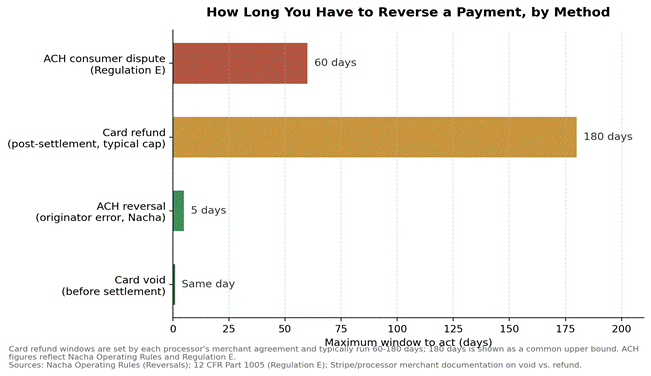
ACH gifts run on a different schedule. According to Nacha’s rules, an organization has five banking days from the settlement date of an ACH transaction to reverse the transaction. Once the window has closed, a refund transaction must be done or the organization must negotiate with the donor’s bank. Regulation E gives consumer protection to a donor who can dispute an ACH transaction with their bank for an unauthorized transaction within 60 days of the transaction posting to the bank statement.

image 12

Figure 1: Refund windows for each payment method are represented here. Generally, the windows for card refunds are 60-180 days and are dependent on the merchant agreement for each processor.

Check the exact cutoffs in your merchant agreements with your payment processors. Don’t rely on the figure above for live cases, since cutoff windows can vary based on the provider and card network.

Correcting a Tax Receipt That Already Went to the Donor

Correcting a Tax Receipt That Already Went to the Donor

A written acknowledgment sent to the donor does not, by itself, make the gift final in the eyes of the IRS. The IRS considers substantiation of the gift to be critical. As per IRS Publication 1771, a donor who claimed $250 deduction or more must have a written acknowledgment stating the name of the organization, the date, and the amount. The refund of the gift, in full or in part, would make the letter no longer valid for the donor, and should not be relied on for a deduction.

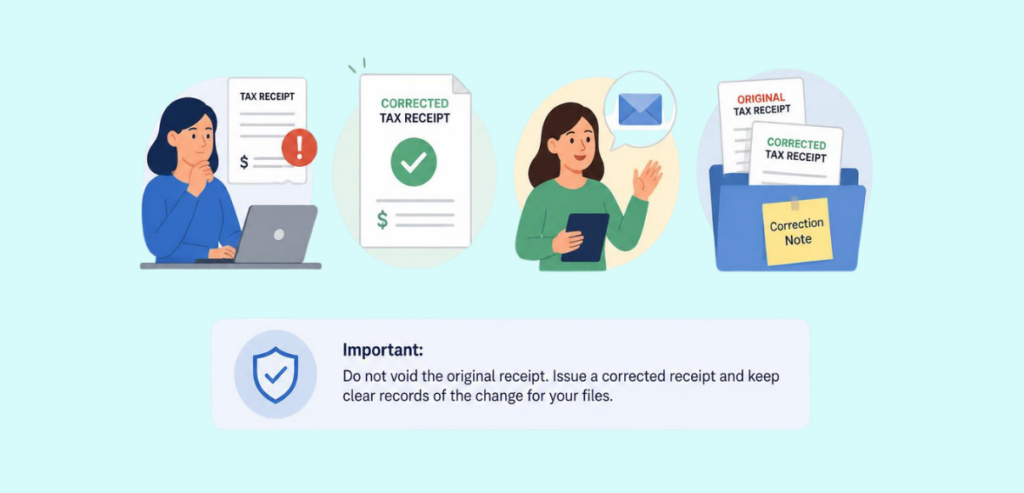
The simplest solution is the rewritten acknowledgment letter, not the removal of the letter. The prior acknowledgment should be stated to be null and void. If the refund was partial, then the new amount should be stated. Both the old and the new acknowledgment should be kept on record. If the refund of the gift was complete, then it should be stated as such in the letter, so the donor has proof that a tax deduction should not be taken.

Whether the donation refund should be reported on Form 1099 is an issue that the organization should route to their accountant for resolution, as it would require facts that the organization would not have, such as if the donor, in fact, received the deduction.

Adjusting the Campaign Total Without Double-Counting

A silent overstatement occurs when a refund processed at the payment processor is still counted on the campaign dashboard. The total remains on the dashboard, but the organization can no longer count it as cash. The reversal should be recorded as its own transaction type in the development database while maintaining the connection to the gift record. Deleting a record removes the gift from the campaign, and subsequently, the auditor will not be able to verify the gift. The record can be modified to preserve the gift and the correction along with the linked reversal transaction.

The same logic applies to restricted funds and the totals of related events. The same is true for gifts that have satisfied the requirement of a matching gift challenge; these gifts will still need corrections beyond the main ledger. This method of reconciliation proves to be useful when the campaign management system reports are compared against the payment processor settlement reports. In the course of this comparison, any refund that is not accounted for will be easily found before the year-end reports are prepared.

The Donor-Record Note That Protects You at Audit

Every reversal must include a concise and objective description in the donor record and on the transaction itself. The note must also include the rationale for the reversal, the approver, the approval date, and the final disposition of the receipt after the reversal. The note itself is the defense. The note communicates the information and the reason for the reversal to the auditors and eliminates the need to contact staff.

Revenue auditors sample contributions and contribution reversals. A refund transaction that does not have a note, even if justified, is a control deficiency. A note must be signed and dated and must also include approval of the refund and a corrected receipt. It must also provide the explanation and justification for the reversal.

Communicating the Reversal to the Donor

Communicating the Reversal to the Donor

The external message to donors is as important as the internal processing. It should identify the amount to be refunded, the method of payment used, and the anticipated date by which the donor will receive the refund. Refunds are processed to the original payment method to satisfy card network rules and to avoid creating an unverified payment relationship with the donor.

The message should indicate whether a corrected tax receipt is included with the refund or will be sent separately. Providing this information will assist the donor in the completion of his or her tax filing. The refund gives the last opportunity to the nonprofit to express appreciation to the donor and to provide the reason for the refund in a non-transactional message. Most refunds are the last interaction the donor will have with the nonprofit and the message will shape the donor’s decision about future donations.

Restricted and Mistaken Gifts: The Special Cases

Two categories require more attention because applying the standard refund path is not as clear. The first category is restricted donations that organizations are unable to utilize as intended. An example is a donation to a restricted fund that is set for a program that is yet to be created. Nonprofit advisory accounting groups suggest that this causes a legal issue.

If the organization cannot substantially fulfill the terms of the donation, the organization is obligated to return the donation, redirect it with the donor’s permission, or petition to release or modify the restrictions of the donation with the attorney general’s consent per the state’s adaptation of the Uniform Prudent Management of Institutional Funds Act. This act pertains to the situation where the funds’ restrictions cannot be fulfilled, and the organization cannot remove the restrictions without notifying the state’s attorney general.

The second category is donations given in error. This is most often a gift that is a repeated donation or a donation from a donor who intended to gift to another organization. This category raises fewer ethical questions, as the gift stems from a procedural error rather than any dispute over the gift’s intended use or mission. Similar to the other categories, a corrective action must be documented, including a note that describes the error, a replacement receipt, and a ledger entry that indicates a correction rather than a deletion of the ledger entry.

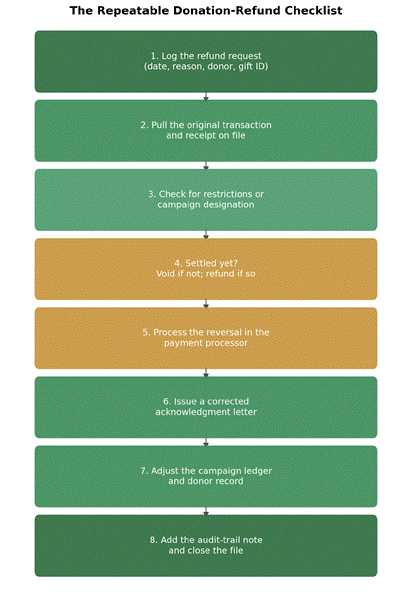
Building a Repeatable Refund Checklist

Any refund process that’s dependent on a single employee will come to a halt whenever that employee is absent. To address that issue, establish a process that ensures consistency and reduces reliance on any single employee. Each request is logged by the organization, including the request date, request reason, and details of the employee and donor related to the request. Staff review the original transaction and the receipt.

They also check if the gift was restricted or if it was earmarked for a particular campaign. This will also influence the approval process. They also confirm if the charge is settled, as this will determine if the charge is to be refunded or is to be voided. Once the payment transaction is completed, the donor receives the revised gift acknowledgment, the campaign ledger and donor record are updated and a note is added to the record to complete the process.

image 13

Figure 2: This refund process has steps that are documented the same way on all refund cases, no matter who processes that case.

Conclusion

Thinking of a donation refund as a small accounting issue is a mistake. There are many effects that a donation refund can have including tax substantiation, campaign finance, donor trust, and audit documentation.  The mechanics demand precision. Ideally, a donation should be voided before it has been settled. In the absence of this possibility, the donation should be correctly refunded, the receipt corrected, and a clear notation left. Most organizations spend too much time explaining donation refunds, whether the question comes from a donor, a board member, or an auditor.

A standard checklist for donation refund requests changes that. With one, the organization handles refunds efficiently and consistently. Without one, the money still gets refunded, but the organization spends far too much time explaining the refund to the board or to an auditor.

Frequently Asked Questions

  1. Can a nonprofit refund a donation after issuing a receipt?

    Yes. Though there is no federal law preventing it, gifts are normally thought to be irrevocable after the donee has accepted the gift. Hence, most organizations handle refunds through a written policy rather than as a donor’s right.

  2. What is the difference between voiding and refunding a gift?

    A void occurs when a transaction is canceled before it settles, so you don’t lose any money. A refund is requested to reverse a charge that has already settled, and this returns the funds in a separate transaction.

  3. Do I have to correct the tax receipt if I refund a donation?

    Yes. Please send a revised acknowledgment letter correcting the original receipt as void or adjusted, so the donor is not relying on incorrect documentation at the time of filing taxes.

  4. How do I refund a restricted gift we cannot use?

    You have to return the funds, get the donor’s written approval to redirect the funds, or for larger endowed funds, you need to follow the procedure in your state’s UPMIFA to get a formal release.

  5. How should a refund be recorded for audit purposes?

    Do not delete it. Link the reversal to the original gift record and add a note explaining the reason along with the details of the approval (name and date). State in the note the method used to correct the receipt.

Related reading on refunding a donation: Nonprofit Payment Resources.

Donation Reconciliation Workflow

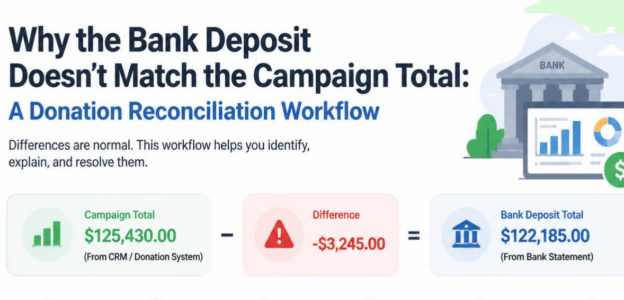
Why the Bank Deposit Doesn’t Match the Campaign Total: A Donation Reconciliation Workflow

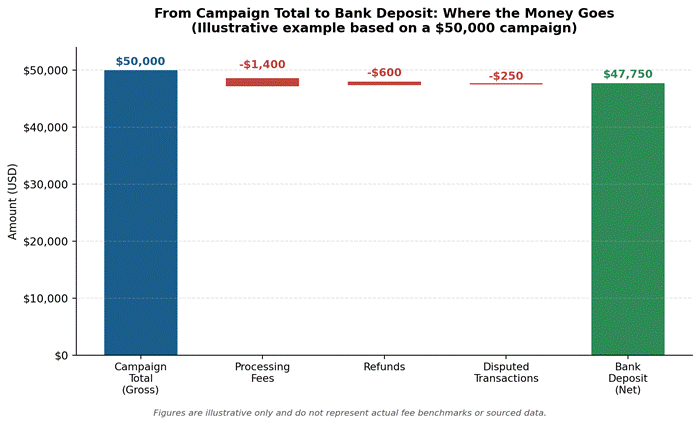
There is a record of $50,000 being raised on your dashboard. Your bank account shows a balance of $47,750. There were no fraudulent transactions that could account for the discrepancy. There were no duplicate transactions. The gap is typical of the donation processing methods that are standard today.

Each nonprofit finance team inevitably experiences this situation. A fundraising campaign closure brings with it a question from a board member for the final amount. The amount logged in the fundraising software is at odds with the amount in the bank. The ability to explain this discrepancy and formulate a standard operating procedure to address it is what differentiates a clean audit from a stressful one.

This guide explains a standard operating procedure (SOP) for donation reconciliation workflow. Included is an explanation of the gap between gross and net amounts, of the multiplication of deposits due to settlement batching, and a workflow that explains campaign dashboard and bank statement discrepancies in a manner that is easy for any auditor to follow.

Gross Gifts vs Net Deposits: Why They Are Never the Same Number

Gross Gifts vs Net Deposits

When a donor makes a $100 contribution to a nonprofit, the dashboard records a $100 donation. The only money that the bank records is what is left after the payment processor takes its fee. That is the only reason there is a difference, and it is not a mistake but by design. There are no contradictions in the accounting sense. The contribution revenue is governed by FASB ASC 958-605. For the nonprofit, the contribution processing fee does not reduce the contribution revenue, and the fee is recorded as an expense. In addition, the gross receipts reported on the Form 990 must be reported in their entirety, and a deduction of the fee, cost, or expense is not permitted. The donor in this example receives a tax receipt for $100, and the nonprofit incurred a processing expense.

The campaign dashboard reflects a gross value for each contribution; therefore, it will not match the bank deposit, which shows the net contribution value after the payment processing fees. The two values are not meant to answer the same questions. One value reflects what was contributed, and the other reflects what was received by the organization. A reconciliation process is meant to connect the two values.

image 10

Illustrative example only. Figures are for demonstration and do not represent sourced benchmarks.

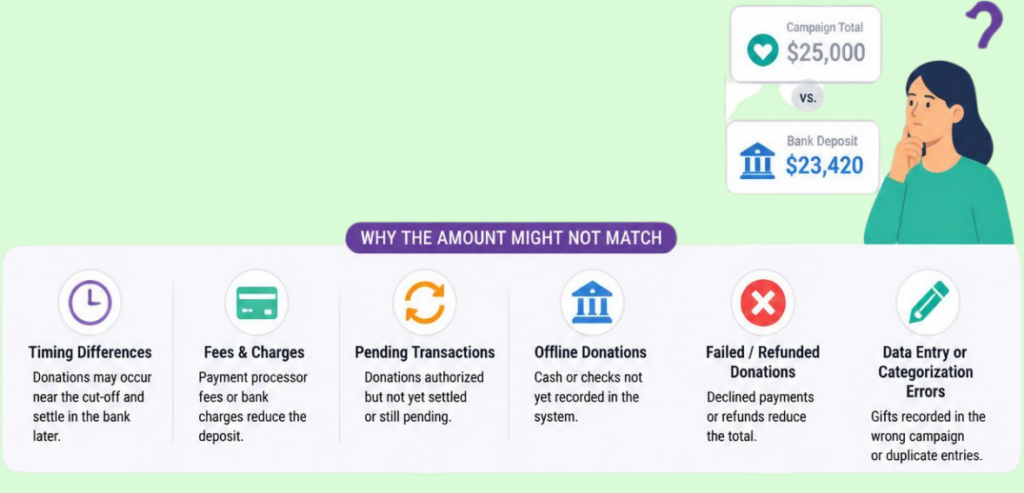
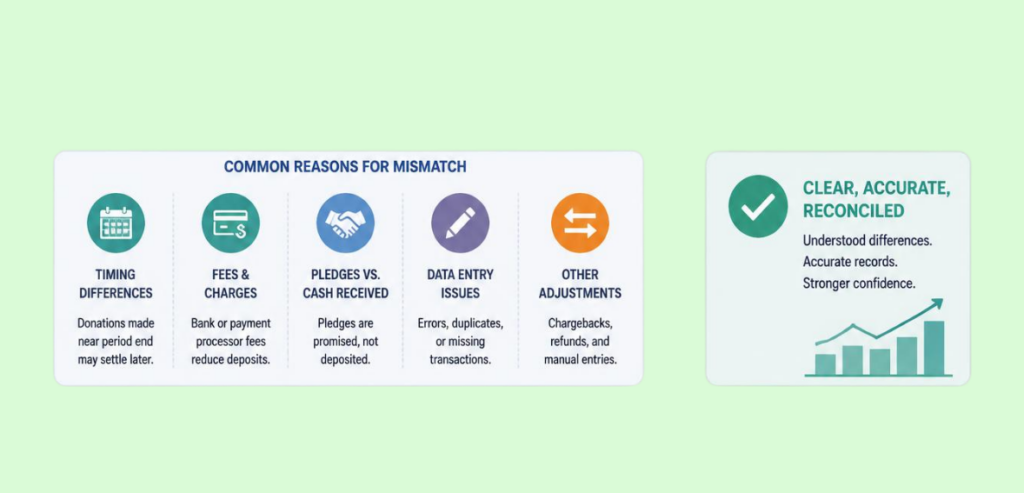
The Usual Suspects Behind the Donation Reconciliation Gap: Fees, Refunds, Disputes, and Timing

The Usual Suspects Behind the Donation Reconciliation Gap

There are four forces that account for the total difference between the campaign total and the deposit total. The majority of the issues pertaining to reconciliation can be attributed to one of the four. Processing fees are the most significant and most certain of these forces. For every card and bank transfer donation, there is a cost that is retained during the processing of the transaction before the funds are transferred to the bank.

The next largest are refunds. If a donor mistakenly donates two times, or asks for their donation back, a refund is accomplished by reducing a subsequent payout instead of reversing the original donation, which results in the refund being recorded in a different reporting period than the original donation. The third is disputes and chargebacks, which can be the most disruptive because they can occur weeks or months after a campaign has been closed and reported to the board. Lastly, timing is the quietest of the four forces. A donation made on the last day of a campaign may not settle into the bank until the next reporting period, so it is possible for a donation to appear in the dashboard and bank statement in different reporting periods.

Published Processor Rates as a Reference Point

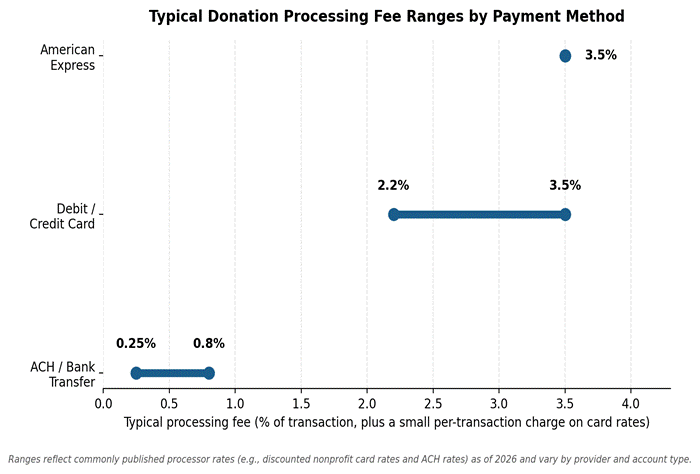
Published rates from the major processors illustrate how much of a donation goes to fees and how long funds are delayed. A typical card processing fee in the U.S. is 2.9 percent plus 30 cents per transaction. Nonprofits can often apply for discounted nonprofit pricing, usually granted to organizations where at least 80 percent of payment volume is charitable donations.  The discount brings the processing fee to about 2.2 percent plus 30 cents per transaction, with American Express fees typically at 3.5 percent. Donation processing fees via bank transfer through ACH (Automated Clearing House) are much lower. This fee is typically around 0.8 percent of the transaction, capped at around 5 dollars, or a flat fee in the range of 0.25 to 1 dollar, depending on the processor. ACH transactions are preferred over card processing transactions, especially for high-value donations such as a 1,000-dollar donation, since the ACH fee is a few dollars at most compared to the card processing fee of 22 dollars to 35 dollars.

image 11

Ranges reflect commonly published processor rates as of 2026 and vary by provider and account type.

Settlement Batches and Why One Campaign Becomes Several Deposits

Many first-time reconcilers are understandably puzzled by the missing transactions from a fundraising campaign. This is caused by the way payment processors batch and group transactions, leading to a delay in settlement to the bank account. A fundraising campaign that lasts a week can produce several (five or more) separate deposits to the bank account due to bank holidays or weekend closures. A Friday batch can settle to the bank as early as Tuesday or Wednesday of the following week. This can be further complicated by a campaign that has multiple payment methods. Multiple payment methods can include a card processor, a separate ACH rail, and an in-person payment terminal, which can significantly multiply the number of payouts and therefore the number of deposits to account for. All of this is part of the normal payment and settlement process, and the reconciler may expect a single deposit for the campaign total, but will more likely face a many-to-one reconciliation.

Building the Bridge with Donation Reconciliation Workflow: From Campaign Dashboard to Bank Statement

Building the Bridge with Donation Reconciliation Workflow

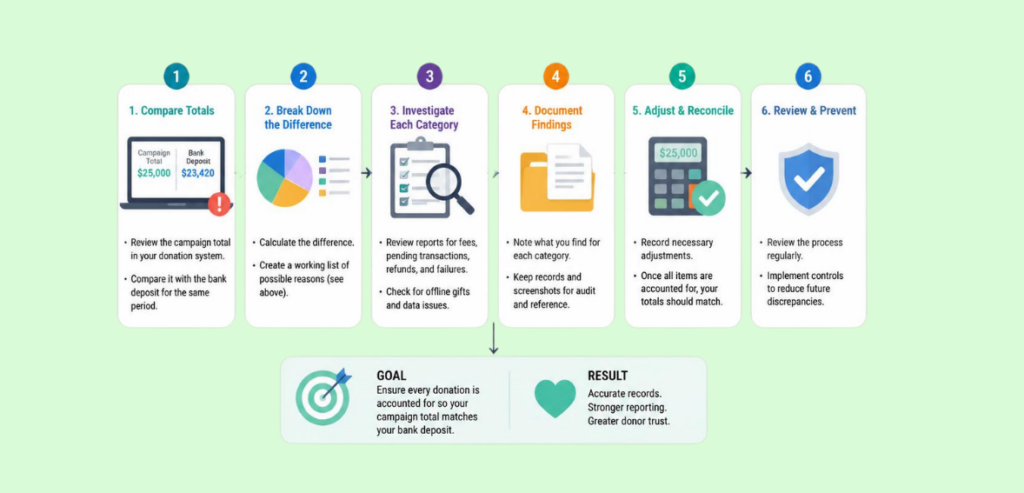
Using a bridge schedule provides a dependable method for closing the gap. Stepwise, it takes you from the total gross amount raised during the campaign to the amount deposited in the bank. The total gross amount raised in the campaign, which is the starting point of the bridge schedule, is obtained from the campaign fundraising platform dashboard. After the gross total, the only source of truth for fees is the processor payout report, since bank statements only reflect the net deposit.

The bridge schedule, starting from the total gross amount, will deduct total processing fees, refunds, voids, returns, and donations that are pending settlement. The bank deposit amount for that time period is the amount that is reached on the bridge. If the amount reached on the bridge schedule is not the bank deposit amount, this is usually due to a timing gap: a donation received near the reporting cut-off is recorded in one period but does not settle until the next.

Where Processing Fees Should Land in Your Chart of Accounts

Just like every other fee, processing fees should have their own line in the chart of accounts, apart from contribution revenue. While the donation is accounted for as full revenue, the processing fee is charged to expense, usually under Bank and Merchant Processing Fees and/or Fundraising Expenses. If the processing fee is netted against revenue, it will understate gross receipts and will misstate the fundraising ratio.

This will create complications for the yearly audit because auditors expect gross revenue and gross expenses. For Form 990 Statement of Functional Expense, the processing fee expense is assigned to the fundraising and/or administration expense category. Because of this, the processing fee expense line has a direct effect on the organization’s fundraising efficiency. A nonprofit that nets processing fees against revenue will grossly underreport the total contributions and total fundraising expense, and this will be evident when comparing the organization’s annual financial statements, even though the organization’s cash position is unchanged.

Handling Disputes and Refunds Mid-Reconciliation

Of the various reconciliation items, disputes are the most likely to reopen a closed period. This is because the different payment rails have different rules with incredibly long time limits on how long a donor is able to contest a transaction. These time limits often exceed the length of typical fundraising cycles.

ACH Returns Follow Nacha Rules, Not Card Rules

When compared to card donations, bank transfer donations have different rules and behaviors. A bank can reverse an unauthorized ACH debit within 60 days of the original settlement. There is no formal procedure or special circumstance that allows a nonprofit to challenge a return. In this case, the money will be deducted from the nonprofit’s future payouts. ACH donations provide a unique challenge because a donor can reverse the donation up to 60 days after settlement. For this reason, the reconciliation of bank transfers should treat ACH donations as not final until the return window has passed. A prior period ACH donation return should be recorded as its own line in the reconciliation.

Card Disputes Follow Visa and Mastercard Timelines

A card donation takes longer to become final because the donor is given more time to contest the transaction. The major card networks allow contesting transactions for up to 120 days, although the timeframe can be extended for certain fraud issues. Compared to the time allowed to the donor, the processor has a much shorter time to prepare a response to the contest. Visa gives about 30 days, while Mastercard allows about 45 days. In the case a donation is contested, the processor will withdraw the amount and a dispute fee will be charged to the nonprofit. Even though the donation is reversed, the fee and the withdrawn amount have to be entered as negative items in the reconciliation to account for the net deposit.

The Month-End and Post-Event Close Routine

Implementing a consistent methodology to deal with month-end closings and the subsequent activities resulting from the month-end process helps mitigate the wide variances and large year-end gaps that can create confusion and disputes. This methodology involves obtaining the payout or settlement report from the processor for the period. The report lists various payouts and associated fees, refunds, and disputes. Each payout is matched to the bank statement. This verifies that the payout was the amount deposited to the bank. The posted fee expense and posted contribution revenue should match the processor report, so the total fees for the period are verified against it.

To prevent confusion, donations that have been reported on the dashboard but are not reflected in the bank by the end of the period are flagged. Reports for disputes and returns are analyzed and journal entries are created to the corresponding accounts. Fees and disputes are reconciled, and the bridge schedule, bank statement, and processor reports are filed in the audit file. This routine is done on a monthly basis to keep gaps small and easily explainable instead of doing this at the end of the year.

Reporting the Reconciled Number to Leadership and the Board

Ultimately, there are really only two numbers for a campaign, and both need to be reported. For most situations, the number that appears on the fundraising dashboard needs to be communicated. This number needs to be on tax receipts, and it is the number that the public should use to reference the total amount raised. Both the number that reflects the amount raised (the gross number) and the number that reflects the amount available to spend (the net number) should also be communicated to the finance team for use during cash flow and fundraising budget planning.

Both numbers and the bridge should be reported to the board to avoid the situation where board members’ questions cannot be answered, and to eliminate the annoying discrepancy between the amount that was announced and the amount that appears in the bank account. It should also satisfy the auditors, who will expect to see gross revenue, fee expenses, and cash flow reconciled to the gross amount with no blended figure.

Conclusion

Variances between the campaign total and the bank deposit are not inherently problematic. This is merely a consequence of timing differences between settlements, payment processing fees, refunds, and disputes. These things happen at different times and have different rules. A nonprofit won’t be shocked to see a difference between the campaign total and bank deposit when they account for donations at the gross amount, record payment processing fees in a separate account, and perform dashboard reconciliations every month. The difference between the campaign total and bank deposit would be the least concern to an organization that performs regular monthly reconciliations when compared to those organizations that attempt to reconcile several months of bank statements in one accounting period. The greatest benefit of reconciliations would be experienced by an organization that establishes the practice for the long term.

For more on donation reconciliation and other nonprofit payment questions, see Nonprofit Payment Resources.

Frequently Asked Questions

  1. Why is my bank deposit less than my campaign total?

    Payment processors take their cut and can deduct more payments for refunds or disputes. What you see in the campaign total is the gross amount of gifts and not what you’ll see in your bank account.

  2. How do processing fees affect donation reconciliation?

    Fees are automatically deducted prior to bank payouts; thus, fees must be recorded as an expense in order to account for the difference between gross revenue and net deposits.

  3. What is the difference between gross and net donations?

    Gross amounts refer to the full contributions made by a donor. Net amounts refer to what remains after processing fees, refunds, and disputes are deducted, which is the amount actually deposited in the bank.

  4. How do I reconcile my fundraising platform to my bank account?

    Create a bridge schedule that shows the gross dashboard total for the reporting period as the starting point. Subtract fees, refunds, and disputes as shown on the processor’s payout report. The result should equal the bank deposit amount.

  5. Why did one campaign create multiple deposits?

    When running a multi-day campaign, it is not uncommon to receive several deposits instead of a single consolidated deposit at the end of the campaign. This is due to the fact that different settlement batches run over the course of several days, and each batch is settled individually.

Card or ACH

Card or ACH for a Major Gift? How Nonprofits Weigh Fees, Returns, and Settlement Risk

A $50 donation vs. a $50,000 donation should never require the same level of consideration. But most nonprofits do just that, simply processing donations based on the buttons clicked. While this method may be efficient (and harmless) when it comes to small donations, larger donations can mean thousands of lost dollars for an organization, as a payment rail chosen by a donor can leave a significant pledge in a state of limbo for a long duration, even after a thank-you letter has been sent.

The card or ACH payment options do not serve the same purpose when a significant donation has been made. Each has a different cost, a different settlement duration, and a different risk of a donation being revoked. A development team needs to understand this before a significant donation has been made.

Why the Card or ACH Payment-Method Question Only Gets Serious Above a Dollar Threshold

Card or ACH Payment-Method

For payments under $25 for a digital gift, there is not much of a debate. Fees incurred using cards or ACH payments are negligible. For small amounts, the donor experience is the priority over processing cost. Things are different for larger amounts. ACH payment fees are fixed. For card payments, fees are charged as a percentage of the transaction. Processing fees are basically negligible for small amounts. For large amounts, the fee will be larger. This is the essence of the challenge.

There is not a set dollar amount for ‘major gifts.’ For a small nonprofit, a gift may be considered ‘major’ at $1,000 or more, whereas gifts of $25,000, $50,000, or more may be considered ‘major’ at a large hospital or university. Based on a major gift program study for the U.S. and Canada, gifts are considered ‘major’ in the $5,000 to $9,999 range.

However, gifts of this level are considered ‘major’ by the organization depending on their donor pool and budget. Gifts of this level, however, are vastly more expensive to process if made by card as opposed to ACH gifts. The costs are nearly the same between card and ACH for small gifts, but they are vastly different for large ones.

Most of a nonprofit’s gift revenue comes from a small number of large gifts, which makes this even more challenging.

Most nonprofits follow the 80-20 rule with their individual donors. In this rule, 80% of the individual donor revenue comes from 20% of the individual donors. In a given fundraising year, a few large gifts are needed to make the fundraising successful. The processing cost on a small individual gift is a small difference, but for the few large gifts that make up the annual funding, the difference is huge. A finance director of a nonprofit will likely have to deal with the large difference. Because of this, when talking about the larger gifts, the issue of payment-rail strategy will most likely come up, even though it doesn’t normally come up in the discussion on the annual fund.

Card Gifts: Convenience, Speed, Rewards — and Cost Plus Chargeback Risk

Card Gifts

Donors like the ease of giving with the swipe of a card, especially when charitable giving means cash back or rewards. There is less of a personal out-of-pocket cost to a donor, but nonprofits experience the cost of processing. Credit card charges for nonprofits average approximately 2.2% + $0.30 to 3.5% + $0.30 for each swipe, depending on the processor, card network, and if the organization is receiving a nonprofit discount. Therefore, the fees for processing a $5,000 gift could be $110 to $175. For a $50,000 gift, the fees would be $1,100 to $1,750, and those fees are money that the nonprofit mission does not receive.

Visa and Mastercard: The Rules Behind Every Swipe

Beyond setting these costs, Visa and Mastercard also establish the rules for charge dispute timeframes. In general, all four networks— Visa, Mastercard, American Express, and Discover—allow chargebacks to be filed within 120 days. Some chargeback reason codes that are related to fraud even allow for extensions beyond 120 days.

Timeframes for a nonprofit to respond to disputes are significantly shorter and allow merchants a time period of anywhere from 20 to 45 days to respond. This means that the acceptance of a major gift by credit card isn’t completely final for around 120 days. During this period, the card charging the major gift can be reversed. This can be done for several reasons, such as the card number having been stolen and used fraudulently.

ACH Gifts: Lower Cost on Big Sums — and Return-Code Exposure

ACH Gifts

Payments sent using ACH move directly between the sending and receiving bank systems. As a result, the pricing structure reflects that ACH payments do not involve a fee relative to the payment; rather, a flat fee of $0.25 to $0.75 is charged for payment processing, regardless of the payment amount. For this reason, ACH payments become a highly cost-effective payment solution for large donations.

A processed ACH gift of $50,000 would cost significantly less than a processed gift of the same amount via credit card, which would exceed $1,000. This advantage of the cost of ACH payments over credit card payments holds for each payment that is made to fulfill the pledge of a multi-year commitment that is paid in installments.

NACHA: The Rulebook Behind Every Bank Transfer

NACHA established the return timeframes on bank transfers that can still be reversed after clearing. Typically, a return from a business or corporate account (i.e., the type typically used by a donor-advised fund or family foundation) must be initiated within two business days of the transfer date. A return from an individual account works differently. If the donor’s bank determines the transfer was unauthorized, the donor’s bank can return the transfer within 60 calendar days.

A return from an individual account provides a much longer exposure time compared to the two days for a return from a corporate account. Therefore, an ACH transfer from a personal account is not fully final, and the transfer remains reversible for 60 days, even though the transfer appears to be completed on the payment beneficiary’s account.

image 6

Figure 1. Processing cost on a $5,000 gift, card vs. ACH, using published 2026 nonprofit rate ranges.

Settlement Timing: When Is the Money Actually Certain?

“Available” funds from card or ACH gifts generally means you’ll have access to those funds within 1-3 business days. Occasionally, gift processors may provide the availability option for the same day or within a few hours for an added cost. Though funds may be “available,” there is no finality to the gift. This is where many nonprofits run into problems when planning or budgeting for a pledge.

A card gift can be reversed up to 120 days after the transaction. Consumer ACH gifts can also be reversed within 60 days. However, ACH gifts made by businesses are generally considered final within 2 banking days since the return window for business accounts is also 2 days. Therefore, the most secure and time-efficient way to receive a major gift is an ACH transfer from a foundation, donor-advised fund, or business corporate giving fund. Development and finance team members who report pledge revenue as “received” when funds are available run the risk of overstating the value of a large gift in the weeks following the transaction, as the gift may still be reversed.

image 7

Figure 2. How many days a settled gift can still be pulled back, by payment rail and account type.

The Donor-Experience Side: What Large Givers Actually Prefer

The Donor-Experience Side

Donor payment preferences are more dictated by what donors feel comfortable with and what they are accustomed to, rather than payment processing fees. This is because most donors do not consider how much payment processing costs nonprofits for the donors’ level of contribution. It is common for high-level, high-capacity donors to use credit cards to make large donations. This is because high-value donations are processed quickly and may even result in a reward for the donor. High-capacity donors may not even consider the consequences of charging a high-value donation.

Conversely, a large portion of donors, particularly those making donations through a trust, foundation, or donor-advised fund, have payments made through institutional practice, which typically leaves little flexibility in payment methods. A small number of donors actually prefer ACH payments once they understand the difference, for the reason that the majority of the contribution will go directly to the cause rather than to payment processing. This group tends to respond well when the question is framed as “which payment method allows the most of your contribution to reach its intended destination?” as opposed to a more technical explanation regarding interchange fees and rates.

Recurring donations represent a special case. For example, a donor who agrees to a $10,000 pledge paid monthly for 12 months will result in the charity paying the processing fee each month. From a processing perspective, paying via credit card means that the charity is paying a percentage-based cost for each monthly donation. Conversely, if the payment is made via ACH, there is only a small flat fee for each installment.

The fee gap grows the most with multi-year pledges, and a short discussion when the pledge is made can save the organization money for the entire pledge duration.

Reconciliation: Keeping Both Rails in One Donor Record

For most nonprofits, running both card and ACH rails simultaneously is the right move. However, it adds a significant bookkeeping burden. Regardless of which rail handled the transaction, a donor’s complete giving history needs to exist in a single CRM record, requiring finance and gift staff to have the matching transaction identifiers to connect a bank deposit batch to a pledge.

The challenges such a system creates often become apparent when a donor changes channels in the middle of a pledge (for example, switching from a recurring pledge via Card to ACH) or when a processor’s settlement batch combines several donations into one deposit, which the finance staff has to split. The majority of nonprofits consider card and ACH systems as separate systems, with reconciliations done at the end of the month, thereby only discovering a discrepancy when a major donor inquires about their total. The matching logic should be included in the gift-entry process to avoid such surprises.

A Simple Decision Rule by Gift Size

A helpful guideline directly connects an appropriate payment method to gift size, weighing both cost and risk. The table below presents an initial framework most gift officers can adjust to fit their organization’s thresholds.

Gift SizeMost Cost-Efficient RailWhy
Under $1,000CardFee difference is a few dollars; donor convenience wins.
$1,000 – $10,000Either, ask the donorFee gap becomes noticeable but not decisive on its own.
$10,000 – $50,000ACH preferredPercentage card fees now run into hundreds or low thousands.
Above $50,000ACH or wire from an institutional accountFlat fee stays negligible; corporate ACH also becomes final fastest.

Talking to a Major Donor About How to Give

To navigate the payment method question with a principal donor, it’s best to focus on the relationship versus the fee. One approach might be to tell the donor, “we’d love to talk through the best way to structure this.” That opens the donor to various other questions, including the timing of the gift, the donor’s level of comfort, and tax considerations, while leaving the payment method as just one of many questions to consider.

 Starting with a fee lecture just underscores to a generous donor that their preferred method of giving is being put into question and is sure to make them feel uncomfortable. Most donors, when thinking about the payment method options that way, prefer to give by ACH rather than by credit card, as the former causes the donor to feel that more of the gift is going to the program that the donor is concerned about, and that less of the gift is going to the credit card processing fees. Those donors are the ones most likely, on a larger gift, to choose ACH, and to continue to choose it on future gifts.

Conclusion

There is no one “right” answer to be found when it comes to methods to accept major gifts: neither card nor ACH wins outright. When comparing the two options, card is the most donor-friendly option for ease; however, the cost for major gifts increases, and lengthy windows for chargebacks are a consideration. ACH, at scale, is the less expensive option, and, relatively speaking, the exposure window is shorter if the payment is coming from an institution.

ACH carries the 60-day exposure when coming from a personal account. Nonprofits that accept major gifts successfully are those that don’t consider the payment method for major gifts an afterthought, and have a habit of clean reconciliation for both methods. These nonprofits are also the most transparent with donors about payment method choice rather than silently absorbing the payment method cost. This approach protects the monetary and relational value of the gift.

FAQs

  1. Is ACH or credit card cheaper for large donations?

    Since ACH charges a flat fee between $0.25 and $0.75, it is the most cost-effective option for large gifts. Card fees on the other hand, add a percentage-based fee in addition to a $0.30 fee. These fees can be between 2.2% and 3.5% and will increase with the size of the gift.

  2. Can a large ACH donation be reversed?

    Yes. A consumer bank account can return an unauthorized ACH debit up to sixty (60) calendar days after settlement. Business accounts can only return unauthorized ACH debit requests within two (2) banking days.

  3. How long does it take for a donation to settle?

    Both ACH and card gift transactions usually clear within one to three business days. However, “available” doesn’t mean the transaction can no longer be reversed.

  4. Should nonprofits push donors toward ACH?

    Nonprofits should be able to offer and explain ACH for larger or recurring donations. Donors should not feel pressured to use the service to make donations. It should instead be made clear to donors that this option is available.

  5. Do donors prefer giving by card or bank transfer?

    It varies by donor. For many, donations via card are the most convenient and commonly used method. Some donors use a card to donate to take advantage of rewards. Donations made through foundations or donor-advised funds are typically already set up for ACH or wire transfers and therefore use those methods.

Card versus ACH for major gifts: one piece of handling donations. The rest of our nonprofit payment guides are in Nonprofit Payment Resources.

Amex-Apple Partnership

Amex and Apple Team on Rewards: What Wallet-Based Perks Mean for In-Store Acceptance

The tap of a screen is worth more today than it was yesterday, and for some it is about to get much better. Because of a partnership between Apple and American Express, cardholders can now use some of their Membership Rewards points to partially pay for purchases completed using Apple Pay. While there are plenty of articles and commentary about the Amex-Apple partnership, the real impact of this integration is something different, and it matters most for merchants. It is a reminder that customers expect mobile wallets for a growing percentage of transactions, with or without rewards. Merchants who consider the acceptance of mobile wallets the end of their payment integration are losing significant sales.

The Amex-Apple Partnership News, Briefly

The Amex-Apple Partnership News

American Express and Apple introduced “Pay with Points with Apple Pay” for American Express cardholders in the United States with Membership Rewards. To use this feature, users select an eligible Amex card in Apple Pay, and a “Use Rewards” button appears. Using the button, users select the number of points to use to pay for a portion or the total value of the purchase.

This feature is available on the iPhone and iPad and can be used entirely within Apple Pay; no other applications need to be used to redeem points. Currently, this feature is limited to online and in-app purchases. As of the initial announcement, American Express has not extended the feature to Apple Pay transactions in physical stores, which is probably the most relevant detail for merchants reading the announcement.

Redemption rates provide additional context. American Express estimates that the value of points redeemed through Apple Pay is approximately $0.007/point, meaning that 10,000 points equals $70. This is significantly less than the value of points transferred to airline or hotel partners, which generally provide a value of $0.02/point.

This feature is primarily focused on user convenience. For merchants, the value and convenience differences of redemption are overshadowed by the largest implications of this collaboration: two of the largest consumer payment partners are demonstrating a commitment to creating a mobile payments ecosystem.

American Express

American Express became an Apple Pay partner at the service’s 2014 U.S. launch and has led the campaign to provide consumers with enhanced transactional convenience using their credit cards. Lisa Kalhans, the Executive VP for Amex’s U.S. Consumer Cards, believes that integrating point redemption systems into daily transactional activities provides consumers with an incentive to use their cards.

Customers have a convenient way to redeem their rewards, and Amex customers reportedly maintain a high transactional volume. Therefore, integrating the Amex system into Apple Pay provides Amex customers a convenience that many rewards point systems fail to offer. Amex reportedly gained a significant increase in customers in the target market of Gen Z and Millennial customers. Gen Z and Millennial customers are reportedly the most active users of mobile wallet payments.

Jennifer Bailey, Apple’s VP of Apple Pay, commented on Amex’s innovative integration and the flexibility that it provides to consumers. The point redemption system allows consumers to make purchases using Amex rewards points. Before Amex, Apple Pay’s rewards redemption capability had only been adopted by Discover in the U.S. and Zilch in the U.K. Amex is by far the largest card issuer to integrate point redemption into Apple Pay.

The Real Merchant Takeaway: Wallet Payments Keep Growing

While the Amex-Apple feature is currently applicable to online and in-app purchases only, there is minimal impact on a physical store location. However, there is a more pertinent and persistent question for any merchant: beyond one issuer’s promotion, do customers expect to walk in and pay by tapping a phone or a watch, and is your store’s payment terminal ready for that? The answer is increasingly yes.

Over 65% of face-to-face card transactions in the United States are made using contactless technology (card, phone, or wearable) as of now. The number of proximity mobile payment users in the United States crossed 111.8 million in 2024 (44.9% of the total smartphone population), and that number is expected to grow to 132.6 million (50.2% of the total smartphone population) by 2028.

The digital wallet payment technology is growing at an unprecedented pace and is expected to grow to be valued at $145.35 billion by 2030 from $56.77 billion in 2025. The growth of this technology and the resulting shift in how people will pay will not be affected by any single bank’s rewards program, including Membership Rewards.

image 5

US proximity mobile payment users, 2024 actual vs. 2028 projected. Source: Capital One Shopping Research, Digital Wallet Statistics 2026.

Making Sure Your Terminal Accepts Contactless Cleanly

Making Sure Your Terminal Accepts Contactless Cleanly

Most point-of-sale systems manufactured in the past few years include NFC antennas. These antennas enable them to interact with systems that support tapping a card, or in many cases, a smartphone. If contactless payment is not available, the issue typically lies with the terminal not being certified for contactless payments, or more frequently, the issue lies in the processor account not supporting contactless payments at the transaction gateway level.

It is easiest to find out if contactless payments are supported simply by calling up your payment processor or terminal provider to see if switching contactless payments on for your account is an option. If it is, they can usually enable it quickly.

Merchants tend to conflate two questions. Can the terminal read a tap (which most devices built in the past few years can do)? And, does the merchant account and processing agreement allow for contactless payments to be enabled in the routing of transactions? The second question is back-office related and not hardware related. Often, the necessary equipment to support contactless payments is sitting idle because no one pushed the processor to enable it.

Tap to Pay on iPhone

Apple is also helping small shopkeepers accept payments without requiring them to buy hardware. Tap to Pay on iPhone turns certain iPhones into payment terminals, allowing shopkeepers to accept payments from a contactless card, Apple Pay, or any other contactless digital wallet, right on the same device they already have with them. On the hardware cost front, this eliminates the cost argument for a market stall, solo service provider, or a pop-up shop, since the payment acceptance tool is the shopkeeper’s phone already in their pocket.

Why a Failed Tap Is a Lost Sale

A customer that pulls out their phone at checkout already knows how they want to pay. If a reader fails to respond quickly to payment, that choice can collapse into a card swipe. Some customers fumble to take out a physical card, some take their time, and some walk away at the sight of a stalled terminal. There is a well-known industry gap between people eager to use their phone as a payment method and the financial transactions that are actually completed.

Although about 85% of U.S. retailers accept Apple Pay, it only comprises 10.2% of all eligible, potential in-store transactions. It is by far the largest gap of accept versus use in consumer payments, and the terminal friction is a large reason behind it. Providing payment acceptance and the ability to tap are as different as day and night, and only one protects the sale.

image 4

Apple Pay U.S. merchant acceptance vs. share of eligible in-store transactions actually completed via Apple Pay. Source: PYMNTS Intelligence.

What Mobile-Wallet Customers Expect at Checkout

What Mobile-Wallet Customers Expect at Checkout

Wallet-first customers want essentially the same experience regardless of the bank or phone they use: a quick tap and instant confirmation with no need to enter a PIN for small purchases. They also prefer security features that reside in their wallets, like tokenization (the replacement of a card number with a code that will only be used once), and Face ID or Touch ID as a replacement for signature.

Younger customers, with Gen Z and millennials as prime examples, are already responsible for higher levels of spending and are now among the main customers of companies like American Express. For these customers, smooth and seamless checkouts are simply the baseline (and no longer a bonus). If a checkout cannot provide this, it will be seen as an old and outdated checkout system.

There are some unvoiced assumptions customers make about contactless checkouts. If a contactless checkout is set up properly, it should work without a hiccup. If a checkout requires a customer to use a physical card rather than a contactless checkout, this suggests the contactless checkout is either faulty or set up incorrectly. If a checkout requires a customer to use a physical card, it will leave a lasting impression, while a checkout that taps cleanly is one customers will continue to use without consciously thinking about it.

Contactless and Your Cost of Acceptance

Small business owners often think tap-to-pay systems might charge them more per transaction than traditional swipe or insert systems. That thought is misguided in light of card networks’ rules. Like chip insert transactions, contactless transactions are also card-present transactions, and therefore, are likely to be assessed the same interchange rate as chip transactions. The relevant rate difference is between card-present transactions, whether tapped or dipped, and card-not-present transactions, such as telephone orders or payments that have to be keyed in, which are subject to much higher interchange, due to the greater likelihood of fraud.

The cost to merchants generally increases because of the mix of card types used by customers, since, whether insert, swipe, or contactless, payment with premium reward cards means higher interchange costs. It is incorrect to think that the cost to the merchant is due to a surcharge on tap systems.

Upgrading Acceptance Without Overspending

Upgrading contactless payment acceptance typically requires no new hardware. For a terminal already on your counter, your processor can push a firmware update to enable NFC. For merchants that don’t even have a dedicated terminal, a software-based POS (point of sale) system that can turn your smartphone or tablet into a payment reader is becoming an accepted industry norm.

By 2027, reports indicate that this software-based POS will be deployed globally to over 34.5 million merchants. This trend will continue to expand the payment acceptance options of small to mid-sized businesses (SMBs) at an affordable price. Before purchasing new hardware, be sure to ask your processor whether the capabilities can be enabled for the payment reader you already have.

A Quick Contactless-Readiness Check

Everything important can be verified in a short 5-minute internal check before a busy weekend. First, confirm that the terminal is not just present, but that the NFC reader is on. Then check that the terminal is updated. Outdated firmware can lead to failed contactless transactions.

Make sure your staff is familiar with what a successful tap looks and sounds like, since a slow read could be mistaken for a declined card. Tap-to-pay signage by the register will ease customer concerns about using contactless payment. Lastly, do not forget to do a tap transaction every so often to confirm the system is still working, rather than assuming it has been working for the last few months.

Conclusion

The Amex-Apple rewards feature benefits those who make purchases through Apple Pay. While Apple and American Express are partnered and Apple Pay users are their target customers, physical store merchants are left out. The rewards feature is a good example of how Apple and American Express are continuing their investment in the Apple Pay ecosystem. The rewards feature is good for online and in-app purchases and for American Express’s customers; however, the rewards feature is of no use for the majority of physical store merchants.

The takeaway more valuable than one issuer’s promotion is that contactless payment is no longer a preference for customers, but a requirement. Contactless readiness is less about any single promotion and more about the store’s staff and payment systems. Ensuring that contactless payment systems work means a customer is never the first to discover that they do not.

Frequently Asked Questions

  1. Do I need to accept Apple Pay and mobile wallets?

    You lose potential sales if you don’t accept them. In the U.S., over 65% of face-to-face credit card transactions are contactless. The majority of new terminals come with support for contactless transactions at no added cost.

  2. Does contactless cost more to accept?

    No. Under standard network rules, contactless transactions are treated the same as chip transactions, and therefore, qualify for the same card-present interchange rate.

  3. Why does my terminal decline some taps?

    The causes are usually a disabled contactless setting on the customer’s card, outdated firmware, or a card spending limit; the hardware itself is usually fine.

  4. Are mobile-wallet payments secure for merchants?

    Yes. Wallets reduce fraud and disputes through the use of tokenization and biometric authentication. In this technology, card numbers are replaced with a code that can be used only one time.

  5. How do I enable contactless acceptance?

    Confirm with your payment processor that NFC is on and the firmware is up to date. Most terminals just need an update to the settings and won’t need new hardware.

Donation Chargeback

When a Donor Says “I Don’t Recognize This Gift”: The Evidence a Nonprofit Needs to Win a Donation Chargeback

You get an email on a Tuesday. Your processor flags a donor’s $250 gift as disputed. The reason says “cardholder does not recognize transaction.” There was no fraud. There was no complaint. The donor didn’t even know that they made the gift. They opened their bank statement, saw a transaction, and called the bank. Now the gift is frozen. There is a penalty: the gift plus a fee, incurred whether you dispute or not. The timer has started.

This is an example of the kind of dispute that most commonly occurs in a nonprofit environment and is one of the easiest to win. Most disputed gifts are not fraudulent in nature. The donor simply forgot that they made a year-end gift. The mystery charge is a gift made by their spouse. The bank will usually side with the cardholder, and inaction will result in losing the gift.

However, you still have the proof. The contents of this document will show you how to win a donation chargeback, the race against the clock to do this, the one-line text fix that will prevent the majority of these disputes, and the best way to prioritize your time and resources to mount a challenge.

image 138

Figure 1. Most disputed donations are not criminal fraud. They are memory gaps, family surprises, and unrecognized statement lines.

Why “Unrecognized” Donation Disputes Happen More Than Fraud Does

Why Unrecognized Donation Disputes Happen More Than Fraud Does

Most assume that disputes on gifts equate to stolen cards. This is not the case. It is estimated that nearly half of chargebacks occur because of friendly fraud. This is where the cardholder disputes a transaction that they have authorized. First-party fraud was 36% of the fraud pie in 2024 – a staggering increase from previous years. True fraud made up the rest of the pie.

As for nonprofits, the trend is clearer. Since donors are impulse givers, they often donate in response to an appeal and may even donate late at night. By the time they remember, the donation may show up next to regular purchases like gas and groceries, and they will not associate the charge with the donation, so they dispute the charge, leaving the nonprofit with the loss. It is estimated that almost 1 in 6 people will dispute a transaction that they are satisfied with.

These situations are easy to resolve. A donor may forget that they have set up a recurring donation. Or a donor may donate on a shared credit card without notice. Most statement lines may read out of context and may confuse a donor. In all of these cases, the donation was made, and the donor has not experienced a loss.

The Clock You Are On: Representment Windows and Why Default Losses Are Avoidable

Representment Windows and Why Default Losses Are Avoidable

The term for contesting a chargeback is representment. This means submitting the transaction to the bank again with proof that the charge was indeed valid. Unfortunately, representment is a race against time. When a dispute gets filed, a timer starts, and if you miss a certain time frame, the case is lost; no proof will change that.

You might assume that the time limits are more flexible than they actually are. Banks will usually advertise longer time limits, but in reality your bank will set its own time limits. It will take your bank time to gather your documents, yet in many cases merchants have around five to ten business days to respond. Treat the time frame with urgency from the very moment you are notified, and do not treat it as a normal time limit.

Visa

Merchants are given a response time of about 20 days for each phase of the dispute by Visa. Visa used to be more flexible about the time allowed to respond to a dispute. However, Visa has automated and optimized their dispute processes, which means there is reduced flexibility and a greater need for a rapid internal response. If your gift records are more of a disorganized mess, your response time will elapse long before you have the opportunity to put together a case.

Mastercard

Mastercard provides 45 days in a single phase. Although the additional time is helpful, it is still a limit. The cutoff time set by your acquirer still applies, and whichever time frame is shorter is the one that you need to work with. When designing your process, assume the worst time frame as opposed to the best time frame, based on a network rulebook.

image 139

Figure 2. Network windows look generous, but your acquirer’s internal cutoff is the deadline that actually governs.

The Evidence Packet: Gift Record, Receipt, Appeal, and Consent

Winning a donation chargeback depends entirely on one noticeable fact. This fact must show that a certain person intentionally donated a specific amount for a specific cause. Four pieces of evidence help validate this fact to show a reviewer easy-to-follow documentation for a donation chargeback in less than a minute.

The first piece of evidence is the gift transaction record. These records show transactional data such as date, amount, IP address, and Card Verification Match results. These records are an electronic way of showing that a person was present at a donation charge. The second piece of evidence is a receipt or confirmation email showing that a person received an acknowledgment message regarding a specific charge.

The appeal or campaign showcased in the evidence is what the donation was responding to. This is a donation that is tied to a specific ask via a response that is documented. The fourth piece of evidence is a record showing that a person’s subsequent donations result from their consent to that schedule. Submitted together, these four records will show a bank reviewer a documented gift rather than vague evidence of a gift.

The Billing Descriptor Problem: The Single Cheapest Fix

Why should people fix their billing descriptor after they read this document? Because it is the first line people read when a charge appears on their bank statement. There are no other lines. A billing descriptor is a chief reason transaction disputes are initiated. A billing descriptor is extremely important and is neglected by most nonprofit organizations. There is an unfortunate tradeoff between naming a nonprofit organization and describing the transaction on a bank statement.

The descriptor will say the name of the nonprofit organization. Transaction details will say nothing.

What is the cost of fixing this? The answer is absolutely nothing. Ask your payment processor. Billing descriptors are approximately 22 characters long. So be brief. The phone number and a descriptor that is a clear identifier will prevent most of the transaction disputes. A donor who sees ” Redcreek Foodbank ” and a phone number will contact the nonprofit directly before disputing.

image 141

Figure 3. A recognizable descriptor turns a mystery charge into an obvious gift, stopping disputes before they start.

Matching the Donor’s Statement Line to the Campaign in Your Records

Matching the Donor’s Statement Line to the Campaign in Your Records

A bank reviewer doesn’t have the luxury of time to investigate a case like a detective. The aim here is to make the connection to the disputed charge in a bank review and your records obvious and instant. The best packs have the gift amount as recorded in the bank statement and in the receipt submitted. They all have to be the same.

Match the numbers and win the case. There is a disputed charge, which has a date and an amount. Your response to the disputed charge should have the same date and amount in the donor’s confirmation and an engagement record in reference to the same campaign. If the reviewer sees “$250 on March 3 in the spring shelter appeal” on the statement, your record, and the donor’s receipt, then the dispute is in order.

If records are not aligned, then even the most certain of victories is at risk. If your gift amount is in one record system, your gift confirmation is stored in a different record system, and your engagement records are nowhere to be found, then there is little hope that the gift amount and confirmation will be aligned in time. The evidence is there but scattered. Winning organizations understand the importance of time in assembling evidence as opposed to the number of proofs.

What Communication History to Include, and What to Leave Out

Communication history strengthens a case, but only the right kind. Reviewers reward relevance and punish clutter. The objective is a concise collection where every piece of evidence demonstrates that the donor was aware of, and desired, the gift, and where nothing detracts from that evidence.

Relevant evidence shows intent by the donor. For example, a received donor thank-you with a reply confirming the gift, a donation to the event with a gift, and a message creating a recurring gift all exemplify a purpose of engaging. Also, these examples attest to intent, and the older the time stamps are in relation to the gift, the stronger the example.

Less is more. Donor relation internal notes, your mission, and long unrelated threads all serve to bury important case facts. Reviewers may not see the one email that proves the case among your excessively long collection of case evidence. The collection of evidence must be concise, unambiguous, and ordered, with evidence of donor intent placed at the top. A succinct evidence collection will always be better than an exhaustive and overly verbose collection.

When to Fight a Dispute and When to Let It Go

Not all chargebacks are worth the effort. Disputing chargebacks costs time and resources and might incur fees regardless of the outcome. Efficient teams prioritize the situations with stronger supporting evidence and a higher potential payoff and allow the unwinnable cases to go unchallenged.

More often than not, the numbers show that the chargeback dispute should be fought. The average rate of winning a dispute is around 41 percent, with winnable disputes being for transactions under $30. The average gift for a nonprofit is usually under $30, so the data support disputing chargebacks more often. Strong evidence for a chargeback dispute is a signed consent form for a recurring donation, and failing to dispute a chargeback is essentially donating money to the card issuer.

The cases that absolutely should not be disputed are when the donor did not intend to donate, the card was stolen, or there is an accidental double charge. These should be promptly refunded and accepted. Win rates on true fraud disputes are under 9 percent, and the time spent pursuing such a low probability of winning chargeback dispute is not worth it. Additionally, a high number of disputes harms your business: a chargeback ratio above around 0.9 percent can result in account termination, monitoring programs, and higher fees. Disputing chargebacks should be done with care to protect your time and your business.

image 140

Figure 4. Win rates are highest on the small, well-documented gifts nonprofits see most, and lowest on true fraud.

How Centralizing Gift History Changes Your Win Rate

Everything leads to one primary reason behind lost disputes. The evidence is genuine, yet it is fragmented. In the limited time available, evidence that is scattered cannot be pieced together. The history of gifts needs to be consolidated, because this is what turns evidence into the legal disputes that you win.

Imagine the two workflows. The fragmented one. An alert for a dispute causes the staff to pull records from the payment processor, the email system, a spreadsheet of pledges, and an archive of past campaigns in order to reconstruct a single gift that is time-limited to five days. 

The centralized version has one consolidated record for the donor that includes the transaction, the receipt, the campaign, and the consent statement, and it links everything with time stamps. The packet assembles itself. One version of the workflow loses because of the missed deadlines. The other wins because of the time it was allowed to prepare.

image 139

Figure 5. Scattered records lose winnable gifts to the clock. A single donor record assembles the evidence packet on demand.

The compounding benefit is strengthening your defense. A central system that provides clear receipts, issues reminders to recurring donors before credit card charges are processed, and features a clear descriptor helps limit constituent disputes. Fewer disputes will lower a chargeback ratio and keep your merchant account healthy and processing fees low. The win rate increases not because of better arguments, but because the evidence was prepared before the argument was presented.

Conclusion

Disputing an “I don’t recognize this” charge is typically not due to a crime. It’s an unfortunate memory lapse, a surprise gift from a relative, or an unexpected charge on a bank statement. Most of the time it is easily resolvable. The charge was a gift, and there is proof. The result will be decided by your ability to get that proof to the bank before the time runs out.

Those actions support each other, so when making these disputes, consider that this is a friendly fraud, not a crime. Because of this, when making the dispute, you should consider the outcome to be positive. Each gift dispute must be submitted within the time frame; otherwise, the dispute will be lost. When filing a gift dispute, gather the gift documentation, gift receipt, dispute request, and consent form, and ensure all amounts match so the reviewer can easily recognize the charge as a gift.

To avoid disputes, fix the billing description first. Only include communication that supports the donor’s intent. Everything else should be omitted. Focus your efforts on the well-documented gift disputes and let the unwinnable ones go. The most important thing of all is to organize the gift documentation so that the documented gift history will support your evidence and easily bring back the disputed gift.

Frequently Asked Questions

  1. Why would a donor dispute a gift they actually made?

    Usually they forgot the gift or did not recognize your name on their statement. A spouse giving on a shared card is another common, honest cause.

  2. What evidence do I need to fight a donation chargeback?

    Four things: the transaction record, the receipt you sent, the appeal or campaign the gift answered, and proof of consent for recurring gifts. The amounts must match across all of them.

  3. What is a billing descriptor and why does it cause disputes?

    It is the roughly 22-character name that shows on a donor’s statement. When it does not match your charity’s known name, donors assume fraud and dispute the charge.

  4. How long do I have to respond to a donation chargeback?

    Networks allow weeks, but your acquiring bank’s cutoff is often just five to ten days. Treat the alert as urgent the day it arrives.

  5. Can I prevent “I don’t recognize this” disputes before they happen?

    Yes. Use a recognizable billing descriptor, send instant clear receipts, and remind recurring donors before each charge. Most unrecognized-charge disputes disappear.

Nonprofit Payment Resources covers donation chargebacks alongside receipts, recurring giving and processing fees, all in one place.
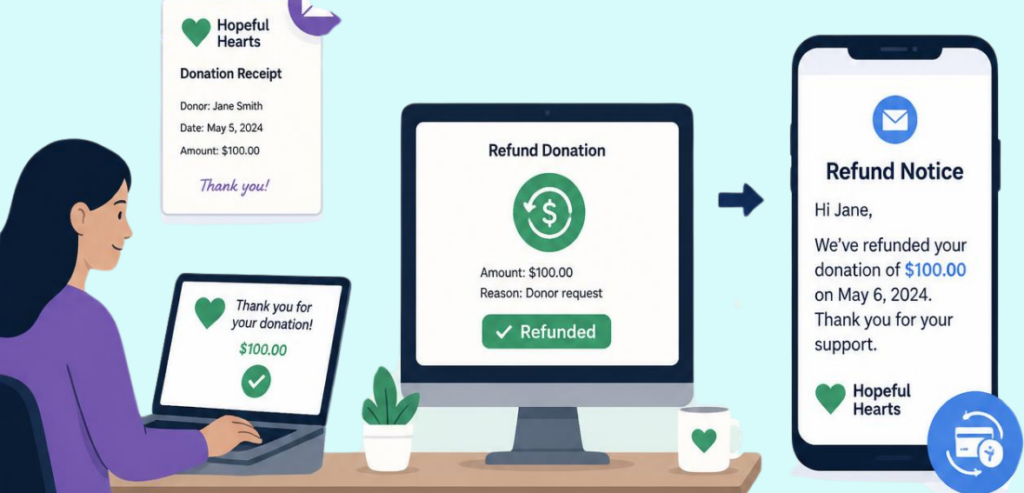
Self-Serve Fraud Tool

PayPal Adds Local Payment Methods and Self-Serve Fraud Tools: What Online Sellers Should Review

Picture a potential sale lost for countless businesses worldwide due to a poorly coordinated checkout. An online shopper from São Paulo builds a cart on your page. Pix is a mobile payment option most commonly used in Brazil. Our shopper will not complete her order if she sees Pix is not an option at checkout. Our shopper closes her tab, and your potential sale is lost. And this happens across countless markets in cross-border commerce. The problem is not the product. It’s the checkout.

PayPal is taking steps to solve this problem. In their June 2026 update, they offered 30+ localized payment options, and cross-border commerce will now have a payment option for every international customer. PayPal is now offering a self-serve fraud tool. This tool provides more seller-side control, allowing users to accept or decline orders on a case-by-case basis. When looking at the online selling experience, one tool focuses on the selling reach, while the other focuses on the selling control. Together, they impact the two metrics every online seller cares about: conversion and orders that turn out to be fraud.

image 134

Figure 1. A familiar payment method signals trust; an unfamiliar checkout signals risk, and the shopper leaves.

What PayPal Just Announced

What PayPal Just Announced

PayPal announced on June 23, 2026, that over thirty new local payment methods would be added to its global platform. The goal is to give foreign consumers the ability to pay exactly how they would if they were purchasing domestically. Without that option, a consumer will go to another platform. With the current update, PayPal allows merchants to offer regional payment options, saving them from the hassle of having to provide payment options for each country individually.

These new payment methods provide foreign consumers with the ability to pay via Swish (Sweden), MB WAY (Portugal), BLIK Pay Later (Poland), and Pix (Brazil). PayPal allows these methods along with the payment options (bank transfers, mobile wallets, and cash-based options) that they’ve already introduced.

Each of these methods is a dominant payment method in the countries they serve. PayPal also stated that adding these payment options would help merchants capitalize on the growing (approximately €359 billion in 2026) cross-border European e-commerce.

PPRO

The expansion technology is from PPRO, a local payments infrastructure specialist. Because of the importance of their role, they are worth identifying. PPRO uses a single integration to offer many local payment options. Merchants or platforms only need to integrate once and can activate whatever options they prefer. This is advantageous to the traditional method of creating and managing links for every country.

Samba Natarajan, who is in charge of PayPal for Europe, explained that the motive of this partnership is to eliminate friction at checkout and provide access to more customers globally. PPRO CEO Motie Bring bluntly stated that the goal of this partnership is to provide international customers a checkout process that they prefer and trust. Trust is what truly matters in cross-border checkout conversion.

Why Local Payment Methods Lift Cross-Border Sales

Why Local Payment Methods Lift Cross-Border Sales

About 70% of all online shopping carts are abandoned. On mobile devices, that number breaches 75%. Not all of that can be attributed to payment systems, but a portion of that certainly can. Approximately 10% of users abandon their shopping in frustration with the inability to pay using their method of choice. Those sales are lost at the click, after investment is made in both acquiring the site visitor and generating the click.

Flipped around, the placement of payment method options in line with shopper preferences has been shown to increase sales and completion of transactions by 12% and 7.4%, respectively. Those gains are explained by the elimination of one of the many barriers to the completion of a sale.

The expectation that a payment method will be offered is substantiated by the results of research studies that show 99% of cross-border shoppers want to pay using their payment method, and 94% of them want to see the price in their local currency. Failure to meet these expectations is the equivalent of asking someone to trust you with their money while refusing to show the price in their own currency.

image 135

Figure 2. Local payment methods remove one moment of doubt at checkout, and the conversion numbers follow.

The trend line only strengthens the argument. Cards represent a continuously diminishing share of online spend in most regions, currently about 39% of European ecommerce. By 2030, digital wallets and account-to-account methods are expected to dominate global ecommerce payments.

Conducting cross-border transactions with cards is, more or less, the same as conducting cross-border transactions with one hand tied behind your back. Online local and alternative payment methods have fast become the norm in the majority of your high-growth markets.

What “Self-Serve Fraud Tools” Actually Let You Control

What Self-Serve Fraud Tools Actually Let You Control

Reach will generate more orders, some of which will be fake. This is the trade-off that every expanding seller encounters, and this is where automated fraud solutions become valuable. Though the phrase may seem technical, the idea is quite simple. Instead of having to go along with whatever a payment processor chooses, you receive a dashboard where you can implement your own rules to the fraud detection process. You get to decide what you think is safe and what you think is risky and what you think should be reviewed before shipment.

PayPal Fraud Protection Advanced

PayPal calls their version Fraud Protection Advanced, and this product is worth a closer look. This product instantly scores each transaction by comparing the buyer to the purchase against millions of previous orders. PayPal’s FPA product uses advanced machine learning. The self-serve aspect of this product comes from the control layer on top. PayPal’s FPA product comes with two hundred plus predefined data points and from there, you can create your own rules.

Custom fields and condition filters can be created to reflect what fraud means to your business. These tools can be used to set velocity checks. For example, you can set a velocity check to flag five orders from a single card in one hour. When a transaction lands in the gray zone, the control layer of PayPal’s FPA product provides a detailed score breakdown, allowing the reviewer to avoid guessing. PayPal’s FPA product enables fraud strategy to no longer be a black box, but rather a customizable tool to fit the needs of your business.

Default Settings Versus Tuned Settings

Most sellers activate a fraud prevention tool and then just leave it alone. There’s nothing wrong with using default settings. They tend to err on the side of caution as default settings are designed to protect a vendor that could be selling some random item to just about anyone.

But your shop isn’t generic. Those default rules don’t know that your average order is €40. They don’t know that half of your customers are from Poland. They don’t know a first-time customer placing a €600 order at 3 a.m. is out of the ordinary for you. They don’t know if your business is a boutique or a marketplace.
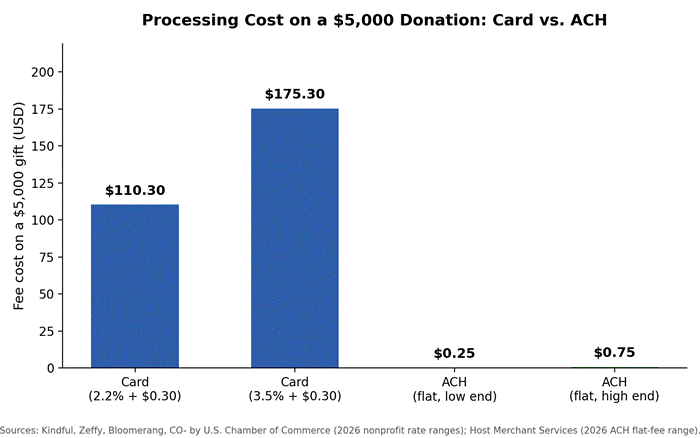
When you start adjusting rules, you create your own context. As you gather data, you can start to change rules that you find are denying good customers, and get stricter on rules that fraud is slipping through. Perhaps rules that were set to the default are denying too many legitimate orders from countries that you’ve been selling to without issue for years.

Maybe fraud is coming through an order pattern that you’ve been burned by in the past. The beauty of having a self-serve tool is you are able to change the rules and see what happens after. Fraud is a moving target, and so should your rules.

image 136

Figure 3. Default rules protect a generic merchant; tuned rules protect your actual customers and catch your actual fraud.

Balancing Approval Rates Against Fraud Risk

Here is the tension at the center of it all. Each time you tighten fraud controls, you stop more bad orders, but you also stop more good orders. Each time you loosen controls, more good orders get through, but more fraud also gets through. No solution will provide you with everything that you want. The goal is not to stop all fraud, but to find the optimal point where the cost of good orders lost and the cost of fraud is at the lowest point possible.

That balance is easy to get wrong in one direction. A seller hit with a chargeback tightens everything up, and the chargeback rate drops to close to zero. It feels like a win. But approvals fall, good customers are lost, and the revenue that is lost is much greater than the fraud that was avoided.

The opposite is also true. Loose controls provide high approvals until chargebacks come in. A self-service tool allows you to see both numbers at the same time and make adjustments with purpose. The right answer is rarely at the extreme. Rather, it is the balance, and where that balance is located is relative to the growth of your business.

image 137

Figure 4. Push too hard on fraud, and you decline good customers; ease off and chargebacks climb. The goal is the tuned middle.

Which Local Methods Matter for Your Markets

You definitely do not need all thirty new methods. You need the few methods that matter where your customers actually are. The main problem is treating “add local payment methods” as a one-switch problem. In reality, it is a collection of a few small, market-specific decisions, and the data solves most of these problems.

PayPal encourages its users to analyze payment methods. The examples are also telling. BLIK has over 63% payment method market share in Poland. Without the bank transfer payment method, PayPal feels that entering the Dutch market is almost pointless. The payment method that PayPal feels is the most crucial to enter the Brazilian market, Pix, is projected to dominate over 50% of the Brazilian e-commerce market.

The same reasoning applies to the other payment methods, Swish and MB Way, in Sweden and Portugal, respectively. The principle is simple. Use your shipping and traffic data. They should show you which countries are your top customers. Then apply the payment method that is either the most popular or the only one that your prospective customers actually use.

image 135

Figure 5. The method to enable is the one that already dominates the market, sending you orders.

Reviewing Your Own Checkout and Fraud Stack

Be honest with what you have before enabling anything. A short self-assessment will save you from adding more tools to a broken checkout. Use the information you already have. Your analytics indicate where checkout drop-offs occur by country and directly indicate the lack of local payment methods. Your payment report shows local market order declines, which result in the loss of good orders. Your chargeback report shows where fraud has occurred.

Combining these three views gives you a clearer picture. Strong traffic from a country that converts poorly in the payment step is likely the result of lacking a local payment method. A market with high order declines and shows little to no fraud indicates overly strict rules.

Chargebacks in a particular region for one product indicate that fraud is likely occurring in that particular region. This review requires no cost other than your time and will give you a specific list of changes instead of a generic one to “improve payments.” The review is how you find the gaps, which will give you the most benefit.

When to Get Help Tuning Fraud Rules

Self-serve doesn’t mean solo for life. Many sellers can do the initial tuning for themselves, especially for lower volumes, where the data pattern is easy to identify. But there is a point where the cost of guesswork gets too high. If you’re losing more money to fraud or chargebacks than you’re earning, if one slight change to your rules results in a massive drop in approval rates, or if you’re entering a new market and you’re uncertain of the local fraud patterns, it’s time to get some help.

The right partner does a couple of things at once. They analyze your data and identify good orders that you are inadvertently rejecting and fraud that is slipping through. They also configure your system in such a way that you are maintaining control over your system.
A payments consultant or a fraud risk management team from your payment processor can help you cut out a lot of the guesswork. The tools remain self-serve. You just get a person who has done a lot of configurations of the system to help you find the right tuning. This is a good indicator that the business is running on good operational principles.
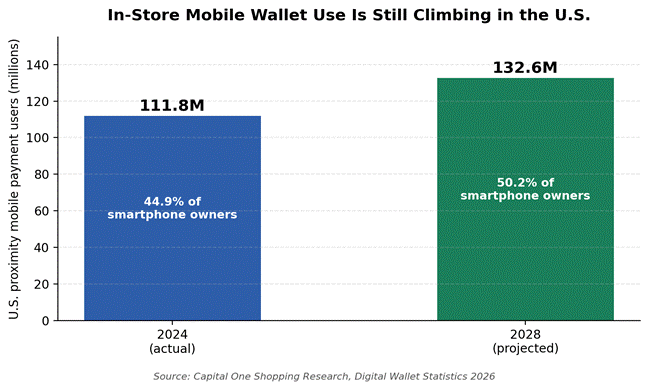
Conclusion

PayPal has essentially released two updates under one title. Local Payment Methods focuses on expansion. Though international customers may not know or trust your brand, they’ll be more likely to complete a purchase if they have access to a payment method they are familiar with.

This is the most reliable way to improve international checkout conversion rates. The Self-Service Fraud Tools focus on letting you pick and choose which new (likely fraudulent) orders you want to accept instead of leaving it up to a default that no one customized for your store. If you only have one, you will invite fraud or minimize growth. The goal is to have both.

You won’t have to make any huge changes for this to work. All you have to do is look at your data. Read your checkout drop-off rates by country to see what local payment method would work best. Read your declines and chargebacks to see if your fraud rules are too strict, too lax, or not being used.

Use only one or two local payment methods. Move your fraud settings to the middle and monitor approvals and fraud. If you are still uncertain, call in an expert. The goal of the PayPal update is to let your international customers check out using their familiar payment method, but it also lets you protect your store from fraudulent purchases.

Frequently Asked Questions

  1. What are local payment methods?

    These methods are payment options that shoppers from a particular country know and trust. Payment methods like iDEAL, Pix, and BLIK are the trusted payment methods in their respective countries (Netherlands, Brazil, and Poland), whereas in other countries they may trust a different payment method or payment card. The mentioned payment methods may be the preferred payment methods in that respective country for online transactions.

  2. Do alternative payment methods increase conversion?

    Yes. Sellers providing online local and alternative payment methods experience, on average, a 12% revenue increase and a 7.4% increase in conversion rate, because fewer shoppers abandon their carts with the payment method of their choice.

  3. What are self-serve fraud tools?

    They are dashboards that enable users to build custom fraud rules. Instead of accepting a provider’s arbitrary rules, you can tailor your fraud detection features. For example, PayPal’s Fraud Protection Advanced allows users to create custom filters and thresholds to set rules for accepting, reviewing, or declining specific orders.

  4. How do I reduce ecommerce fraud without blocking good customers?

    Instead of instantly tightening everything, slowly add in the rules to align with your own data. Pay attention to the approval rates and fraud simultaneously. Loosen the rules that reject good buyers and place the strict filters for the particular products or areas where fraud actually occurs.

  5. Should I offer international payment options?

    Offer payment methods based on where your sales and traffic come from. Use the payment method most widely used in the country you sell to for optimal sales; adding a payment method that is unused in that country will not help sales.