
For-profit businesses build transaction costs into product pricing or profit margins to cover operational costs and maintain cash flow to run the business. On the other hand, non-profits have no such offer. Non-profits rely on high-volume, varying-size transactions, which are highly vulnerable to flat fees per transaction. For them, every cent lost to processing fees is a cent that never reaches the mission. For example, with a $25 donation and a 2.9% + $0.30 fee, the nonprofit loses $1.02, which is nearly 4.1% of the donation amount. On a $10 donation, the loss is $0.59 or 5.9% of the gift.
Processing fees for nonprofits are like a tax on generosity. The donor gives $100 believing that the full amount serves the cause, but an intermediary takes its cut first. This processing fee retains money meant for mission-critical work. Online giving has grown by over 12% in recent years, and these broader online giving trends are making payment infrastructure a critical decision rather than just an optional one. This resource page covers the full nonprofit payments processing landscape, including online donations, recurring giving, event payments, CRM integration, security compliance, and methods for evaluating and comparing various platforms, so nonprofit leadership can make cost-effective decisions. This is especially very important for people in the topmost leadership of 501(c)(3), like executive directors, development directors, and operations staff.
There are multiple technical components that move the money from the donor’s credit or debit card (or bank account) to the nonprofit merchant’s account, involving multiple steps, and a fee is charged at each step by an intermediary. A typical transaction generally involves these steps.
A merchant account is a specialized bank that holds the funds before they are transferred to a non-profit organization. Merchant accounts specifically underwritten for tax-exempt organizations are often categorized under 501(c)(3).
There are two types of donations, one-time and recurring donations. A one-time donation is a single non-recurring gift. It is processed at the time of donation, and is common for year-end campaigns, emergency appeals, and event giving. One-time donations are often made impulsively to a cause.
The forms for these donations are designed for quick checkout, including suggested donation amounts, donation impact statements, mobile-optimized layouts, and a minimalist approach to reduce clutter and abandonment. This is important because the average donation form abandonment rate is around 60%. And every additional field typically reduces conversion rates. Non-profits must be willing to accept a variety of platforms like cards, digital wallets, and apps.
Recurring donations are automatic charges scheduled on a recurring basis, such as monthly, quarterly, or annually. These payments are authorized by the donor and are the most valuable relationship a donor can have with a nonprofit. An average one-time donor gives $128 per year, while an average recurring donor gives $528 per year. Also important is that monthly donors have a retention rate of more than 85%, compared to the ~45% of one-time donors.
For recurring donations, a subscription model, a payment processor, and a card updater service are required in the portal. Card updaters auto-update expired card numbers, thus preventing churn.
If a recurring recharge fails due to expired cards or insufficient funds, automated retries and donor notification emails can recover more than 25% of failed gifts on average.
A donor-covered fee model is a model that asks the donor to cover the processing fees associated with their donation at the checkout page. For example, if a donor donates a certain amount, the donation platform adds a surcharge that covers processing fees, asking the donor, “Would you like to cover $X so that the whole donation reaches the mission?” This model is also known as the fee-recovery or tip model.
Data shows that more than 65% of donors opt in to cover the processing fee, depending on how persuasively the ask is made. It was also found that opt-in rates are slightly higher when exact processing fees are mentioned rather than percentages, suggesting that specificity creates transparency and reduces hesitation.
A peculiar case is the Givebutter platform. It charges no platform fees and instead uses a tip model. Donors are just asked to leave a tip for the platform.
About the legality of this model, it is legal in virtually all U.S. jurisdictions. It is a voluntary opt-in, not a mandatory surcharge, but all nonprofits should disclose this in their donor communications on donation forms. In some states and donor-advised fund guidelines, opt-out is preferred. This means that the tip or surcharge must be disclosed early.
In nonprofit fundraising events, many types of payment scenarios occur simultaneously. There may be ticket sales, auction-bidding, paddle raises, fund-a-need moments, and merchandise purchases, all happening at the same time. General e-commerce platforms are usually not designed to handle these. The most common events that should be addressed in this regard are:
At any nonprofit event, cash causes many operational problems. Cash donations require manual tracking, create reconciliation issues, and are difficult to link to donor records for tax receipts. Cash may also lead to shortfalls in donations due to corruption and logistical complications.
Nonprofit events need a range of features, including mobile card readers (tap, chip, swipe), tablet-based checkout stations, text-to-give facilities, and QR donation links displayed on screens and tables. Some prominent platforms that offer these resources include Stripe, Terminal, Square for Nonprofits, PayPal, and Zettle. Some of these companies also provide their own branded card readers.
There are two types of auctions that are held at any nonprofit event. A silent auction and a live auction. Silent auctions are conducted through online platforms such as OneCause, Handbid, or GiveSmart. In such auctions, the auctioned item is placed with its QR, the donor can scan it, and place their bid. After the specified time is over, the highest bidder wins the auction. The payment is made at the close of the auction, ideally with a process called card-on-file checkout. Card-on-file checkout is a simple feature that lets you collect attendee details and register their cards at check-in. At the end of the event, all winning bids are automatically charged without requiring the attendees to stand in line for checkout. This simple feature is great for improving user experience and payment capture rates.
In live auctions, an auctioneer calls out the bids, and the winner is invoiced on a card that is pre-registered at check-in. Live auctions require pre-event card capture to register the cards, and then, after the event, charge in batches.
Another type of donation collection method is peer-to-peer (P2P) fundraising. In this method, all the participants of a donation event leverage their personal networks to raise money for the cause. It involves individuals creating their own personal checkout pages and asking their own friends and family to donate to the cause. These are a bit complex to handle when compiling the overall data, because you need to track individual checkout pages, donations made on each page, and other issues, such as team leaderboards and sub-account management.
Some of the most famous P2P fundraising platforms are Classy, Mightycause, Fundly, and Givebutter.

After securing donations, it is important to maintain records of the donation data. Most nonprofits maintain separate databases for the payment processor and donor list. This creates the problem of siloed data. When these databases are disconnected, staff must manually transfer data between them, leading to human errors, delayed acknowledgement, and damaged donor relations.
The solution is a donor management system (DMS) or a nonprofit CRM that stores all donor info, their donation history, and tax receipts, which makes it easier to maintain records, provide timely acknowledgement to donors, and manage their communication preferences.
This is a bigger problem than most nonprofits realize, as it can cost donor relations. A study by Bloomerang showed that 54% of donors stopped giving because they felt unappreciated or uninformed. This suggests that timely gratitude letters and tax receipts directly impact donor retention.
The market is flooded with CRM integration options, each providing its own specific features. The basic features of these platforms are almost identical, which makes it important for you to understand your organization’s needs so you know what to look for when comparing CRM integration options.
The most common CRM integration platforms used by major nonprofits are Salesforce Nonprofit Success Pack (NPSP), Blackbaud Raiser, Edge NXT, Bloomerang, NeonCRM, and many more.
To integrate your data efficiently within your organization, it is important to understand the differences between the various types of integration.
Some important details the system should sync automatically include the donor name, email, donation amount, donation date, recurring status, and campaign details. This is also where grant and campaign tracking becomes more useful, because nonprofits need clean reporting across donor activity, appeals, and funding sources. You should ensure the integration you choose meets all the requirements for efficiently maintaining donor records.
The IRS requires the nonprofit to provide a written acknowledgment for any single charitable donation made above $250. The nonprofit must provide this to donors, and donors require this to claim deductions. It is clear that any delay in providing an acknowledgement may cause an inability to claim deductions. Therefore, it is necessary to automate the provision of receipts and acknowledgements of successful donations.
A good automation would trigger a customized thank-you email containing the tax receipt, other required details as stated by the IRS, as soon as a successful donation is made.
When a donor donates on behalf of or in honour of someone else, or a donor-advised fund (DAF) sends a gift on behalf of an individual, the CRM must track two details: hard credit and soft credit. Hard credit is the actual donor, and soft credit is the person on behalf of or in honour of whom the donation was made.
Unify your donation data, automate acknowledgements, and strengthen donor relationships with a powerful CRM integration designed for efficiency and growth.
Understanding PCI compliance for nonprofits starts with knowing that PCI DSS is a set of security requirements established by major card networks for any organization that accepts credit card payments. PCI DSS stands for Payment Card Industry Data Security Standard. It is a set of security requirements established by major card networks that every organization that accepts credit card payments must comply with, regardless of its tax-exempt status.
A common misconception among nonprofit staff is that PCI-DSS applies only to businesses, but in reality, all 501(c)(3)s that accept card payments are fully subject to PCI requirements and face consequences for noncompliance.
The PCI guideline has various compliance levels, categorized by the number of transactions per year. Most small and mid-size nonprofits fall into Level 4, which requires an annual Self-Assessment Questionnaire (SAQ), rather than a full on-site audit. It is necessary to know the level your nonprofit falls into in order to optimize for cost reduction.
The PCI-DSS lays down that the following features must be present in any nonprofit platform:

Choosing a payment processor is crucial to your nonprofit, as it is the interface between you and the donor. The payment processor is responsible for processing all the transactions and making sure the donations are processed securely.
The pricing structure of your processor will determine how much of every donation you end up losing to processing fees. The two most common types of pricing structures that payment processors provide are the interchange model and flat-rate pricing. In flat rate pricing, you are charged a single flat fee on every transaction, regardless of what card was used to make the donation.
This is often a bit expensive as processors usually pump up the average prices, so you end up paying more on lower-tier cards. In the interchange pricing model, there are two charges involved: a non-negotiable fee of interchange, and a markup. You cannot negotiate pricing, but markup costs can be negotiated using the scale and amount of donations your nonprofit receives as leverage.
While choosing a payment processor for your nonprofit, it is important to consider some donor-specific features, such as whether the processor provides automatic card updation, donation suggestions with impact statements, multi-donation checkouts or fee-recovery.
Different processors provide different integrations. When choosing a processor, consider whether it offers native integrations, the quality and customizability of its API, and compatibility with your nonprofit’s existing tech stack.
Most processors process transactions within 1-2 business days, but some retain rolling reserves. Rolling reserves are a percentage of funds the processor holds back as security. For small nonprofits, tight cash flow can significantly impact operations; thus, it is crucial to know the reserve status of your processor.
Customer support is a critical feature of your payment processors. Some processors offer competitive rates but poor customer service. Thus, when choosing a payment processor, you must consider whether you can reach a real person if something crucial fails. Some questions you might consider asking are whether the processor provides 24/7 support or only during business hours. Some processors also offer dedicated nonprofit account managers, while others offer only general support queues.
If the payment processor only offers long-term contracts with early termination fees, it is better to walk away from such a deal. Reputable processors should offer monthly agreements, and you should avoid a 1-to-3-year commitment at all costs.
Another red flag to avoid is bundled equipment leases. Processors often sell POS hardware on inflated leases, which you should avoid. Instead, look for low-priced or free card readers. If your payment processor does not provide a full breakdown of the costs and fees it charges for your transactions, it is better to avoid it. There is a high chance you are being overcharged, and you should not sign up with such processors.
Lastly, you should look for a payment processor that has experience handling nonprofit transactions. An inexperienced processor may assign inappropriate risk categories or merchant codes, leading to higher interchange rates.
Find a transparent, reliable, and nonprofit-focused payment solution that minimizes fees, improves cash flow, and supports your mission every step of the way.
Every nonprofit has very different needs at various stages. A small nonprofit startup 501(c)(3) processing $20k per year will have completely different needs from a nonprofit giant processing millions of dollars every year. There are various criteria that can be used for comparison across all platforms, such as platform fees, processing fees, recurring status support, fee recovery, contract terms, support quality, and the types of events they can handle. We have compared the top donation platforms so you can know what the best choice for you is. Many nonprofits start by looking at free donation software, but long-term value depends just as much on processing costs, donation features, and support quality.
Popular platforms like Donorbox offer a quick setup, but their 1.5% platform fees can quickly drain fundraising revenue. Givebutter removes the platform fees, but relies on a donor-tips model that creates confusion for your donors. Stripe offers lower base rates, but it does not give the feature to suggest donation amounts or include impact statements. In addition, Stripe needs technical expertise to create donation forms from scratch.
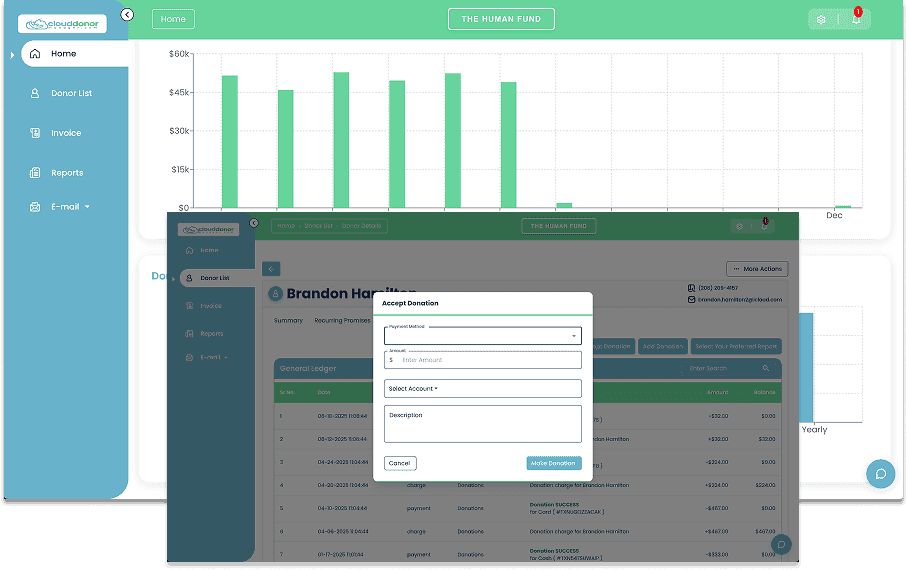
HMS + Cloud Donor Manager bridges the gap between these three, particularly for established nonprofits processing $50K and above annually. Instead of padded flat rates or confusing tip models, HMS provides a transparent interchange-plus pricing model, meaning you pay only as much as the wholesale processing cost.
HMS pairs these savings with Cloud Donor Manager, delivering a ready-to-use donation form, event registration and a built-in CRM to cater to all your needs, with almost no technical knowledge required. It provides you with month-on-month agreements, so you don’t overpay, and dedicated account managers who provide instant expert support in case of difficulties. These features make HMS + Cloud Donor Manager a one-stop, ideal solution for nonprofits.
Switch to HMS + Cloud Donor Manager and keep more of every donation with transparent pricing, powerful tools, and expert support designed for growing nonprofits.
We use cookies to enhance your browsing experience, analyze site traffic, and support our marketing.You can accept all cookies, reject non-essential ones, or manage your preferences below. Learn more in our Privacy Policy.
Manage your cookie preferences below:
Essential cookies enable basic functions and are necessary for the proper function of the website.
These cookies are needed for adding comments on this website.
Google Tag Manager simplifies the management of marketing tags on your website without code changes.
These cookies are used for managing login functionality on this website.
Statistics cookies collect information anonymously. This information helps us understand how visitors use our website.
Google Analytics is a powerful tool that tracks and analyzes website traffic for informed marketing decisions.
Service URL: policies.google.com (opens in a new window)
Marketing cookies are used to follow visitors to websites. The intention is to show ads that are relevant and engaging to the individual user.
Facebook Pixel is a web analytics service that tracks and reports website traffic.
Service URL: www.facebook.com (opens in a new window)
OptinMonster is a powerful lead generation tool that helps businesses convert visitors into subscribers and customers.
Service URL: optinmonster.com (opens in a new window)