Posted: September 28, 2026 | Updated: October 06, 2026 at 6:00 PM
Annual fundraising galas rely on a narrow window of opportunity to raise money. The paddle raise can take less than 30 minutes. The live auction can take less than an hour. And the moment most of that money is actually collected, at the check-out desk, occurs as guests prepare to leave. Sponsorships and ticket sales are settled in advance; the paddle raise and auction money is collected at the desk. Any disruption at the check-out desk can result in lost donations that are nearly impossible to recover.
Disruptions at the check-out desk are largely preventable. Testing payment solutions, networks, and back-end systems can be done days or weeks in advance. This guide discusses a gala payment test run and provides a description of the tests, what each test is intended to determine, and provides a reference to related guidelines published by payment processors and the IRS.
A week’s notice is typically enough time to change some venue settings, print new forms, or order a replacement reader. The results from a test run the day before, though, can’t be acted on.
Some timing is determined by the reader vendors. Many smart readers must have connected to the processor recently, sometimes within the last 24 hours, before they are allowed to take payments offline. Readers whose software has not been updated in a month or more can be blocked from processing at all. And a reader that has sat in a drawer since last year’s gala may need to be re-registered before it will work. It needs to come out now, not the night before.
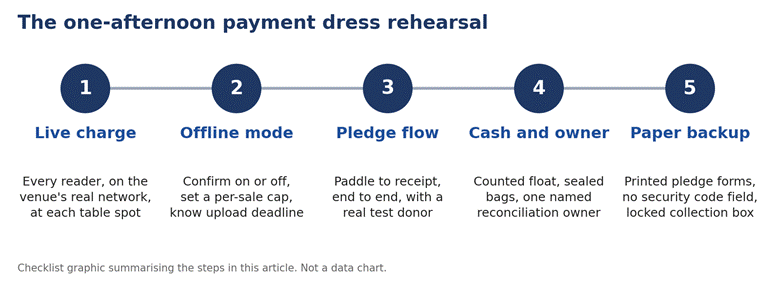
Figure 1. The five checks covered in this guide.
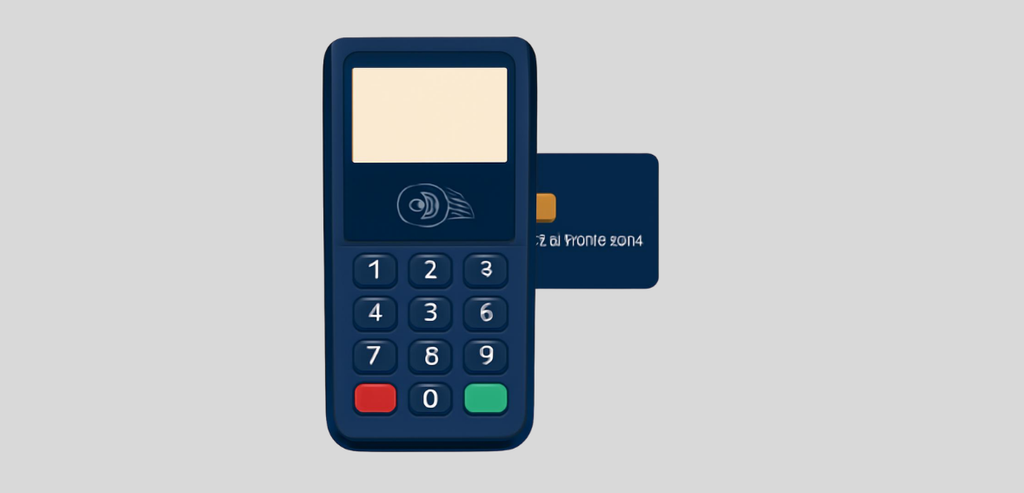
A demo mode test turns on the reader. This test does not prove communication with the processor from the ballroom. The real test is running a charge on a card through the processing system with the reader. This test is performed at all locations where a reader will be placed, including the registration table and auction check-in/out tables. Finally, the charge is refunded.
Most problems occur during processing. Some venues use guest Wi-Fi that requires a captive portal, the kind that opens a web login page, and most card readers cannot get through one. It is important to get a non-guest network that does not require a captive portal, and to get its name and password in writing.
Vendor documentation for smart readers also commonly warns that readers may not support the newest Wi-Fi standards, need WPA2 or WPA3 password protection, must sit on the same local network as the point-of-sale device, and can be blocked when a venue’s access points isolate wireless clients from each other.
The standard workaround, and the standard troubleshooting step, is a mobile hotspot. Test communication between your POS system and each reader, and write down the location of the reader, the network it was connected to, the time, and whether the charge was approved. Then test each reader again on a mobile hotspot.
While the app is in offline mode, the reader continues to scan cards, even in the case of an internet outage. The cards are collected and sent to the processor when there is an internet connection. Until then, the cards are not authorized. Expired, frozen, or over-limit cards are indistinguishable from good cards. Therefore, a guest walks out with the item, and the charge may never go through.
Before the event, decide whether offline mode will be on at all, and if so, set an upper limit per transaction. It is also a good idea to decide when the devices will be reconnected and by whom.
Rules vary by provider, and this is where reading your own processor’s documentation a week out matters. Some rules are close to universal. Offline payments must be uploaded within a set window, and 72 hours is a common outside limit; once stored payments expire, they cannot be recovered or processed. The organization, not the processor, usually bears the loss on an offline payment that later declines, and the processor generally will not hand over the customer’s contact details so you can chase it.
Per-transaction caps apply, and the cap is usually configurable down to whatever amount you are comfortable losing. Certain payment types are never accepted offline, commonly manually keyed card numbers, gift cards, wallet payments, and some debit networks. And on most platforms, logging out of the app, switching accounts or locations, deleting the app, or resetting the device destroys stored offline payments before they upload.
Setting a low offline cap on the auction checkout table limits the loss from any single transaction that later declines. Large donors can always be solicited through other means, including a pledge form.
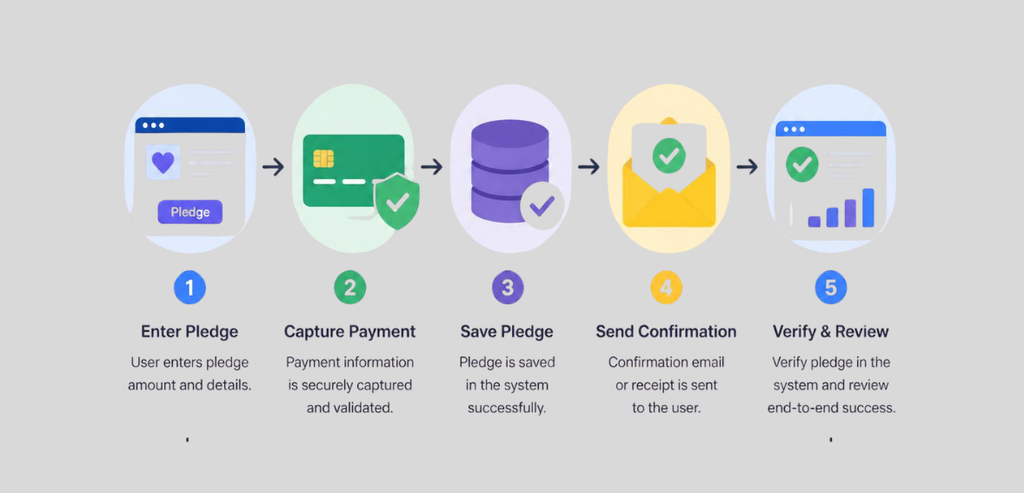
The quickest way to raise funds is by taking pledges. Traditionally, a pledge drive will raise a significant number of pledges in a short amount of time. To really understand the process, you should follow a single pledge from the time a paddle is raised to the time the donor receives a receipt. You can designate a staff member to be the test donor and use an actual card.
Observe each of the following steps. Record the paddle number and amount. The data entry volunteer will match the paddle to the guest record. The system will process the payment or generate a payment request. The donor will receive a receipt. Determine how long it takes for Finance to process the payment. Note any discrepancy between the paddle number or amount and the donor record.
It is less expensive to collect pledges electronically at the event than to key card numbers by hand afterward. Most processors publish a lower rate for a card tapped, dipped, or swiped through a reader than for a card number keyed in or entered online, so a pledge captured at the table costs less to process than the same pledge chased by phone the following week.
The receipt step includes legal requirements. IRS Publication 1771 (Rev. 11-2023) states that an organization must provide a disclosure statement to the donor when a payment of more than $75 is partly a contribution and partly for goods or services (for example, a gala ticket or an auction item). The statement must provide a good faith estimate of the fair market value of the benefits provided to the donor. The IRS may impose a penalty of $10 per contribution, with the total penalty not exceeding $5,000 for a particular fundraising event, if the statement is not provided.
The statement must be provided in connection with the solicitation or the receipt of the payment. In addition, to claim a charitable contribution deduction, a donor must obtain a written acknowledgment from the organization for any donation of $250 or more. The receipt step must therefore include a field for fair market value on tickets and auction lots. For the organization’s own tax position, the accountant or tax lawyer should be consulted.
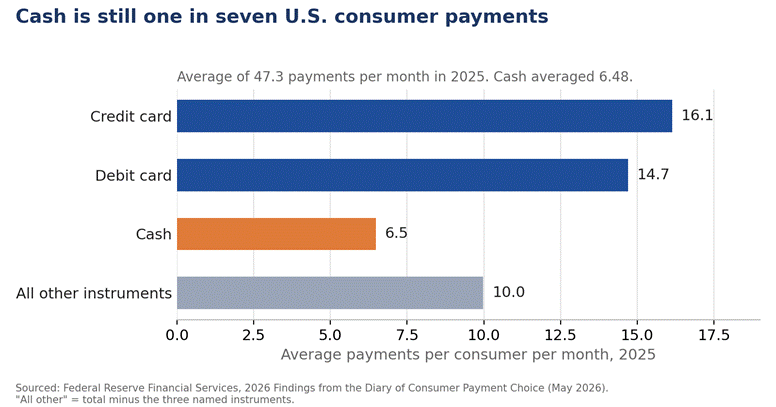
You will still find cash at galas. The Federal Reserve’s 2026 Diary of Consumer Payment Choice reported that the average American made 47.3 payments per month in 2025. Of those, 6.48 (or 14%) were made with cash. About 80% of consumers made a cash payment within the last 30 days, and about 76% reported carrying cash, averaging about $69.
The beginning cash in a cash drawer is known as the cash float. Floats must be counted, signed off, and logged before being handed to cashiers. Log deposit bag numbers and seal the bags. At the end of the event, floats must be counted and signed off by the same two people.
Reconciliation of all cash and payment transactions is the responsibility of the reconciliation owner. The owner compares cash counts, payment transaction totals, and the pledge and auction results against processor reports to ensure all the numbers agree. The owner must have access to every processor dashboard, sets the deadline for resolving any communication issues with the processor, and is the person who makes sure every offline payment is uploaded inside the processor’s window, typically 72 hours at most.
A backup system is for when other systems fail. For fundraising, that system is a paper-based one. Traditionally, a paper form captures the donor’s name, contact info, and pledge, and is signed by the donor. Payment options may include a linked or mailed payment, an invoice, or a check.
Payment cards contain sensitive information, and forms used to capture that information are subject to data security rules. Card verification codes are the clearest example and should never be captured on a form. If a form captures a full card number, it should not be retained; process the payment and destroy the form. Other sensitive data should likewise not be captured or kept by the organization.
A payment card number may be replaced by an email address on the form. Payment by email link may then be arranged for the next business day, which also carries a lower processing cost than keying the card number by hand.
To maintain adequate forms for the event, a sufficient number of payment request forms should be printed, and sequentially numbered so that every form can be accounted for. One form should be tested by event staff to ensure there are no issues with the form or follow-up processes.
Print this list and work through it in one afternoon, a week before the event.
This test run is for the week that precedes your event. The night after your event requires a number of tasks, including uploading offline donations, resolving declined credit card authorizations, collecting open pledges, sending acknowledgment letters, and reconciling your donation records. Our fundraising event close-out guide provides more information about each of these tasks.
Payment failures during a gala tend to come from a small number of causes, which can be identified and resolved in a relatively short amount of time. Often, a reader is unable to connect to the venue network. Transactions are sometimes stored offline and settled after a guest has left the venue. A pledge is sometimes matched to the wrong guest record.
Cash is sometimes not counted, or paper forms contain information they should not. These issues can all be identified during a test run. Offline payments typically have a 72-hour window to upload, and many readers must have connected recently before they will take payments offline at all.
For more on the pre-gala payment test run and other nonprofit payment questions, see Nonprofit Payment Resources.
A week in advance leaves time to address issues with the payment setup. That includes replacing a card reader, changing venue network settings, or reprinting forms.
Not always. Many card readers cannot get past a captive portal and need a password-protected network to connect.
In offline mode, the organization typically bears the loss if a stored payment later declines. Set a low per-transaction cap to keep that risk small.
One individual should be in charge of reconciling all payments at the event. This individual should review the totals of the processed payment transactions and the cash and pledge receipts.
No. The card security code should not be collected, as this information is not to be stored by the organization.