

It is the end of a long training day. You have coached six clients, written three programs, and answered a dozen texts. Now you are at your kitchen table chasing late payments and copying session times into a spreadsheet. Sound familiar?
You did not become a coach to play accountant. Yet billing and booking quietly eat hours every single week. The good news is that the fix is simpler than you think. The right personal trainer payment software handles both the money and the calendar for you. It collects payments automatically. It books sessions while you sleep. And it slashes the no-shows that drain your income without you even noticing.
This guide breaks down everything you need to know about personal trainer payment software and the scheduling tools that pair with it. We cover what these solutions actually do, how much they cost, and which platforms lead the market this year. By the end, you will know exactly how to build a payment and scheduling system that runs on its own.

No-shows can be devastating to a personal training business. You lose that hour to teach, and you lose the opportunity to resell it. Current estimates put average no-show rates in the fitness industry at 20% to 30%. That amounts to a ton of lost potential income for an in-demand trainer.
No-shows are further complicated by the need to do manual admin. Chasing invoices becomes a chore. The last thing you want to do is ask your client for a payment in person. Every minute spent on this type of admin is a minute you can’t spend training or doing other more valuable activities, like selling or taking a much-needed break.
One of the best solutions for personal trainers is payment software that handles both. Once the software is implemented, the payment is connected to the booking. Clients will pay when they reserve their booking. The no-show becomes a much more expensive cost for the client than for the trainer. One of the best features is the automated reminders. A text message sent the day before and then an hour before the scheduled booking has been shown to decrease no-shows by around 40%.
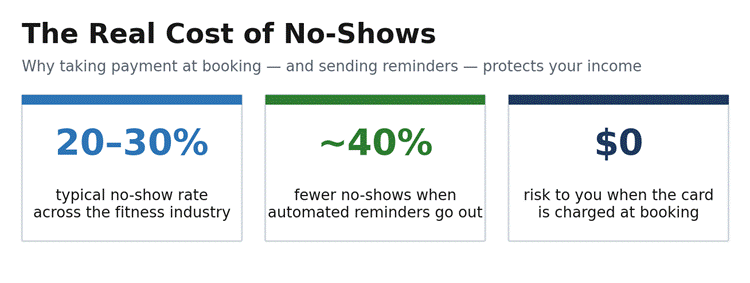
Figure 1: Why payment-at-booking and reminders protect your income.

Great personal trainer payment software combines payment and scheduling functionality into a single solution. Clients can self-book via a personalized link or on the website. Payments can be made by card, subscription, or package. Automatic reminders and receipts are sent, and the system records payments and alerts members of outstanding payments.
Once these features are integrated, a single action can book and charge a client. The client selects a time, and the charge is made for the booked time slot. There is no invoicing, no spreadsheets, and no client friction. This is what a payment and scheduling system should address.
| Core Feature | What It Does for Your Business |
| Client self-booking | Clients reserve, reschedule, or cancel sessions on their own, without texting or calling you. |
| Payment at booking | The card is charged the moment a session is booked, which removes no-show risk and late payments. |
| Recurring billing | Automatic monthly charges for memberships and packages create predictable, reliable income. |
| Session packages | Sell 5-, 10-, or custom-session bundles that clients buy upfront and book against over time. |
| Automated reminders | SMS and email reminders go out before each session to reduce last-minute cancellations. |
| Calendar sync | Two-way sync with Google Calendar, Apple Calendar, or Outlook keeps your schedule accurate. |
| Cancellation policies | Enforce notice windows and automatically charge for late cancellations or no-shows. |
| Financial reporting | Track revenue, failed payments, and overdue balances from a single dashboard. |
Table 1: Core features to look for in personal trainer payment software.
Before making a purchase, it is beneficial to understand the two primary types of tools. Tools like a scheduling solution handle calendaring and bookings. Scheduling solutions can also manage reminders, cancellations, and even recurring sessions. A payment solution, on the other hand, deals with processing transactions. Payment solutions process the card, handle recurring billing, and track transactions.
Standalone scheduling solutions solve your booking issue. Integrated solutions solve your entire business issue. Many fitness-focused solutions have started combining both. Integrated solutions can also include features such as workout programming and progress tracking. The right solution depends on whether you need a simple booking layer on top of your existing features or an integrated solution to manage your business. To make this clear, the image below illustrates a connected flow in the business that eliminates the need for manual work at every step.
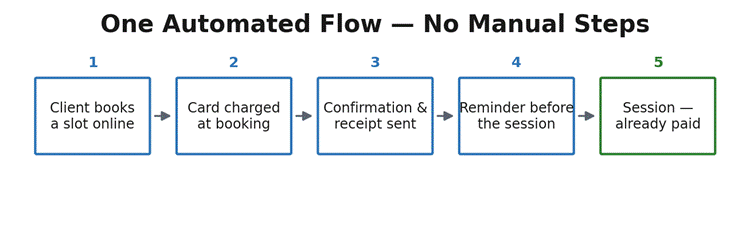
Figure 2: Booking and payment in a single, automated flow.

Here are the primary coaching platforms that will support trainers in 2026. Each platform description allows you to assess individual strengths and subsequently align them to your business model. Some are full coaching suites, others solely support payment processing, and some support scheduling.

Image source
Cloud Studio Manager is an all-in-one platform built for studios, gyms, and personal trainers, pairing full client management with built-in payments. Clients can self-book and pay in a single step, and recurring memberships, packages, and ACH bank-draft billing are handled automatically. It also goes beyond booking and billing: no-code automations recover failed payments and win back lapsed clients, native email and SMS marketing replaces tools like Mailchimp, and waivers and contracts are sent and stored with e-sign.
Because it runs on Host Merchant Services, you keep your own merchant account and member payment data, so you stay free to negotiate rates or switch anytime. For trainers who want training, scheduling, payments, and client communication in one system, it is the most complete option here.
ABC Trainerize is a coaching-oriented platform used by fitness professionals worldwide. Its payment tools are on Stripe. They manage one-off purchases, subscription sales, and package sales. Everything related to billing, invoicing, and client onboarding happens automatically upon purchase.
There is a scheduling function as well, and though program delivery is their strongest area, they also offer workout libraries, habit coaching, progress tracking, and in-app messaging. They focus on coaches who want their training, payment, and client communication integrated.
Image source
Mindbody is a comprehensive solution for fitness business management. Its integration for scheduling and coordinating payments, marketing, and staff management makes it highly convenient for fitness studios. Mindbody is perfectly suited for fitness studios with multiple staff members and locations.
The trade-off for this solution is complexity. Mindbody is considered on the higher end for features and pricing targeted towards enterprise-level clients, which can make this solution overly complex for a solo personal trainer. Fitness studios can start using Mindbody for around $99 per location per month, with tiered pricing based on the features used.
Acuity Scheduling is a self-scheduling tool preferred by many service industries. Acuity Scheduling focuses on streamlining your self-scheduling process with features such as custom intake forms, availability rules, and branded booking pages. It works in tandem with Stripe, Square, and PayPal for processing payments and Google Calendar and Outlook for scheduling. You can get a plan for about $16 a month or $49 a month for their advanced plan. Acuity Scheduling is a good solution for trainers who need a standalone scheduling system.
My PT Hub provides custom solutions for personal trainers and online coaches. With its Packages feature, trainers can build, market, and sell training products directly from their app. It also handles payment processing, facilitating one-off and subscription payments with Stripe across more than 170 countries. Once a trainer subscribes, clients can purchase training products using a credit card, Apple Pay, or Link without creating an account. Trainers can monitor all payments — even failed transactions — from the Financial dashboard.
Many of the fitness platforms listed utilize Stripe as their payment processing solution. As a subscription and recurring billing processor, Stripe leads globally. Stripe automatically converts currencies, saving time for coaches with clients abroad. Stripe charges a flat fee of 2.9% plus 30 cents per transaction on card processing. Clients using Stripe Billing will see a slight surcharge on their recurring card fees. For flexibility, Stripe Billing requires more work on the clients’ end than its competitors. Clients can find their current billing fees on Stripe’s official pricing page.
Square is ideal for in-person payment needs. Their mobile card readers allow you to process payments at the session or consultation location. Signup is rapid with no underwriting. Square’s point-of-sale systems also provide gym and studio owners with proper registers. Transaction costs are around 2.6% plus 15 cents per in-person payment. If you conduct in-person training today or plan to establish a studio in the future, Square is an excellent first choice.
GoCardless provides businesses with a unique way to collect payments through direct debits. Once a client has consented to direct debit, the payment is automatically taken at the agreed date. This payment collection system follows the model adopted by many gyms. Once a member has signed up, the payments continue to flow to the gym, and membership cancellations must be actively pursued.
The system is very popular within the UK’s fitness marketplace. The primary concerns for businesses considering GoCardless is the integration process and the time required to set it up. Once the system is live, however, personal trainers who offer monthly coaching programs tend to love that it removes the need to ask if a client wants to continue training.
| Platform | Best For | Payments | Starting Price |
| Cloud Studio Manager | All-in-one (recommended) | Built-in payments, ACH, recurring | Runs on Host Merchant Services |
| ABC Trainerize | All-in-one coaching | Stripe: one-off, recurring, packages | Free tier; paid plans scale |
| Mindbody | Studios and teams | Built-in payments + billing | From ~$99/month per location |
| Acuity Scheduling | Standalone scheduling | Stripe, Square, PayPal | From ~$16/month |
| My PT Hub | Online PT packages | Stripe in 170+ countries | Subscription based |
| Stripe | Online card payments | ~2.9% + fixed fee | Pay per transaction |
| Square | In-person payments | ~2.6% + 15¢ in person | Free app; pay per sale |
| GoCardless | Recurring direct debit | Bank debit billing | Pay per transaction |
Table 2: Quick comparison of leading payment and scheduling solutions (2026).
All payment methods deduct a fee. With an understanding of the payment processing fees, you can assign a more accurate value to your work. Most card processing companies charge a percentage of the total transaction amount, plus a flat fee. Tools designed for recurring billing can also add a percentage to the standard processing fee. The table below demonstrates the ranges that you can expect.
| Provider | Typical Fee | Notes |
| Cloud Studio Manager (HMS) | Interchange-plus via HMS | Transparent markup; you keep your own merchant account. |
| Stripe | ~2.9% + fixed fee per charge | Recurring billing adds a small percentage of subscription revenue. |
| Square | ~2.6% + 15¢ in person | Strong for in-person card readers and point-of-sale hardware. |
| PayPal | Higher than most rivals | Simple to set up; useful as a backup payment option. |
| GoCardless | Per-transaction direct debit fee | Lower friction for recurring monthly memberships. |
Table 3: Indicative processing fees. Always confirm current rates with each provider.
Remember that all-in-one platforms typically do not charge their own transaction fees. Instead, they route you to a processor, such as Stripe or PayPal, that charges their normal fees. Be sure to do your due diligence, and your costs per sale will become clear. If you want a broader analysis of features for several different services, you can view the Capterra directory for personal trainer software.
Choosing the appropriate tool is entirely dependent on your work style. Some users, like a personal trainer with a few clients, may benefit from a simple booking system with a payment feature at checkout. However, a coach who packages their offerings as memberships and coaching may require a system that supports recurring payments and automated invoicing. Studio owners with staff need point-of-sale hardware and multi-staff scheduling. The image below provides a mapping solution of the three most common profiles and their appropriate solution.
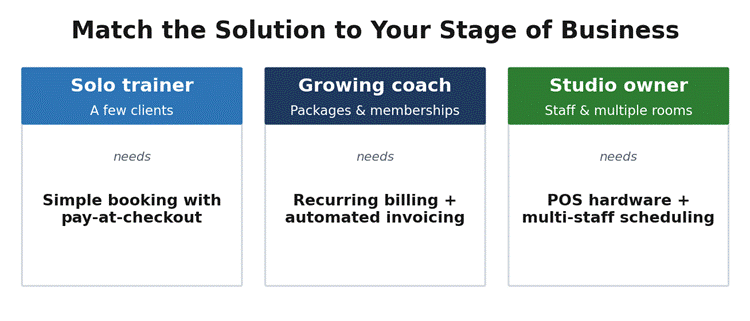
Figure 3: Match the solution to your stage of business.
Finding the best choice for your situation means knowing what to ask yourself. How do you train? In person? Online? Both? What does your pricing structure look like? Individual sessions? Packages? Monthly memberships? How many clients do you have? How fast is your business growing? Do you need workout programming built into the same software, or something simple to help you schedule and collect payments? The new tools do help you quickly book and collect payments. Just know that if you spend two to three hours a week on admin, you have outgrown free tools and spreadsheets — consider this your sign to upgrade.
A couple of small changes can make billing a breeze. The first change is to collect payment upfront or schedule an automated payment. There are many risks when collecting payment after a session, such as not being paid on time and having to negotiate payment. Encouraging clients to purchase packages of sessions creates a commitment to multiple sessions. This also creates a predictable income for the trainer. Use automated reminders to protect your time for every booked session.
Automated direct debit for ongoing coaching clients is the best way to protect your income for every booked session. Once the client gives permission, payment is automatically collected on the same date each month, with no action required by either party. If a payment fails, it is automatically reported to the trainer so they can charge the client again or reach out to the client. This system makes money collection fast and convenient, so trainers can spend their time on something more rewarding rather than chasing clients for payment.
As a coach, your time is your product. Every hour wasted due to poor administration or no-show clients is an hour you aren’t being paid for. Personal trainer payment software makes billing and booking a seamless process for clients, even sending reminders. All so you can avoid administrative inconvenience and focus on your clients and your business.
Once you determine your current model and growth stage, you can implement the software that is right for you. Once your payment and scheduling system is up and running, it is the end of your worry about income and client appointments for years.
For beginner trainers who have between five to ten clients, the free version helps with basic scheduling. For trainers who have more than five to ten clients, the paid version helps with scheduling and client payment. The automated client reminders reduce client no-shows and save the trainers’ administrative time, meaning the cost of the version is offset.
A scheduling application organizes bookings, sends reminders, and manages calendars. Comprehensive software for personal trainers features scheduling within the system and also includes programming workouts, tracking client progress, and collecting payments. An all-in-one system is the most convenient solution if you prefer all functions in a single platform.
Payments made before service eliminate nearly the entire risk of a client not showing up and protect your revenue. If you wait until after a service to collect payment, you must chase a client for payment after fulfilling your obligation to them.
Yes. Most contemporary personal trainer payment systems enable you to create session bundles, bespoke offerings, and subscription memberships. Clients purchase via a shareable link, and the payment system handles billing, receipts, and client onboarding.
