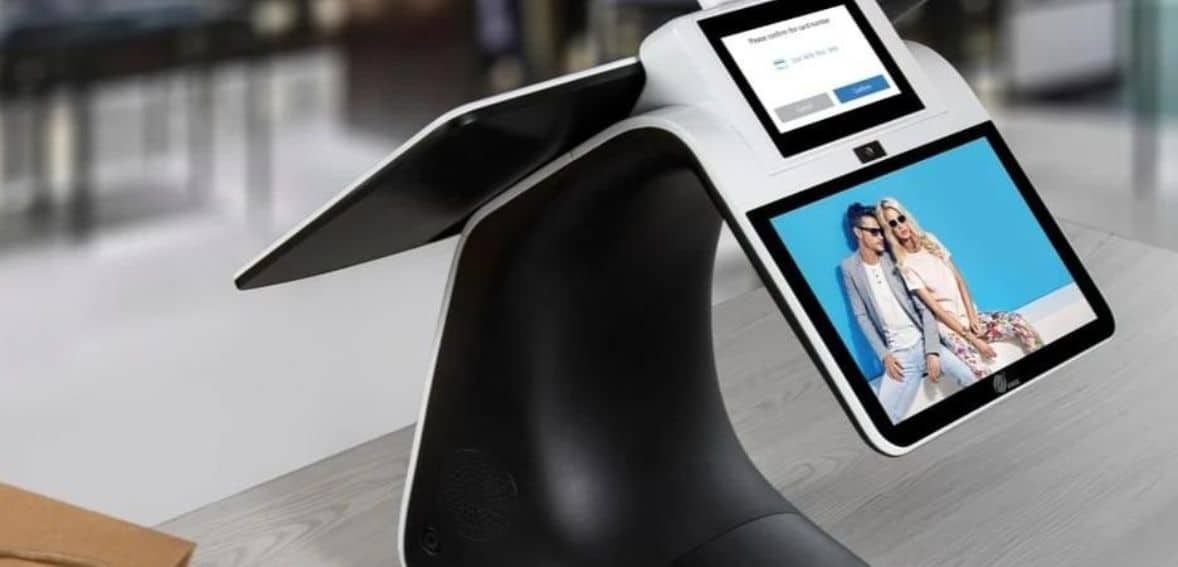
PAX E800 Smart Register POS Device: An Overview and Quick Reference Guide
PAX E800 is a true game-changer, bringing a touch of elegance to the in-store environment. Traditionally, cash registers have been functional but lacking in style, but with the E800, that’s no longer the case. Boasting a stunning 15-inch IPS touchscreen display, the E800 ensures high-speed performance precisely when you need it most.
Powered by PAXBiz and Android, the E-series grants you access to a diverse world of third-party business apps and solutions. Enjoy seamless integrations between cash register apps and the payment module, streamlining and reducing the need for extensive IT management and data transfers. And if you are wondering about What Size Paper Is Pax E800, we have included that too, read below.
Compliance: PTS PCI SRED 5.x, Visa payWave, EMV L2 and L1, American Express, Mastercard PayPass, Interac Flash, Discover D-PAS, UnionPay qUICS, PTCRB, and JCB J/Speedy.
Card Reader: Hybrid Smart Card and Magnetic Stripe, Contactless around LCD Display
Camera: 5 MP, Reads 2D and 1D Codes
Tips For Using PAX E800 POS System
Avoid exposing the terminal to hot, humid, dusty, or strong electromagnetic environments.
Refrain from violently vibrating, shaking, or striking the product.
Don’t plug or unplug any components of the product while it is powered on, as this may damage the internal circuit.
Non-professionals should avoid attempting any maintenance on the terminal.
Before inserting the magnetic stripe, IC, or contactless card, check for any foreign objects inside or surrounding the card slot. If any are found, report them to the related personnel.
The operation within the 5.15 to 5.25GHz frequency range is restricted to indoor environments.
What Size Paper Is Pax E800?
If you are What Size Paper Is Pax E800 and the E800’s paper specifications, have a look at this:
Paper Specifications:
Paper sizes include a 24″ by 230′ (which comes at around 70mm diameter) and 3 1/8″ by 230′ (which comes at around 70mm diameter)
The paper type should be 48gm Thermal
The average paper quantity is around 50 Rolls per case
Core size should be 1/2″
And remember to choose the paper with these features only:
BPA Free
Should provide a clear, crisp, black images
Red end of the roll indicator
Why Choose PAX E800 POS System?
PAX’s E800 stands as a visually stunning game-changer in the world of payment solutions. Featuring a magnificent 15-inch HD display with a capacitive touchscreen, the E800 excels in delivering lightning-fast performance precisely when you need it. This versatile device is designed to accept a wide range of payment types, including traditional Chip & PIN, contactless options, and cutting-edge alternatives like mobile wallet and QR code transactions.
The E-series operates on Android, offering access to a wealth of third-party business apps and innovative EPOS solutions. This seamless integration allows for smooth communication between applications on the cash register side and the payment module, reducing the complexity of data transfers and minimizing the need for time-consuming IT management.
The customer-facing display comes in three distinct sizes – 8, 12.5, and 15.6 inches. The E800 display utilizes adaptive technology, ensuring that the screen brightness automatically adjusts to suit the retail environment. Moreover, it offers excellent visibility from any tilt angle.
Equipped with a Quad-core’s cutting-edge processor and substantial memory capacity, the E800 provides all the advantages of the Android platform.
Experience a seamless checkout process with a wide array of connectivity options, ensuring that your E800 remains consistently connected and powered.
Cookie Consent
We use cookies to enhance your browsing experience, analyze site traffic, and support our marketing.You can accept all cookies, reject non-essential ones, or manage your preferences below. Learn more in our Privacy Policy.
Cookie Preferences
Manage your cookie preferences below:
Essential cookies enable basic functions and are necessary for the proper function of the website.
Name
Description
Duration
Cookie Preferences
This cookie is used to store the user's cookie consent preferences.
180 days
These cookies are needed for adding comments on this website.
Name
Description
Duration
comment_author_email
Used to track the user across multiple sessions.
Session
comment_author_url
Used to track the user across multiple sessions.
Session
comment_author
Used to track the user across multiple sessions.
Session
Google Tag Manager simplifies the management of marketing tags on your website without code changes.
Name
Description
Duration
cookiePreferences
Registers cookie preferences of a user
2 years
td
Registers statistical data on users' behaviour on the website. Used for internal analytics by the website operator.
session
These cookies are used for managing login functionality on this website.
Name
Description
Duration
wordpress_logged_in
Used to store logged-in users.
Persistent
wordpress_sec
Used to track the user across multiple sessions.
15 days
wordpress_test_cookie
Used to determine if cookies are enabled.
Session
Statistics cookies collect information anonymously. This information helps us understand how visitors use our website.
Google Analytics is a powerful tool that tracks and analyzes website traffic for informed marketing decisions.
Contains information related to marketing campaigns of the user. These are shared with Google AdWords / Google Ads when the Google Ads and Google Analytics accounts are linked together.
90 days
__utma
ID used to identify users and sessions
2 years after last activity
__utmt
Used to monitor number of Google Analytics server requests
10 minutes
__utmb
Used to distinguish new sessions and visits. This cookie is set when the GA.js javascript library is loaded and there is no existing __utmb cookie. The cookie is updated every time data is sent to the Google Analytics server.
30 minutes after last activity
__utmc
Used only with old Urchin versions of Google Analytics and not with GA.js. Was used to distinguish between new sessions and visits at the end of a session.
End of session (browser)
__utmz
Contains information about the traffic source or campaign that directed user to the website. The cookie is set when the GA.js javascript is loaded and updated when data is sent to the Google Anaytics server
6 months after last activity
__utmv
Contains custom information set by the web developer via the _setCustomVar method in Google Analytics. This cookie is updated every time new data is sent to the Google Analytics server.
2 years after last activity
__utmx
Used to determine whether a user is included in an A / B or Multivariate test.
18 months
_ga
ID used to identify users
2 years
_gali
Used by Google Analytics to determine which links on a page are being clicked
30 seconds
_ga_
ID used to identify users
2 years
_gid
ID used to identify users for 24 hours after last activity
24 hours
_gat
Used to monitor number of Google Analytics server requests when using Google Tag Manager
1 minute
Marketing cookies are used to follow visitors to websites. The intention is to show ads that are relevant and engaging to the individual user.
Facebook Pixel is a web analytics service that tracks and reports website traffic.