Small businesses spend real money waiting on their own revenue. The 2026 Small Business Late Payments Report from Intuit QuickBooks, published in July 2026, found that 59% of US small businesses had invoices past due 30 days or more. A year prior, in the 2025 report, the figure was 47%. Businesses with past-due invoices had an average of $17,700 due to them.
Two pieces of software, on opposite sides of a gap, fill the billing and accounting needs of a business. Determining whether a business needs both, or only one of the pieces of software, is dependent on how the business bills and receives payment and the volume of transactions the business processes in a given month.
In this article, we will look at what each piece of Accounting and Billing Software does, how money moves between the two, where accounting software with invoicing already incorporates both features, and how to choose the right software based on the size of the business.
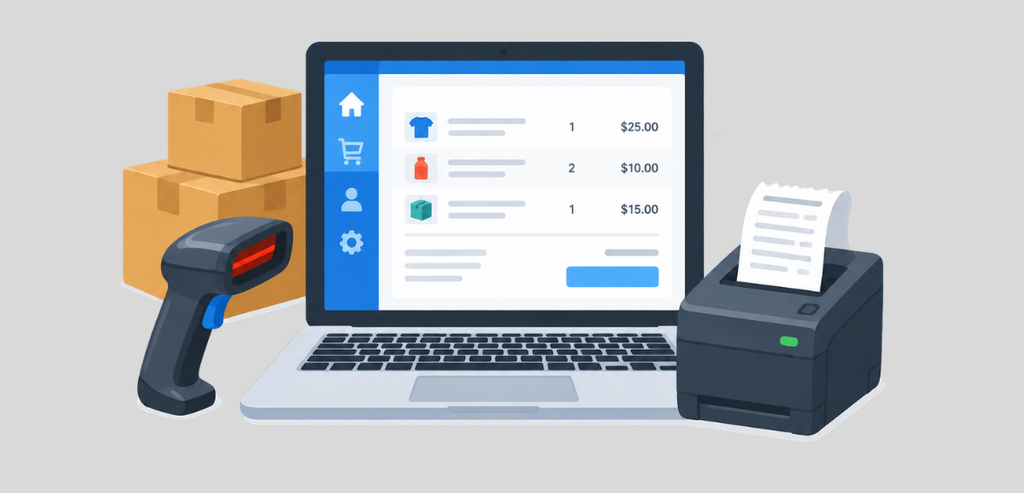
Billing software helps automate the customer invoicing process by creating, sending, and tracking customer invoices. Additionally, it collects payments and, in some cases, reminds customers of invoice due dates by sending automatic reminders. Some applications can even run charges at specified time intervals.
A billing tool focuses on the customer transaction. Therefore, a billing tool is designed to know the balance of accounts receivable and when they are due. It is not designed to create and track other balances (i.e. payables, payroll, loans, etc.). It can be connected to other systems that create and track those balances.
The rules and regulations around subscription-based pricing create challenges in billing as well. A billing tool needs to have rules and logic in place for pricing based on usage, tiers, seats, trials, proration, and renewals. Dedicated subscription billing tools help companies manage these rules and challenges.
Dedicated subscription billing platforms charge for recurring revenue management. A common model on pay-as-you-go plans is a percentage of billing volume, in the range of 0.5% to 0.7%, where billing volume includes subscriptions, subscription schedules, and usage-based billing. One-off invoices are usually priced separately. These fees are in addition to standard payment processing fees.
Zoho Invoice is a standalone invoicing product. From what we could see, Zoho’s own help documentation describes it as free forever, with no subscription fees. It allows users to create invoices and credit notes, automate payment reminders, take payment online and offline, track expenses, and bill clients for project hours. It does not include a general ledger. Zoho Books is sold separately for that feature.
Accounting software is the official record keeper of the business. It contains the chart of accounts and general ledger. It prepares the income statement and balance sheet. It tracks accounts receivable and payable.
The IRS states that a business must record transactions in a systematic way so that the business can determine the total amount of income, expenses, assets, and liabilities for a given period of time. Transactions are recorded in journals and ledgers. A journal is recorded using supporting documents. A ledger contains the totals of the journals and is arranged by account. The IRS also states that this system can be used on paper or through electronic accounting software.
Almost all accounting software uses double-entry bookkeeping. A transaction affects at least two accounts. Cash is reduced by a processing fee and an expense. Accounts receivable is reduced and cash is increased by a payment on an invoice. If the debits do not equal the credits, this is an indication of an error.
The difference between an invoice and accounting software is that an invoice is a single document, while accounting software places that invoice with the rest of the business activity.
| Function | Billing software | Accounting software |
| Main record | Invoice and customer account | General ledger and chart of accounts |
| Core output | Invoices, receipts, payment links | Profit and loss statement, balance sheet |
| Recurring charges | Plans, renewals, proration, usage | Recurring invoices on simpler schedules |
| Payments | Collects card and bank payments | Records payments, fees, and deposits |
| Scope | Money coming in from customers | All money in and out of the business |
Accounts receivable is the amount customers owe the business for invoices that the business has already issued. Receivables are recorded by billing software and represented in the accounting system as an asset on the balance sheet.
The two systems must agree on this amount. If a customer is credited in the billing system, the accounting system must also credit that customer. If a refund is given by the processing system, the customer must be refunded in both the billing and accounting systems. If this is not done, the report in the accounting system becomes inaccurate.
An aging report is used to determine what the customers owe the business. The report groups invoices based on the time they are past due. If there is a lack of payment data in the ledger, the report is useless.
Many small businesses rely on one product doing many things. QuickBooks Online, Xero and Zoho Books all offer invoicing as part of their accounting products. If the invoicing and the general ledger are housed in the same system, the paid invoice automatically posts to the general ledger.
This is ideal when billing is relatively simple. Straightforward invoicing (i.e. invoices for a single transaction, project or a fixed monthly retainer) is quite simple to do within most accounting tools. A single system starts to strain when the billing gets more complicated, such as with subscription billing.
QuickBooks Online is a cloud-based accounting software by Intuit with invoicing functionality. In October 2026, Intuit’s invoicing page showed recurring invoices that could be set to automatically send daily, weekly, monthly, or yearly. The Plus and Advanced plans offer progress invoicing for project milestones. According to Intuit, when customers pay through QuickBooks, the payment is recorded and matched for the user. Intuit also claims users of pay-enabled invoices get paid up to 4x faster than with paper invoicing. This is Intuit’s own claim.
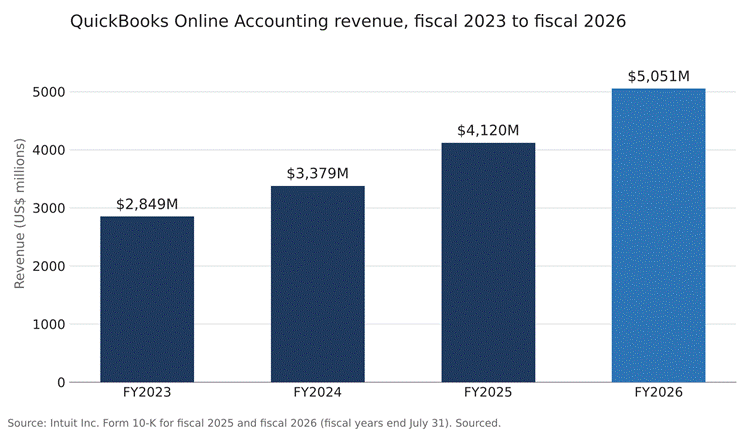
Intuit’s Form 10-K for fiscal 2026, ended July 31, 2026, reported QuickBooks Online Accounting revenue of $5,051 million, up 23% from $4,120 million in fiscal 2025. Intuit attributed the revenue growth to higher effective prices, customer growth, and mix shift.
Xero offers cloud accounting with invoicing. Per Xero’s training material, online payments for invoices are automatically marked as paid and the payment is automatically reconciled. Xero’s payments page claims adding a pay now button to an invoice can help a business get paid up to twice as fast. This is Xero’s claim.
Xero’s FY26 results reported 506,000 new customers during the year. Xero’s FY26 annual report shares its global customer number as 4.9 million customers. Xero completed its acquisition of Melio on October 15, 2025, and introduced bill pay for US customers in December 2025.
Zoho Books is Zoho’s accounting product that offers invoicing. Zoho’s US pricing page indicates that the free plan is available as long as annual revenue does not exceed $50,000. The free plan allows for one user and one accountant, and generates up to 1,000 invoices per year. Bank reconciliation is included. Automatic bank feeds are included with the Standard plan, which is $20 per organization per month, or $15 when billed annually.
There are specific reasons for the differences in billing and accounting data. Understanding those reasons helps to resolve differences in reconciliations.
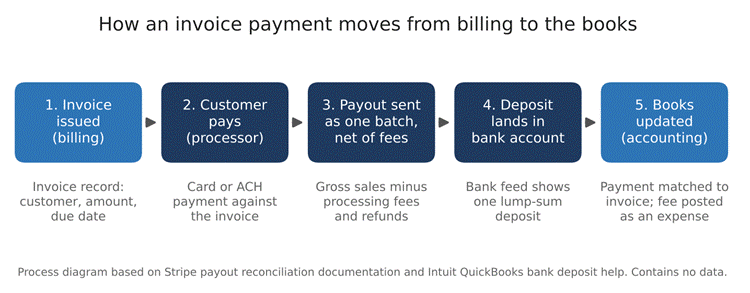
The invoice starts in the billing system. Payment is accepted by card or bank transfer via a payment processor. The processor does not send each payment to the bank individually. Processor payout documentation generally states that automatic payouts occur on a schedule and consist of funds from multiple transactions.
Therefore, the bank deposit is a net figure. This means gross sales less processing fees, and potentially less refunds and/or disputes in that same batch. The bank feed in the accounting system shows this figure as a single lump sum. The ledger, however, needs to show each sale separately, as well as each processing fee and refund.
This is where most small business accounting and billing setups break. The processing fee and refunds are shown in the bank feed as lump sums. The billing system may send a single payment to the accounting system as a single deposit, but the bank shows multiple. Therefore, the accounting system may show multiple deposits, and the bank shows a single deposit. This has to be fixed by hand.
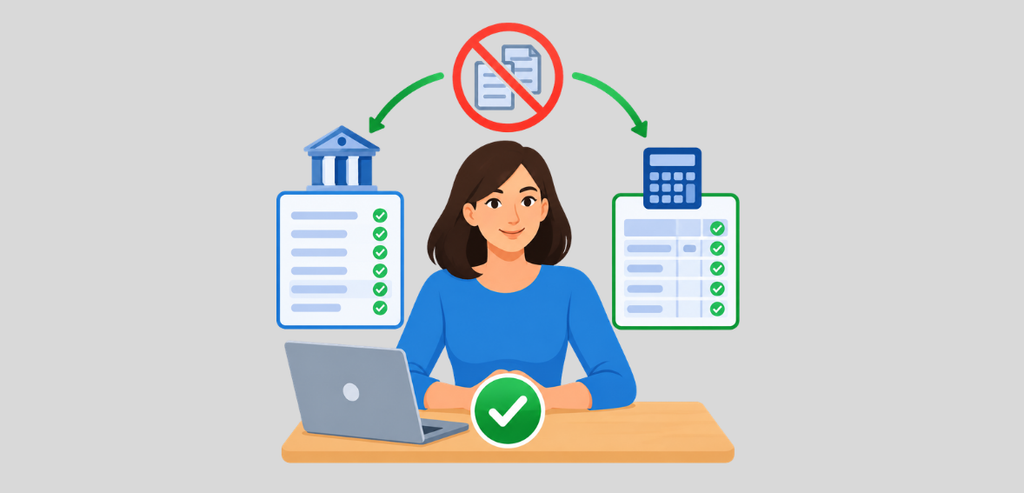
There are two definitions of double entry in this topic. In bookkeeping, double entry means using debits and credits. In operations, it means typing the same invoice in two systems, the goal being to eliminate the second system.
The fix is a clearing step between the payment and the bank. With QuickBooks Online, that fixing step is the Undeposited Funds account. In the Intuit help files, the point is that when several customer payments reach the bank as one total, recording them one by one leaves the books out of step with the bank. The user is then instructed to put payments from Undeposited Funds into one bank deposit, and match that deposit to the bank feed.
Processors offer a tool for this as well. A payout reconciliation report matches payouts on the bank statement with the related batches of transactions and splits them into charges, refunds, and fees. The common limitation is manual payouts, which the report cannot tie to specific transactions, so the business has to do that reconciliation itself.
Third-party integration apps can do the whole process. Most processors publish accounting integrations for QuickBooks Online and Xero, built either in-house or by partners, that sync payouts to invoices and can record payments received outside the processor, such as checks or cash.
There is one rule to be followed for having a clean setup. Each invoice is created in one place only. Payments flow to a clearing account. Fees are posted as an expense. The bank and deposit are matched. The rule says four things must happen, and once the rule is set, you don’t have to do data entry for reconciliations; you just have to review.
The structure a business chooses for its receivables and payables systems influences how quickly that business can get paid and how much manual work is required. Intuit’s 2026 report tracks these factors.
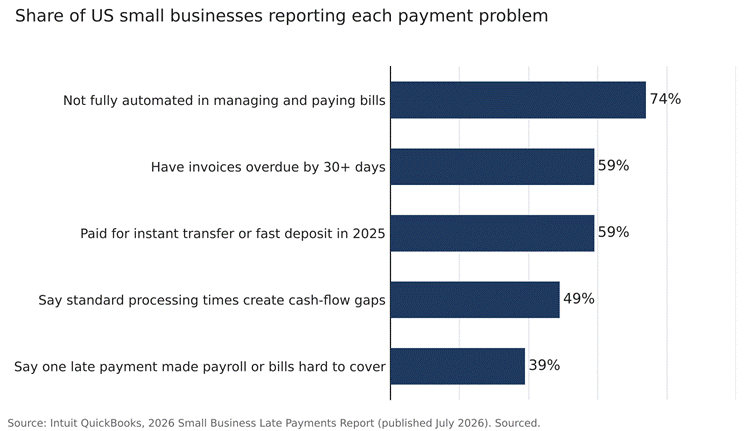
Credit terms are crucial. Intuit reports that 55% of businesses with net-30 terms had invoices past due. Only 26% of businesses with immediate terms had past-due invoices. Of the businesses with no invoices past due, 64% required immediate payment.
Getting paid doesn’t always end the wait. According to the report, clearing ACH and card payments can take 1 to 3 business days. Nearly half of business owners, 49%, said standard processing times of payments create a cash flow gap. In 2025, 59% of business owners said they paid to use a service to make transfers or to get funds transferred to them instantly.
The same is true on the payables side. The report says 74% of businesses are not fully automated when managing and paying bills. Of internal reasons for delays in outgoing payments, manual processes were the highest. The report cites the Intuit QuickBooks Small Business Insights as well as a 2025 survey of 1,305 business owners in the U.S.
Setup is more dependent on billing complexity and volume of transactions than on the number of users. The table below outlines common scenarios and describes a starting point. This is based on the capabilities of the product described above. It is not a ranking of the vendors.
| Business situation | Starting setup | Examples named in this article |
| Sole proprietor, few invoices a month | Free invoicing tool, or free accounting plan with invoicing | Zoho Invoice; Zoho Books Free (revenue up to $50,000) |
| Service business with one-time or project invoices | One accounting platform with invoicing | QuickBooks Online, Xero, Zoho Books |
| Business billing in project milestones | Accounting plan with progress invoicing | QuickBooks Online Plus or Advanced |
| Subscription or usage-based pricing | Billing platform plus accounting platform, linked by an integration | A subscription billing platform with QuickBooks Online or Xero |
Many solo and very small service businesses can start with one tool. For many, an invoicing tool is the main need, and the owner, or an external bookkeeper, can manage the ledger elsewhere, or use a free tool like Zoho Books Free. For businesses under the $50,000 revenue limit, Zoho Books Free provides invoicing and bookkeeping services.
Growing service businesses usually stay within one accounting platform for invoicing. QuickBooks Online and Xero both link payments to the invoices and bookkeeping. Plan limits come into play here. In the case of QuickBooks Online, Progress Invoicing is limited to the Plus and Advanced Plans.
For subscription and usage-based businesses, it is prudent to implement two systems. A subscription billing platform can manage subscription plans, renewals, and proration, while the accounting system can manage the ledger. The integration of the two systems can carry the burden of syncing invoices, payments, charges, refunds, payouts, fees, and disputes. Before committing to an integration, there are four questions that should be asked. Does it post processing fees as an expense? Does it post refunds and disputes? Does it sync individual payments or only payouts? Does it post to a clearing account to match the bank feed? A connector that brings only the net amount leaves the remaining details, fees, and refunds to be entered manually.
Before committing, map out the payment process from the invoice to the bank. Each step is an opportunity for error and creates friction.
Although related, accounting and billing have different functions, with each requiring its own particular piece of software. A billing system creates invoices and captures payments. An accounting system captures the transactions and creates ledger entries, which are then summarized into financial statements. Many small businesses can utilize the same piece of software to handle both billing and accounting functions. Some options available to small businesses include QuickBooks Online, Xero, and Zoho Books.
A separate billing system becomes economical when there is a need to capture complex prices. This is common in subscription and usage-based pricing models. The integration between the systems becomes just as important. Fees should be expense transactions, and the clearing account should be reflected on the financial statements. Each invoice should be captured only once.
Intuit’s 2026 report shows the impact of out-of-date systems. Nearly three-quarters of small businesses in the U.S. had not fully automated their bill payments. Further, 59% had accounts receivable over 30 days.
No, billing software creates invoices and collects payments. Accounting software updates the general ledger with every transaction and generates financial statements.
Yes, invoicing is included in all the paid versions of QuickBooks Online and Xero and in the higher-tier plans of Zoho Books. Invoices from paid plans in these applications post to the general ledger.
Yes, there are integrations. Most billing platforms and processors offer QuickBooks Online integrations that sync invoices, payments, fees, and payouts.