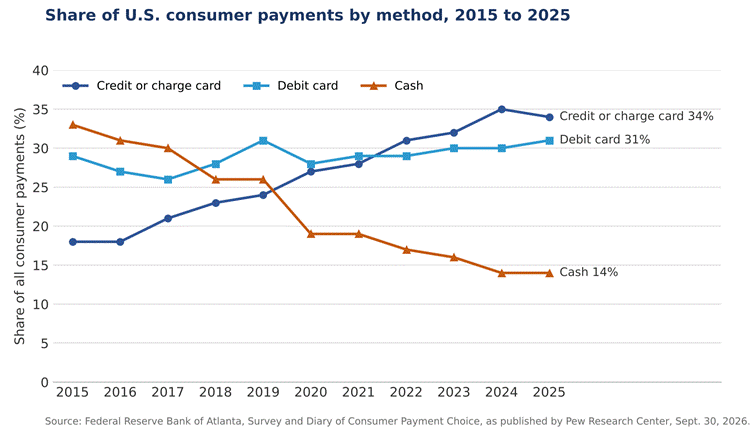
Cards are the primary means of payment for most in-person transactions in the U.S. Results from the Federal Reserve Bank of Atlanta’s Survey and Diary of Consumer Payment Choice indicate that credit card payments represented 34% of the total payment instruments used by consumers in 2025. Debit cards accounted for 31% of the payment instruments. Cash accounted for 14% of the total payment instruments, a decline from 33% recorded in 2015, according to an analysis of the survey data published by the Pew Research Center on September 30, 2026.
The survey reported that 78% of Americans in 2025, preferred using either a credit or debit card to pay for in-person transactions. Only 16% of the respondents indicated a cash payment preference. For small businesses, a card reader is a payment acceptance device that allows business owners to take card payments from customers. Choosing a card reader means comparing hardware, connection and per-sale fees.
This guide provides information on the various card payment readers, how they connect to the Internet, what they cost and how they can be tailored to the specific way a business sells. Prices and rates quoted in this guide were obtained from the card payment processors’ websites and were current as at October 12, 2026.
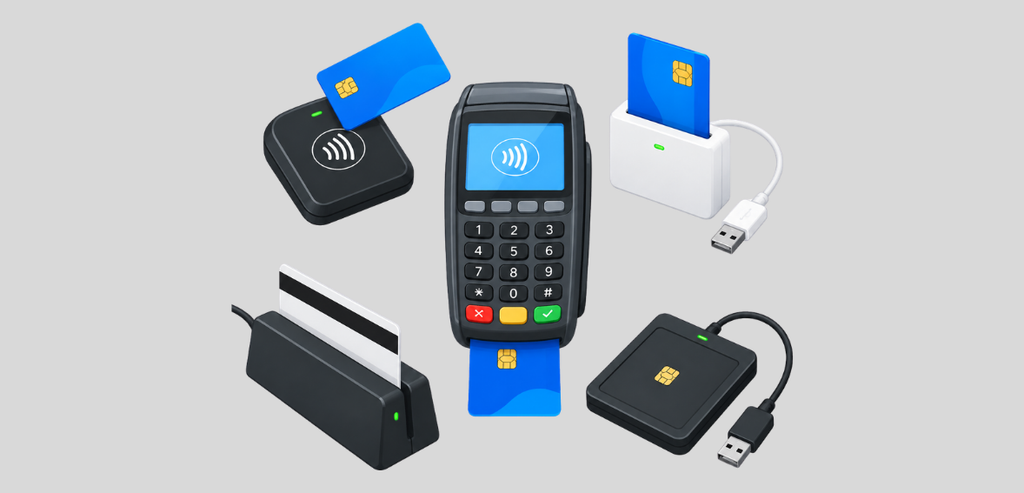
Every card reader has a single function. They read card data and forward that information on to a payment processor for authorization. Other features and differences may include how the card is read and if a phone or tablet is required to make the device function.
Magstripe Readers
Magstripe readers read the card’s magnetic stripe and swipe the card. Square’s magstripe reader plugs into the phone’s headphone jack or Lightning connector, and does not require charging.
The magstripe reader’s limitation is coverage. A swipe-only reader cannot read a chip and will not accept contactless payments. Square reports that over 95% of the cards processed through Square are EMV chip cards.
Mobile Chip and Contactless Readers
A mobile reader is a small, battery-powered device that pairs via Bluetooth to a phone or tablet. The customer inserts a chip card or taps a contactless payment card or mobile device. The payment processing app on the phone finalizes the transaction and generates the receipt.
Starter models from Square, Stripe, and PayPal range from $29 to $59. Some also accept swipes. Others drop the swipe slot and rely on chip and tap only.
Standalone Smart Terminals
These have a screen and a built-in mic and/or NFC and/or Bluetooth and/or 4G/5G/lte connection, and don’t require a phone or tablet. Some models include a built-in receipt printer. Others are capable of running point-of-sale applications and support barcode scanning.
Countertop Point of Sale Systems
These systems pair a larger reader with a smaller one. Staff use the smaller reader, and customers use the larger reader. Because of the larger size, these systems are designed to be used behind a counter. Square’s countertop devices list at $149 for Stand, which requires an iPad, and $899 for Register.
How the reader interacts with your device determines where you can take payments. It also determines the behavior of the reader when the connection is lost.
Bluetooth
A Bluetooth card reader connects wirelessly to your device over a short-range connection. The device then connects to the internet over Wi-Fi or Cellular data. If there is no connection on your device, the sale cannot be processed in real time.
All Bluetooth readers need charging. Stripe rates the battery life of its M2 reader at about 28 hours of active use and 42 hours of standby. The reader also notes that battery life can vary. Square’s chip reader uses Bluetooth Low Energy 5.3 and is compatible with iOS 16 and later and Android 9 and later.
Wi-Fi, Ethernet and cellular
A Smart Terminal can connect to the internet on its own. Most use Wi-Fi. Ethernet is common with fixed counters, though an extra accessory is often required. Square Terminal and Stripe Reader S700 can both use Ethernet with an accessory.
Cellular service means point-of-sale systems can do payments over cellular data. SumUp claims its Solo reader has a built-in SIM card with free, unlimited data. Stripe charges $10 per reader per month for cellular data.
Wired USB
Some setups use a wire to connect the device to the point of sale. Square Stand requires an iPad and a USB-C connection. Square Register can connect via Wi-Fi or Ethernet and integrates a payment processor.
Offline mode
If the internet goes down, some payment processors can store transactions to send later. The length of time payments are stored depends on the processor. Square processes offline payments when the device reconnects to the internet. Payments are declined if the device does not reconnect in 24 hours. The seller is liable for disputes, declined or expired payments.
A card reader has three costs: the one-time cost of the hardware, a fee with every sale that is charged by the processing company, and a monthly cost for the software.
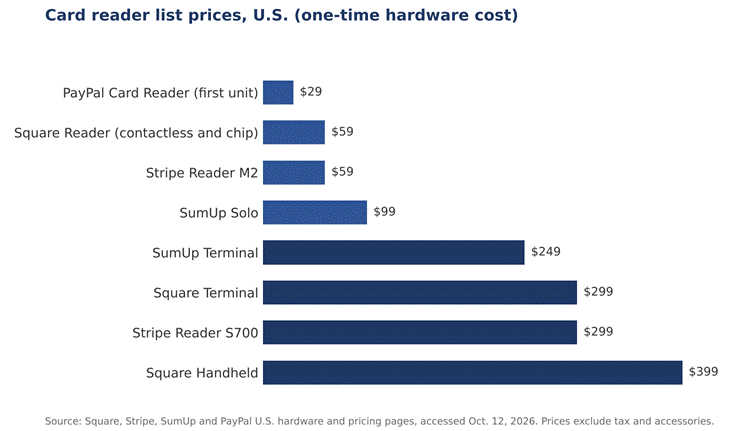
Their Reader for chip and contactless is $59. It doesn’t support magstripe. Square’s Reader for magstripe is free, but limited to 1 per account.
The Square Terminal is $299 and includes a receipt printer. The Square Handheld is $399. Square Stand is $149 and requires an iPad. The Square Register (2nd gen) is $899. Payment plans are available for some devices at 15% APR. These plans are not available in AL, DE, MO, MS, NH, or TN.
On the free plan, card-present payments are 2.6% + 15 cents. Card-not-present payments are charged 3.5% + 15 cents. The paid Plus plan is charged at 2.5% + 15 cents for card-present payments. Instant transfers to a bank incur a 1.5% fee. Businesses processing $250,000 or more a year can contact Square for custom pricing.
Stripe Terminal connects Stripe’s online and in-person payments. Stripe gives businesses three methods to connect in-person payments to their business. The first method is to create a point-of-sale app using Stripe’s API. The second method is using a third-party integration, and the third method is using Stripe’s no-code option. Stripe Reader M2 is $59 and connects over Bluetooth to accept payment with chip, contactless, and magstripe cards. Stripe Reader S700 and S710 are each $299. Stripe Reader S700 has a touchscreen and can run custom point-of-sale apps.
Stripe charges 2.7% and 5 cents for every successful in-person card transaction. International card transactions add 1.5% and Tap to Pay adds 10 cents per transaction. The cost to use point-to-point encryption adds 5 cents per transaction.
SumUp sells the Solo Card Reader for $99. The SumUp Terminal is a handheld point-of-sale device for $249. Apple Pay, Google Pay, Visa, Mastercard, American Express, Discover, and Diners Club – All are accepted by SumUp.
SumUp charges 2.6% + 10 cents for swiped card transactions. Keyed-in transactions cost 3.5% + 15 cents. SumUp’s Standard Plan is free. The POS Plus plan is $49 a month and includes features such as multi-device sync and floor plans.
SumUp offers a virtual and mobile banking service. They offer FDIC-insured savings accounts, deposit accounts, and earning accounts. They do not have physical locations.
PayPal’s card reader is $29 for the first and $79 for each additional reader. The reader connects to a mobile device. PayPal says there are no monthly or setup fees.
PayPal Point of Sale charges 2.29% + 9 cents for card-present transactions. Manually entered card transactions are charged 3.49% + 9 cents. These rates are from PayPal’s U.S. merchant fee page, last updated October 1, 2026.
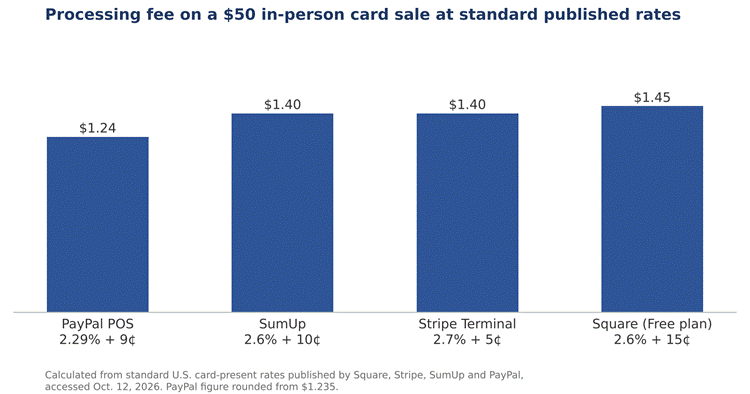
The table below compares the four providers. Monthly fees are for the base plan only.
| Provider | Entry reader | Smart terminal | In-person rate | Base monthly fee |
| Square | $59 (Reader for contactless and chip) | $299 (Terminal) | 2.6% + 15 cents | $0 (Free plan) |
| Stripe | $59 (Reader M2) | $299 (Reader S700) | 2.7% + 5 cents | None listed; cellular $10 per reader |
| SumUp | $99 (Solo) | $249 (Terminal) | 2.6% + 10 cents | $0 (Standard plan) |
| PayPal | $29 (first unit) | Not available | 2.29% + 9 cents | $0 |
The cents fee becomes more significant as the percentage fee becomes smaller. For example, on a $5 sale, Square’s 2.6% + 15-cent fee would come to 28 cents, or 5.6% of the sale. Stripe’s 2.7% + 5-cent fee would be 18.5 cents, or 3.7% of the sale. However, on a $100 sale, Stripe’s rate would also come to $2.75, and Square’s rate would come to $2.75 as well. Run your average ticket through the equation to decide for yourself.
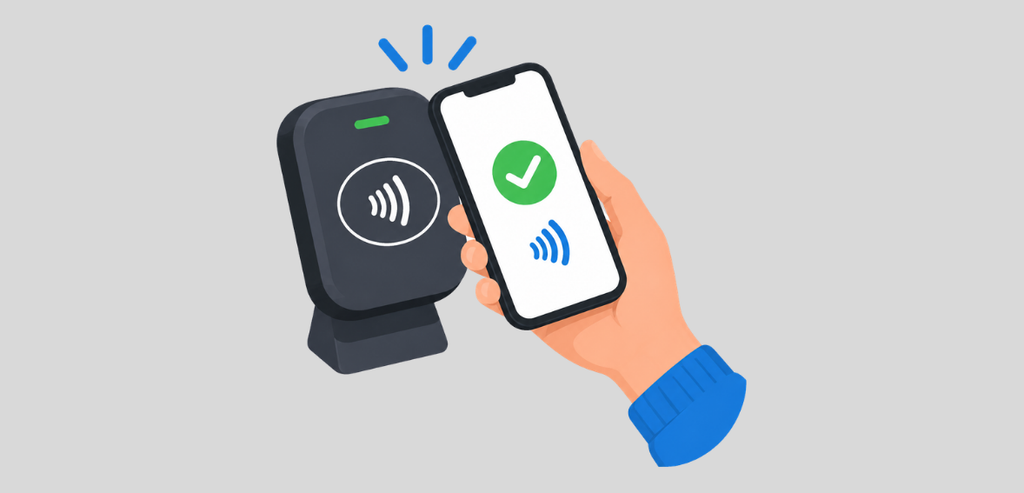
Contactless payments can be processed with no reader at all. With Tap to Pay, the phone itself becomes the reader. The customer just touches their contactless credit card or phone to the merchant’s phone. The sale is completed with the merchant’s phone.
Square notes that Tap to Pay has limitations. With the iPhone, it can only be used on the iPhone XS or later with iOS 15.5 or later. Tap to Pay on Android can be used with any device with Android 9 or later with NFC. Square also states that in Tap to Pay on iPhone, some contactless cards may not be accepted, and the feature may not be available in certain countries.
Costs vary by provider. Square and Stripe both charge the same rate for a contactless payment with Tap to Pay as they do for a payment with their reader. That means the rate is 2.6% + 15 cents for Square and 2.7% + 5 cents for Stripe.
The main gap is chip and swipe. If the card has no contactless payment symbol, Square suggests using a QR code or a checkout link. Frequent fallbacks to the alternatives increase cost for the seller. For many sellers, adding a reader once they gain more sales is the best approach.
Think about where your sales happen first. Take into account how frequently you make a sale and the average price of the sale. The card reader that best fits those criteria is the best card reader for small business use.
| How you sell | Reader type | Connection | List price examples |
| Occasional or contactless-only sales | Tap to Pay on a phone | Phone NFC and data | $0 hardware |
| Markets, pop-ups and field service | Mobile chip and contactless reader | Bluetooth to a phone | $29 to $59 |
| Tableside or on-site, no phone handoff | Standalone smart terminal | Wi-Fi or cellular | $99 to $399 |
| Fixed counter | Countertop system or terminal | Wi-Fi, Ethernet or USB-C | $149 to $899 |
A vendor at weekend markets needs something portable and support for a backup when the signal is weak. A mobile Bluetooth reader or terminal with cellular data would work. See what offline mode covers.
A service business that collects payment at the customer’s location has similar needs. An employee can use their phone to read cards with the business’s account if the employee already carries a phone for work. A handheld terminal avoids giving a customer the employee’s personal phone.
A shop or cafe with a fixed counter benefits from a countertop terminal. If a terminal stands on a counter, it needs a receipt printer. Some terminals include a printer and cover other connectivity options with the purchase. E.g. Square Terminal covers Ethernet with a hub.
Ticket size affects the terminal choice. The 2025 Federal Reserve survey found the average debit card purchase was $74 and credit card purchase was $80. If the average ticket size is below that, businesses should weigh the cost of fixed per-transaction fees closely.
Readers only have half a say. Rates and payouts are decided by the processor. Pricing pages often don’t highlight some of these details and instead place them in footnotes.
What do you pay for each kind of transaction? Tapped, dipped, swiped, and keyed transactions can have different rates. What is the rate for a paid software plan? What is the annual volume for custom pricing?
What is the time frame for payment, and what is the cost for expedited payouts?
What kind of hardware is provided, and is the hardware only compatible with the processor’s software? What is the process for cancelling the service, and are there any termination/cancellation fees?
How are offline transactions, refunds, and disputes dealt with? Who takes the loss for a declined transaction?
What procedures is the processor taking to ensure compliance with PCI DSS? What kind of encryption do the readers utilize?
What are the obligations of a business owner to ensure PCI DSS compliance? What are the differences between the obligations of a business for a given processor and other processors?
Talk to a qualified payments professional or security professional to understand your obligations.
When it comes to card readers for small business, there are 3 main considerations: how you connect, how you sell, and what you pay per sale. Each of Square, Stripe, and PayPal charges between $29 and $59 for their mobile card readers. Square, Stripe, and SumUp charge between $249 and $399 for their smart terminals. The standard in-person rates for the 4 providers range from 2.29% to 2.7%, plus 5 to 15 cents per sale.
If your tickets are low, consider Tap to Pay, available on most iPhones and iPads. The cost to use Tap to Pay is $31 per month, and a chip reader sells for $15 to $20 to process cards that can’t tap. Check what offline mode covers for each provider, prior to making a purchase. Also confirm whether the hardware stays usable if you switch processors.
Not all readers will work for every business. Mobile businesses can start with a lower-cost Bluetooth reader for $29 to $59. Businesses with fixed locations can benefit from a more advanced smart terminal or countertop system.
Yes, if payment is contactless. iPhone XS or later with iOS 15.5 or later can use Tap to Pay, as well as Androids with NFC and Android 9 or later.
No, with basic plans. Free plans from Square, SumUp, and PayPal POS have no monthly fees. More advanced plans and Stripe’s cellular data plan have fees.
Yes, if you want to accept payments from chip-only cards. Tap to Pay can’t read chip cards, so a more expensive card reader can be used for chip-card payments.
Yes, many readers have offline mode. However, Square won’t process stored transactions if the device can’t connect to the internet within 24 hours.