
Posted: November 04, 2026
From Thanksgiving to New Year’s Day, the U.S. celebrates several important holidays back to back. The U.S. Office of Personnel Management (OPM) has listed Thanksgiving for November 26, 2026, and Christmas Day for December 25, 2026. New Year’s Day is on January 1, 2027, and is also a Friday. Customers will be asking the question “Are you open?” on these days. You need to have consistent signage and online information to inform customers of your business hours.
This resource gives instructions on signage and online listings to provide holiday hours for 2026 and beyond. This resource includes holiday hours signs and online listings for Google, Yelp, and personal business websites.
We made 4 printable signs for the 2026 season. All of our free-to-download templates fit on standard US Letter paper. Our templates for Thanksgiving, Christmas, and New Year’s Day include the days, so you just need to fill in the hours. Our Thanksgiving template includes both Thanksgiving Day and the following Friday. Our last template is a closed for the holidays sign, which you can use to indicate a break that lasts for several days.
Each of the templates has a similar format. At the top, in a dark color, the name of the holiday is included. The rest of the template includes a number of days, each containing a pair of multiple-choice options. The options include leaving the day closed or indicating the time the day will open. At the bottom of the template, there is space to include a date when the location will reopen, as well as a phone number or web address. Once the information is entered, print the template and use a dark marker to fill in your hours.
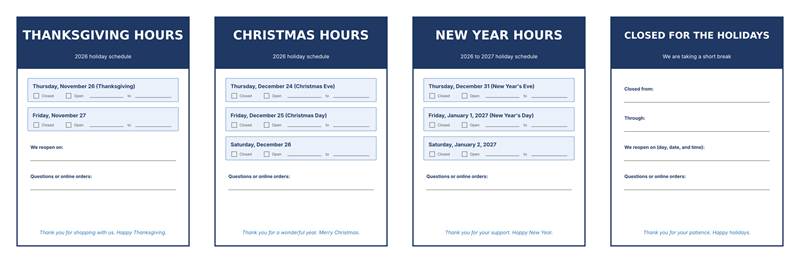
Figure 1. Four free holiday hours sign templates for the 2026 season.
A good sign gets straight to the point. First, include the weekday and the date. Many people plan their outings on weekdays, and by including the weekday, your sign removes ambiguity.
Next, be specific with your times and/or include the word “closed” for the whole day. Likewise, include the times you close early (e.g., New Year’s Eve or Christmas Eve). A sign for the holidays should convey all hours you are closed for the duration, and not just the holiday.
It’s important to indicate the day you reopen. A sign that just says “closed” provides no information on when to return. A good sign also doesn’t include vague phrases. Adding “hours of operation may vary” creates doubt. The purpose of a sign is to remove doubt. Generally, large letters on a high-contrast background are easiest to read.
The Alchemer listings management company states in its help center that businesses should set their holiday hours at least two weeks out. The same information says that Google and Yelp are quick to push changes. Bing and Apple require a manual edit later.
Yext’s Hitchhikers documentation states that Google and Yelp are both quick to push holiday hours for the week of the actual holiday.
Yext also states that Google and Yelp are fine with holiday hours being published and submitted before the holiday.
You should post your holiday hours on your listings and send them out over your marketing channels as soon as you can. The main signage should be on your business’s front door, eye level to customers. Smaller signage should be over the checkout counter and any pickup or service counter. Take down the signage when the normal hours resume.
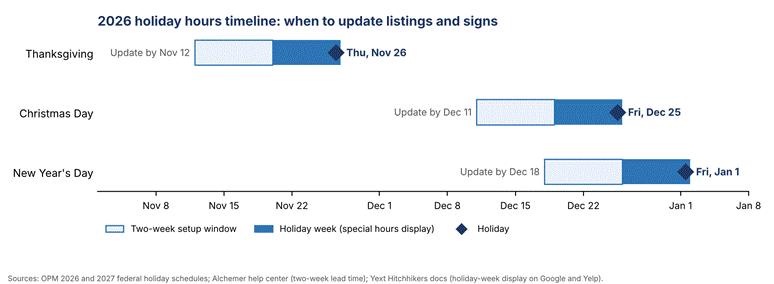
Figure 2. Suggested 2026 update dates, based on a two-week lead time before each holiday.
Google dubs this feature Special Hours. Its help center has more detail. To edit your company’s Business Profile, choose Edit Profile and then edit/enter Hours. Select the edit button near Special hours. You can then select from suggested holidays or add your own. To mark that you are open during that time, uncheck Closed and add the hours. To mark closed, leave it checked. Last, select Save.
There are two rules regarding Special hours. First, Special hours will not appear if the business is set to closed. Second, according to Google, Special hours should not be used to indicate closures of more than six days, and businesses should use the Temporarily closed feature instead. Google also says that businesses should confirm their hours for official holidays, even if their hours remain the same. According to Yext, business profiles that do not adjust for holidays can display a note that hours may differ.
You can modify your business hours through the Yelp for Business app or website. You can go to your business information and edit special hours. To note that your business is closed, you can specify a time frame. Yelp works with a 24-hour window so you’ll need to add special hours for each day your hours are adjusted. Per Yext, Yelp shows these special hours on your business page.
You need to make some updates to your site as well. Create a short banner on your homepage to show your holiday hours. Edit your contact page and site footer to reflect your holiday hours. For any orders that are made online, state the last day that orders can be made for pickup/shipping for each holiday. Remove the banner to show regular hours.
Short lines work best on doors. On each line, write the day and the date. Provide the start and stop times of your availability and the day you’ll return. Word your door notes like this. (Swap in your times.)
| Day | Date | Sample sign wording |
| Thanksgiving | Thursday, November 26, 2026 | Closed today for Thanksgiving. We’re back Friday, November 27 at our normal time. |
| Christmas Eve | Thursday, December 24, 2026 | Open until 3 p.m. on Christmas Eve. Closed all day Christmas. |
| Christmas Day | Friday, December 25, 2026 | Closed Friday, December 25. Doors open again Saturday, December 26. |
| New Year’s Eve | Thursday, December 31, 2026 | Closing early at 4 p.m. tonight. See you in the new year. |
| New Year’s Day | Friday, January 1, 2027 | Closed Friday, January 1. Regular hours start again Saturday, January 2. |
| Multi-day break | December 24 to January 1 | Closed for the holidays, December 24 through January 1. We reopen Saturday, January 2. |
A brief thank-you at the bottom keeps the tone friendly. Hold it to one sentence so the hours stay the focus.
A holiday hours sign has a simple job. It helps let the public know when they can visit. It should include the day of the week, the date, the time frame, and the day the business reopens. It should be published on the same day as the business’ hours are updated on your business website as well as on Google and Yelp. Holiday hours should be posted two weeks in advance. That means posting Thanksgiving hours by November 12, 2026, Christmas hours by December 11, 2026, and New Year’s hours by December 18, 2026.
You should include the weekday and date, your open and close times (or say closed), and when you reopen. Add a way for people to contact you (phone number or website) if they have questions.
Alchemer says you should post your holiday hours at least two weeks in advance. Putting up the sign should happen on the same day.
Go to Business Profile and then to Edit Profile, then to Hours, and finally to Special Hours. For the date, put in the times you want, or say closed, and then save.
