Posted: August 24, 2026 | Updated: October 06, 2026 at 5:51 PM
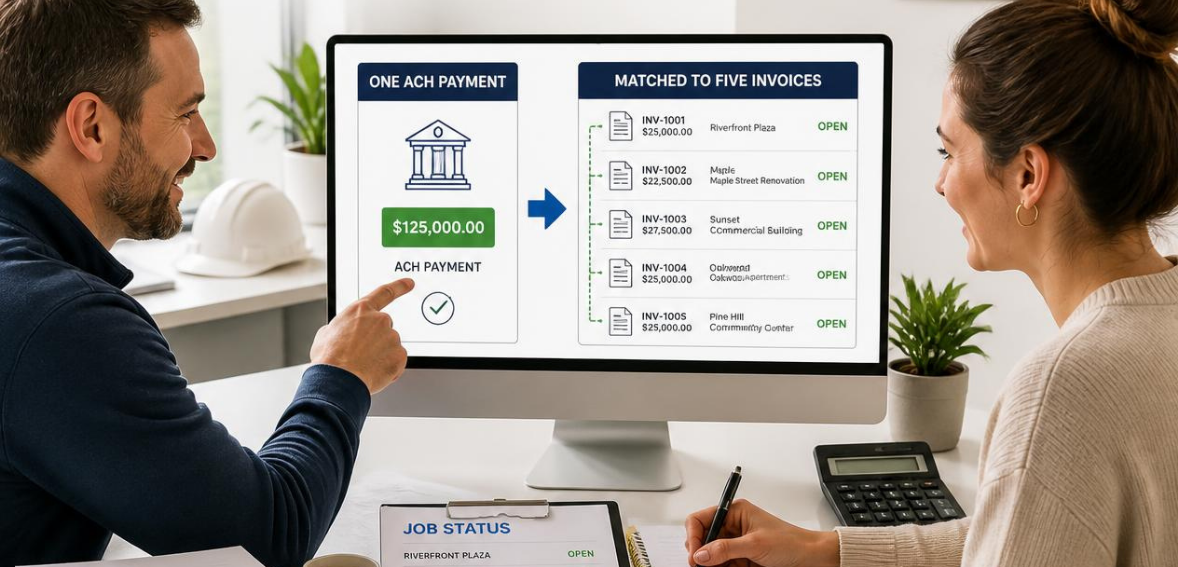
A contractor examines the bank feed for Tuesday at 9:00 am. There is a single ACH payment credit posted overnight. The amount doesn’t match any of the invoices. It is a combined payment from a commercial customer who paid for five separate work orders, all at once. The contractor will not see any invoice numbers for these transactions.
This is just the nature of dealing with general contractor, facilities, and property manager accounts. They will combine payables and send a single wire or ACH payment credit to pay for numerous work orders. The contractor needs to learn how to convert this one credit into five completed work orders.

When a property management firm consolidates a bunch of work orders into one invoice, a field service contractor would see a sizable lump-sum payment appear in their account. However, in the background, there could be dozens of work orders. Each work order would have its own invoice with specific line items and a separate due date.
If the payment amount happens to match one of the line items exactly, it is easy to reconcile the payment. However, the payment could be for multiple other line items which could be outstanding. The main problem is not receiving the payment, but proving which work orders the payment closed.
Field service contracting and trade contracting generally have the same issue. General contractors tend to batch payments to subcontractors once per month. Property managers consolidate payments to maintenance vendors into one payables run based on the cycle for owner disbursements. Facilities accounts tend to run payables on a fixed schedule every week or every other week. These come as no surprise to field service contractors.
They simply understand how the accounts payable system of commercial clients works. It is common for invoices to be consolidated. The contractors that are able to smoothly reconcile payments are the contractors that created a matching process before the payments started.
The fix begins before payment is made. Remittance detail is the information the payer includes with the payment that describes which invoices the payment covers. When a payer includes this information with a payment, the deposit reconciles itself. When this detail is missing, someone on the contractor’s team must perform after-the-fact reconstruction and typically compares payment amounts to open job costs, hoping that the math only results in one answer.
ACH credits and debits for corporate customers, called CCD, can carry one addenda record to include payment-related information. The addenda record provides an 80-character field that can include an invoice number, but not much else. For this use case, a CTX, or Corporate Trade Exchange, was designed. CTX can carry thousands of addenda records per payment and can therefore include payment detail for each invoice as an ANSI X12 820 remittance advice.
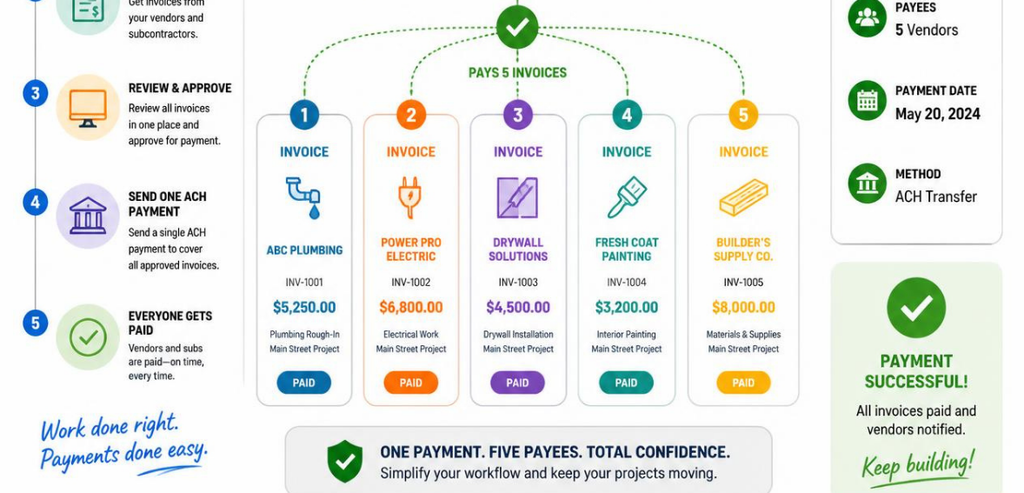
Contractors that invoice commercial accounts frequently should check with their customer’s accounts payable whether they use CTX. A CTX-capable payer can include five invoice numbers in a single ACH transaction. A CCD-only payer cannot do this, and a contractor would have to look elsewhere to obtain the detail.
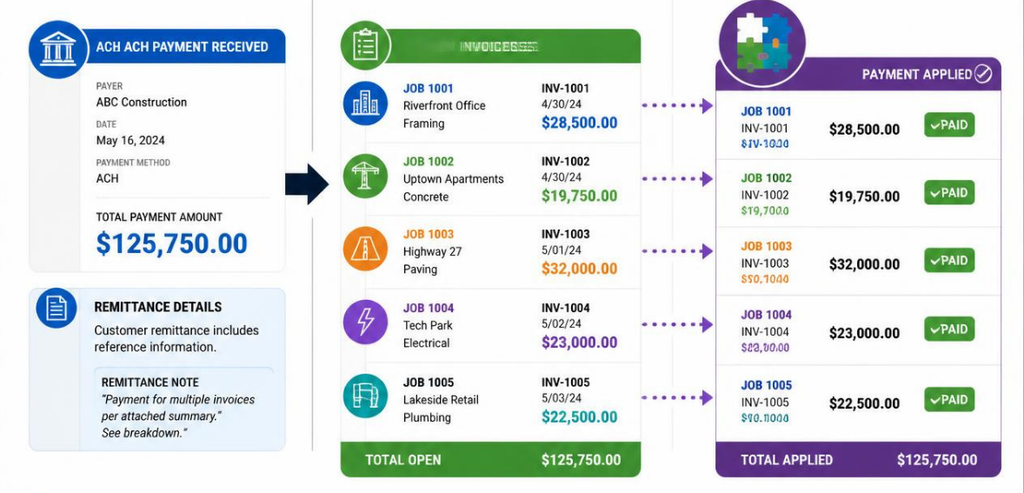
After the contractor obtains the remittance detail, splitting the deposit is simple; it is no longer guesswork. The contractor will list all open invoices for that customer, then line up remittance detail with the invoice numbers, and apply the payment amount to each until the total is the same as the deposit. A short example might help to show the pattern.
In this situation, an ACH deposit exactly equals five separate job invoices for a single commercial customer. The remittance detail described the amounts and attached the corresponding invoice numbers. The contractor’s bookkeeper used the detail to post to the individual job files, which closed those files. Without that description, a single deposit could be used to overpay a large job invoice, misapply funds to multiple small job invoices, or be used to underpay all remaining invoices.
Separate invoice numbers should always be used to post a single lump payment. A single payment that is posted to a customer’s balance as a lump payment may bring a customer’s account balance to an even amount; however, this loss of detail eliminates the relationship between payments and specific invoices, which is crucial for a contractor in the future, especially if an invoice-related dispute arises. The simplification of splitting postings for individual job files that is made possible by accounting software becomes even more beneficial when remittance detail is available since entering the amount and the invoice number may be done as a single entry for multiple invoices instead of individually.
Sending clean digital invoice data is not a given for every customer. For some, accounts payable systems strip remittance detail before the funds are transferred. Some customers still pay by lump-sum ACH but only mail a payment spreadsheet, if they send anything at all. An accounting system will process the payment, but the funds will be registered as unapplied cash. This means the funds have been received but cannot be matched to a particular invoice and are then held in a suspense account. If the payment addendum is not filled out, the cash will remain unapplied. For these instances, the job records provided by the contractor are used to determine the best possible match.
Matching the payment amount with various customer invoice balances that include either a purchase order number or job site address will often lead to the best possible match. There may, however, be instances where the best possible match is not obvious. The most effective way to determine a remittance for these situations is for the accounts payable contact to be reached for a remittance breakdown. Money is typically posted against invoices when the correct remittance is not available. These posts then result in a credit balance that has no explanation.
It is not a mistake to hold an unmatched deposit in suspense. It is actually the prudent course of action versus making an incorrect guess. A suspense account establishes control over the receipt of cash, and ensures that it has not yet been assigned to an account, giving a contractor protection against the two worst-case outcomes. Those outcomes involve the contractor reporting cash that has not been invoiced or, worse, closing a real balance by invoicing an incorrect due amount.
Failing to act to clear a balance in suspense means that a contractor should expect to eventually lose control over a real cash balance. Eventually, no one will be “actively working” the deposit. Deposits that sit unaddressed for extended periods of time will make it more difficult for contractors to identify the reason for that cash deposit.
Ideally, a system should be built to track jobs and to track money in accounting; however, job management systems and accounting systems are built to work in parallel. When a job is finally closed, the accounting system shows a payment received; whereas, in the job management system, it shows a work order that is complete and invoiced.
Disconnected systems lead to issues. For example, a job may appear as completed in a job management system, but if that work order invoice is still open in accounting, then you have an issue in the system. The best method is to post job payments to accounting before you update the job status in your work management system to ensure the backwards integration from accounting status to closed job is complete.
Some payment platforms that support commercial ACH origination differ in the detail of remittance information they pass to the contractor. HMS Pay is designed to carry structured remittance data with commercial ACH transactions. As a result, when a contractor receives a batched payment, they can see the invoice-level details along with the payment deposit.
This is not a reminder to do an accounting exercise. Rather, the detail flows directly to the reconciliation workflow. This shortens the “closure gap,” the duration between the payment deposit and the closing of each invoice.
The most harmful error that can occur with reconciliations is not missing a payment. It is ‘dunning’ a customer that already made a payment. Suppose a client makes a lump-sum payment to satisfy multiple invoices. However, the payment gets posted to only one of the five invoices because the remittance detail was either ignored or misunderstood.
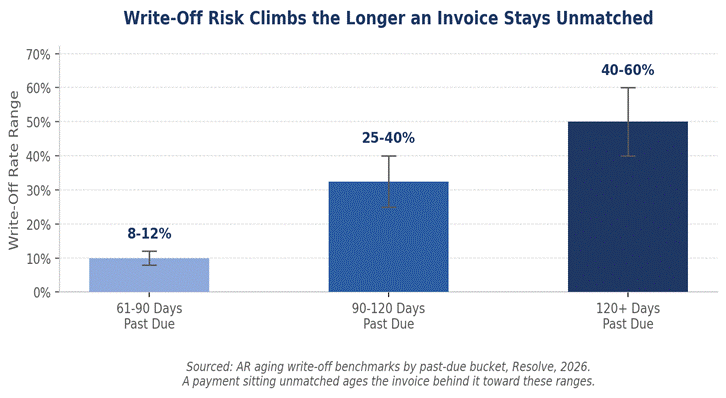
In this case, the accounting system reflects that four invoices are still open. As a result, a reminder or a collection call will be made for work that has been settled. For a business account, particularly a property manager or a general contractor who sends this contractor business continuously, this error will damage the business relationship much more than a slow payment would. The accounts receivable (A/R) report will likely show the error since an invoice that should have been closed will continue to age.
The chart illustrates how accounts receivable normally ages for non-collected payments, and it demonstrates how the error snowballs. From a process standpoint, there is no difference between an invoice that is unpaid and an invoice for which payment details were not entered, and so the invoice is not marked as paid. It is processed as if it had not been paid, so it is at the same risk of being written off as an unpaid account, even though payment was processed well before.
Using invoice numbers that facilitate matching is a key differentiator amongst invoicing software. Vague numbers such as invoice 1042 do not provide any help to the payer when posted on the remittance line with a corresponding dollar figure. Using a number that includes the job address, property information, customer account, etc. helps the contractor and the accounts payable team on the customer’s side frame a remittance detail even when the remaining information is sparse.
Many contractors put the purchase order number on the invoice header since purchase order numbers are usually the field a commercial payer’s system uses to key its remittance file. The goal is not a clever numbering scheme. The goal is a number that survives being copied into an 80-character addenda field or a hand-typed email without losing its meaning.
ACH payment deposits need to have accompanying remittance detail, or else a request needs to be sent to the payer’s accounts payable. The routine for billing contractors is to check if remittance detail for each ACH payment was provided on the day the payment clears. The accounts payable department is then contacted to explain why the deposit was made, and the status of the jobs is not updated until after the accounting split is finalized.
There is a weekly review of aging reports looking for invoices for customers that batch their payments to ensure that those customers do not have any unmatched payments. This routine takes a couple of extra minutes for each payment and is much cheaper than having to find a misapplied payment across multiple jobs. It is also a lot less embarrassing than having to call a customer and explain why an invoice that was already paid was chased.
Assigning responsibility for this process to a single person is as important as the process itself. Reconciliation as a team effort can lead to each person leaving their deposit for a little longer while thinking someone else will do the reconciling. Little delays in a busy month can add up. A single person, whether it is the office manager, bookkeeper, or contractor for a smaller shop, should check every single business deposit each day.
With this focus, a pattern emerges regarding which customers batch payments, which always give clean remittance, and which customers always need to be reminded to include invoices. From that pattern, the process for reconciling becomes easier and more automatic.
Dealing with a single ACH deposit covering five invoices is not challenging. The challenge is in establishing a system to capture remittance and payment details at the point of payment and establish job records that reconcile with the accounting ledgers. Simply put, capturing remittances for payment and matching the job records and the accounting ledger is the actual challenge where contractors spend the majority of their time.
In contrast, contractors that have integrated payment, remittance capture, and reconciliation as part of one system spend more time closing files and less time following up on paid jobs.
For more on matching ACH remittance to open jobs and other contractor payment questions, see Contractor Payment Resources.
In this case, you would need to match the deposit to the remittance detail, which would list each invoice number and the corresponding invoice amount, and then post the payment as line splits in your accounting system so each invoice is closed individually.
It is the detail that is sent with the payment that shows what invoices are covered by the payment. Without this detail, a deposit made by the customer cannot be split correctly.
You would need to match the deposit to the open invoices, and as a last resort you would need to call the customer’s accounts payable contact to confirm prior to posting to your accounting system.
Never post a payment to an account without first matching the payment amount to the invoice detail.
Use either job, property, or purchase order number sequencing to ensure that invoice numbers referenced on your remittance detail are not lost.