
Posted: August 26, 2026 | Updated: October 06, 2026 at 5:51 PM
A technician has just finished a job. However, the card they swiped was processed for $340 instead of $240. The customer noticed the error before the van left the driveway. What happens next depends on whether or not the charge has settled. Field teams typically reach for refunds as the “polite fix,” but this is rarely the quickest or most efficient route.
Voiding, refunding, and addressing the underlying issue on the invoice resolve three separate issues. If refunding and voiding are mixed, then errors and duplicate charges occur, as well as a balance discrepancy for both the field teams and the customer. This article lists on-site payment mistakes and will go over when it is appropriate to void, when to refund, and the instances where the issue is best resolved by correcting the invoice in question and not the payment.
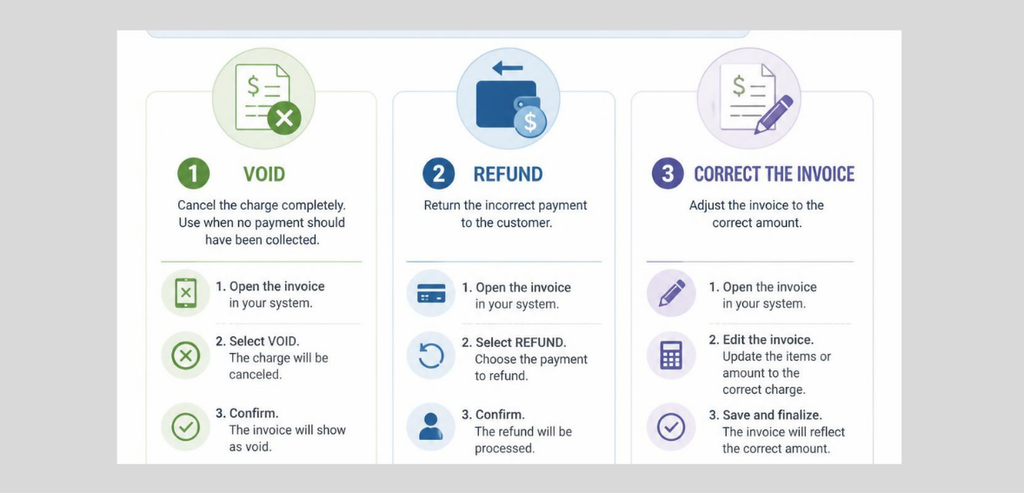
Most errors that occur on site are from three different sources, and corrective action will depend on the mistake that was made. The first mistake is a keying mistake. This typically occurs when the technician double-enters a line item or shifts the decimal. The technician enters $340 for a work order that states $240. The second mistake is a correct total that is assigned to the wrong account. This occurs when the amount charged is correct, but it was entered for the wrong customer or job number.
The last mistake is a double charge. The card reader appears to freeze, and the technician goes ahead and taps the card again. From a customer’s perspective, there are wrong numbers on the screen, but the fix that needs to be done on an operational level is different each time. Understanding which mistake was made determines what action can be taken, whether it is a void, refund, or invoice edit.
Every payment transaction undergoes two processes. The first process is authorization. The card can be tapped or dipped and the funds are placed on hold by the bank. The bank also sends an approval code, but at this stage no funds are taken or transferred. The second main process is settlement. This is the process that involves fund transfer. As the name suggests, settlement happens when a processor closes its batch. Here, the funds are moved from the customer to the merchant. A cancel or void transaction occurs during the first stage when the batch is still open.
Nothing has moved, and therefore there is nothing to reverse. The hold is lifted, and the transaction does not post on the customer’s account or the bank statement. A refund pays the customer, but only after the settlement is done. This is after the funds are moved and the transaction is closed. A refund does not cancel the original transaction. A refund is a new transaction that pays the customer a full or partial transaction amount.
Card networks differentiate between voids and refunds in their message types. Visa and Mastercard each type them differently. Issuing banks treat the message types differently on the cardholder statement. A voided authorization drops off after a few business days as an authorized but never posted charge. A refund is processed as a separate transaction and can take anywhere from 3 to 7 business days for the funds to be made available to the customer. Processors charge different rates for voids and refunds. A voided transaction avoids the settlement and refund fee, but with a refund the merchant still pays the processing fees on the original charge.
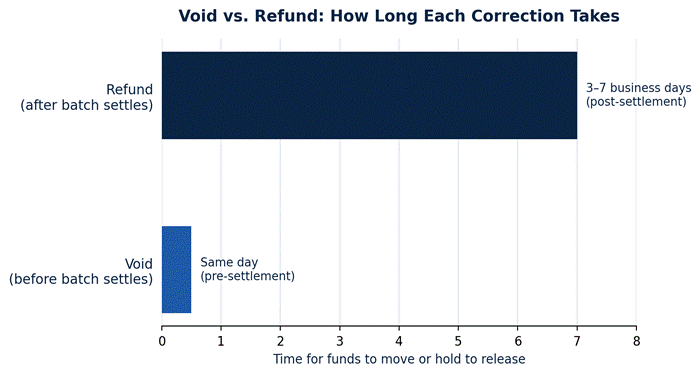
Example timeline of typical void windows and post-refund windows for a typical processor. Actual time periods for cutoffs differ for each processor and card network.

Not all mistakes in pricing are mistakes in payments. For instance, just because a card charge occurs for the full amount in an invoice, that invoice may still contain errors (for service codes, discounts, or incorrectly priced parts). Voiding or refunding the payment would be the wrong remedy in this case. The technician would be responsible for correcting the invoice and then making the determination as to whether the payment should be made for the corrected amount. If the corrected amount is less than the original payment, then the technician would be obligated to refund the difference to the customer because the original payment was made for the incorrect amount.
If the corrected amount is greater than the original payment, then the technician would be required to obtain authorization for that amount. In this case, it would not be appropriate to issue a void. The other case is a payment error for which the invoice is correct. In this case, the documentation was correct, and the card transaction was the error. Knowing the difference in these two cases would provide the technician with the remedy and avoid reversing a payment that did not need to be reversed.
The best solution is the one provided to the technician before they leave the property. Within the void window, this solution will take only a few seconds. First, cancel the original authorization. Next, verify the corrected total with the customer. Finally, run a fresh charge for the corrected total. In this case, there is no need to make a refund and the customer does not have to watch their statement for a credit a few days after the transaction.
Unfortunately, there is no way to void a payment after the batch has closed and the payment has been settled. In that case, the best solution is to make a refund in the field and correct the original total. This should be done in the correct order. The original total should be corrected in the invoice record. Once that is done, the payment should be voided (if still possible), and either refunded or charged, if required.
The biggest curveball a technician has to deal with is timing. The field crew has no control over batch cutoffs. This is the choice the processor makes. A job that is completed in the morning has hours to spare before the batch settles and allows a clean void if the mistake is noticed before the technician leaves for the day.
Jobs closed late in the day have a short window, so mistakes discovered an hour after a job is closed can be on the other side of settlement. Teams that develop the habit of having the customer confirm the amount verbally before the card is processed largely avoid this waiting game.

Customers judge the correction by what shows up on their statements. A void is the best outcome a company can have. A void at most will cause a brief pending charge in the bank account, and that charge will disappear before a transaction is posted. Most customers will not see a void happen. With a refund, the original charge still posts to the card, and if a support request is made relating to the refund, then that refund was not adequately explained. The original charge is posted to the credit card, and a few days later, the credit is posted as a second entry.
Customers see two entries instead of one. Even though the credit total equals the charge total, customers will interpret this as a company error. If the service technician explains this, or if the company sends a follow-up message to the customer, then the customer will understand that this was not an error. An invoice correction that does not change the payment balance is not posted to the credit card, and will not show on a credit card statement, because the record was only updated. Informing a customer of the result of a service call and whether the customer will see a void, refund, or nothing will prevent the customer support call that comes two or three days later when the credit card statement posts.
This example distribution illustrates the categories of mistakes described in this article. These categories were not drawn from a published survey.
Not all roles on a field team should have the same rights to correct payments. Technicians cannot be given unlimited refund authority as it creates a system that’s easier to exploit even for honest mistakes. At the other extreme, requiring every correction to go through the back-office approval process significantly delays a correction that should take a couple of seconds at most. Most field service operations sit somewhere in the middle.
Most field technicians are granted permission to void same-day transactions, often on their own devices, as the risk is significantly reduced and the correction is instant. Refunds, partial or full, are restricted by several factors including a supervisor login, a threshold, or a reason code, as that money has already been moved and has a high risk of error and thus should be reviewed.
Role-based access controls at the payment processing level make it possible to split up payment authority rather than relying on policy alone. HMS Pay provides permission tiers that separate void authority from refund authority at the device level, allowing a technician’s login to make an on-site correction without the ability to issue refunds from the field. Additionally, every void and refund has an audit trail associated with the user who initiated it, which is useful when a supervisor is reconciling the day’s corrections against the batch.
A correction touches both the invoice and the payment record. If the payment is voided or refunded in the payment system and not noted on the invoice, the office is left with two different records. The accounting side will reflect one amount, while the job record will reflect a different amount. This discrepancy is usually discovered during a reconciliation. Someone will have to remember or will have to call to find out what happened on the job and what has been logged. The solution is simple, although not automated.
Every void, refund, or edit of an invoice should be documented, with the original transaction and explanation of the change. While field apps time-stamp corrections against the source invoice, a manual fix can be done by using an internal reference number. Should a customer dispute a charge, having connected records with matching timestamps helps a lot.
This becomes especially relevant for teams running many technicians on the same merchant account due to the implications of corrections logged under the wrong job number. An incorrect job number can cause issues with that merchant account during the monthly account reconciliation. Staff doing daily batch reconciliations should be able to match logged corrections against pending and settled invoices.
In the event that the described controls are absent, an overcharge that is subsequently refunded to the client would result in the accounting staff having to review the account in an unproductive manner.
To know the correct approach, you must answer the following questions in order: has the transaction settled and is the invoice correct? The chart that follows shows the common scenarios and the appropriate next step.
| Situation | Invoice status | Payment status | Correct action |
| Wrong amount keyed, caught immediately | Needs correction | Not yet settled | Void, then re-run corrected amount |
| Wrong amount keyed, found after batch closes | Needs correction | Settled | Correct invoice, then refund the difference |
| Correct invoice, duplicate charge | No change needed | Settled (both attempts) | Refund the duplicate transaction |
| Correct invoice, charge posted to wrong customer | No change needed | Settled, wrong account | Refund wrong account, charge correct account |
| Discount or part missed on invoice, charge matches old total | Needs correction | Settled | Correct invoice, refund overage |
Voiding and refunding have distinct differences and will not solve bad invoices on their own. The line around which the decision is made is whether the transaction has settled. Before that, voiding is faster, less costly, and completely unnoticeable to the customer. After that line, the only available option is refunding, and that should be explained to the customer in detail since two entries will appear rather than one. In addition to that, there is the question of whether the invoice was ever correct.
Bad pricing, for example, cannot be corrected by a payment adjustment. Clear field permissions, a strong link between the records for the invoice and payment, and a commitment to fixing the documentation before swiping the card a second time keep errors occurring on the site from becoming support tickets or disputes several weeks later.
If the transaction is not settled yet, void the transaction. Otherwise, do a refund.
No, once a payment is settled, voiding a transaction is no longer an option, and a refund is necessary.
Adjust the invoice, and then refund the difference between the payment and the adjusted total.
If the payment was not settled, void. If the payment was settled, correct the invoice and then refund the overage during the same site visit.
Same-day voids should be allowed for technicians. Refunds should be controlled, requiring a supervisor or additional approval above a certain amount.
Related reading on fixing on-site payment mistakes: Contractor Payment Resources.