Author Archives: Max Kulkarni

Chargeback Alert

Chargeback Alert Services Explained: When They Save Money and When They Do Not

Chargebacks can be a significant pain for businesses. They are sudden, unexpected, and directly eat up your operational cash, regardless of whether the dispute is settled in your favor or not. To tackle this problem, you need to implement chargeback alert services in your business, and this article will tell you exactly how you can implement these systems in your business.

Revenue leakage refers to the combined loss of product/service, transaction amount, and penalty fee. And chargeback alert services are early warning mechanisms designed to intercept disputes before they are finalized.

Chargebacks are an unavoidable cost of doing business online. Every business experiences chargebacks at some point. The problem arises when chargeback rates exceed a certain threshold, threatening merchant accounts. Businesses often throw money at prevention tools without understanding their specific dispute profiles. Every business has different needs, and understanding your business’s niche requirements is crucial when deciding on chargeback alert mechanisms to protect against chargebacks.

Chargeback alert services are powerful, but they are not a universal cure. Instead, they are situational financial tools that come in handy when the business faces an unavoidable crisis.

The Chargeback Baseline: What Are They and Why Do They Hurt

Chargeback Baseline

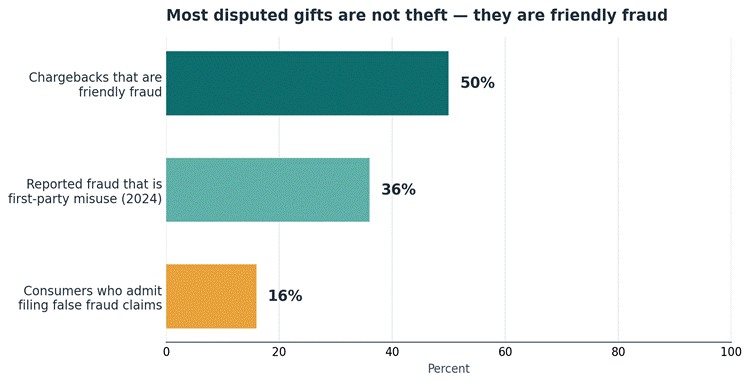
According to 2025–26 industry estimates, friendly fraud represents 75% of all chargebacks. This is a significant increase from previous years. For your reference, friendly fraud accounted for just 34% of total merchant losses in 2023. Let us start by examining the chargeback lifecycle to understand how chargebacks actually work.

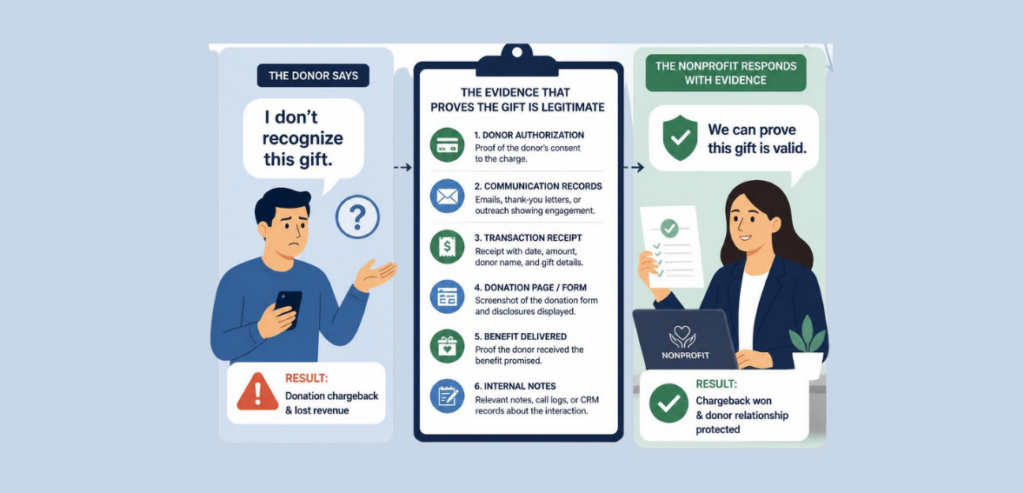
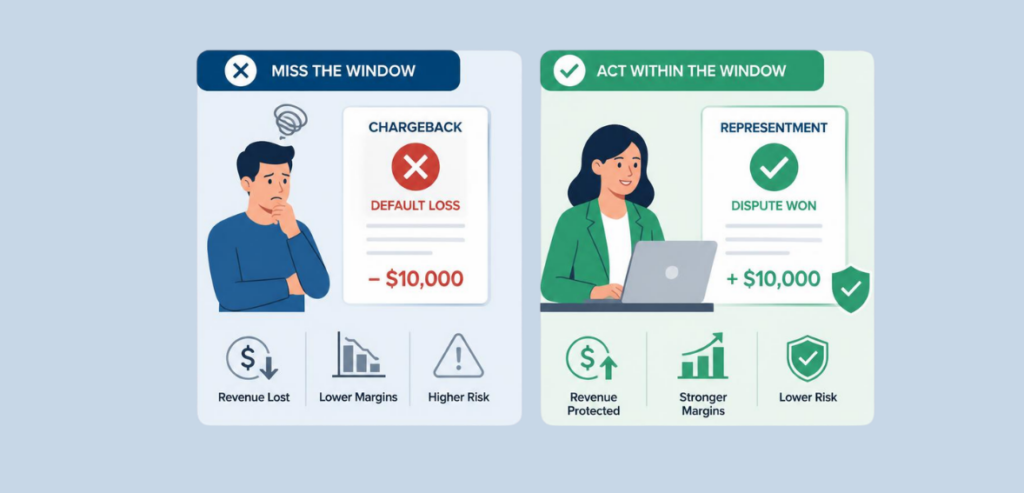
After a transaction is completed, the settled amount becomes vulnerable to chargebacks. If the customer wants, they can file a complaint with their issuing bank or card company and issue a chargeback. Upon receiving such a complaint, the issuer initiates a dispute. The merchant must then respond within a specified time window. The merchant provides the comprehensive documentation and evidence of the transaction, and the complaint is resolved by the issuer.

But here is a catch. If the merchant loses the dispute, the transaction amount, plus a chargeback fee, is deducted from the merchant’s account. However, regardless of the outcome, even when the merchant wins the dispute, the chargeback fee is deducted from the merchant’s account. This means that every chargeback incurs a fixed cost for the merchant, regardless of whether the dispute is settled in the customer’s favor or the merchant’s.

The base chargeback fees are typically $15 to $35. Every chargeback comes with a hidden cost, including the base chargeback fee, the cost of goods sold (COGS), and the time spent defending it. A chargeback can be issued for various reasons. For example, chargebacks are sometimes issued in cases of true fraud, i.e., when a stolen credit card is used by a malicious actor.

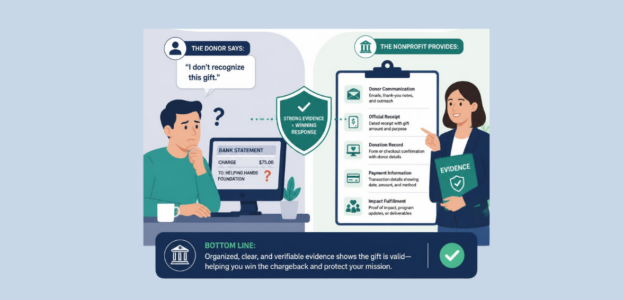
However, apart from genuine fraud, there is one type of chargeback that represents a massive revenue loss for the business and must be contained at all costs — friendly fraud. Friendly fraud refers to a situation in which a legitimate customer disputes a valid charge. These could occur for a variety of reasons, such as forgetfulness, buyer’s remorse, purchases made by family members, or malicious intent.

You cannot control chargebacks due to malicious intent, but friendly fraud due to genuine reasons can be avoided. Most friendly fraud cases are a symptom of a larger operational flaw in your business. Problems such as poor product descriptions, slow shipping, and poor customer support could lead to friendly chargebacks.

Chargebacks are not something you must ignore as a small business owner. When chargeback rates exceed a certain threshold, card networks respond with heavy penalties, higher processing rates, and higher subscription tiers. In some cases, consistently high chargeback rates could lead to the merchant account being permanently revoked.

The Mechanism of Chargeback Alert Services

Chargeback Alert Services

There are two major chargeback alert services available today. These are offered by the major card networks, namely Ethoca by Mastercard and Verifi by Visa. This section aims to demystify the technology behind these chargeback alert services and help you better understand network flows.

Chargeback alerts act as a delay mechanism. Think of these alerts as a “pause button” that delays the official chargeback to provide the merchant a chance to recover their losses. Alerts give merchants a 24- to 72-hour window to resolve the issue before it becomes an official chargeback.

You must understand the concepts of issuers and network alerts to better understand chargeback alerts. Issuer alerts are the alerts generated directly by the issuing bank when a customer calls to complain. And network alerts are triggered at the card network level.

When chargebacks were processed in the traditional way, the merchant remained unaware of the chargeback for a very long time, until it was too late to cover their losses. Modern alert mechanisms notify the merchant as soon as the customer lodges a complaint about a transaction they want to issue a chargeback for.

A typical chargeback cycle begins with the customer calling the bank to lodge their complaint regarding a specific transaction they want to issue a chargeback for. Next, the bank pings alert services, such as Ethoca or Verifi, which send alerts to the merchant and the payment gateway. The merchant responds to the chargeback alert, and depending on the outcome of the dispute, either suffers a chargeback or does not. After resolution, the bank cancels the dispute.

There is no alert network on the market that covers 100% of the global issuing banks, which limits these alert services for merchants.

What Happens When You Get an Alert?

Before diving into the nitty-gritty of the alert processes, there are two main concepts every business owner must understand: auto-resolution and blacklisting. Auto-resolution is when the software automatically refunds the transaction upon receiving an alert. And, blacklisting means adding the offending customer’s details to an internal blocklist to prevent future fraud.

Now, let us go through the alert lifecycle step by step. The first step in an alert cycle is the alert itself. When a customer lodges a complaint with the issuer, an alert is received. As soon as the alert is received, the merchant must locate the transaction on their systems.

The next step involves the financial decision. You have a few options, and the decision depends on the time chargeback amount in question and the time required to dispute it. Mostly, the merchants issue a full refund to satisfy the alert. The third step is the most important step — the operational action. You should cancel the subscription, halt the shipment, or revoke all digital access. The last step of the alert lifecycle is to update the network. The merchant informs the alert provider that the refund was issued to close the loop.

Chargeback alerts are important because missing the time window can result in double the losses. You may end up paying the alert and getting a chargeback, nevertheless.

When Chargeback Alerts Save You Money?

When Chargeback Alerts Save You Money

This section highlights specific business profiles and scenarios where paying for alerts can yield a high return on investment (ROI). The key to understanding how chargeback alerts save you money is chargeback monitoring programs and high-risk merchants.

Chargeback monitoring programs are punitive measures by the card networks for excessive disputes and often carry massive fines. The most vulnerable category of merchants is the high-risk merchants. Merchants whose industries are prone to disputes, such as information products, supplements, and adult travel, are at higher risk of chargebacks than others.

Now, let us understand how chargeback alert services can help you save money in your business. Imagine that you are nearing the 1% chargeback ratio threshold and need an immediate reduction to avoid losing processing capabilities. In such a case, alerts help you to refund angry buyers immediately, saving the chargeback fee on every refund and limiting losses to the cost of goods sold (COGS).

When the cost of the alert is a tiny fraction of the potential loss of merchandise and dispute fees, it is a wise decision to implement chargeback alert services rather than sit and wait for chargebacks in the traditional way. Alert services save you money when your business has inherently higher average order values (AOV).

For digital goods or SaaS, COGS is zero. This makes refunding the amount to dissatisfied customers a better choice. It saves your chargeback ratios and avoids the chargeback fees. This is a perfect example of exceptionally well-operational efficiency. For subscription-based businesses, alerts signal the need to cancel future recurring billing, preventing sequential chargebacks from the same user.

When Chargeback Alert Services Do Not Make Financial Sense

Chargeback alert services can save you a lot of money, but they are not useful in every business. This section explains the businesses in which alert services are an operational overhead rather than an investment. To understand the scope of alert services, you must understand the concept of margin erosion and double dipping.

When the cost of prevention tools erodes your business’s profit margins, it is called margin erosion. Double dipping is the combination of alert pricing and chargeback fees. If you are paying the alert fees, refunding the amount, but still receiving a chargeback, it does not make sense to continue paying for an alert software.

Alerting services do not make sense for businesses that have low margins or low AOVs. For example, if your product is $10, paying a $35 alert fee to refund a $10 purchase is a financial disaster. This is mathematically worse than just taking the $15 chargeback fee. Some chargebacks are almost guaranteed to be settled in favor of the merchant, for example, a B2B SaaS with signed contracts. Auto-refunding friendly fraud that you could have easily won through the representation of proof does not make sense.

If you think that alerting services could cover for bad customer support, then you are wrong. Alerting services are the last resort for reducing chargeback expenses, but in the majority of cases of friendly fraud, a good support staff can clear up the customer’s confusion and save you a refund, too. Lastly, if your dispute ratios are too low, for example, below 0.1%, then it does not make sense to pay for an alert software separately.

Conclusion

Chargeback alert services are a powerful defensive tool, not a substitute for good business operations. Most cases of friendly fraud arise from confusion, and having a strong support staff and appropriate measures in place could save you the entire COGS. You must treat alerting services as a last resort, issuing timely refunds to prevent chargeback fees from eating into your profit margins. Nevertheless, optimized business operations remain a necessity for sustained business growth.

Frequently Asked Questions

  1. Are chargeback alerts the same as fraud alerts?

    No, fraud alerts are different from chargeback alerts. Fraud alerts happen before or during a transaction. Chargeback alerts occur after the transaction, upon the customer’s complaint to their issuer.

  2. Can I fight a chargeback if I receive an alert?

    Usually, no. The purpose of an alert is to resolve the issue by issuing a refund to avoid chargeback fees. However, once it becomes a standard chargeback, you can dispute it.

  3. Do chargeback alert services cover all credit cards?

    No, alerting services cover only those issuing banks that are willing to participate in the alerting network. Ethoca and Verifi cover most global banks, but some smaller regional banks may still be left out.

  4. What happens if I refund a transaction but still get a chargeback?

    This is known as “double dipping”. You must submit proof of the refund (ARN – Acquirer Reference Number) to your payment processor immediately to have the chargeback reversed without penalty.

  5. Are chargeback alert fees refundable?

    No, once an alert is triggered and delivered to your system, the network will charge you a fee for the alert, regardless of whether you successfully avoid a chargeback.

Merchant Descriptors

Merchant Descriptors Explained: How the Right Billing Name Can Reduce Friendly Fraud and Support Calls

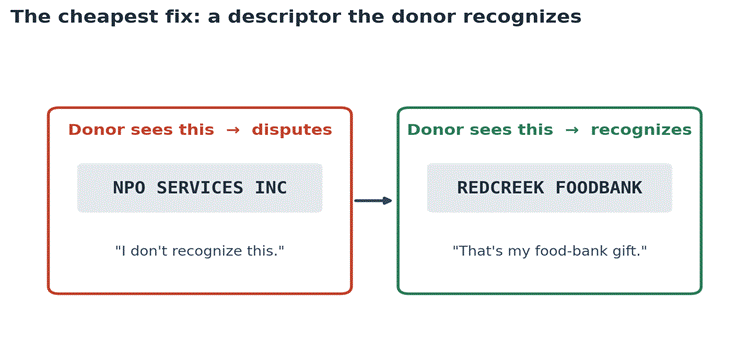
Merchant Descriptors are the names of the billed items listed on an itemized bill. These are not merely names of the services provided; they are the cross-referencing proof for the homeowner to check in the future. The risk of chargeback increases when the payer fails to recognize a payment they made a month ago. For example, if your bill describes an emergency pipe change vaguely as “plumbing services”, then after a month or two, the homeowner might not remember what they paid for, prompting them to issue a chargeback.

You must have realized that descriptors are a seemingly minor technical detail, yet they directly affect businesses’ operational processes. Getting your descriptors right is the first step towards avoiding chargebacks. Incorrect billing descriptors cause significant operational challenges, including revenue loss, higher dispute rates, and increased stress on support teams.

The Unseen Leak in Revenue And Support

Leak in Revenue

To minimize the risk, you must optimize your billing descriptors, which depend on two main factors: transaction confusion and friendly fraud. Transaction confusion occurs when a cardholder does not recognize a legitimate charge. This is often due to two main causes: wrong billing items and DBA mismatch. DBA stands for “Doing Business As” and refers to the name of your enterprise and the name to which your merchant account is registered.

Transaction confusion is the primary cause of friendly fraud, i.e., unintentional chargebacks filed when customers fail to recognize transactions on their account statements. The modern consumer frequently reviews their bank statements on mobile apps. With an increasing number of digital transactions, it becomes difficult to track every dollar spent. Paired with skepticism about online fraud, a consumer panics when they see a transaction on their statements that they don’t recognize.

A dispute filed via a banking app takes just three clicks; the customer response is not delayed while the panic subsides, which means any slight inconvenience could be a trigger for issuing a chargeback. Most businesses treat billing descriptors as a “set it and forget it” compliance checkbox; however, they are tools for future-proofing your sales against potential chargebacks. Optimizing your merchant descriptors is the lowest-effort, highest-ROI tactic for chargeback prevention and CX strategy.

Decoding the Merchant Descriptor: What It Is and How It Works

Decoding the Merchant Descriptor

The merchant descriptor is the text displayed on a customer’s credit card or bank statement to identify a purchase. Let us first understand how data travels through the billing cycle. The payment process starts through a payment gateway. When the card is tapped or dipped on an EMV card reader, the data is tokenized and transmitted to the payment gateway. The payment gateway transmits the data to the acquiring bank. The acquiring bank transfers the data for verification to the card network. Once the transaction is verified by the card network, the request is sent to the issuing bank. The issuing bank, often called the issuer, is the customer’s bank that issued the credit card. The card network charges a processing fee on every transaction. The issuing bank approves or declines the transaction request. It is the issuer that ultimately decides how the descriptor is formatted in their app or statement; this makes it important for you to align your descriptors so they appear as desired on the issuer’s statements. Upon approval of the request, the funds are debited from the customer’s account.

Having detailed, clear descriptors is necessary because issuers often truncate or reformat data to fit their legacy UI constraints. This mangles your descriptors and confuses the customer. Another key concept to understand here is DBA. DBA stands for “Doing Business As”. It is the brand name the customer knows, which often differs from the legal entity’s name. You must register your merchant account under the same name as your DBA to avoid transaction confusion and reduce the risk of friendly fraud.

There is a difference between the authorization descriptor and the settlement descriptor. The authorization descriptor is often referred to when the job is still pending, while the settlement descriptor is mentioned once the work has been completed.

Now, let us discuss the problems associated with defaulting to the parent company’s legal entity name during account setup. Imagine this: a customer walks into your store and makes a purchase. Now, after a month, the customer is reviewing his account statement and finds an unfamiliar name next to the purchase amount. The customer recognizes you by your brand name, but they may not remember your legal entity or parent company. They panic and issue a chargeback through their bank’s mobile app, and you end up taking a loss.

Understanding Static, Dynamic, and Soft Descriptors

This section will categorize the technical tools available to merchants and explain to you when to deploy each. First, you need to understand basic concepts such as static, dynamic, and soft descriptors.

Static descriptors are fixed names applied to every transaction processed by the merchant account. These are the best descriptors for single-product SaaS, physical retail, or brands with a singular, distinct identity. It is the easiest descriptor to set up in the payment system and has the least chance of getting distorted in the issuer’s UI constraints.

Next are the dynamic descriptors. These descriptors are configured via API on a per-transaction basis, allowing for item-specific details. This is the gold standard for multi-product lines, aggregators, or variable billing. These descriptors allow appending order numbers or specific product names.

The last type of descriptors is soft descriptors. It is the temporary name shown while a transaction is in “pending” status. You might have guessed that, since they are temporary, soft descriptors are the riskiest descriptors to use. Most often, they are the prime culprits for support calls. The customer does not remember the “temporary” name, leading to confusion during later transactions. Pending charges sometimes look different than actual charges, such as fewer characters passed in the auth message.

You must understand how to align soft and hard descriptors so you can avoid confusion for your customer when they see their account statements.

The Ripple Effect: Friendly Fraud, Chargebacks, and Support Overload

Friendly Fraud

Poor descriptors cause operational damage to your business. Customer confusion directly leads to significant financial losses. This section will help you connect the dots and understand the relationship between confusion about account statements and the issuance of chargebacks. You must understand three main concepts: first-party misuse, dispute ratio, and network monitoring programs.

First-party misuse is the industry term for friendly fraud. It is the chargeback issued on a legitimate payment, intentionally or unintentionally, by the customer. The percentage of total transactions that result in a chargeback is known as the dispute rate. It is a crucial health metric for your organization that measures the optimization of your payment processes.

Network monitoring programs, such as Visa Dispute Monitoring Program (VDMP), often increase restrictions on your business if your chargeback rate rises. If your chargeback rate exceeds 1%, most card networks impose restrictions and higher processing costs on every transaction. In some cases, your entire merchant account may be revoked.

You can optimize chargebacks by taking some essential steps. Starting off, you should address the support burden. If a customer sees an entry on their account statement and thinks, “What is this charge?” This will confuse them and trigger chargebacks. It is a low-value, high-cost support ticket.

Transaction confusion leads to bank calls. Banks default to opening a dispute. When this happens, the merchant incurs the chargeback fee, which is often $15 to $25. The merchant usually loses the COGS and the revenue. High dispute ratios risk merchant account closure or placement in expensive high-risk processing tiers. Another challenge is the particular vulnerability of recurring bills to descriptor-based disputes.

Anatomy of a Perfect Descriptor & Compliance Constraints

This section will provide the exact, actionable formula for building a compliant and highly effective descriptor for small business owners. An ideal descriptor consists of three components: prefix, suffix, and special characters.

The first 3-7 characters of the descriptors that act as brand identification are the prefix of the descriptor. Mostly, it is used to indicate the DBA of your organization. All the remaining characters detailing the specific purchase or contact info of your business are the suffix of the descriptor. Some card networks impose limitations on the characters that can be used in a descriptor. Card networks prohibit special characters, such as exclamation marks and question marks, from being used in descriptors.

A rule of thumb while defining a descriptor is the 22-character rule. Most descriptors that are under this length are sufficient to clearly state the item lines and maximize statement clarity for the customer. You should always lead the descriptor with a customer-facing brand name or DBA. You should remove the organization classification (e.g., LLC or INC) from the descriptors, as it is not particularly important to customers.

Including a contact number or a short URL in your receipts is the ultimate safety net for your business. It intercepts customer panic; they feel that the confusion can be cleared if they can reach your support teams, which drastically reduces the urge to issue a chargeback because the customer remembers they made the transaction.

You should use secondary fields, such as city or state, effectively. This information is usually very crucial for any customer to remember where they spent their money. You can also use it for other purposes. For example, acquirers allow it to be used for customer support URLs.

Lastly, you must stay up to date with your card network’s latest rules and mandates. Card networks such as Visa and Mastercard update their terms biannually, and staying informed about these changes is crucial for remaining compliant and avoiding unnecessary charges.

Conclusion

The process of issuing chargebacks and friendly fraud is not an immediate decision. It is the cascading effect of various factors that culminate in a decision to issue a chargeback. With everything available on the mobile itself, the customer does not have time for their panic to subside; your descriptors must be detailed and clear enough that the customer can recognize, at first glance, the goods or services they paid for. The right billing descriptors can help optimize business processes, improve customer satisfaction, and reduce the probability of chargebacks.

Frequently Asked Questions

  1. What is a merchant descriptor?

    A merchant descriptor is the text string that appears on a customer’s credit card or bank statement to identify a transaction.

  2. What is the difference between a DBA and a legal business name in billing?

    A legal business name is the official entity registered with the state, while a DBA is the brand name customers actually know.

  3. How many characters can a merchant descriptor have?

    Most card networks allow up to 21 or 22 characters for the primary merchant descriptor. Some networks provide additional fields for phone numbers, URLs, cities, or states.

  4. Why do my customers not recognize my charges?

    This is most probably due to confusing descriptors. If your issuer’s UI changes how descriptors appear on statements, and the customer cannot recognize the charges, they may forget they paid your business.

  5. Can I put a phone number or URL in my merchant descriptor?

    Yes, you can, and you should put a phone number or a URL in your merchant descriptors. It is a lifesaver because, when a customer is in panic after failing to recognize a payment, the option to resolve it with the company first reduces the risk of a chargeback.

Failed Card Payments

Soft Declines Vs Hard Declines: What Failed Card Payments Really Mean for Small Businesses

The payment landscape is changing significantly on a daily basis. Failed card payments are not just a technical glitch; they are a massive revenue leak. But it is definitely solvable. You should understand key concepts such as revenue leakage and involuntary churn. Many businesses focus obsessively on top-of-the-funnel conversions but ignore the bottom-of-funnel payment failure rate.

Involuntary churn is driven by failed payments, such as expired cards or false fraud positives, and consistently accounts for 20-40% of total SaaS churn. This represents a significant revenue loss, and most businesses fail to optimize it. Failed payments do not just result in lost sales. Recurring models erode the customer’s average lifetime value (LTV).

You must understand voluntary churn, which means the customer actively canceled their subscription. This is very different from involuntary churn. When the customer’s credit card is declined, it is not their fault. You must understand the difference between soft declines and hard declines, as the first step to closing this revenue leak.

For example, the founder spends thousands on ads to acquire a customer, only to lose them silently in month two, because the debit card had a $0 balance on a Sunday. This is a massive loss for the business, which could have been avoided with intelligent optimization of payment processes.

The 3-Second Journey of a Card Payment

Journey of a Card Payment

This section provides a simple explanation of the baseline transaction flow to help you understand who actually declines the payment. Before that, we want you to understand the key concepts of payment processing. There are four main parts of the payment cycle: the payment gateway, the payment network, the issuing bank, and the acquiring bank.

The payment gateway is a digital checkout software that securely transmits the customer data to the payment processor. The infrastructure that routes the transaction between the merchant’s bank and the customer’s bank is the payment processor, such as Visa or Mastercard. The issuing bank is the bank that issues the credit card to the customer, while the acquiring bank is the merchant’s bank that receives the funds once the transaction is approved.

Once a customer clicks “Pay” on the payment portal, the payment details are transmitted to the payment gateway. The gateway then sends the data through the card network to the issuing bank, which decides whether to approve or decline the transaction based on factors such as available funds, card status, and fraud risk. If the transaction is declined, the payment cycle stops. Otherwise, once the transaction is approved, the issuing bank sends back a positive response. The response travels back down the chain to the merchant. The acquiring bank then settles the funds in the merchant account.

What is a Payment Decline?

Payment Decline

This section will help you understand what payment declines actually are and how you can optimize your processes to prevent them. The key concepts to understand here are decline codes and authorization responses.

A decline code is a specific two-digit alphanumeric response from the bank that explains exactly why a transaction was blocked. An authorization response is the final “yes” or “no” message sent by the issuing bank after evaluating the transaction risk and available funds.

A decline is an API response indicating that the issuing bank or processor will not authorize the transfer of funds. These responses come in the form of two-digit alphanumeric codes, called decline codes. For example, code 05 means “Do Not Honor,” and code 51 means “Insufficient Funds.” Declines are not personal rejections. They are simply algorithmic safety measures.

If you misclassify these codes, it will lead to either lost revenue, such as from giving up too early, or network penalties from trying too hard. Of the dozen decline codes, only a handful account for the majority of declined transactions. Understanding the reasons and workings of these commonly encountered codes is necessary to optimize your operations to handle these declines.

What Are Soft Declines?

Not every soft decline is fatal for the business. Most of them are temporary, highly recoverable, and worth fighting for. There are key concepts you must understand to better understand soft declines, such as insufficient funds, velocity limits, and network downtime.

Insufficient funds, or NSF, is a common decline trigger indicating that the customer’s bank account does not have enough money to cover the charges. The fraud-prevention rules that block transactions impose velocity limits: if too many purchases are attempted within a short time frame, those requests are declined.

Another roadblock to payment processing is network downtime. These are brief network outages at the bank or processor level that prevent the transaction request from being completed. Although you can optimize NSF and velocity-limit-based declines, network outages are largely out of the scope of any business owner. It is a choice you make when selecting your payment processor to minimize outages.

A soft decline is a transaction that failed due to temporary issues. The card is valid, the account is real, but circumstantial friction prevents authorization, which in turn blocks the transaction. Common triggers for soft declines include insufficient funds (NSF), processor downtime, and unusually large purchase volumes that trigger temporary fraud blocks.

However, you must not view soft declines as lost revenue. In fact, most of the soft declines are highly recoverable with the right strategy. A soft decline might be approved tomorrow without any customer intervention; therefore, it should not be treated as a hard-and-fast decision, but rather as a temporary halt to your payment.

What Are Hard Declines?

Hard Declines

Now, you understand what soft declines are and what common triggers lead to soft declines. It is time for you to understand hard declines. A hard decline is a permanent payment failure where the issuing bank absolutely refuses the charge, meaning the credit card cannot be used again for that purchase.

You should note that we defined soft declines as temporary halts and hard declines as permanent blocking of payment requests. There are several reasons for hard declines, such as expired cards, lost or stolen cards, and invalid CVVs. A decline indicates that the card has expired, and the customer must enter their replacement card details to proceed with any transaction. These are expired card declines. Sometimes, the customer’s credit card may get lost or stolen. The customer reports this theft to their issuing bank, which in turn blocks the card for any future transactions. In such a case, all transactions on these cards will be blocked, and the customer must enter a replacement card in the system to resume successful transactions.

In simple words, hard declines are transactions that failed due to a permanent, unresolved issue with the payment method. The issuing bank is explicitly saying not to try that card again. Common triggers for hard declines include expired cards, lost or stolen cards, and invalid CVVs. A CVV is a 3-4 digit number on the back of a credit or debit card. The purpose of the CVV is to prove physical possession of the card during online orders. It ensures that the card data is entered by the card’s legitimate owner and that the details are not stolen from the dark web.

A crucial insight for business owners like you: retrying hard declines is not just futile; it actively hurts your merchant account standing. If your account is flagged for multiple hard declines, the banking network will impose penalties. In extreme cases, banks revoke the merchant account altogether.

Failed Card Payments: Soft Declines vs Hard Declines

This section explains the difference between soft and hard declines. We will distinguish between soft and hard declines based on three main criteria: root cause, resolution path, and system action.

The root cause is the underlying reason the transaction was declined in the first place. The resolution path is the specific sequence of actions required to fix the decline and successfully capture the revenue. And lastly, the automated response your payment software should trigger, such as queuing a retry or halting future attempts.
The first difference between soft and hard declines is that their nature varies greatly. Soft declines are temporary and highly recoverable, whereas hard declines are caused by permanent, unresolvable issues with the payment system. Regarding system actions, a soft decline must be automated and safely retried using carefully designed algorithms. On the other hand, retrying hard declines is futile and must be stopped immediately.

Soft declines often require no customer intervention because the system can retry and resolve the issue in most cases. However, for a hard decline, customer intervention is necessary. For example, a transaction declined due to NSF can be retried within 7-15 days, depending on the likelihood of approval; whereas a transaction decline due to an expired card requires the customer to re-enter card data on the payment portal.

The most common decline codes for soft declines are Code 51 (NSF) and Code 05 (Do Not Honor). For hard declines, the most common are Code 04 (Pick Up Card) and Code 14 (Invalid Card Number). The strategy for handling soft and hard declines is also different. Soft declines are handled by optimizing payment processes and implementing smarter retry algorithms. Meanwhile, hard declines require customer intervention, making communication the most important aspect of handling them.

You should treat soft declines as an indication to try the payment method again, whereas hard declines mean that any further retries are in vain.

Conclusion

Soft declines and hard declines are not inherent business failures. In most cases, soft declines can be addressed by optimizing payment processes, whereas hard declines can be addressed through effective communication. The difference between soft declines and hard declines dictates your approach towards handling them. The first thing you do as a business owner is to shift your mindset towards these declines. Viewing them as permanent roadblocks will lead to lost revenue that could have been recovered through efficient processes.

As a business owner, you have to treat declines as a data and operations problem, rather than a cost of doing business. Improving your optimization and communication workflows can help minimize losses from soft and hard declines, respectively, and boost your organization’s long-term revenue.

Frequently Asked Questions

  1. Do I pay transaction fees on declined card payments?

    Yes, most payment processors charge processing fees on all transactions, including declined payments. This is why it is important to implement smart algorithms to handle declines, as unchecked declines can lead to significant revenue leakage.

  2. Can I keep retrying a hard decline to see if it goes through?

    No, usually hard declines are caused by permanent and unresolved issues, such as expired cards, lost/stolen cards, or invalid CVVs. Retrying hard declines is a waste of operational cash on the processing fees of payments deemed to fail.

  3. What is the difference between a decline and a chargeback?

    A decline stops the transaction before the money moves. A chargeback happens after a successful payment when the customer formally disputes the charge with their bank.

  4. Can I automatically prevent card expiration declines?

    Yes, by enabling an “Account Updater” service through your payment gateway, which automatically fetches new expiration dates directly from Visa and Mastercard.

  5. Should I email customers as soon as their card is declined?

    You can email your customers immediately for hard declines, but for soft declines, you must wait. You should first let your automated system retry the payment based on algorithms, and email only if it still fails.

Seasonal Business

Seasonal Business Playbook: Payment and Operations Strategies for Peak Periods

Imagine a store packed with customers, online orders piling up faster than you can fulfill them, the phone ringing nonstop — and then your payment system freezes, transactions time out, and customers leave.

This is not a hypothetical scenario but a real-life reality for thousands of seasonal businesses every year. Retailers during the holidays, beach shops during the summer, tax preparers during tax season, and vendors at festivals all face this during peak seasons. The tough news is that much of this could be avoided.

Peak season is critical for a small seasonal business because it can determine whether it generates enough revenue for the entire year. It is not always the businesses with the biggest budgets or the flashiest ads that succeed during peak seasons.

What most of them do to survive and thrive is prepare their payment systems, operational procedures, and teams in advance, before the pressure hits. This playbook gives you all the strategies you need to accomplish that when the busiest days arrive.

Strategy 1: Map the Revenue Calendar and Know Your Business’s Peak Period

Know Your Business’s Peak Period

If your goal is to optimize anything, you need to first know when everything is happening. Most business owners understand approximately when their sales will peak. Very few take the time to differentiate between peak sales months, peak days of the week, and peak hours of operation.

Use CRM technology to break down the data you have available. Once you understand how to interpret the data, build a revenue calendar. It is a document outlining projected sales, staffing levels, estimated shipping and delivery dates, and marketing campaigns. Share these documents with all departments throughout the year so that you and your management team can serve as an accurate source of information.

Strategy 2: Build Payment Infrastructure for Your Peak Periods

Build Payment Infrastructure

As a seasonal business owner, your payment processing infrastructure should be able to handle the worst day imaginable — the busiest day of your year, with the highest transaction volume and most chaos. If it works that day, it can handle anything.

Scalable Processing Capacity

You need to verify with your payment processor that there is no cap on your acceptance volume that could flag your account for unusual activity during busy times. Contact your payment processor at least 60 to 90 days in advance of your peak season and provide them with copies of your transaction history from prior years. This helps ensure that any potential volume limits are changed well in advance. Trying to make changes the week before you plan to process at high volume will result in significant damage to your business.

Backup Hardware is Non-Negotiable

Having backup hardware is essential. Under no circumstances should a peak-season business operate with a single terminal. You should always have at least one additional terminal available for immediate deployment. Mobile credit card terminals are also a great option for giving your employees flexibility, enabling them to process sales anywhere in the store. With mobile payment capability, you can quickly add checkout capacity without the cost of installing additional fixed terminals.

Offline Processing Capability

A payment system that can queue and store transactions when the internet goes down is an absolute requirement for businesses today. Disruptions in internet service are more common than most people think, and when your system comes to a halt due to a lost connection, you create an environment where customers cannot make purchases. There are also many instances of customers losing confidence in your business because you cannot accept payments via their preferred method.

Payment Method Coverage

The rise in contactless payments, digital wallets, and other online payment solutions means that a merchant’s ability to accept diverse payment methods will remain an important differentiator in the retail marketplace. Merchants that added contactless payment capabilities before peak shopping periods have reported that their customers can check out 30-40% faster than before. This translates into shorter checkout lines and a higher volume of transactions processed per hour.
Strategy 3: Prepare a Pre-Season Timeline

Pre-Season Timeline

You need to prepare in advance. Being the top business during peak season means getting your operations and products ready well before you need them.

90 Days Before the Season

Audit and upgrade all of your technology. Check that all your payment processing setups are up to date. Make sure that your POS software is on the latest version. Also, confirm that your processor meets uptime SLAs during peak volume.

60 Days Before

Hire all the people you need for peak season. The best seasonal employees disappear quickly, so hire them early. Train your new hires on more than just their job duties. Your employees need to be trained to respond to crisis situations without panicking — an employee freezing during a crisis can be as costly to your business as a terminal going down.

30 Days Before

Run a test to see how your site performs under stress. Simulate your anticipated high-volume transactions, run through all possible refund scenarios, and test checkout using as many devices and browsers as you can to identify weaknesses before customers do. This is also the time to test your host’s ability to handle traffic spikes. For example, a site that performs efficiently with 200 users can crash at 2,000.

1–2 Weeks Before

Make final adjustments and confirm everything is working properly. Everyone on your team should be aware of and understand all protocols, and know when and how to escalate issues. Make sure your payment processor’s emergency customer support number is posted clearly at each register. Do one last check of your checkout process from the customer’s perspective, both in-store and online.

Strategy 4: Keep Cash Flow Healthy During the Rush

Keep Cash Flow Healthy

An increase in your revenue does not always result in a corresponding increase in your available cash, especially when processing deposits takes longer than expected. Timing is critical during busy times of the year. The first thing you should do is confirm your payment processor’s funding timeline prior to peak season.

For instance, with the right payment processing partner, next-day deposit funding can deliver a very significant operational impact by enabling you to pay employees for overtime hours, restock product inventory quickly, and pay supplier bills in real time.

To get a more accurate picture of your actual performance compared to your plan during the seasonal months, keep your operating account separate from your seasonal revenues account. By doing so, you will be able to see the actual performance of the season without the worry that spending from reserved funds has skewed your numbers. In addition, you can set automated low-balance alerts on your accounts to ensure that you are never caught short on payroll or payments to suppliers.

Negotiate payment terms with your key suppliers before the season starts. This will provide you with the flexibility needed to adjust your business if you experience slower-than-anticipated cash receipts in any given week.

Additionally, create forecasts of your returns and refund ratios based on your historical data, so you are not caught off guard by a higher-than-expected volume of returns immediately after the peak season. Tracking your return rates by product and service type will help you identify problem areas before returns pile up.

Strategy 5: Make Sure All Operations Work Together

All Operations Work Together

Operating simultaneously in both physical and digital formats creates omnichannel stress during high seasons for every business. Customers expect the same experience whether they shop in person, buy through your website, or use curbside pickup. To perform well during high seasons, your operations need to work in sync with your customers, not in competition with them.

A unified inventory management system is the first step to creating a positive relationship with your customers. If you sell an item online that you do not have in stock at your warehouse, you have severely damaged the trust your customers have in you.

Find an inventory management platform that syncs your inventory across all channels in real time. If you oversell during a high-selling period, you will create returns, disputes, and chargebacks, which will lower your profitability and hurt your reputation.

To maximize revenue during high sales periods, you need an optimized online checkout process. Peak sales periods create significant traffic on e-commerce sites and increase cart abandonment rates. Every additional step in the checkout process, every slow-loading page, and every confusing form field represent lost revenue.

The best checkout flows have three steps or fewer between the shopping cart and the confirmation page. Make sure your checkout process works well on mobile devices, since most holiday shoppers will research and buy products on their phones. If your mobile checkout is clunky, you are missing out on significant revenue.

Conclusion

During peak seasons, businesses generate enough income to sustain themselves during off-peak periods. Businesses that do not prepare properly lose customers permanently, incur chargebacks that negatively impact their processing rates, and leave revenue for the competition to collect.

Take the time to prepare early by auditing your payment systems with an honest assessment of what is working and what needs improvement. Prepare your team to handle customer needs before the peak season pressure hits. Work with a processor that values customer satisfaction and offers transparent processing rates, timely funding, and reliable 24/7 customer service.

Through advance preparation for peak seasons, you not only survive but thrive during the busiest times of the year.

Frequently Asked Questions

  1. Can my processing limit actually block transactions during peak season?

    When your sales volume exceeds historical averages, your payment processor may flag your account. To avoid this, contact your payment processor in advance for a temporary limit increase. Provide the previous year’s sales numbers as a supporting document for the request.

  2. How can I reduce fraudulent credit card purchases during the holiday season?

    Consider implementing velocity controls that flag suspicious activity without automatically declining transactions. Set your own threshold levels based on past data and use Address Verification System (AVS) and Card Verification Value (CVV) checks for all online orders.

  3. Should I offer buy now, pay later (BNPL) payment options during the holiday season?

    If your average sales price is high, you should consider offering BNPL to reduce buyer hesitancy at checkout and potentially increase order sizes. But you will want to weigh processing fees before deciding if your merchandise mix supports this option.

  4. What should I do if my payment processing system fails during peak periods?

    Each point of sale should have a written failure protocol posted that includes your processor’s emergency contact number and instructions for switching to a backup terminal. All employees should practice the protocol before the start of the peak season.

  5. How do I minimize chargebacks for holiday gift purchases?

    Ensure that your merchant name descriptor is recognizable on customers’ bank statements. Email customers a purchase confirmation that includes transaction details with clear contact information, since many customers will contact you directly before disputing purchases.

Small Business Taxes

Tax Season Survival Guide for Small Business Owners: Payments, Deductions, and Deadlines

Feeling stressed during tax season is completely normal for any small business owner. Your stress is justified because the risks of being unprepared are substantial, and there is widespread confusion. Small business tax preparation is the process of organizing financial data to accurately report income and claim legal deductions. This guide explains how to navigate the stress of tax season and offers proven strategies for preparing small business taxes.

Tax season often feels like a penalty for being an entrepreneur. The unnerving dread of something going wrong is unshakable. The root cause of panic, however, lies in messy accounting records, confusing payment platform reports, and last-minute scrambling. According to a survey by the National Small Business Association (NSBA), more than a quarter of small businesses spend over 100 hours on tax preparation.

Reactive filing can lead to missed deductions, overpaying the IRS, and increased audit risks. There is a huge difference between a business owner who spends April frantic with a shoebox full of receipts and the owner who clicks one button on their customized payment software.

Small Business Taxes Demystified

Small Business Taxes Demystified

This section will explain the core mechanics of small business taxes. We will strip away all the complex accounting technicalities and explain the fundamental equation of small business taxes so that you understand what the IRS actually taxes. You need to first understand some core concepts — gross income, deductible expenses, and taxable profit.

Gross income is determined by every dollar that enters the business before any expenses are taken out. It refers to the total amount of money received, regardless of expenses incurred. Deductible expenses are the costs required to run the business. The IRS allows you to deduct these costs from your income when filing your taxes. Taxable profit, also known as net income, is the actual amount left after deducting operational expenses from the gross income. The net income of any business is the amount that is taxed by the IRS.

The IRS does not tax all the money you collect; it only taxes the profits. But you need to explicitly list the expenses on your tax returns. It is your responsibility to file taxes and deduct expenses from your gross income, so that you are taxed on profit only. According to the NSBA, a large majority of small businesses overpay on federal income tax. Ignoring business expenses is costly — you need to track them systematically.

If you are not tracking your business expenses, you are leaving deductible returns on the table, and even worse, paying taxes on the expenses you incurred. Ignoring expense tracking leads to last-minute scrambling for receipts and expenditure proof, and you end up paying taxes on your gross income, which is a massive financial leak.

The IRS is not obligated to separate your gross income into expenses and profits. You are accountable for deducting the expenses when you file your tax returns. If you cannot prove the validity of an expense with satisfactory proof, the IRS assumes your income is taxable. This makes it even more crucial to track business expenses and maintain sufficient documentation for filing.

You should also understand how the IRS taxes your income — the rules differ for sole proprietorships, LLCs, and corporate entities.

Understanding 1099-K Reporting and Payment Processing Taxes

Understanding 1099-K Reporting

After gaining a good understanding of how small-business income is taxed, it is important to understand the 1099-K forms issued by the IRS. There is widespread confusion about these forms and their impact on small-business taxes.

The 1099-K form is an IRS information return form used to report payment card and third-party network transactions. A key concept to understand here is payment processing tax reporting. It is the mechanism by which platforms such as Stripe, PayPal, or Square report your gross transaction volume to the IRS. You also need to understand reconciliation — the act of matching the gross amount reported on a 1099-K with your actual bank deposits and accounting records.

The 1099-K form is a way for the IRS to ensure that digital income does not remain hidden. There are several myths surrounding the 1099-K form. The biggest misconception business owners have is treating the amount reported on the 1099-K as their taxable income. This is a myth. The amount on your 1099-K form is actually your gross volume, not your taxable income.

The IRS has explicitly detailed the charges you are not obligated to pay taxes on. Refunds, chargebacks, sales tax collected, and the payment processor’s own fees are exempt from tax under the 1099-K. Understanding the 1099-K form is important, but the filing workflow is equally important. You should reconcile your 1099-K amount so the final amount matches your actual revenue. You can do this by deducting platform fees and refunds as expenses.

After the passage of the “One Big Beautiful Bill Act” in July 2025, the 1099-K threshold for tax year 2025 has been restored to the pre-2021 standard of $20,000 in gross payments and 200 or more transactions. Keep the reporting thresholds in mind while filing your tax returns, and always check the current IRS rules before filing.

The Business Tax Deadlines of 2026 You Should Not Miss

Business Tax Deadlines of 2026

The business tax deadlines of the year 2026 are the specific dates by which federal returns must be filed or extensions requested. If your business is not able to file taxes within the given deadline, then you need to file a filing extension. A filing extension is an IRS form that grants extra time to file the paperwork, but not extra time to pay the taxes owed.

The major deadlines for businesses under various categories are as follows. For partnerships (Form 1065) and S-Corporations (Form 1120-S), the deadline was March 16, 2026. For sole proprietors, single-member LLCs (Schedule C), and C-Corporations (Form 1120), the deadline is April 15, 2026.

Now we need to address the myth of extension filing. You should file an extension to prevent a late-filing penalty, but you still need to pay the taxes before the April deadline. Although the extension will protect you from late-filing charges, you will still be charged late-payment interest if you exceed the April deadline. To avoid late-payment interest charges, pay your taxes before the April deadline, regardless of whether you have filed for an extension or not.

Mastering Quarterly Estimated Taxes

This section explains the “pay-as-you-go” tax system in the United States and helps business owners avoid massive, unexpected year-end tax bills and underpayment penalties. First, you need to understand the concept of quarterly tax estimation. Quarterly estimated taxes are four payments made throughout the year to cover income tax and self-employment tax. Self-employment tax is a 15.3% tax on Social Security and Medicare contributions for individuals who work for themselves.

An important rule in tax filing is the safe harbor rule. The safe harbor rule is an IRS guideline that saves you from the underpayment penalties if you pay a specific percentage of your previous year’s tax liability.

You might be wondering, who needs to pay these quarterly taxes? Generally, anyone who expects to owe $1,000 or more in taxes for the year needs to pay quarterly taxes. The standard quarterly deadlines are April 15, June 15, September 15, and January 15. Your quarterly taxes can be calculated in two ways: by projecting your current-year income or using the safe harbor rule.

Essential Tax Deductions for Small Businesses

Essential Tax Deductions for Small Businesses

Now that you understand quarterly taxes and tax deadlines, you should know some essential tax deductions that every small business should claim. Tax deductions for small businesses are IRS-approved expenses that lower your taxable income. Before going to the list of tax deductions every small business should claim, it is important to know the distinction between ordinary and necessary expenses. IRS Publication 535 divides expenses into two categories — ordinary expenses and necessary expenses.

Ordinary expenses are expenses that are common and accepted in your trade or industry. Necessary expenses are those that are helpful and appropriate for your business’s growth. The important condition is that these expenses, related to carrying on a trade or business, must be directly related to profit-motivated activities rather than personal use.

Now, let us discuss some of the essential deductible expenses every small business should claim. Common categories include software subscriptions, marketing and advertising, contractor fees, business insurance, and legal or professional fees.

The Home Office Deduction: You can claim a deduction on your home office, but you need to be compliant with the “exclusive and regular use” rule, or you might face penalties.

You should also deduct transportation and vehicle expenses. For this, an understanding of standard mileage rates and actual expenses is important. You need a documented mileage log to claim these deductions.

Some lesser-known deductions every small business should claim include bank fees, credit card processing fees (which tie back to the 1099-K section), continuing education, and startup costs. These deductions are often overlooked, but they can add up to meaningful savings on your tax bill.

Building a Bulletproof Small Business Write-Off Strategy

A small business write-off is another term for a deduction, often used for physical assets or bad debt. Audit risk is the likelihood that the IRS will request proof of your tax claims. The golden rule of write-offs is that documentation is your only defense. A simple bank statement is not enough to prove your claim. You need itemized receipts showing the purchased items to claim deductions for your business expenses.

You should not aggressively claim deductions. Claiming deductions on personal lifestyle expenses, such as regular clothing or personal cell phone bills, can result in an audit and scrutiny from the IRS. Instead, take a conservative approach toward claiming deductions. Claim expenses that are profit-motivated and related to the business, and show itemized receipts as proof.

A bonus strategy to lower current-year tax liability is to accelerate end-of-year purchases. For example, make a business purchase in December instead of January; this will lower your current-year tax liability on the purchase.

Conclusion

Navigating business operations and tax filings during tax season is a stressful task for any small business owner. Managing deadlines, understanding payment reporting, and rigorously tracking deductions are important for claiming tax deductions for your small business.

Tax season reflects your year-round systems. Good systems mean a stress-free, efficient tax season, whereas inefficient systems can lead to unnecessary stress and massive revenue leaks from taxes on operational expenses. This guide has provided you with an understanding of taxes on small businesses and proven strategies to maximize your tax deductions and have a stress-free tax season this year.

Frequently Asked Questions

  1. Do I have to report income if I didn’t receive a 1099-K?

    Yes, you must report all income to the IRS, regardless of whether you received a 1099-K form. The form is just for verification, but the IRS requires you to report your business’s actual tax liabilities.

  2. What happens if I miss a quarterly estimated tax payment?

    You may face an underpayment penalty and accrue interest on the amount owed. To minimize the damage, make the payment as soon as possible.

  3. Are credit card processing fees tax-deductible?

    Yes, credit card processing fees charged by platforms such as Stripe, PayPal, or Square, as well as traditional merchant accounts, are considered ordinary and necessary expenses that can be deducted.

  4. How long should a small business keep tax records and receipts?

    Generally, you should keep tax records and receipts for 3 to 7 years, as this covers the standard IRS audit look-back period.

  5. Is it better to take the standard mileage rate or deduct actual vehicle expenses?

    It depends on your vehicle and driving habits. Standard mileage is easier to track with just a mileage log; actual expenses, on the other hand, often yield a higher deduction for expensive vehicles but require meticulous receipt tracking.

What is the CFPB

CFPB’s Future Under the New Administration – What Small Businesses Should Watch

With a change in political administration comes a shift in federal agencies’ priorities. This article will explain the what is the CFPB and its future under the new administration, with a focus on trickle-down compliance — how rules aimed at massive banks eventually alter the tools and costs for local businesses.

While the CFPB focuses on consumer protection, small businesses sit at the intersection of being merchants, borrowers, and users of fintech. This means they are affected by these rules both as users and business owners.

Small businesses are increasingly turning away from traditional bank financing, relying heavily on non-bank lenders and digital payment processors. This trend has accelerated in recent years, as the majority of small businesses have chosen non-conventional lenders over legacy institutions. Data indicates that small businesses prefer these institutions due to their speed, ease of access, and ability to process alternative data, such as real-time cash flow.

Small business owners often have a false sense of security regarding consumer laws. New CFPB directors have historically reversed or paused previous administrative rules with high frequency. With a partisan shift in administration, major leadership changes have consistently resulted in first-year reversals of predecessor policies, as seen in 2017, 2021, and 2025.

Changes to the Consumer Financial Protection Bureau (CFPB) will redefine access to credit, payment processing fees, and compliance burdens in 2026.

What is the CFPB, and Why It Matters to Small Businesses

Small Businesses

This section will explain what the CFPB actually is and the scope of its work, and then dig into why the CFPB affects small businesses and how your business is impacted by its policies.

The Consumer Financial Protection Bureau, also known as the CFPB, is a federal agency that oversees financial products and services. The CFPB’s core mandate is to prevent predatory, deceptive, and abusive financial practices. In other words, the CFPB’s ultimate goal is to protect consumers from financial crimes.

You might be wondering: if the CFPB is meant to protect consumers, why should you care? This is a common question for many small business owners. Small business owners sit at the intersection of consumer and merchant roles in the payment process. Small business owners are often treated as “consumers” by regulators when taking out personal guarantees for business loans.

The CFPB mandates are important for you as a small business owner because the CFPB regulates the vendors that small businesses rely on for their payment processing. The vendors could be your bank, credit card networks, or payment apps. All these organizations fall within the CFPB’s scope.

The Dodd-Frank Act (2010) created the CFPB. It includes Section 1071, which amends the Equal Credit Opportunity Act (ECOA) to mandate small-business data collection. The CFPB’s policies have had a profound impact on small businesses since its creation, especially in access-to-capital cases.

CFPB’s Future Under The New Administration – What is Changing?

CFPB’s Future Under The New Administration

Now, let us discuss the new mandate and how it has changed policies for small businesses. This section will explain the high-level policy trajectory for the CFPB’s 2026 outlook, free of political influence. You need to understand two main concepts: the difference between deregulation and enforcement, and the rulemaking pause/review.

Deregulation is easing rules to promote growth, while enforcement is strict policing to prevent harm. These are not discrete categories; they exist on a spectrum. A rulemaking pause or review is the standard procedure where new leadership freezes pending regulations for reassessment.

A shift in policy direction is expected from the newer leadership following the recent administrative transition. The previous leadership preferred aggressive rulemaking, whereas the newer leaders are expected to move toward market-driven compliance. If historical data is any guide, the likelihood of a freeze or review of rules enacted late in the previous term is high. There is also an expected shift in enforcement strategies — for example, prioritizing clear industry guidance over regulatory lawsuits.

However, there is a trade-off. A lighter regulatory touch may lower costs for financial providers, but those savings are not always passed down to the merchants. Financial regulation in 2026 is expected to focus on unwinding complex mandates while maintaining basic transparency.

Key Areas of Potential Regulatory Change

Three major areas are expected to undergo regulatory changes under the new policy: junk fees and fee transparency, non-bank financial institutions, and consumer data rights (open banking).

Let us understand each concept. Junk fees refer to hidden or surprise charges in financial services. Fee transparency means that every fee levied on a transaction must be disclosed explicitly in the account statement. Non-Banking Financial Institutions, or NBFIs, are tech companies that offer financial services without a traditional bank charter — for example, digital wallets that provide banking services. Consumer data rights are rules that dictate how financial data can be shared or controlled.

The effects of policy changes to these three key areas of payment processing will be significant. There has been an ongoing push against “junk fees” for a long time. Changes to these policies will impact credit card swipe fees and consumer surcharging models. Additionally, payment processing oversight is on the radar. The CFPB’s push to treat tech giants and digital wallets — such as Apple Pay, PayPal, and others — like traditional banks will significantly impact policy terms. The likelihood of the new administration altering this approach is high.

Let us discuss an important rule: Section 1033, also known as the Data Protection Rule, which was formulated to accelerate the transition to open banking in the United States. The rule requires financial institutions to share consumer data securely only with authorized third parties. The implementation phase of this rule is set to start in April 2026. The rollout of open banking rules means businesses that use third-party financial apps to manage cash flow may face changes in policy.

Easing up on these CFPB regulations might give merchants more breathing room — more flexibility in how they charge their customers. However, it is a double-edged sword. Less oversight might also allow processors to increase hidden fees on merchants themselves.

Spotlight on Lending Rules

Spotlight on Lending Rules

This section will look at the single biggest direct impact the CFPB is set to have on small businesses — the regulation of commercial credit and Section 1071.

Section 1071 is a rule that requires lenders to collect and report demographic data on small business loan applicants. Some small businesses opt for alternative financing, such as merchant cash advances (MCAs) and revenue-based financing, which are often used by businesses that cannot get bank loans.

The intent behind Section 1071 was to ensure fair lending practices, but the realities of business differ from that vision. In practice, lenders claim it increases the cost of issuing loans, making the process more complex and harder for businesses to get approved. The new administration is likely to handle merchant lending rules in a way that is more conducive to lending activity — for example, delaying compliance dates and narrowing the scope of who must report.

The new policies will directly impact access to credit. It will be interesting to see whether easing the rules makes it easier for a local business to secure a loan. Another key point to watch is whether the new administration will aggressively regulate alternative financing. It remains to be seen if the CFPB continues expanding its reach into Merchant Cash Advances (MCAs) or backs off, but for now, this crucial but expensive funding avenue remains lightly regulated.

Indirect Effects via Fintechs and Processors

Now we will explain the secondary impacts of CFPB’s actions. Small businesses do not interact with the CFPB directly; they interact with the vendors. Here is how policy changes at the CFPB level trickle down to affect small businesses.

To understand the impact, you need to grasp the concepts of trickle-down costs and de-risking. When a B2B vendor faces a regulatory fine or compliance cost, they pass the expense to their users via higher subscription fees — this is known as trickle-down cost. This is similar to how gas prices go up when the supplier has to pay higher costs. De-risking is when financial providers drop small business clients in “risky” industries to avoid regulatory scrutiny. This means that small businesses that are prone to chargebacks or generally riskier will find it harder to find a payment provider.

Modern small business tech stacks — Stripe, Square, Shopify — are heavily scrutinized by the CFPB. If the CFPB penalizes a payment processor for fraud, the processor may de-risk and mass-cancel accounts of legitimate small businesses to play it safe.

The change in administration is expected to stabilize the fintech market, resulting in more predictable software and processing costs. However, there is a risk of decreased innovation. When fintechs spend their budget fighting regulators, they are not investing in building new tools for small businesses.

Small businesses should also be aware that less oversight may mean fewer recourse options if a payment aggregator suddenly freezes their funds.

Risks, Opportunities, and Preparedness for Small Businesses

There is a real opportunity for small businesses to capitalize on this rapid change in CFPB policies. The central focus is on easier access to capital. This is an ideal time to start shopping around for credit lines in 2026, as lenders may loosen underwriting standards when compliance burdens drop.

This opportunity comes with its own risk — vendor instability. Start diversifying payment processors to avoid cash flow interruptions if one processor faces regulatory issues. Do not depend entirely on a single processor; distribute liability among multiple providers so that cash flow is maintained.

Review your customer fee structures. If consumer protection rules shift, ensure that your own customer billing — surcharges, subscriptions, and so on — remains transparent to avoid local state-level scrutiny, even if federal scrutiny drops. At this stage, as a small business owner, you can also leverage open banking. Start preparing to use new data-sharing capabilities to integrate accounting and banking software in your business more efficiently.

Conclusion

The CFPB is not just a consumer watchdog. It is the architect of the small business financial ecosystem. Stop viewing regulations as a political issue or restriction; shift your mindset to see them as a third-party risk management issue. This will help you see opportunities that other small businesses miss and ensure the long-term growth of your business.

Frequently Asked Questions

  1. Does the CFPB directly regulate my small business?

    No, the CFPB does not directly regulate small businesses. It is responsible for protecting consumers from harmful financial practices. But the regulations it imposes to achieve this have a trickle-down effect, which indirectly affects small businesses.

  2. What is happening to the CFPB’s Section 1071 small business data rule?

    Under the new administration, the Section 1071 rule is likely to face delays or review. This is similar to what happened with many rules in the past, which were either reversed or reassessed upon a change in administration.

  3. How do CFPB rules affect my credit card processing fees?

    The CFPB heavily scrutinizes payment networks and digital wallets. It does not directly increase or decrease processing fees, but vendors typically do not absorb the excess costs and most likely pass them down to small businesses that use their services.

  4. Are Merchant Cash Advances (MCAs) regulated by the CFPB?

    The CFPB has recently attempted to bring MCAs and alternative B2B financing under tighter scrutiny. A change in administration may pause these efforts, leaving MCAs lightly regulated.

  5. If consumer protections are rolled back, do I still need to worry about compliance?

    Yes, even if federal CFPB enforcement softens, many state-level regulators enforce their own consumer and commercial financial protection laws. Transparency in the billing process is the safest bet.

Fraud Small Businesses Face

Fraud Prevention for Small Business: Protect Your Revenue Without Slowing Down Sales

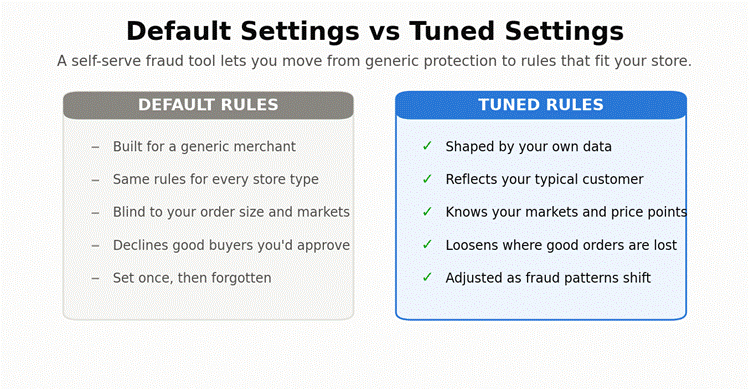
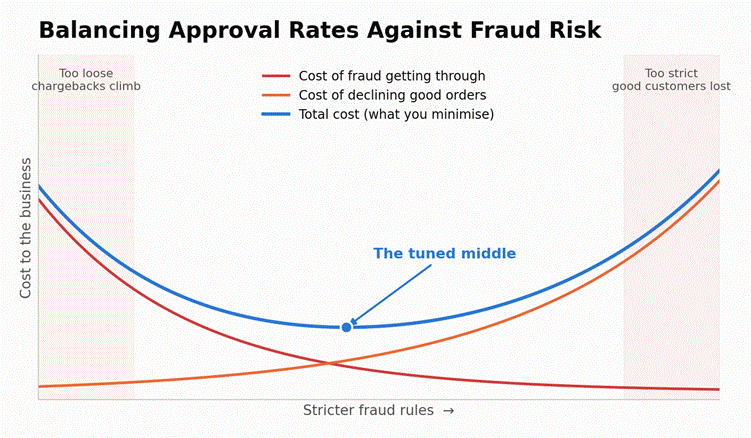
Most business owners are concerned about fraudulent payments. But overcorrecting for this fear has its own hidden losses. It could lead to lost sales due to overly strict security filtering. One of the major causes of these losses is false declines. A false decline is a legitimate transaction blocked by overly aggressive fraud filters.

Imagine this: a VIP customer makes a large, legitimate purchase from your business. During checkout, their credit card is declined because your security filters are too strict. The friction and embarrassment that come with that would lead the client to abandon your business forever.

Small businesses are prime targets because hackers assume they lack enterprise security. This means more attempts by hackers to break into your systems, steal your money, or disrupt operations. Fraud small businesses face are of many types and they can implement strict measures to prevent fraudsters from stealing from them, but this is a double-edged sword. On the one hand, fraudsters find it difficult to break into your systems; on the other hand, false alarms can lead to legitimate payments from good customers being declined. This could result in losing good customers.

Payment fraud protection should be a revenue optimization strategy, not a firewall that blocks out good customers. The right way to approach it is to think of it as a set of security measures that protect your money from fraudsters while keeping the checkout experience smooth. It is a structural necessity, not just a risk control mechanism. This article will detail fraud prevention for small businesses. We will also discuss strategies to protect your revenue without alienating customers.

Types of Payment Fraud Small Businesses Face

Types of Payment Fraud Small Businesses Face

Before we dive into strategies to secure your business from fraudulent payments, it is important to understand the types of payment fraud small businesses face. You need to first understand how card payments actually work so you can identify the threats your business faces.

There are three main types of fraud that can occur for small businesses: card-present fraud, card-not-present fraud, and friendly fraud.

Card-present (CP) fraud is often difficult to detect because the card is physically present in the store, making it harder for staff to determine whether it is stolen, cloned, or legitimate. Card-not-present (CNP) fraud occurs online or over the phone using stolen card details. Both types of payment fraud occur due to stolen card data — either the card is physically stolen or cloned, or the card data is leaked on the dark web.

A modern consumer enters their card details on various websites. If a data breach occurs at any of these organizations, the consumer’s card data is exposed. In most cases, even after damage-control efforts, sensitive information appears on the dark web and is exposed to attackers for exploitation. Due to card data being easily available on the dark web, CNP fraud is surging. At the same time, the tactics behind CP fraud are evolving.

The last type of fraud small businesses face is friendly fraud. Friendly fraud, also known as first-party fraud, occurs when a legitimate customer makes a purchase but later disputes it with their bank, claiming that they did not authorize the payment or that the order did not arrive. In most cases, friendly fraud is buyer’s remorse disguised as a chargeback. Sometimes fraudsters hack a legitimate customer’s account to use their payment methods. This is known as an account takeover (ATO), and the purchases made during such periods are usually without the customer’s consent.

Friendly fraud has become a dominant type of dispute in e-commerce. 40% to 80% of all fraud losses and 61% to 75% of all chargebacks are due to friendly fraud.

Attackers often target small businesses with weak security protocols to test massive lists of stolen credit card numbers. This is known as card testing. In this method, your business is specifically targeted for weak defenses, and stolen credit card data obtained from the dark web is checked in bulk to identify those that can be exploited. This can lead to sudden surges in processing fees when a large number of cards are processed through your payment system, resulting in significant losses for small businesses.

Securing the Storefront: EMV Chip Fraud Prevention

EMV Chip Fraud

The first step toward fraud prevention for small businesses is securing the physical POS systems in your store. EMV chips play a critical role in determining who absorbs the chargeback risk during physical card-present payments. It is crucial to discuss the liability shift of EMV chip cards before proceeding to the technical details of how EMV chips work. The EMV liability shift states that if a merchant swipes a chip card rather than dipping or tapping it, the merchant is liable for the fraud loss, not the bank.

A simple action, such as swiping the card rather than dipping or tapping it, can shift liability significantly. EMV chip technology creates a unique, single-use transaction code that cannot be reused even if the payment is intercepted. EMV (Europay, VISA, Mastercard) enforced this technology to prevent card fraud. It is mandatory for merchants to use EMV-compliant POS to ensure that the issuing bank absorbs the chargeback risk. A merchant that fails to follow the rules has to absorb chargeback losses.

With contactless payment methods such as NFC/Tap-to-Pay gaining popularity, the risk of card fraud is somewhat reduced. These methods upgrade consumer data security and the customer experience. A customer can simply tap their card or phone to pay for purchases, and the data is encrypted at the source, preventing the actual credit card data from being transmitted over the network. Since a unique code is generated for each transaction, the chances of fraud are significantly reduced.

You can start implementing safety features in your small business by auditing your POS terminals to ensure features such as fallback-to-swipe are restricted. You cannot treat this as an optional step. If you rely on swiping cards because contactless or dip payment methods are a bit glitchy, you could risk depleting your operational cash to cover chargebacks you could have prevented.

CNP Fraud Prevention for E-Commerce

CNP Fraud

Worldwide card-not-present (CNP) fraud losses are projected to grow significantly. Estimates indicate they will reach $28.1 billion by 2026, up 40% from approximately $20 billion in 2023. Due to the explosive growth of e-commerce and digital wallets, CNP fraud is expected to remain the dominant form of fraud in the e-commerce landscape over the coming years. Liability for CP fraud can be shifted to the issuing bank through EMV chip payment methods, such as dipping or tapping. In a CNP transaction, the risk is much higher, and the merchant holds almost all the liability.

Online fraud prevention requires an entirely different mindset. There are numerous ways CNP fraud can occur. Even worse is its invisible nature. Hackers do not look like shoplifters; they blend right in with legitimate customers, making it difficult to identify fraudulent transactions. To protect your business against CNP fraud, you need to secure your payment gateways and implement tokenization.

Tokenization is an encryption technique in which sensitive information, such as a 16-digit card number, is replaced with a meaningless, unique digital token during transmission. This protects sensitive card data from theft during transmission, and since unique tokens are generated for every transaction, fraudulent payments using the same token can be easily blocked.

An important factor to monitor is the velocity-to-volume ratio of transactions on your website. If too many transactions are being processed too fast, it is a definite red flag that needs to be intercepted and stopped.

Fraud Detection Tools for Small Businesses

Fraud Detection Tools

There are three methods to verify transactions: Address Verification Service (AVS), Card Verification Value (CVV), and 3D Secure. These methods protect customer data and your business’s credibility.

Address Verification Service (AVS) checks whether the billing address entered matches the one on file with the bank. Card Verification Value (CVV) is a unique 3–4-digit code on the card that verifies the card’s physical possession. AVS and CVV are non-negotiable foundation layers for your small business because they ensure that the delivery was made correctly and the card was in the owner’s possession at the time of payment.

3D Secure is a security protocol that shifts the liability of chargebacks back to the issuing bank without adding additional friction. It is now mandated by major card networks, such as VISA and Mastercard, for every merchant that accepts card payments. You can also use IP address tracking and geolocation services to match the billing address and identify any potential fraud.

Setting Fraud Rules Without Hurting Conversions

Now we arrive at the core of our article — strategies to prevent payment fraud without slowing down sales. The key to achieving effective fraud prevention is risk scoring. Risk scoring is the method of assigning a numeric value (0–100) to a transaction based on hundreds of data points to determine the likelihood of fraud.

Having “hard rules” on transaction processing has hidden dangers. If the rules are not strict enough, attackers will find workarounds; if the rules are too strict, they may start flagging legitimate transactions as fraud. Both outcomes are unfavorable for your small business. Focus on implementing dynamic risk scoring instead of binary approve/decline rules.

You can set up manual review queues for moderately risky transactions instead of automatically declining them. An effective method of transaction handling is whitelisting. Whitelisting fast-tracks your loyal, returning customers for frictionless checkouts.

Regularly review your payment data. For example, if 90% of flagged orders turn out to be legitimate, then your filters are too tight. This is important because complicated and frictional checkout processes are a major cause of cart abandonment. A complicated checkout process causes 17% to 22% of online customers to abandon their carts.

Conclusion

It is quite possible to lower the risk of payment fraud without affecting sales. However, as a business owner, you should understand that there is no single tool that stops all fraud. It requires a layered approach, distinct tools, and a distinct mindset to tackle different types of fraud.

Fraud management is not optional; it is an engine for revenue optimization and customer trust. You can start optimizing your fraud prevention policy by auditing your sales and flagged payment data. Analyze your chargeback reports, then implement a dynamic security policy rather than rigid pass/block filters. In this way, you can reduce fraud without losing customers.

Frequently Asked Questions

  1. What is the difference between AVS and CVV?

    AVS checks if the numeric part of the billing address matches the bank’s records. CVV is the 3- or 4-digit security code on the card that proves the buyer physically possessed the card during checkout.

  2. Am I financially responsible for a chargeback?

    In a card-not-present (online) transaction, the merchant bears the liability for fraud and pays both the lost revenue and a chargeback penalty, unless protected by layers such as 3D Secure.

  3. Do I need expensive software for small business fraud prevention?

    No, most modern payment gateways (like Stripe, Shopify, or Square) have built-in fraud detection tools. You can start by optimizing built-in settings before migrating to dedicated software.

  4. What is a safe chargeback ratio?

    Most payment processors require you to keep your chargeback ratio below 1% of total transactions. There are penalties and extra charges if you exceed these rates.

  5. Why are legitimate customers getting declined on my site?

    This is most likely due to overly strict fraud filters. This can happen if your gateway is set to auto-reject transactions with a slight AVS mismatch or an out-of-state IP address.

Donor Management

Donor Management 101: How Nonprofits Can Track, Engage, and Retain Donors with Software

Organizations incur high costs from managing disorganized data. Storing your contacts in various spreadsheets, processing donations through separate processors, and sending automated emails through third-party services — all of this is disconnected in the sense of donor management. The lack of synchronization between these tools requires manual data reconciliation, which often leads to human errors, missed deadlines, or lost funding. Apart from being a slow, time-consuming process, manual data reconciliation is prone to errors that multiply rapidly and become harder to spot.

The cost of this fragmentation is not just the human labor or the time wasted skimming your spreadsheets for errors. It also leads to missed follow-ups, duplicate communications, and sometimes even worse — lost funding. The average first-time donor retention rate is nearly 20%. This means that almost 80 out of 100 donors do not stay; however, if you strategically deploy resources, you can maximize your revenue from the 20 who do.

Mastering your donor data management software is not just an IT side project; it is a strategy nonprofits must use to protect their revenue. Donor attrition is the rate at which donors stop giving to your organization. Managing your donor data effectively can help you reduce donor attrition and increase your nonprofit’s average donation value.

What Is Donor Management?

What Is Donor Management

Donor management is not just a passive data-storing activity. Instead, it is a process through which nonprofits build meaningful relationships with their donors. There are a few key terms you should understand before we get into what donor management actually is.

Let us start with the donor database. A donor database is a centralized repository for all interactions, transactions, and preferences of your supporters. It is an essential part of the donor management process and helps you plan your operations to maximize donation revenue for future programs.

Donor management is not a mundane task your staff has to handle; it is a strategy executed to maximize nonprofit revenue. To execute this strategy, we require a Customer Relationship Management (CRM) tool.

A nonprofit CRM is a technology engine that powers the database, enabling tracking and automated outreach. Tracking donor data is not just about maintaining records of donations received and donors registered. The scope of tracking extends beyond the transactional details; it is about tracking the “context” of a gift. The context of a gift is the set of questions that answer what led to the donation, rather than just referring to the dollar amount. It is about knowing the background, impression, and the story that motivated the donor to make a gift to your organization.

You can shift your focus from transactional fundraising — running aggressive campaigns for every program and constantly asking for donations — to transformational fundraising simply by managing your donor data effectively. When donor data is managed strategically, donors become partners, making them feel responsible for creating impact. This shifts the perspective from giving an organization money to participating in a cause they support.

A healthy system does not limit itself to capturing the numbers; it captures the story behind them. It tracks both quantitative data, such as gift size and frequency, and qualitative data, such as personal feedback and engagement notes. Industry data shows that a personalized thank-you letter can increase retention rates by up to 39%. A healthy system enables you to send timely messages and personalized acknowledgments to your donors, increasing the likelihood of a second gift.

The Failures of a Manual Tracking System

Manual Tracking System

In the long term, manual tracking is not optimal for tracking donor data because it siloes the data. When the data is divided into disconnected silos, reconciliation errors and redundancy occur. This could lead to costly mistakes. Isolated spreadsheets of information cannot be easily cross-referenced, resulting in time and labor wasted on work that could have been put to more productive use.

Spreadsheets are great for accounting. They have all the functionality you need to record and reference numbers, but they are not the ideal tool for relationship building. When donations are purely transactional, donors do not feel connected to the cause, making it harder to justify using a credit card. On the other hand, when donors relate to the cause, they feel compelled to contribute.

Another problem with spreadsheets is that they require a technical person to operate them. There are formulas and macros that are created by the person who maintains these spreadsheets. This creates a problem for your organization — if the person who knows the formatting logic and the formulas in your spreadsheets leaves, new staff will have difficulty understanding how your spreadsheets work. This could lead to delays or discrepancies.

Manual data entry also inevitably leads to human errors, such as typos, overwritten cells, and compliance risks. These errors can be detrimental to the organization in the long term and could lead to penalties and loss of donor trust. Setting up reminders for follow-ups is difficult in spreadsheets, which makes proactive engagement with the data impossible. It is normal for every organization to start with spreadsheets, but as the size of your nonprofit grows, you should explore the possibility of having a dedicated donor management software.

Inside a Nonprofit CRM: Core Functions Explained

Nonprofit CRM

There are two core features of a nonprofit CRM that make operations easier: segmentation and reporting & analytics. Segmentation is the grouping of donors based on shared characteristics, such as giving history, location, or interests. It is an important part of donor management because it provides insights into your donors and their preferences. Reporting and analytics help you convert the data and numbers in the software into detailed reports with actionable insights.

Let us understand some core features every nonprofit CRM should have. Every donor management software should track donations and donors’ history. The software should create a unified timeline for every supporter that tracks gifts, emails, and event attendance. This helps you understand how the donor interacts with various programs and enables you to send personalized communications about programs the donor has previously contributed to.

A good donor management software features deduplication tools, custom fields, and household tracking. This is important because it provides personalization. Nonprofits that ask personal questions see higher donor loyalty, increasing retention rates by up to 20%.

Donor management software should include segmentation and targeting features that let you set custom filters. This moves beyond the traditional “batch-and-blast” method, where donors were filtered using crude criteria, which often results in lower conversion rates. Segmentation helps you zero in on donors that are more likely to give to a particular program and send out personalized emails, resulting in higher average donations.

The donor software should include communication and engagement tools that integrate with mail tools, receipting tools, and task reminders to help staff make outreach phone calls. The nonprofit CRM provides instant report generation and analytics that deliver actionable insights from donor data.

The Donor Lifecycle: From the First Gift to Lifelong Advocate

The ultimate goal of a nonprofit is to transition from winning a donor’s support to turning them into lifelong advocates for your cause. We will walk you through the various stages of the donor lifecycle to help you understand the importance of a CRM for managing donors in your nonprofit. The donor lifecycle consists of four main steps: Acquisition, Engagement, Retention, and Reactivation.

Donor acquisition is the stage where you bring a donor to your nonprofit. You capture their details from an integrated donation form. Then comes the stage where you communicate with the donor. This is the engagement stage, which usually starts with a simple welcome email, followed by a series of automated emails until the donor makes their first donation. Cultivating a relationship with the donor during the engagement stage is crucial for creating a positive impression of your nonprofit and for connecting with the cause.

After the first gift has been made, the donor must be retained. This brings the donor to the retention stage. The ultimate goal of this stage is to secure the next gift. In this stage, you use donor retention strategies, such as impact reports tailored to their specific fund restrictions.

The last stage of a donor’s lifecycle is reactivation. You make an effort to win back lost supporters — for example, running a targeted report on lapsed donors for a specialized campaign.

Software-Driven Strategies to Track, Engage, and Retain Donors

This section will discuss how you can use nonprofit CRM software to turn donors into recurring givers. The advantage of recurring giving is that donations are automated and scheduled, making your revenue more predictable. This enables you to plan operational costs accordingly.

Nonprofit donor management software helps you track donor data effectively. It standardizes data entry across all interfaces, making it easy for your staff to manage donor data and automatically sync it with the CRM. This eliminates the need for manual data entry and reduces reconciliation errors. You can use wealth screening integrations or track volunteer hours to identify major gift prospects.

You should utilize personalization to retain donors. Sending personalized emails and program activity alerts that align with the donor’s past patterns increases the donor’s lifetime value and the likelihood of securing a future donation. You can also use the software to upgrade donors by identifying annual givers and formulating newer subscriptions that match their previous giving patterns.

Implementation Basics and Common Mistakes to Avoid

There are some serious mistakes to avoid while transitioning to donor management software.

First, prioritize data cleansing. Fix or remove incorrect, corrupted, improperly formatted, or duplicate data before moving it to a new system. Do not migrate dirty data into your new CRM — the problems will follow you and be harder to fix once they are embedded in the new platform.

Second, organize employee training programs. They should be trained to use the new software before it goes live; otherwise, adoption will be slow, and the tool will become a liability instead of an asset.

Third, implement the software transition in phases. Do not try to change everything at once. Roll out core features first, get your team comfortable, and then layer on advanced functionality like segmentation and automated workflows.

Conclusion

This guide explains how donor management software maximizes donor revenue by centralizing data, automating outreach, and enabling personalized engagement throughout the donor lifecycle. A nonprofit CRM can free up human time for human connections — the conversations, events, and personal touchpoints that actually drive retention.

Using spreadsheets has become outdated, and in a world where donors expect responsive, professional service, minor mistakes or missed deadlines can cost you trust immediately. Investing in donor management software is not an optional upgrade; it is a necessary step to protect the revenue your nonprofit depends on.

Frequently Asked Questions

  1. What is the difference between a donor database and a CRM?

    A database is simply where data is stored — think of it like an Excel sheet. A CRM (Customer Relationship Manager) is a comprehensive software that wraps around the database to provide a holistic overview of your nonprofit data, including tracking, communication, and reporting.

  2. Can we use Excel to track donations?

    Yes, you can use Excel to track donations. It works well when the organization is small. But as the nonprofit grows and the number of donors increases, Excel sheets become insufficient for tracking crucial information, such as donor history and preferences.

  3. What is a good retention rate?

    The industry average hovers around 40–45% overall, but first-time donor retention is often much lower (under 30%).

  4. Is it hard to migrate data from spreadsheets to a new CRM?

    Most modern CRMs offer bulk import tools and onboarding support. Migrating the data itself is usually straightforward. The harder part is cleaning your existing data to make it fit for migration.

  5. What do “LYBUNT” and “SYBUNT” mean in my reports?

    These are common CRM reports. LYBUNT means the donor gave “Last Year But Unfortunately Not This [Year].” SYBUNT means the donor gave “Some Years But Unfortunately Not This [Year].” They are critical lists for reactivation campaigns.

Contractor Invoicing Software

Contractor and Job Management: Invoicing, Payments, and Getting Paid Faster

When it comes to contracting, you may not get paid until after your job is done. That’s especially true for most contractors; late payments can hold back cash flow, slow delivery, and add avoidable stress. Whether you’re a one-man field service operation or manage many large projects, you need invoicing and payments to be trustworthy.

Modern contractors want more than spreadsheets. They need to streamline job management, invoicing, and payments into one digital process. That’s where contractor invoicing software and job management payments come in. These platforms and best practices can help contractors eliminate invoicing delays, improve accuracy, and get paid faster.

This blog explains the best practices contractors should follow to optimize their invoicing and payment processes.

The Modern Contractor’s Payment Challenge

Contractor’s Payment

In contracting, multiple jobs, sites, and teams are active at any given time. You need to be on top of all those moving parts and payments. That can be difficult to coordinate without a proper system in place.
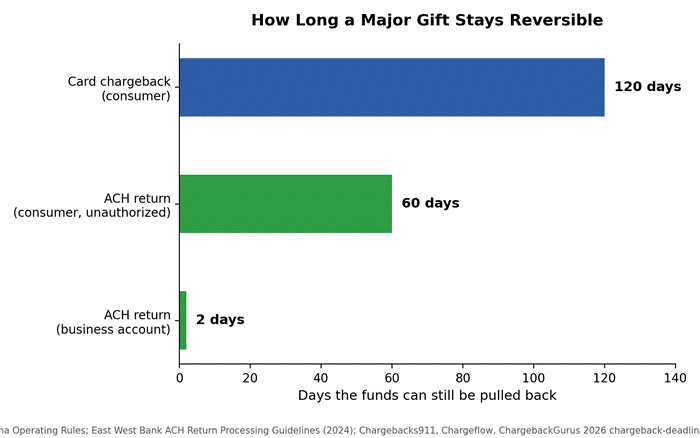
The most common challenges contractors face start with invoicing delays. Sending out invoices days or weeks after job completion pushes the payment timeline out even further. According to industry data, contractors who invoice within 24 hours of job completion get paid an average of 14 days sooner than those who wait a week or more.

Inconsistencies are another major issue. Mismatched line items, missing labor hours, or vague descriptions slow payments down and give rise to disputes. Paper-based invoicing compounds these problems — it’s error-prone, hard to track, and adds extra time to every step.

You might also be limited in your payment options. If your customer wants to pay online and you’re only set up for checks, you’re adding friction to the process. You need a smarter way to handle payments and manage jobs to avoid these errors.

What Is Contractor Invoicing Software?

Contractor invoicing software is tailored for service- and project-based companies. Unlike generic invoicing software, contractor invoicing software is designed to integrate with your job management tools to complete the workflow from project start through payment collection.

It allows you to create invoices on demand from your job data, including labor hours, project milestones, and materials. No more tedious math to make sure your invoices are accurate and up to date.

Contractor invoicing software also allows you to send invoices immediately, track their status, and collect payments online. With real-time invoice visibility, you can easily track your finances and follow up with clients if necessary. You can also automate tasks like recurring invoices, payment reminders, and reporting.

Role of Job Management Payments

 Job Management Payments

Job management payments are an essential component of any contracting company’s financial operations. By connecting payments to the job management process, businesses can simplify invoicing, track payment status in real time, and reduce administrative overhead.

Job management payments enable businesses to bill customers immediately upon job completion, improving cash flow and reducing payment delays. It also increases transparency, allowing both your team and your clients to see costs, timelines, and payment expectations.

Automated payment reminders and multiple payment options can also help speed payments, reducing the amount owed. Overall, job management payments help businesses run more efficiently and provide a more professional experience to customers.

Why Getting Paid Faster Matters

Getting Paid Faster

Cash flow is the heart of any contracting business. Late payments can delay payroll and material purchases for your business. According to a QuickBooks survey, 64% of small businesses are impacted by late payments, and contractors are among the hardest hit because of the gap between when materials are purchased and when the job is billed.

Faster payments enable contractors to reinvest in their business, take on more jobs, and keep their accounts in the green. It eliminates the need to borrow or use credit to bridge the gap between expenses and income.

Faster payments also mean quicker operations. Contractors spend less time chasing payments and more time doing good work. So, faster payments are not only convenient; they’re essential.

Field Service Payment Processing Explained

Field service payment processing enables contractors to process payments on-site. This is particularly useful for contractors that provide on-site services such as maintenance, repair, or installation.

Contractors can collect payment on the job using a mobile device or portable payment terminal. Square, PayPal Zettle, and Stripe Terminal all offer mobile readers that pair with smartphones and process payments in seconds. For contractors processing mostly on-site payments, transaction fees typically range from 2.6% + $0.10 for card-present transactions, compared to 2.9% + $0.30 for invoiced online payments. This eliminates the need to send an invoice and wait for payment.

Field service payment processing also enhances the customer experience. Customers appreciate the convenience of paying on the spot, and contractors appreciate having fewer unpaid invoices. Integration with contractor invoicing software automatically captures the payments for accurate reporting.

Contractor Billing Best Practices

Getting paid faster starts with effective billing. Practices that follow contractor billing best practices will improve billing accuracy, clarity, and payment velocity.

One of the best practices is to send invoices quickly. The sooner you send an invoice, the sooner the payment process begins. Late invoice delivery often means late payment. If you can generate and send the invoice from the job site before you’ve even left, you’ve already shortened your payment cycle.

Contractors need to send clear and detailed invoices. Detailed, itemized invoices — including payment terms, a project description, labor hours, and materials used — help reduce confusion and disagreement. Vague invoices invite questions, and questions delay payments.

Offering multiple payment options is another key best practice. Your clients will be more likely to pay quickly if they can pay the way they want to: by credit card, ACH, or mobile wallet. ACH payments are particularly valuable for larger jobs because the per-transaction cost is typically $0.25 to $1.00, far cheaper than the 2.5% to 3.5% you’d pay on a credit card transaction for a $5,000 invoice.

Contractors also need to be consistent. Standardized invoice templates and processes result in professional, easy-to-read invoices. When every invoice looks the same and includes the same level of detail, clients know exactly what to expect.

The Importance of Progress Billing

Progress billing is a method of billing a client at multiple stages of a project rather than at the end. Progress billing is best suited for larger or longer projects where waiting until completion to invoice could create serious cash flow problems.

Progress billing provides a regular flow of cash and helps prevent financing issues. It can also make it easier for the client to manage their cash flow, since they’re paying in smaller increments tied to visible milestones rather than facing one large bill at the end.

To implement progress billing effectively, contractors should create a schedule of billing milestones and payment amounts at the start of the project. Each milestone should be associated with a specific phase of work — for example, 30% at foundation completion, 30% at framing, 30% at finish work, and 10% at final walkthrough. Contractor invoicing software can help you automatically track and bill for these milestones, so nothing falls through the cracks.

Cloud Job Manager: A Contractor Management Solution Built for the Job

Contractors have had to manage bookings, invoicing, and payment processing across separate platforms, which creates problems because when systems don’t communicate, users are forced to repeat data entry, invoices may be missed, and cash flow gaps are created that could have been avoided.

Cloud Job Manager from Host Merchant Services is a solution designed for contractors that addresses all these needs by combining job scheduling, dispatching, invoicing, and payment processing on one platform, so contractors can manage the whole job workflow from assignment to payment.

Particularly for field service contractors, mobile capability is very helpful because it allows crews to update job status, log hours, and initiate invoices right from the job site. With HMS payment processing integration, payment capture and reconciliation are fully automated, eliminating manual entries and reconciliation headaches.

Cloud Job Manager allows contractors with multiple teams or sites to manage all job statuses, open invoices, and payment statuses from one location, which is much more efficient and eliminates the need to check emails for invoices or call the office for payment information, as everything is available and simple on the dashboard. Cloud Job Manager is a tool that removes the hassle of invoicing, since invoicing is part of the job’s completion.

Automation and Its Impact on Payments

Automation is essential for faster payments. Every manual step in your invoicing process — creating the invoice, sending it, following up, recording the payment — is an opportunity for delay and error. Automating these tasks reduces both.

Automated invoicing means that the moment a job is marked complete in your system, the invoice can be generated and sent without anyone having to lift a finger. Automated reminders keep customers aware of upcoming and overdue payments without you having to make awkward phone calls. For contractors with recurring service contracts — like HVAC maintenance or landscaping — recurring billing can be set up so that customers are charged automatically on a schedule they’ve pre-authorized.

The cumulative effect is significant. Contractors who automate their invoicing and reminders report reducing their average days-to-payment by 20% to 30%. That’s real money back in your operating account weeks sooner.

Improving Client Communication

Clear communication can facilitate timely payment. Setting expectations at the outset — payment terms, billing schedule, accepted payment methods — keeps agreements in play and reduces surprises when the invoice arrives.

Keep in touch with clients during an engagement. Frequent progress updates help clients realize the value of the work you’re doing, which keeps payment on their radar. When the invoice arrives, it shouldn’t be the first time the client is thinking about money.

Make it easy for clients to connect with you. Add clear contact information and next steps to your invoices so they know what to do if they have questions. A timely response to client inquiries can help fast-track the payment process. The goal is to remove every possible reason a client might have to delay a payment.

Choosing the Right Tools for Your Business

Choosing the right contractor invoicing software and job management system is one of the most impactful decisions you can make for your payment operations. The right platform should integrate invoicing, scheduling, and payment processing into a single workflow so you’re not jumping between tools.

When evaluating platforms, pay attention to transaction fees, whether the platform supports ACH payments, how mobile-friendly the field app is, and whether it integrates with your existing accounting software, such as QuickBooks or Xero. A system that’s hard to use in the field won’t get adopted by your crew, no matter how good the features are on paper.

For contractors already processing payments through Host Merchant Services, Cloud Job Manager is a natural fit because the invoicing and payment processing are already connected. But regardless of which platform you choose, the key is finding something that reduces manual work, not adds to it.

Overcoming Common Payment Challenges

Even with the best systems in place, contractors still face payment challenges. The key is anticipating them and having a plan.

Late payments can be reduced with clear terms stated upfront and automated reminders that escalate — a friendly nudge at 3 days overdue, a firmer reminder at 14, and a final notice at 30. Some contractors build late fees into their contracts, typically 1% to 1.5% per month, which incentivizes on-time payment without damaging the relationship.

Disputes are best avoided with detailed documentation and transparent billing. If a client questions a line item, you should be able to pull up the job record, photos, time logs, and materials list within minutes. That level of documentation doesn’t just resolve disputes — it prevents them.

Technical issues can be avoided by choosing reliable, well-supported software and keeping it up to date. If your payment system goes down on a job site, you need a provider with responsive support, not a ticketing system that takes 48 hours to reply.

The Future of Contractor Payments

The contractor payment space is evolving quickly. Mobile-first platforms are already the norm, and real-time payment tracking is becoming standard. The next wave includes embedded financing — where customers can access installment plans directly through your invoicing portal — and AI-powered cash flow forecasting that predicts when payments will actually land based on historical client behavior.

Integrated platforms are also moving toward offering contractor-specific financial products, like same-day payouts and invoice factoring built directly into the job management software. For contractors who’ve traditionally been underserved by banks, these tools represent a meaningful shift in how they manage working capital.

Contractors who adopt these technologies early will run more efficiently, deliver a better client experience, and gain a real competitive edge.

Conclusion

Getting paid faster as a contractor isn’t about any single tool or trick. It’s a combination of the right software, smart billing practices, and clear communication with your clients.

Contractor invoicing software, job management and payment integration, and solid billing practices — like progress billing, automated reminders, and multiple payment options — can meaningfully improve your cash flow and reduce the stress of chasing payments.

From field service payment processing on the job site to automated recurring billing for maintenance contracts, the solutions exist to get paid faster and run a tighter operation. Tools like Cloud Job Manager from Host Merchant Services bring scheduling, invoicing, and payment processing together, so contractors can focus on the work rather than the paperwork. The contractors who invest in these systems now will be the ones best positioned to grow.

Frequently Asked Questions

  1. How can contractors get paid faster?

    Contractors can use invoicing software to automate the process, set up reminders, and track payments in real time. Clear terms, accurate job details, and invoicing as soon as the job is done also help avoid cash-flow gaps. Accepting ACH and card payments online removes friction for clients who want to pay digitally.

  2. Which payment methods should contractors accept from clients?

    Contractors should accept a variety of payment methods, including credit cards, ACH, and mobile wallets. ACH is especially valuable for larger invoices because transaction fees are significantly lower than credit card rates. Offering this flexibility can increase on-time payments and customer satisfaction.

  3. What are the benefits of progress payments for contractors and clients?

    Progress payments ensure that contractors get paid in stages as they complete work, improving cash flow and reducing financial risk. Clients also benefit by seeing the work as it progresses and paying in manageable increments. Progress payments are a win-win solution that can keep contracts moving smoothly.

  4. How does job management software contribute to more efficient payment processes?

    Job management software streamlines scheduling, billing, and payment monitoring, minimizing human errors and administrative burden. By connecting job completion to invoicing, contractors can speed up billing and easily track unpaid invoices, leading to improved financial clarity and more efficient operations.

  5. How can contractors minimize delayed payments from clients?

    Contractors can minimize delayed payments by establishing clear payment conditions upfront, requesting deposits, and using automated reminder systems. Building late fees into contracts and offering early payment discounts can also promote timely payments and support consistent cash flow.

Retail POS

Choosing, Setting Up, and Getting the Most from Your Retail Point-of-Sale System: A Complete Guide

POS systems are the forefront of any retail business. Most merchants think of Retail POS as “glorified calculators”, but a POS system is far more than that. It is a critical growth engine for your organization. Earlier, POS systems were isolated systems that handled customer orders; now, they are connected business hubs that seamlessly integrate with your inventory management software, serving as a single point of business management.

POS is a crucial part of your retail business system. It is a component you cannot make a bad choice on, because it will result in lost sales, frustrated staff, and inaccurate data, negatively impacting your business operations. POS systems help you to manage stockouts of items in your inventory. In North America alone, stockouts account for $144.9 billion in lost sales annually. Globally, annual stockout losses reach $1.2 trillion. The problem is evident: merchants using legacy POS systems struggle to manage inventory because they have to track orders and inventory separately. Modern POS systems are connected business hubs that allow merchants to track everything with a handheld device.

The best POS system for retail is not a one-size-fits-all; it depends on your retail business’s operational maturity and budget. The retail business is highly competitive, and you need better systems to thrive.

Functions of a Retail POS System

Functions of a Retail POS System

If a typical day in your business ends with manually matching receipts and counting cash before closing, you are losing time and customers. Modern POS systems are not just devices installed in the front to take orders; they are integrated systems that set baseline expectations for first-time buyers. A new customer judges your service by how intuitive and personalized your POS feels.

Point of Sale (POS) is the hardware and software ecosystem in which retail transactions and operations converge. POS is not just about transaction processing. Transaction processing accounts for only 20% of the process. Modern POS systems are designed to handle multiple business operations, from gathering customer data to employee management.

The main functions of a typical modern POS system include:

  • CRM, i.e., capturing buyer data for personalized marketing
  • Employee Management: Time tracking, permissions, and performance tracking using metrics such as sales per hour.
  • Reporting and Analytics: Modern POS systems not only track past sales but also use the data to intelligently forecast future sales.
  • Ecosystem Integrations: Connecting accounting software and e-commerce platforms.

Modern POS systems are integrated hubs that track sales, customers, and employee data in real time. Manual reconciliation and receipt matching are things of the past. Modern retail businesses require efficient practices to boost operations and sustain growth amid fierce competition.

Types of POS Architecture

POS Architecture

POS systems have evolved significantly over the years from legacy systems installed on front ends to smartphones functioning as wireless registers. The needs of your business affect your choice of POS systems, so it is important to understand the options available in the market.

The oldest and most widely used POS systems are legacy POS systems, in which you install a computer at the cash register. It runs on the local server. These systems were quite popular back in the day, but are a cybersecurity and maintenance liability.

Stepping away from legacy POS systems, we have cloud POS and mPOS systems. Cloud POS systems are multiple POS systems synced across locations in real time. It allows remote management and automatic software updates, making it an ideal choice for businesses operating across multiple physical locations.

mPOS stands for Mobile POS. These low-cost POS systems can be used by businesses that experience a sudden surge in demand during specific times of the year, such as festive seasons. mPOS systems give these businesses line-busting capacity by allowing you to use employees’ smartphones as POS systems. This is ideal for holiday rushes, pop-up shops, and personalized floor sales.

An important feature to consider while choosing a POS system is offline capability. A POS system that can queue transactions even when offline is necessary to ensure that sales are not halted in case the internet connection is lost. The transactions are stored offline and automatically synced once the connection is restored. Most modern POS systems offer queuing for transactions for a specified period after the internet is lost, after which they expire permanently.

How to Choose the Best POS System for Retail?

Best POS System for Retail

Once you understand the importance of POS systems for your retail business, the next step is to choose one. There are many factors to consider while choosing a POS system for your business. The system’s ability to handle more SKUs, registers, and locations without breaking determines how scalable your chosen POS system is. Scalability determines the future growth and ease of expanding business operations in the future.

Before choosing a POS system, consider your business’s requirements. Separating the “must-haves” from the “nice-to-haves” allows you to make a more informed choice that will save money in the long run.

Another question to ask yourself is whether you need a general POS system or a niche POS system with a specialized service built in. For example, if you are in the liquor retail business, you should ask yourself whether you need a system built specifically for liquor stores or whether a general retail POS system will be sufficient.

Before finalizing your choice of POS system, consider its API and integration capabilities. Most merchants choose the cheapest POS system available and then struggle to integrate it with their online stores, often leading to duplicate data entry. This increases management complexity rather than minimizing it.

The True Costs of a POS System

The cost of implementing a POS system in your business is not usually a one-time payment. It comes with additional costs and recurring fees that must be considered before finalizing a POS system for your business. You must calculate the true Total Cost of Ownership (TCO) before opting for any POS provider.

Most POS system providers trap retail owners into proprietary hardware and software. Before choosing a POS provider, check whether they support non-proprietary devices or trap you into buying both hardware and software from them. POS providers often work on SaaS subscription models. They rent you the POS software via a monthly/annual subscription.

Before finalizing a POS provider for your business, there are some key factors you must consider:

  • The software licensing costs, i.e., whether you are charged per register or per location.
  • Hardware costs, such as leasing or buying upfront. Usually, providers that offer lease-only terms are a trap because they forcibly sell you proprietary software.
  • The type of payment processing your POS provider supports is important when choosing a POS provider. An integrated processor locks in with a specific payment processor that the POS provider chooses. An agnostic processor gives you the freedom to choose your own pricing model and payment processor. Preference should be given to an agnostic processor, as it offers greater flexibility.
  • Pay attention to any hidden costs, such as API access fees, premium support tiers, and charges for adding extra user accounts.

It is essential to understand the true TCO of the POS system you choose for your business to prevent future losses and protect your profit margins from being eaten up by operational costs.

The Core Advantage of POS Systems

Core Advantage of POS Systems

The core advantages of having a robust POS system are retail inventory management and omnichannel flow. Omnichannel flow bridges the gap between brick-and-mortar and online stores. POS enables a seamless shopping experience by merging the online experience into physical stores. Omnichannel retail is very important because it prevents duplicate orders and inventory mismanagement. An omnichannel retail POS works by syncing data in real time, preventing a customer from buying an item online that was just sold in-store.

Retail inventory management is another important feature of POS systems. POS systems enable matrix inventory mapping, which allows you to manage items with multiple variants, such as size, color, or material, without creating database chaos. A robust POS system can use past sales data to automate reordering and issue low-stock alerts based on predictive sales velocity, helping you efficiently manage inventory and prevent stockouts.

Additional features of POS systems include shrinkage control and BOPIS. Shrinkage control uses cycle counts and variance reports to spot theft or administrative errors. BOPIS (Buy Online, Pick Up In-Store) relies on hyper-accurate POS data to function properly; without it, inventory can be mismanaged, leading to out-of-stock items.

Securing Payments and Maximizing POS ROI

A successful rollout of POS integration in your retail business requires multiple steps. It requires auditing and cleansing inventory data before migration. It also requires training the staff to use the new POS systems and handling edge cases, such as split payments and returns. Payment security is yet another aspect that cannot be ignored. Using frictionless payment technology, such as Tap-to-pay and essential authentication protocols, 3D Secure, is important.

You must transition to newer payment methods, such as Tap to Pay, which allows you to use iPhones to securely accept contactless payments without external hardware. This reduces hardware costs and increases the number of devices that can be used under a single POS system. Reducing friction in the payment process is a key driver of impulse buying and increased customer retention.

Along with reducing friction, it is important to secure payment data at the POS to prevent sensitive data from being leaked in the event of a security compromise. Mandatory authentication frameworks such as 3D Secure protect omnichannel and e-commerce transactions from fraud and chargebacks. These features help to reduce checkout abandonment rates and decrease average chargeback fraud.

Conclusion

The POS is the retail operating system that bridges payments, inventory, and customer data. Having a robust POS system is the key to preventing stockout losses and ensuring customer trust by syncing real-time inventory data at the online ordering interface. Cloud POS systems and omnichannel expansion are no longer optional for business growth.

The right POS system for your business is not just a cost center; it should be seen as a competitive advantage. Investing in the right POS system is necessary for surviving in the fierce competition of the retail market. You must choose a POS system that satisfies your current business needs and allows for easy scalability in the future.
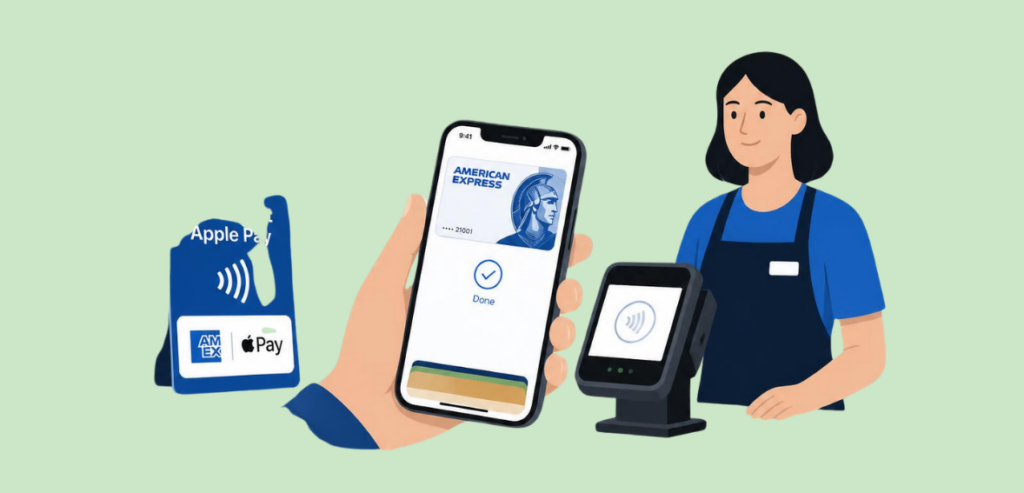
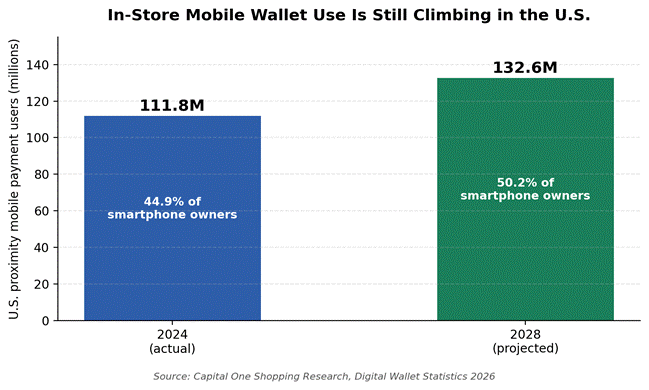
Frequently Asked Questions

  1. What is a cloud-based POS system?

    In a cloud-based POS system, your data is securely stored on remote servers, allowing you to access sales data, manage inventory, and update prices from any device, anywhere.

  2. Can a POS system work offline if my internet goes down?

    Most modern POS systems allow you to queue transactions with minimal security checks if the network connection is lost. The data is auto-synced to the servers once the connection is restored within the specified time window.

  3. Do I need a specific POS for my retail niche?

    It is not necessary to have a niche POS for your retail business. Generic POS works fine, but niche POS systems offer superior functionality tailored to your business that improves management efficiency.

  4. How do POS systems help with retail inventory management?

    A POS tracks every item sold or returned in real-time. It prevents stockouts by sending low-inventory alerts and shrinkage control.

  5. How long does a retail point-of-sale setup usually take?

    For a single-location small retail store, setup can take anywhere from a few days to two weeks. The majority of time is spent in auditing and importing clean data rather than the physical installation of the POS system.