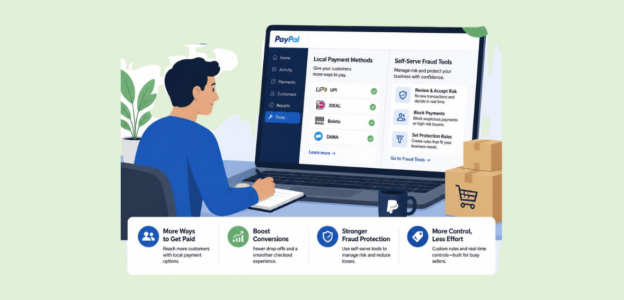
Author Archives: Max Kulkarni

Reduce Cart Abandonment

E-Commerce Payment Optimization: Reduce Cart Abandonment and Boost Conversions

If you’re running an e-commerce business, you’re probably already spending a lot of money to attract users through ads, SEO, social media, and email. Traffic is spiking, engagement is high, and products are getting added to your carts. But then, a significant number of customers are abandoning their carts and not converting into purchases.

Cart abandonment has become one of the biggest roadblocks for e-commerce businesses. There are many different ways to reduce cart abandonment. For many businesses, this is an enormous gap between revenue that could have been earned and revenue that was actually earned. The customers who abandon their carts aren’t a random selection of visitors; they are interested customers who were just one purchase away from becoming paying customers.

Even a lost sale could also mean a lost opportunity for long-term customer value. There are many reasons why customers abandon their carts, but one of the biggest reasons is the checkout and payment experience. If the checkout process is too slow, too complicated, or unclear, users will quickly walk away.

Even minor issues, such as limited payment options or hidden fees, can prompt customers to question their purchase decisions and opt out. This is where e-commerce payment optimization comes into play. By improving the checkout experience, payments, and customer satisfaction, e-commerce businesses can increase their online checkout conversion rates.

Payment optimization is more than just a technical upgrade; it’s a business decision that affects your revenue, customer satisfaction, and brand trust. In this blog post, we’ll talk about how businesses are reducing cart abandonment and creating a better checkout experience, and ultimately turning carts into confirmations.

Understanding Cart Abandonment: The Real Reasons Behind Drop-Offs

Understanding Cart Abandonment

Cart abandonment isn’t an error – it’s a symptom of friction, uncertainty, or unmet expectation in the checkout.

One of the most frequent is the unanticipated cost. The customer is happy with the product price, but if shipping, taxes, service rates, or other fees appear at checkout, they’re dissatisfied. Transparency matters. Anything unanticipated breaks that trust.

The second is complexity. The customer has to fill out a multitude of forms and click through many screens, and there are extra fields they don’t need. In a world that rewards convenience, customers expect a quick and easy checkout. If it seems too much effort, they won’t purchase.

The third is trust. If the customer feels their payment information isn’t secure, they won’t buy. If the site doesn’t have obvious security cues or uses unfamiliar payment methods, it will raise doubts.

With those key pain points in mind, you can begin to envision what a frictionless checkout experience looks like and how to deliver it for completed purchases.

Psychology of Checkout Behavior

Psychology of Checkout Behavior

The checkout page is the most important in your conversion funnel. What do you need to know about customer psychology to optimize checkout performance?

During checkout, the customer is at the point of no return; they have decided to purchase, but a small doubt can be the difference between an abandoned cart and a completed sale.

  • Perceived effort: The more effort it takes to complete your checkout, the less likely the customer is to go through with that purchase. You want to minimize the mental effort the customer has to go through when completing a purchase, so they are more likely to complete it.
  • Trust: The customer needs to know they are making a good choice and can trust your site with their transaction. Any signals of trust (secure payment system, clear return policies, etc.) can help win over the customer.
  • Urgency: Creating a sense of urgency can encourage customers to purchase before they second-guess themselves. Limited-time offers, low stock notifications, etc., can all drive purchases. This, however, can be tricky because it can be manipulative.
  • Clarity: The customer should always know what they are paying for, what information is needed, and what will happen next.

Checkout Page Best Practices That Improve Conversion

Checkout Page Best Practices

Now that we understand the psychology behind checkout behavior, let’s look at the practical steps you can take to improve your checkout page and boost conversions.

Minimalism and clarity are key. Make sure the checkout page is clean and contains only the necessary elements. Anything else can distract the customer and force them to abandon their purchase. In some cases, removing unnecessary fields can yield a significant increase in conversion rates.

Guest checkout: You do not want to create friction for a user by forcing them to create an account. Offer them a guest checkout option and let them complete the purchase without delay.

Progress indicator: A progress indicator can be a great addition to the checkout page. Customers want to know how many more steps they have left to complete to improve their sense of control and reduce anxiety.

Mobile checkout: More and more customers are shopping from mobile devices. A mobile checkout experience that is not responsive, takes too much time, or is difficult to navigate will cause customers to abandon their cart.

Clear calls-to-action guide the step-by-step process. Make them easy to find and label appropriately so you can guide users through the process without confusion.

Payment Method Options and Their Role in Conversion

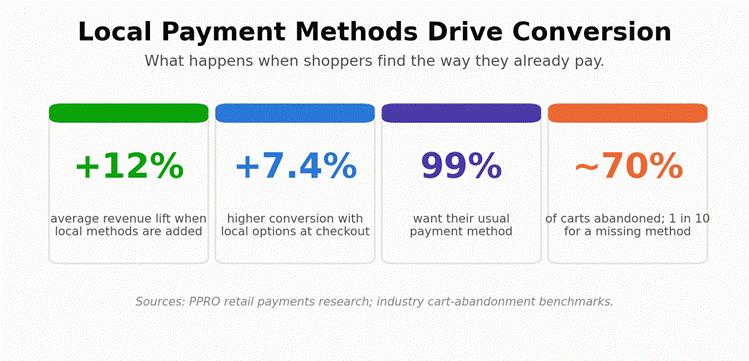
The most effective way to reduce cart abandonment is to offer customers a range of payment methods. Because customers have individual preferences, accommodating them can boost conversion rates.

Credit and debit cards remain a traditional method of payment, but digital wallets are gaining popularity. These payment methods streamline the checkout process, giving customers a faster, more convenient experience.

Buy Now, Pay Later offers are also becoming popular. Customers can choose to pay for their purchase in installments, making it more affordable and appealing.

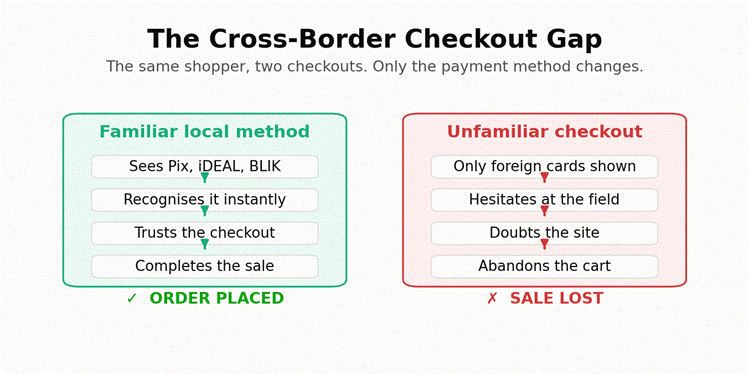
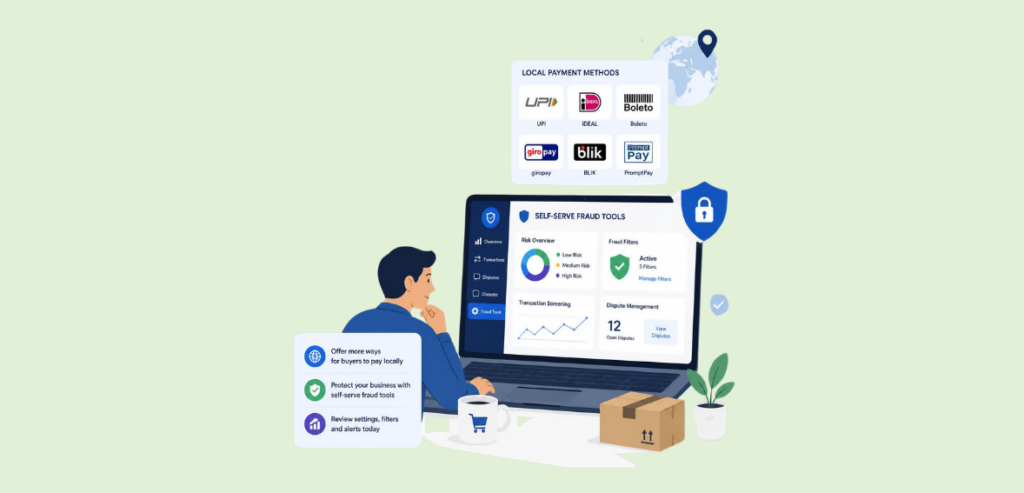
For international audiences, local payment methods are key. Offering customers a payment method they are familiar with can help increase trust and boost conversion rates. The goal is to offer a comprehensive payment environment that meets the varying needs of a diverse customer base.

Reducing Friction in the Payment Process

Reducing Friction in the Payment Process

Friction is one of the biggest culprits behind cart abandonment. Each tiny step or hiccup increases the chances of a drop-off.

The checkout process must be as simple as possible. That means fewer steps, fewer form fields, and autofill capabilities. This makes the checkout faster and easier.

Error handling is key as well. Clear, actionable error messages help guide customers and reduce frustration. Rather than saying “something went wrong,” specific instructions help users fix their mistake as quickly as possible.

Transparency is essential, too. Showing the total price early in the checkout process eliminates any unpleasant surprises.

By eliminating friction, businesses can guide customers along a frictionless path to purchase.

Building Trust Through Secure Payment Experiences

Trust is the backbone of e-commerce. Customers need to feel safe. Security measures that customers can see, such as SSL certificates and encryption icons, reduce customer anxiety. Payment icons customers recognize help promote trust; they feel more comfortable with payment options they’ve seen before.

Transparency around privacy and data storage also helps promote trust. Customers want to know what will happen with their data. Safe, simple payment processes help ensure customers complete their purchases.

Optimizing Mobile Checkout for Better Results

Mobile commerce is growing, and mobile optimization is no longer optional. Customers want a fast, simple experience on the go. That means easier layouts, bigger buttons, and clear navigation to make your site more user-friendly. Big forms and long processes are a guaranteed way to lose mobile customers.

Digital wallets and one-click payments are a mobile best practice. They save customers time and significantly reduce friction. Fast load times and smooth functionality help ensure customers remain engaged and your conversion rate stays up. If your mobile checkout isn’t performing as well as your desktop checkout, that’s a sign you need to revisit the experience.

Using Data to Improve Checkout Performance

Analytics are essential for continuous optimization. Without data, you’re guessing at what’s working and what isn’t. Key metrics such as cart abandonment rate, checkout completion rate, and time on page will show you exactly where your visitors are dropping off in the funnel.

A/B testing is a great way for businesses to test out different layouts, button placements, and payment flows. By measuring results across different variations, you can discover what drives conversions and what creates friction. Continuous testing and analysis help ensure you’re delivering the best possible checkout experience for your customers.

Personalization and Customer Experience

Checkout can be personalized, and when it is, it becomes more relevant to the user and more valuable to the business. Show customers their preferred payment methods first, offer personalized discounts based on their purchase history, and remember their information for future checkouts.

Returning customers who see a faster, pre-filled checkout experience are far more likely to complete their purchase. Personalization isn’t just a nice-to-have — it leads to higher conversion and stronger customer loyalty over time.

Speed and Performance Optimization

Speed is a huge factor in e-commerce. Slow-loading pages, unnecessary redirects, and delayed payment processing all add up to frustration, and frustrated customers leave. Performance optimization means keeping load time as short as possible, minimizing redirects, and processing payments as quickly as possible.

A faster checkout means happier customers and higher conversion rates. When every other part of the experience is comparable to your competitors, speed can be a major differentiator.

Post-Purchase Experience and Its Impact on Retention

The checkout experience doesn’t end with payment. The post-purchase experience is critical for customer satisfaction and long-term retention. Order confirmations, shipment tracking, and clear communication all build trust and set the stage for repeat purchases.

A good post-purchase experience turns a one-time buyer into a loyal customer. Happy customers return, spend more, and recommend the brand to others.

Role of Checkout Recovery Strategies in Reducing Cart Abandonment

Unfortunately, cart abandonment will always happen. Even the most optimized checkout process cannot eliminate cart abandonment. That’s where checkout recovery comes in. Instead of viewing abandoned carts as lost sales, consider them a second chance to convert interested shoppers.

One of the most powerful checkout recovery tactics is using abandoned cart reminders via email or SMS. Reminding them of the cart they left behind and offering a discount or free shipping will help nudge them to complete their purchase.

Retargeting ads are another powerful way to recover abandoned carts. By delivering ads to customers who have abandoned their carts, you’re able to keep your brand fresh in their minds and guide them back to the checkout page.

When it comes time to return to the checkout page, make it as easy as possible by adding a direct link back to the cart. And don’t forget to preserve the user’s selections when they return to the checkout. Checkout recovery tactics are a great complement to payment optimization. Lower cart abandonment rate and higher conversion rate.

Conclusion: Transforming Checkout into a Competitive Advantage

eCommerce payment optimization is about more than just cutting cart abandonment — it’s about the experience.

By simplifying, adding flexibility, and building trust with customers, you can create a smooth, engaging checkout experience that leads to higher conversion rates. This means offering multiple payment options, mobile optimization, and data-based decision-making.

In an increasingly competitive e-commerce marketplace, a great checkout experience can set a business apart. By reducing friction, increasing transparency, and improving usability, a well-optimized checkout experience can be a major growth engine for e-commerce businesses. A continuous focus on enhancing the payment experience allows businesses to reach their full potential.

Frequently Asked Questions

  1. Why do customers abandon carts during checkout?

    Customers abandon their carts when they encounter hidden costs, a confusing checkout process, or limited payment options. Other factors include slow-loading pages and a lack of trust signals. A better checkout experience can significantly reduce customer abandonment.

  2. How can I increase my checkout conversion rate?

    Simplify your checkout process by reducing the number of steps and enabling guest checkout. Offer multiple payment options and ensure you are mobile-friendly. Add clear pricing and trust badges.

  3. What payment methods should I accept in my store?

    Accept credit and debit cards, digital wallets like Apple Pay and Google Pay, and Buy Now Pay Later options such as Klarna or Afterpay. More payment options mean fewer missed conversions at checkout time.

  4. Does page speed affect payment conversions?

    Yes, slow checkout pages frustrate customers and cause them to abandon their carts. Even a few seconds’ delay can cost you sales. Optimizing your payment page speed can dramatically improve checkout time.
  5. How do trust signals affect online payments?

    Customers are more likely to trust websites with trust badges, SSL certificates, and customer reviews. These signals increase customers’ confidence in the secure payment process, thereby directly improving conversion rates.

Gym Billing System

How to Set Up and Grow a Gym Billing System That Reduces Churn and Recovers Failed Payments

Most gym owners chase an illusion of growth — maximizing the number of registrations. They fail to understand that acquiring new members is not worth the effort if the business has structural flaws that make them leave. It is trying to fill up a bucket with a hole in its bottom. Pouring more money into it won’t fix the problem; you will have to address the root of it.

Most gyms suffer from revenue leakage. This money is lost due to operational problems, primarily failed payments. A gym’s primary product is its subscription, but most gyms treat their gym billing system as an administrative chore. With rising customer acquisition costs (CACs), gym owners need to focus on membership billing—the end-to-end infrastructure of a gym, from initial checkout to recurring billing.

The most sustainable way to grow your profits is to focus on increasing customer retention rates. Even a 5% increase in customer retention rate can boost your profits by 25% to 95%. The numbers make it pretty clear — it is not about how many new people you bring in, it is all about how many existing ones you are able to hold on to. Your billing infrastructure should be more than a collection tool — it should be a revenue driver.

How Gym Revenue Leaks Occur

Gym Revenue Leaks

Before we dive into the strategies to prevent revenue leakage in your fitness studio, we need to understand what causes it in the first place. Gym businesses lose money primarily due to two types of churn: involuntary and voluntary.

Churn is the percentage of customers who cancel their subscriptions or stop paying, relative to the total number of customers. Involuntary churn occurs when a member wants to stay, but their payment method fails. This can be due to a variety of reasons, such as an expired card or insufficient funds. On the other hand, voluntary churn is when a member actively decides to cancel their subscription. This can be due to relocating, loss of interest, or financial strain.

While there is not much you can do to resolve the personal problems of your customers, if you look closer, you will realize that both involuntary and voluntary churn share a common problem — payment failure. Failed payments account for up to 68% of total subscription losses.

Involuntary churn is the lowest-hanging fruit for immediate revenue recovery, as it stems from problems that can be fixed by optimizing your payment structure. Voluntary churn is often triggered by billing friction. Customers do not want any friction in their payment process and are pushed to leave at the slightest discomfort.

That is fixable. A failed payment should not mean a lost customer; it should be viewed as an opportunity to provide automated customer service to a member who needs it.

Core Components of a High-Performing Gym Billing System

High-Performing Gym Billing System

Modern billing systems require careful planning and a robust implementation. Gyms need recurring billing automation and multiple payment methods. Systems that automatically invoice and charge on a set cadence without manual input are necessary to streamline customer billing.

Automation should be your top priority. Focus on automating every task that can be automated. Eliminate manual invoicing or staff chasing payments. That is wasted time that could be used for front desk service and customer assistance. Customers tend to stick with a gym where they feel valued.

Any modern billing system needs proration and upgrade features. A customer should be able to pause or upgrade their plan mid-month. Pause options save almost half of at-risk subscribers — 51.7% of customers who would have otherwise canceled can be retained simply by offering the option to pause their plans. A system that accommodates these changes creates a smoother user experience and encourages impulsive upsells.

The billing software also needs diverse payment rails. It should support credit/debit, ACH/direct debit, and digital wallets so the user can pay however is most convenient for them. Security features matter too—implement tokenization throughout the payment processing cycle. Securely store payment methods so members never have to re-enter details for secondary purchases.

One of the most important features is flexible plan architecture. Support a variety of plans to appeal to a wide demographic — family plans, class packs, hybrid memberships, and so on.

Integrating these non-negotiable features into your gym billing system can help you retain more customers and reduce churn.

Mastering Failed Gym Payment Recovery

Gym Payment Recovery

Payment recovery is critical. You cannot write off a customer just because they hit a snag in the payment process. Recovering lost revenue requires strategies for dunning and smart retries. Dunning is the automated process of communicating with a customer to collect overdue payments. Smart retries use algorithms to retry failed cards at specific times of the day when they are statistically more likely to clear.

Smart dunning recovers substantial revenue for your gym business. Intelligent payment retry systems can save up to 37% to 70% of failed charges and prevent customers from canceling their plans.

You cannot just use the logic of “retrying every 24 hours.” This is statistically ineffective and could be potentially dangerous for your business. Multiple failed transactions could trigger fraud alerts, or your merchant account could be flagged. Instead, implement intuitive retry logic — delay retries to align with common payday schedules, or retry soft declines at optimal times based on historical data.

Implementing an account updater service is also essential for your gym billing software. Use network-level tools from VISA and Mastercard to automatically update expired card numbers before they even fail. It is like building a system that can avoid problems before they even arise. Dunning should not be limited to app notifications or occasional reminders. Escalate the communication from subtle reminders to emails or SMS with payment links as the due date nears.

Most gym owners underestimate the importance of habits. Provide a grace period to your customers so they can attend for a few days even without paying, just to maintain the routine. This habit preservation alone can increase customer retention rates.

Reducing Churn Through the Front-End Billing Experience

Front-End Billing Experience

A member’s interaction with your billing portal directly influences retention. If you can reduce friction in the payment process, cut down the number of steps, and provide a portal for customers to securely manage their subscriptions, you can boost customer retention rates.

Transparency is a customer retention tool. Customers do not want to be blindsided at checkout. Hidden costs are the leading cause of cart abandonment — approximately 39% to 48% of customers abandon their carts at checkout due to unexpected charges. Complex cancellation policies or hidden fees increase chargeback risk and lead to bad reviews, whereas transparency builds trust.

We cannot stress enough the importance of providing a pause button to your customers. Offering the option to pause their subscription for 1 to 3 months can help at-risk customers avoid canceling altogether. Another way to retain customers is to offer a downgrade as a last resort—if they choose to cancel, give them the option to switch to a cheaper plan instead of leaving entirely.

Removing friction is another critical aspect of billing systems. A card update should not take more than 30 seconds. If it does, the friction of the decision itself will lead your customer to leave rather than stay.

Connecting Billing to HMS Studio Management and Operations

Your billing software should not exist as an isolated silo in your business infrastructure. It should actively communicate with the rest of the gym’s tech stack. Suppose a customer’s payment is 10 days overdue. The system should automatically restrict turnstile access and prompt the member to visit the front desk to discuss their plan renewal.

Bring attendance tracking into your billing system. If a member has not swiped in 21 days, the billing system should automatically send re-engagement messages — something like “We miss you!” along with a special offer — to prevent voluntary churn before the next billing cycle.

Keep your data in one place. If it is split across multiple spreadsheets or software, the staff will get confused, which eventually leads to operational chaos. A unified dashboard eliminates the need to jump between spreadsheets and scheduling apps, streamlining day-to-day operations.

HMS studio management provides features that let you manage scheduling, waivers, and capacity in a single software. It also offers access control integration, allowing you to link successful payments to physical gym entry criteria.

Common Billing Mistakes Most Gym Owners Make

Do not have your staff manually call members for failed payments. It ruins the rapport between the customer and the staff, and the customer feels disrespected when they get a call asking them to pay their membership fees. Provide flexibility in your billing plans — locking members into ironclad contracts makes them feel trapped, leading to higher chargeback and cancellation rates.

Always use management software tailored to your business. This becomes even more critical if you are relying on generic processors such as Stripe or PayPal. Not every failed payment deserves equal attention. Your system should intelligently distinguish dead-end cases from those that still have a chance of recovery. For example, retrying a card reported as stolen will not give you results, no matter how effective your algorithm is.

Conclusion

Investing in good billing management software is necessary for your gym business to increase customer retention and profit margins. A frictionless experience that makes members feel valued increases the customer lifetime value (LTV) of your gym business. Storing payment information securely as tokens can be very useful for promoting upsells. An impulsive buying decision is much easier when the customer does not have to pull out their credit card again.

Let customers interact and engage with your billing system. Integrating in-app stores, dynamic pricing, add-on subscriptions, and referral automation are some ways to keep your customers hooked. Do not work mindlessly on customer acquisition. Instead of trying to fill a bucket with a hole in it, patch the hole while you fill it. Retaining existing members is just as important as acquiring new ones. Overall, implementing a gym billing system and optimizing it are necessary to keep churn rates in check.

Choose the right billing software for your gym. Understanding your business’s needs and pain points enables you to make a choice that will structurally improve operations and ensure future scalability.

Frequently Asked Questions

  1. What is an acceptable churn rate for gyms?

    A churn rate of 3% to 5% is considered healthy for any gym business. The churn rate becomes a problem worth addressing if it consistently stays above 7%.

  2. How many times should we retry a failed credit card?

    Ideally, retrying a failed credit card should be limited to 3 attempts spaced over 14 to 21 days, after which the card should be considered expired.

  3. Can I charge a fee for a failed gym payment?

    You can charge a fee for failed payments, but keep in mind that payment failure is not always the customer’s fault. If you charge for failed payments, your involuntary churn might increase.

  4. How do I stop members from canceling via chargebacks?

    Provide frictionless cancellation processes. If canceling is easy and transparent, members will use your process rather than call their bank to dispute the charge.

  5. Is ACH better than a credit card for gym memberships?

    ACH is better for subscription models because it has much lower processing fees than credit cards. ACH also has much lower failure rates, which makes it ideal for recurring payments.

Accept Donations Seamlessly

Payment Processing for Nonprofits: Accept Donations Seamlessly and Maximize Every Dollar

Payment processing is not just an IT service that a nonprofit needs to accept donations seamlessly; it is the backbone of charitable giving in modern times. Your payment processing systems play a crucial role in determining donor conversion and retention rates. Let us suppose you post an emotional video that pitches a cause to people. A potential donor stumbles upon the video while scrolling, and feels inspired to donate. They click on the link, but drop the idea as soon as they are asked to enter a 16-digit card number.

The reason is quite simple: the donation process did not fit into the donor’s daily life, requiring extra effort to complete, and the friction of this process alone was enough to drive them away.

The average donor abandonment rate for nonprofits sits at 60%. This means that 6 out of 10 donors who visit your site leave without donating. When a donor visits your website with the intention of making a gift, the website’s interface and the ease of payment ensure that an intentional donor doesn’t leave.

There is a slight difference between the intention of donating and actually making a donation. Both are fundamentally different; the intention is an emotional response, while donating money or making a gift is a mechanical process. An outdated donation page makes it difficult for the potential donor to navigate the payment process. The donation process must be as smooth as possible, because even the slightest friction in the payment process can increase donors’ resistance to making a gift to your nonprofit.

It is crucial for you to optimize online donation acceptance, make your website mobile-friendly, and remove friction from the payment process to help your nonprofit improve donor conversion rates and increase revenue.

How Nonprofit Payment Processing Actually Works?

Nonprofit Payment Processing

We will now explain how payment processing for nonprofits works, so you can identify which parts of the process can be optimized to increase your organization’s revenue. There are three main components: the payment gateway, the payment processor, and the merchant account. Although they seem daunting, these terms are actually quite simple. The payment gateway is named similarly. It is the entry point, i.e., the digital card reader that securely transmits the donor’s card information.

The payment processor is the middleman that routes payments between the card-issuing bank and the acquiring bank. And, the final component is the merchant account, or in other words, your nonprofit’s account in which you receive the donations.

Among the three components, the gateway and the processor must be managed efficiently. The lifecycle of a donation is just 3 seconds. In those three seconds, the donation payment is authorized, captured, cleaned, and settled. The settlement process usually takes more than a few days, but the donation is usually queued for settlement within a few seconds.

You must understand that there is no such thing as instant cash; donations usually take a few days to be settled in the merchant account and used for your nonprofit’s operational costs. Failing to account for these delays could lead to negative cash flow and a cycle of short-term credit, making it even more difficult to cover payroll and program costs.

On average, generic processors, such as PayPal or Stripe, take more than 2 days to settle funds in the merchant account. Deploying a dedicated account for nonprofit payment processing can reduce settlement times and also save on processing costs. Regardless of which type of payment processor you are using, you must pay extra attention to registering your nonprofit under the correct Merchant Category Code (MCC), which will help you obtain processors at discounted fees, and also make your donors eligible to claim tax benefits against written receipts.

Another benefit of using a dedicated processor is tax-compliant generation. Generic processors treat every donation the same as other retail purchases, but dedicated processors instantly generate tax-compliant donation acknowledgments for donors, allowing them to claim tax benefits and feel valued — both of which increase customer loyalty.

Navigating Processing Models and Cost Structures

Processing Models

Knowing which type of payment processor to choose is necessary, but not sufficient — you also need to understand pricing models and payment structures charged by various processors to process each transaction in order to make a well-informed choice. There are two main pricing models available in the market: flat-rate pricing and the interchange-plus pricing model.

The flat-rate pricing model charges a single rate on every transaction. The upside of this model is that it is easier to project processing costs, and the account statements are much simpler for non-financial people to interpret. The downside, however, is that you are severely overcharged by processors, because the fixed rate is usually a single conflated price blend of all the credit and debit cards in the market. This means that although you save money on VIP card transactions, you end up overpaying on low-value cards with far lower processing rates.

You must choose an interchange-plus pricing model. The processing fee is a cumulative amount consisting of an interchange fee and a markup fee. The interchange fee is paid to the card-issuing bank and is usually non-negotiable. The markup fee is paid to the card network. Account statements for interchange pricing are complex but very transparent because the interchange and markup fees for each card are explicitly disclosed. You save money by paying the exact processing fee for each transaction, higher for premium cards and lower for low-value cards.

Most nonprofits opt for the interchange-plus pricing structure and prefer to use the donor-covered fee model. In this model, you prompt the donor to cover the processing fees for the donation to your organization, so the entire gift amount is credited in the nonprofit’s account. Usually, this model has a high success rate, with most donors opting to cover the fees when prompted with the right framing. The way you frame the prompt matters here. A prompt that aligns with the mission shows better performance than vague prompts, such as adding tips or non-emotional pitches.

How to Accept Donations Seamlessly And Optimize Donation Experience?

Optimize Donation Experience

Most donors today are reached through social media platforms on their mobile devices, which means the majority of the donations are made online from the nonprofit’s website. This means that the user experience on your website determines whether the donor will donate or abandon the idea and exit your website. You must optimize your website for mobile devices and reduce friction in your payment processes to prevent donors from abandoning your site without making a gift.

You must understand that making a donation is an on-the-go decision. The era of people firing up desktop systems and navigating clunky websites to make a donation is over. Donors want the donation process to be simple and fast. Even the smallest amount of friction, such as entering a card number, can prompt the donor to leave because they simply do not have the time. Their attention is split between thousands of micro-actions every day, and your nonprofit is competing for a space among that. So, you must be extra careful while designing the flow and features of your website.

Tapping Into The Potential of Recurring Donations

Recurring Donations

The online donation landscape has seen a profound shift. As the newer generation gets involved in the charity scene, a new trend of recurring donations is gaining traction. Younger donors believe that smaller, consistent donations have a more sustainable impact than large one-time donations. This belief has led to a shift in donation trends. Online donations are becoming the primary source of revenue for nonprofit organizations, with recurring donations increasing customer retention rates and higher lifetime donation values.

The increasing participation of the middle class in charitable giving has lowered the average donation amount, but the overall volume is higher than ever. Younger generations prefer a subscription-based model for donations, too, much like Netflix and Spotify, where you pay and forget. This method also increases customer retention, because once the donor sets up a subscription, the friction is in canceling it.

Managing Operations and Scale: Security And CRM

Your nonprofit must focus on two things to ensure smoother operations and maximize scalability. The first one is CRM restructuring. Relying on outdated manual data entry systems for reconciling donor data and payment information is dangerous. You must end this CSV nightmare immediately. The best way to ensure smoother operations is to implement automated data entry and real-time bi-directional data synchronization.

The payment gateway and the CRM must be synced together. Platforms like HMS Cloud Donor Manager offer features that auto-sync payment data and CRM in real time. You can efficiently utilize this data to gain insights into the donor’s behavior. This helps you classify donor behavior and manage donor expectations efficiently.

In parallel with the CRM feature, security is of utmost concern. Your payment process must ensure that the donor data remains secure and your nonprofit is protected from fraud. One common security feature deployed by nonprofits is tokenization. In this method, the real sensitive data never touches the payment network. Donor’s sensitive information, such as card number, is entered at the POS and encrypted with a one-time, device-generated code. This code is used in the network to process the transaction. This way, the donor data isn’t at risk even during an attack.

PCI-DSS compliance must be non-negotiable for your nonprofit organization. This is necessary for your organization to improve safety by bypassing your servers entirely. It also reduces compliance audits from hundreds of complex questions to simple checkboxes, such as SAQ-A.

Conclusion

Payment processing for nonprofits is not just a static utility. It has become the bare minimum. An active driver of participant conversion rates, payment processing must be carefully selected with a clear understanding of its concepts. The core focus of any nonprofit must be to minimize donor friction and manual labor in backend operations. Fixing these two alone can significantly change your organization’s revenue outcomes.

You should stop viewing processing fees and lower conversion rates as the industry norm; instead, actively work to optimize these components for your nonprofit. Addressing the behavior and lifestyle of the new donor can help you better understand which strategy works best for your organization.

Frequently Asked Questions

  1. What is the average credit card processing fee for nonprofits?

    The average credit card processing fee varies according to the pricing model you choose for your organization. Typical flat-rate fees for card transactions are 2.9% plus $0.30 per transaction, whereas the interchange-plus fee varies by card.

  2. Can nonprofits ask donors to cover processing fees?

    Yes, it is 100% legal for nonprofits to ask donors to cover the processing fee. The framing plays a key role in whether the donor will cover your processing fee. Framing the prompt in line with the mission increases the likelihood that the donor will cover for you.

  3. How long does it take donations to reach our bank account?

    It depends on the processor and the payment method. Standard credit card processing usually takes 1 to 2 business days, while ACH transfers can take 3 to 5 business days.

  4. How do we reduce donor drop-off on our website?

    You must optimize your donation page by eliminating unnecessary form fields and enabling mobile wallets like Apple Pay to remove every possible barrier to giving.

  5. Do we need a dedicated merchant account to accept donations?

    No, you do not need a dedicated merchant account to accept donations for your nonprofit. Mid-to-large nonprofit organizations use dedicated merchant accounts for their actual needs and benefits.

Online Rent Payment

Rental Property Payment Collection Made Easy: Automate Rent and Reduce Late Payments

If you’ve ever had rental properties, you know that collecting rent isn’t just a part of your job; it’s the very backbone of your entire business. Paying mortgages, maintenance budgets, and the whole package depends on tenants paying their rent on time.

Also, that same process is typically one of the messiest parts of property management. Payments are late, reminders are building up, spreadsheets are getting confusing, and that once simple process is now consuming all of your time and nerves.

The good news is that it doesn’t have to take on that nature. Thanks to online rent payments and rental management software, landlords now have tools that automate and manage the entire process. What once required constant outreach and manual tracking can now sit in the background.

Automation is revolutionizing how rental property income is collected. It’s not just about convenience and making life easier for tenants and landlords. It’s about establishing a reliable system that reduces late payments, boosts your cash flow, and makes your life a lot easier. In this blog, we’ll discuss how new-age rent collection works, why automation is so crucial, and how you can start collecting payments more efficiently.

Why Rent Collection Feels Harder Than It Should

Let’s be honest, rent collection isn’t supposed to be hard, but it is. And especially when you’re dealing with cash or checks, it’s almost impossible to keep everything running like clockwork.

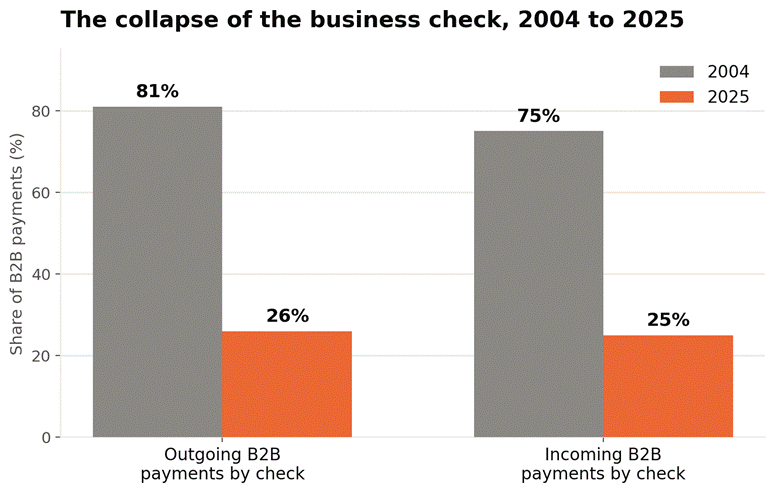
Checks are delayed. Checks are misplaced. Trips to the bank take forever. And if you’re looking after more than one place, the list of ‘who paid what and who hasn’t’ quickly spirals out of control. Even keeping a spreadsheet up to date can be a hassle when you’re juggling a hundred other tasks.

And there’s the human factor. Sending recurring rent reminders is embarrassing. Calls, emails, and conversations about late rent are none too pleasant. No one wants to be a debt collector. But when you don’t have a system, it’s unavoidable.

That’s why so many property managers are abandoning manual rent collection in favor of an online rent payment system. Not because the old way doesn’t work. But because it can’t scale. And because it really doesn’t make things easier.

The Shift Toward Online Rent Payments

The Shift Toward Online Rent Payment

Let’s think about this. How do we buy stuff? How do we pay our bills? We pay for food, we pay our bills, and we shop online. And one thing in common with all of those: they’re all online. Tenants want the same thing for paying their rent.

Online rent payment systems bring this digital ease right into the rental business. Tenants can pay rent with a few clicks using their preferred payment method: bank transfer, debit card, credit card, or mobile wallet. ACH bank transfers are particularly popular for rent payments because they typically cost between $0.25 and $1.50 per transaction, compared to credit card processing fees of 2.5% to 3.5%, which, on a $1,500 rent payment, add up to $37 to $52.

This isn’t a fad. It’s about where people want to go with their financial behaviors. When paying rent is as simple as paying the electric bill, tenants are hugely more likely to pay on time. Properties that offer online payment options see late payments drop by as much as 40% compared to those relying on checks and cash.

It’s a win for landlords. Money comes in faster. No more physical cash collection. And everything is logged in the system, so you no longer have to depend on your own memory.

The Role of a Tenant Payment Portal

Tenant Payment Portal

With a tenant payment portal, your tenants have a dashboard that lets them access all their rent-related information and activities. Easy. Clear. Simple. In short, we want rent to be as easy as possible to pay.

From the tenant’s perspective, this is very useful. They can log in at any time and see when they need to pay, what they’ve paid, download receipts, and change their payment details. They can also enable automated rent collection.

From the landlord’s perspective, it’s even better. Instead of all of your information being scattered around in emails, text messages, spreadsheets, and memory, you can see it all in one place. You can see who’s paid, who’s not, and when.

The online portal is the default place to check payments, reducing confusion about who has paid what. Tenants also value the transparency of seeing their payment history and the control over their finances that paying via a portal provides.

How Automation Reduces Late Payments Naturally

Automation Reduces Late Payments

One of the major reasons tenants don’t pay on time isn’t that they don’t want to; it’s that they forget, get busy, or find it inconvenient. With automation, you can address all three in one stroke.

With a tenant who has set up automated rent collection, there’s nothing for them to do to ensure their rent is paid each month, reducing the risk of forgetting to pay. They can be on the go or in another city, and rent will still be paid on time.

Automated reminders help, too, since tenants will know about upcoming payments before they are processed. That gives them an extra layer of confidence without you having to do anything. This also creates habits over time. Even if a tenant has a habit of forgetting to pay rent, autopay takes care of it.

Making Life Easier for Landlords

The best feature of automation is the time it saves you. No more going through payment logs at the end of the month, manually sending reminders, and updating payment records. Automation does that for you.

That means less administrative work on your plate and more time to do the things that actually grow your business. Whether that means improving the quality of your properties, finding new tenants, or even growing your portfolio, automation gives you the time to think bigger.

Improving the Tenant Experience

Happy tenants stay longer, take better care of the property, and have a good relationship with the landlord. The payment experience is a key part of all three.

If you give your tenants the option to pay online and provide an excellent tenant portal to easily manage their payments, you enhance the payment experience. No more writing checks or going into the bank. They feel empowered. The ability to view their payment history, set up automation, and receive instant confirmations makes them feel more in control and more trusting of their landlord.

In a competitive market, these small things can become important. The payment process can make the difference as to whether a tenant renews or not.

The Power of Rental Management Software

Rental Management Software

Rental management software is the final piece of the puzzle, bringing everything together into one unit. The days of having a separate tool for each payment, accounting, and communications are behind you.

You can manage the entire rental operation in one place. Your payments are automatically recorded, reports are generated instantly, and your financial information is always up to date. This also makes scaling your operations easier. No matter if you’re managing five units or fifty units, the system can accommodate. This is especially beneficial for landlords building their portfolios over time.

Platforms like Buildium, AppFolio, and TenantCloud offer end-to-end rental management, covering everything from collecting rent to communicating with tenants, all in one system. When evaluating platforms, pay attention to per-unit pricing, ACH transaction fees, and whether the platform charges tenants a convenience fee on top of what you’re already paying.

Security and Trust in Digital Payments

Every time there’s a money transaction, security is paramount, and for good reason. The good thing about the technology space for landlords is that every payment processing and collection platform is built with high-end security protocols.

Information is encrypted, sensitive data is protected, and the system is built to prevent fraud. Many platforms also use tokenization, which means the actual card data is never exposed. That means you can feel confident that your tenants are secure and that the system is reliable.

Trust is a big part of the tenant experience, and a secure payment system is a critical component of any great platform. If your tenants are confident in the platform, they will be more inclined to use it.

Transitioning to Automated Rent Collection

The transition to automation can feel difficult, but it isn’t as hard as it looks. It comes down to picking the right system and communicating the benefits to your tenants.

Explain the benefits to your tenants in layman’s terms. Let them know how the automation will benefit them and make their lives easier, not just yours. Demonstrate to them how to set up their payments and be available to answer any questions they may have.

It’s also helpful to give your tenants a little time to adjust. Some tenants will be thrilled right away; others may need a little extra motivation. That’s normal. Once you have everything in place, the upside is obvious quickly. Payments are easier, communications are easier, and everything feels better organized.

The Future of Rental Property Payment Collection

The way we collect rent from tenants will only continue to change as technology advances. We’re already experiencing trends such as mobile-first platforms, real-time payment tracking, and more intelligent financial insights.

In the future, automation systems will become so intelligent that they’ll be able to predict how tenants are likely to pay and send individualized payment reminders. They’ll even give landlords better insights to help them make smarter financial decisions.

Landlords who become early adopters of these changes will reap the benefits and have a competitive edge. They’ll run more efficiently, have a better experience for their tenants, and stay ahead of the game.

Conclusion

You don’t have to hate collecting rent from your tenants. With the right tools and strategy in place, it can be the easiest part of your property management.

By embracing online rent payment systems, tenant portals, and automated rent collection, landlords can eliminate the frustrations and time-consuming tasks of traditional rent collection and instead set up an easy, reliable process that benefits everyone involved.

You want to build a better system, one that reduces late payments, improves your rapport with tenants, and then creates the foundation for growth. That kind of efficiency is not just desirable in the world we live in today; it’s a must.

Frequently Asked Questions

  1. How does automated rent collection prevent late payments?

    Automated rent collection helps to ensure that rent is never missed due to a tenant forgetting to pay on time. With recurring payments and reminders in place, rent payments are no longer a guesswork game.

  2. Is online rent payment safe for both landlords and tenants?

    Yes. Online rent payment platforms are secure, encrypted, and compliant with industry standards. With tokenization and secure gateways, online rent payment systems protect sensitive data and eliminate the need to handle cash or checks.

  3. What features should I look for in rental management software?

    Features to consider include a tenant payment portal, recurring rent collection, multiple payment options (especially ACH for lower fees), real-time reporting and account tracking, integration with accounting software, and mobile compatibility.

3D Secure

Visa and Mastercard Mandate 3D Secure for Online Transactions – What E-Commerce Merchants Must Do

Visa and Mastercard have recently mandated 3D Secure for online transactions. The new mandate coming into effect means that having 3D Secure on your payment portal is not just a “good practice,” but rather a mandatory requirement that you must follow or face penalties for fraudulent transactions. The scale of losses due to fraudulent payments reached $48 billion in the global e-commerce landscape in 2025.

These losses are projected to reach $107 billion by 2029. The numbers are not just staggering statistics; they indicate a deeper problem in today’s payment system. Growing technology has made payments easier, faster, and more accessible, but at the same time, bad practices and online identity theft have also grown in its shadow.

Visa and Mastercard rolled out this new mandate in phases over time to combat online fraud. Visa’s enforcement department is called Visa Secure, and Mastercard has Identity Check – both these enforcers have taken acquirers, i.e., banks that process your payments, on the hook for non-compliance with the 3DS2 method of identity verification. The new mandate gives the acquirer discretion to decline or impose a fine for payments not routed through 3DS2 authentication.

When payments are declined or fines are passed down the chain, who do you think will have to absorb the losses? Inevitably, you, the merchant, will have to absorb these losses because neither the bank nor the payment processor will be willing to cover them. The risk of not using 3DS2 is entirely on you. The new mandate is applicable to all card-not-present (CNP) transactions, which, in simple words, are online sales, a huge volume in the modern business landscape. Risking that amount of money is not a wise decision for any business.

The latest mandate takes into account the latest 3DS2 architecture. The original version, 3DS1, launched in 1999, used static passwords and clunky full-page redirects. This worked fine with desktop websites, but was highly unoptimized for modern apps, which is why the networks are insisting on the upgrade. This is important because you will be most affected by non-compliance across the entire chain of entities involved in processing a payment. As of 2025, U.S. merchants lose $4.61 for every dollar in fraud, a 32% increase since 2022. You must understand how 3DS2 works and how the mandate has changed payment processing for online orders.

How 3D Secure 2 Works

How 3D Secure 2 Works

The 3DS2 authentication process works with the card issuer or Access Control Server (ACS), prompting the customer to verify their identity through passwords or other verification methods. Most people think that 3DS2 is just a “pop-up that asks the customer to verify their identity.” Many functions are happening under the hood while a 3DS2 verification runs.

Every time a transaction runs, three components interact: your 3DS server, the Directory Server, and the Access Control Server (ACS). This whole exchange happens via JSON messages. The Directory Server is run by Visa or Mastercard, and its function is to route the messages to the ACS. The Access Control Server is run by the card issuer, which makes the risk call.

Let’s go through the exact steps a transaction goes through, from the moment the “Pay” button is clicked to when the funds are deducted from your bank. The first message is an AReq (Authentication Request), which can carry up to 150 data elements. It carries data such as browser ID, type, and many other values — 83 values are mandated by EMVCo for every request.

There is a powerful feature that enables seamless transactions and reduces friction during payments. You can use the “threeDSMethodURL”, an iframe that loads in the background even before the first request goes out, whose function is to collect fingerprint data. Visa mandates that if an issuer supports this feature, the merchant must use it.

Skipping these features increases friction and drops approval rates. This means that data quality can be leveraged to gain more revenue. When many tests are run on the passed data, merchants that send high-quality data get faster, frictionless approvals. On the other hand, passing sparse data, mismatched addresses, or missing device signals results in more rejections and, thus, more failures.

When all the data points transferred in the JSON element are verified as low-risk, the issuer’s system returns a “Yes” status, and the customer never sees a thing. All this process happens within a second; that is the definition of frictionless flow.

The Deadlines for Adopting 3DS2

Deadlines for Adopting 3DS2

You may be thinking about the mandate’s deadlines. The reality is that there is no global deadline. Visa and Mastercard did not declare the mandate globally at once; it was rolled out in waves. Depending on where your business is located, you can determine if you still have time or are already overdue.

Global enforcement is shifting to the Asia-Pacific region, where both Visa and Mastercard announced April 2026 as the critical enforcement and fine-escalation milestone for issuers and acquirers.

The EU’s PSD2 regulation and the European Banking Authority’s (EBA) Regulatory Technical Standards were the first to make it legally mandatory to implement 3DS2 in every card-not-present transaction. They called it Strong Customer Authentication (SCA), which was fully enforced without issuer soft declines in 2021. For Mastercard in Europe, the Identity Check mandate set October 2025 as the hard deadline for all the acquirers in the EEA.

Compliance is not one-size-fits-all. It depends on where your business, card issuers, and acquirers are located, and all these factors determine what deadline you must follow.

What Changes Does the New 3D Secure Mandate Bring About for Merchants?

New 3D Secure Mandate

At the beginning of the blog, we mentioned that in failed 3DS2 transactions, penalties imposed or payments declined will be passed down the chain. Now, your payment processor will not absorb the loss, nor will the bank, leaving us with only one possibility: the merchant loses money. This is the biggest liability shift the new 3DS2 mandate has caused. If a fraudulent CNP transaction proceeds without 3DS2 authentication and the customer issues a chargeback, you will bear the entire chargeback loss, not the bank.

The liability shift is embedded in the new Visa and Mastercard mandate. Before the 3DS2 mandate, the chargebacks from CNP fraud generally fell upon the issuing bank. Now, when a merchant uses 3DS2, and the issuer authenticates a transaction, only then does the chargeback loss fall upon the issuer. Otherwise, if 3DS2 is not implemented, you bear the risk. The liability risk is amplified by the numbers.

Chargeback volume is projected to reach 337 million by 2026, which is a 41% increase from 2023. Another statistic is that false declines cost retailers $443 billion per year globally, which is 9 times the cost of actual fraud. You must understand the scale of liabilities that will arise in the near future, as well as the potential losses from non-compliance with the new mandate.

How to Implement 3DS2 in Your Business

Implement 3DS2 in Your Business

To implement 3DS2 in your business, you must check which software you currently use. Most likely, using a hosted service like Stripe Checkout means the 3DS2 option is already enabled on your website, so you do not need to do anything extra. In your tech stack, if you use customized payment portals, you might want to check 3DS2 compatibility and status.

Enable background verification. Make sure your checkout page supports a pre-call method so you can store and verify fingerprint data in the background before the customer sends a payment request. This will help you both ways: the transaction will be faster, and the abandonment rate will be reduced. You must pay attention to the latest “decoupled authentication” feature, which was not available in earlier versions.

Confirm with your provider that you get the latest 3DS version 2.2 or higher, because it supports all the latest features. You will need to send cleaner, higher-quality data to achieve a higher authentication rate. 3DS2 is just a data sharing protocol, so the better your data is, the more transactions are authorized.

Review your exemption strategy to save money in the long term. Not having a clear, explicit distinction between low-value and high-value recurring transactions is a surefire way to overpay on every payment your business makes. PSPs do not tell you this on their own; they just keep charging inflated rates until you explicitly set your policies.

Suppose a customer entered a card and it was declined, or, let’s say, they were redirected to an OTP window and closed the tab in both cases. You can treat it as a permanent revenue loss, or give yourself one last chance to recoup lost revenue by setting up simple exception handling, such as an email follow-up or a “try another card” message. Your payment portal must have these backups, because they save lost revenue most of the time.

Before going live, it is best to stress test your payment portal in a virtual sandbox. The payment portal must handle all edge cases and address all failure points in the payment architecture.

The Characteristics of 3DS2 Technology

3DS2 is a very fast and frictionless technology. Most people believe that 3DS2 makes their site slower or leads to higher abandonment rates, but this is a myth. The myth stems from the previous 3DS1 version. The old version used redirects and static passwords for verification, which frustrated customers and led them to abandon their carts at checkout. The 3DS2 system offers frictionless data flow, enabling up to 95% of transactions to be verified in the background using device data.

It is no surprise that issuers place greater trust in 3DS2-authenticated traffic, as it verifies every transaction at the biometric and device levels, making it highly secure and reliable. You must have made payments on your mobiles where, before entering your PIN or password, you are asked to verify using Face ID or fingerprint. That sort of one-tap security is very fast and user-friendly.

The 3DS2 system has many advantages in terms of security, but it also has flaws, such as sometimes requiring customers to undergo OTP verification, which increases hassle during checkout. Another thing is that many providers charge separately for the feature. It is an operational cost, not necessarily a disadvantage, as it can be avoided by switching to a better processor.

Conclusion

Synthetic identity document fraud surged 311% between Q1 2024 and Q1 2025. The importance of secure transactions online is only going to increase in the future. The new mandate on the 3DS2 technology by Visa and Mastercard is aimed at preventing fraud in online CNP transactions. We need to understand that the new technology is better than its predecessor, which was clunky and slow.

3DS2 is way faster, more secure, and far more efficient than 3DS1. You should understand that stronger security on your payment portal enhances customer trust and credibility. If the mandate’s rules are followed, the risk of fraudulent transaction-based chargebacks remains with the issuer.

A clean implementation today prepares your business for the next revolution, including decoupled authentication for IoT and going online without a technical overhaul.

Frequently Asked Questions

  1. Does this affect Apple Pay or PayPal?

    Digital wallets typically feature built-in biometric authentication that already meets established security standards. However, you must confirm if your provider meets the requirements.

  2. What happens if a customer fails authentication?

    The transaction must be stopped, and a clear message stating the failure must be displayed to the customer. Prompting them to try another card is a safer option, as attempting to bypass security on the same card is flagged as fraud.

  3. What is a “soft decline”?

    Soft decline means that the transaction can be approved by the bank, but is rejected because 3DS2 authentication was not used.

  4. Will 3DS2 make my checkout slower?

    For 95% of customers, 3DS2 technology speeds up checkout. For the remaining customers, you can implement background biometric authentication to speed up transactions.

  5. Is 3DS2 required for monthly subscriptions?

    Yes, 3DS2 is required, but only for the first payment. Once the first transaction is authenticated, subsequent fixed charges are usually exempt.

Zelle Fraud Crackdown

Zelle Fraud Crackdown: Banks Add New Safeguards – What It Means for Business Payments

In 2023, the Zelle payment network found itself in the midst of a heated controversy. Following reports that Zelle processed a total of $806 billion in transaction volume in 2023, a U.S. Senate probe highlighted that just three banks, namely JPMorgan Chase, Bank of America, and Wells Fargo, handled 73% of Zelle transactions. On the surface, it seemed like normal statistical data until another significant data point emerged. The data presented to the Senate in 2022 showed that customers of these three banks had lost $456 million to Zelle scams and fraud.

Even more baffling was that more than two-thirds of the losses had never been repaid, prompting intense scrutiny from the Consumer Financial Protection Bureau (CFPB). The Zelle fraud crackdown has led to a transition in peer-to-peer payments from unregulated, instant-settlement platforms to heavily regulated banking norms. The earlier payments were “caveat emptor.” It means buyer beware: it is the payer’s responsibility to conduct due diligence by verifying goods and sellers before making any payments, and the payer bears the risk of faulty or fraudulent payments. Recourse options are usually limited unless explicitly stated in refunds or warranty policies.

You must think that Zelle is an excellent platform that allows your business to bypass processing fees imposed on every transaction by legacy banking systems, but that era of flying under the radar is now over. Banks are aggressively imposing regulatory measures. Accounts with business-like transaction patterns are being monitored and face an increased risk of sudden account freezes or arbitrary transfer limits for unverified commercial users. The definition of “full-and-final” payments has changed with new policies rolled out by Zelle’s parent company.

Zelle Fraud Crackdown: New Scam Reimbursement Policy

Scam Reimbursement Policy

One of the major features of the growing regulation of fraud payments is increased monitoring of transactions that appear suspicious or anomalous. The new mandates from Early Warning Systems (EWS), Zelle’s parent company, have forced its affiliated banks to implement measures to absorb losses from online fraud. As of June 2023, this means that 2100+ participating financial institutions will reimburse consumers for payments that qualify under “imposter scams,” such as impersonating banks, government agencies, or utility services, and will have to reimburse the amount customers have paid.

You must understand that EWS has implemented a special “clawback” mechanism for banks. Suppose your business received a payment from a customer. If the payer disputes the payment or the bank flags it as fraudulent, the new clawback mechanism allows the bank to forcibly withdraw funds from your account and reimburse the customer. For you, as a business, this means that Zelle transactions are not final cash. You cannot consider the money to be settled in your account. If your payer claims they were tricked into making the payment, the bank may withdraw the funds from your account and refund the amount to the payer.

This is a direct share taken from your operational cash. You cannot risk your business’s operational funds on the whims and wishes of consumers. It is high time to move towards more secure payment methods. Rather than relying entirely on frictionless, fast payments, you must shift your focus to securing operational cash. EWS has mandated the implementation of “Risk Insights for Zelle.” This is a comprehensive network-wide tool that analyzes recipient risk attributes to block potentially fraudulent transfers before payments are made. You can save yourself from potential chargebacks eating up your cash with this tool.

The Hidden Business Costs of Anti-Fraud Friction

Anti-Fraud Friction

If your business has been operating on quick cash settlement till now, the new mandate has now forced a structural shift in the way payments are settled and newer features that challenge existing customer behavior. Your customers will now be forced by the bank through deliberately introduced friction in the transaction process. This strategy targets scammer psychology. Introducing deliberate time waits and other frictions that delay the transfer of money forces the scammer to second-guess and hesitate before committing fraud.

New mandatory delays will be instituted in banking systems. Banks will now impose mandatory delays of up to 4 hours on transfers involving new payees or amounts exceeding a specific threshold. Banks will use these behavioral biometrics and deliberate processing delays to disrupt scammers’ psychological momentum. Your business is now in the line of fire.

Preventing large volumes of fraud reduces chargeback risk, but the imposed delays mean cash will take longer to be settled into your account, limiting your spending capacity and hindering continued operations. This move by banks to introduce deliberate friction into the payment process has inadvertently become a trap for legitimate businesses. You must understand the effect this can have on your business.

Banks are deploying behavior biometric tools, such as BioCatch, to monitor suspicious activity. These technologies track mobile session activity and flag transactions if the user shows hesitation, unusual swiping behavior, or eccentric calling patterns while initiating a transfer. You should know that Zelle is actively targeting transactions that use the victim’s phone number as a verification token to confirm identity, which has complicated matters for legitimate corporate transactions.

The new mandates mean that you can no longer rely on quick cash to fulfill operational costs. You should maintain a buffer of at least 12-24 hours. You must now build these buffers into your cash flow projections to account for delays due to fraudulent payments. Failing to do so might result in situations where you make purchases based on current numbers, only for cash flow to become negative due to chargebacks, forcing you to take short-term credit to cover operational costs that could have been easily prevented with smart planning.

Square Raises Processing Fees – How to Evaluate Whether Your Flat-Rate Processor Still Makes Sense

Flat-Rate Processor

After reading the regulations governing Zelle payments, it makes sense to move away from instant payment platforms toward a safer, more traditional approach: credit card processing platforms. They have longer fund settlement timelines. But the risk for EMV (Europay, Visa, Mastercard) transactions lies entirely with issuing banks if your chosen organization implements newer mandates, such as 3D Secure.

Most businesses fall into the corporate trap of “low-fees” processing, or freemium models that look lucrative in the short term. Newer payment processing platforms employ these strategies to capture market share. At first, you are offered simplicity at the lowest rate, or “premium” features for free. Once they capture market share, these companies aggressively monetize their user base through unavoidable rate hikes. This is the hidden penalty of relying on third-party ecosystems.

Square is one such example. In the beginning, Square offered affordable payment processing rates to businesses to capture market share. Then suddenly came the shocking announcement. On January 13, 2026, Square quietly enacted a major price hike across all subscription tiers in its payment processing network. It was not just a minor hike, but a staggering 14% increase in online processing rates for its free-tier merchants from 2.9% plus $0.30 to 3.3% plus $0.30 per transaction.

Square’s current U.S. pricing shows online or invoice rates of 3.3% + 30¢ for Square Free, 2.9% + 30¢ for Square Plus ($49 per month per location), and 2.9% + 30¢ for Square Premium ($149 per month per location). An even bigger shock to businesses is the usage fees implemented on payments routed through third-party apps. These software are being penalized by platforms to cover their API costs. You will be the worst-affected if you continue using flat-rate processors. A wise move for your business would be to adopt pricing models that offer greater flexibility.

Choosing Better Pricing Models — Interchange Plus Vs Flat-Rate Pricing

You have a small business and are looking to switch processors to save on processing costs — how do you choose a model that saves you money and tells you exactly how much money you are charged per transaction?

If you are still using flat-rate processing in 2026, you are losing money that could have been saved with a strategic decision. We would recommend using Interchange-Plus Pricing. The Interchange-Plus pricing model charges a combination of two fees per transaction. The first is called the interchange fee, and the second is the markup fee. The interchange fee is paid to the cardholder’s issuing bank, and the markup fee is paid to the acquiring bank and the card network. What makes interchange pricing so special is the dynamic fees that are charged on every transaction. To understand the difference, you must first understand how flat-rate pricing works.

Flat-rate pricing is a model in which the payment processor charges a fixed fee per transaction. This fee is fixed per transaction, regardless of whether the payment was made with a low-value debit card or a high-value VIP credit card. This is a trap. Most businesses think flat-rate processing is better to adopt in the initial days because it provides a clear projection of the processing fee the business will pay each month, but they fail to see that the payment processor heavily inflates these fixed rates.

The processor offers a sinister tradeoff: convenience is traded to hide the true cost of card network fees from you. Flat-rate processors universally apply heavy surcharges for cross-border payments, like Square, which adds a 1.5% international fee on top of its base rate.

The difference between interchange and flat-rate models is that in interchange pricing, you see exactly how much interchange and markup fees were paid by you on every card transaction. The statements look complex, but are actually the bare bones of every transaction. In flat-rate models, these fees are bundled into a single fee and charged on every transaction. The businesses lose money because premium card transactions are low in volume, yet they end up paying conflated rates for every transaction, including those from low-value cards.

Suppose your business processes more than $20,000 per month. You could save 30% to 40% of total processing costs just by switching to an interchange-plus model. This could help you turn unnecessary expenses into available working cash that can be put to more productive use.

Conclusion

The payment landscape is changing rapidly. New rules and regulations aimed at securing payment processes are being implemented every day. While some rules help businesses mitigate unnecessary risk, some increase operational difficulties. Businesses that relied on Zelle payments to avoid processing costs and settlement timelines are now forced to seek better alternatives.

As a business owner, it is in your best interest to switch to a better pricing model, such as interchange-plus pricing. Knowing the exact processing cost of each transaction will not only help you save money but also provide a better understanding of your customer demographics. For corporate payments, ACH transfers are the cheapest and most secure option. If you understand the new policies and make a decision accordingly, your business will have more breathing space in terms of operational cash and better risk management.

Frequently Asked Questions

  1. What is Zelle’s new scam reimbursement policy?

    Zelle’s parent company, EWS, has implemented a clawback feature that allows banks to forcibly withdraw funds from the receiver’s account and reimburse the payer if the payment qualifies as an “imposter scam.”

  2. Why are my business’s Zelle transactions taking longer to clear?

    The new steps taken by the banks to protect against fraudulent payments include a major change that increases fund settlement time by up to four hours.

  3. How did Square change its payment processing fees in 2026?

    Square increased its payment processing fees across all subscription tiers in January 2026. This included a staggering 14% fee hike on the free subscription tier.

  4. What is the main trap of using flat-rate payment processing?

    The main trap of using flat-rate processors is that you are forced to overpay a conflated processing fee on every transaction. It often hides the true cheaper cost of card networks.

  5. Why is Interchange-Plus pricing recommended for growing businesses?

    This model breaks down the exact interchange and markup fees, giving you complete transparency on what you are actually paying per transaction. Businesses processing over $20,000 monthly can save up to 40% in total costs by avoiding the hidden markups of flat-rate plans.

Apple Business

Apple Launches Tap to Pay Expansion and New Business Tools for iPhone

Apple has introduced Tap to Pay and new business features in its latest iPhone models. As contactless payments rapidly grow worldwide, demand for convenient tap-to-pay options at the point of sale has surged. By late 2025, Apple had successfully entered European markets in Denmark, Switzerland, and Belgium. In 2026, it reached a major milestone in North America with the rollout of Tap to Pay in Mexico.

With Apple Business, the company’s strategy is not to become a standalone bank or payment network. Instead, it leverages the extensive network of established providers such as Adyen or Stripe, or regional leaders. The company is currently laying the groundwork to capture one of the biggest payment markets in the world by late 2026. It is set to debut in India later this year.

Contactless payments have had a visible impact on consumer willingness to pay. For example, in Italy, charities that used Tap to Pay on volunteers’ iPhones captured instant and secure donations on the streets, increasing their total collection by nearly 18%.

The geographic push toward contactless payments proves that features like Tap to Pay are no longer a niche luxury. Customers around the world are shifting to contactless payments. Apple’s strategy of working through existing Payment Service Providers (PSPs) gives it an edge over competitors in distribution. It helps avoid regional regulatory complexities, speeding up adoption and building the brand’s reliability and trust.

Combined with the strength of its hardware and software capabilities, Apple is positioned to reshape the global landscape of merchant payments, shifting the standard of contactless payments from optional to expected. The scale and viability of the technology are already evident from the trust customers place in iPhone POS systems, which align them with globally supported platforms.

Resolving Security and Privacy Concerns

Security and Privacy

Imagine you need to pay for a charity you support, but the payment has to be made on the volunteer’s personal phone. There’s a natural hesitation in tapping your credit card on a stranger’s device—your data could be stolen, skimmed, or sold. That hesitation is universal. Historically, customers don’t trust personal devices as secure payment terminals, and most prefer not to use any payment method that involves their sensitive information and a stranger’s phone.

Apple has eliminated this trust gap with a hardware-level privacy framework. The chip embedded in Apple devices, called the “Secure Element,” encrypts all payment data locally. For small business owners, this means you no longer have to worry about PCI compliance because sensitive data never touches your servers—and not even Apple’s servers store it.

When a transaction requires a PIN, the iPhone automatically locks the screen, blocking all background apps, notifications, and screen recording software from capturing the display. The data or PIN entered during the transaction cannot be recorded by any third-party app. Neither the merchant’s device nor Apple’s servers ever store credit card data.

Security is the primary obligation for contactless payments. Under the hood, Apple has built multiple security features that ensure technological safety and help merchants seamlessly transition into Apple’s payment ecosystem.

Apple has also built accessibility features into its products. Audio guidance enables visually impaired customers to navigate payment processes, securely enter PINs, and complete transactions independently without merchant assistance.

Apple Business – A Unified Business Hub

Business Hub

Apple is set to launch a new software hub on April 14, 2026, called “Apple Business.” This platform serves as a hub that consolidates all previous Apple tools into a single, centralized, and completely free platform. The goal is to unify the customer base that was previously scattered across several portals—including Business Connect, Apple Business Essentials, and Apple Business Manager—creating confusion and making it difficult to streamline services, since every business owner was on a different platform.

Apple Business includes a new feature called “Blueprints.” This feature enables zero-touch device deployment, meaning all the business apps and settings a company needs are automatically installed the moment an employee powers on a company iPhone.

With this new platform, Apple has removed the friction and cost of device management, making its iOS ecosystem significantly more attractive for growing companies. Businesses spend a lot of money on IT management outsourcing because it requires a technically skilled workforce and complete infrastructure to build those services in-house.

Most businesses outsource their IT management, but it’s still very expensive for smaller operations. Apple’s built-in Mobile Device Management feature lets small businesses securely manage their entire fleet of mobile devices without incurring the cost of an outsourced IT department.

Another key feature is “Managed Apple Accounts,” which uses cryptographic separation to keep different Apple accounts on the same device separate. This ensures that an employee’s personal data—photos, videos, messages—stays strictly isolated from company data on the same device.

With this unified platform, Apple aims to consolidate its customer base and expand services globally in the business management and payment space.

Connecting the Dots: Brand Trust from Apple Maps to Checkout Screens

Apple Maps

Another new feature displays the merchant’s logo and verified business name on the customer’s iPhone during checkout. The digital branding automatically carries over to the digital receipt stored in Apple Wallet, continuously reinforcing brand recognition long after the purchase.

Apple is building a complete ecosystem for brands that use its services. This involves improving discoverability in Apple Maps, enabling smoother conversions with Tap to Pay, and driving long-term brand retention. Merchants have complete control over the “Place Cards” feature, allowing them to fully customize how their business appears across Apple Maps, Siri, and Apple Wallet.

For example, a customer discovers a pop-up bakery via an enhanced Apple Maps place card, taps their card on the baker’s iPhone, and later spots the baker’s logo in their Wallet history.

Financial and Operational ROI

Apple’s new features offer significant operational and financial ROI for any business. Traditional POS systems required proprietary hardware compatible with their specific systems. These systems also came with expensive hardware leasing fees, restrictive maintenance contracts, and bulky terminals. They took weeks to ship and required complex installation and setup.

With Apple’s Tap to Pay, merchants no longer need to install expensive POS systems. The overhead costs have been eliminated, and the payment process is more agile—any employee’s iPhone can serve as a POS terminal, enabling sales from anywhere on the floor or on the sidewalk. Businesses that only needed these systems during holiday rushes now have the flexibility to temporarily push the payment app to employees’ iPhones, without investing in hardware that sits idle most of the year.

Apple acts strictly as the secure hardware and OS layer rather than as the acquirer for the merchant, which lets them maintain a sleek frontend while established PSPs handle the fintech backend. Adopting Tap to Pay doesn’t force businesses to overhaul their existing payment infrastructure. Apple integrates with major payment service providers, such as Stripe, Square, and Adyen, via dedicated SDKs. Financial reporting and all backend tasks remain housed in the merchant’s current software stack—Apple just plugs into it.

The interoperability Apple provides drastically lowers the entry barrier. Businesses with highly customized software can integrate Apple into their operations without a complete overhaul of their system architecture.

Conclusion

The rapid expansion of Tap to Pay and the launch of the Apple Business platform signal the end of fragmented retail hardware. By bundling local discovery with hardware-level security, payment processing, and device management into a single unified ecosystem, Apple is democratizing business tools once reserved for massive retail chains.

For small and medium-sized businesses, this is of exceptional significance because the new features can convert personal iPhone devices into an agile, secure POS system that not only improves baseline metrics but also fundamentally transforms operational fluidity. Businesses that successfully leverage this ecosystem stand to unlock unprecedented customer convenience and highly streamlined operations.

Frequently Asked Questions

  1. What is Tap to Pay on an iPhone?

    It’s a feature that turns a compatible iPhone into a secure contactless payment terminal.

  2. Do I need a separate card reader or dongle?

    No. Apple Tap to Pay integrates into existing software and doesn’t need additional hardware to function. Any compatible iPhone can work with the feature and serve as a POS terminal.

  3. What is the new “Apple Business” platform?

    Apple Business is a new, unified platform set to launch in April 2026 that consolidates business operations from older Apple platforms into one ecosystem.

  4. Does Tap to Pay on iPhone work for customers using Android devices?

    Yes. As long as the customer has a contactless credit or debit card or is using a digital wallet like Google Pay on their Android device, the merchant’s iPhone can securely read and process the payment.

  5. Is Tap to Pay on iPhone secure for my customers?

    Apple uses a specialized chip, the Secure Element, to encrypt all transaction data. It doesn’t store card numbers or PINs on the device or its servers, meaning the merchant never has access to sensitive information.

Mastercard Fee Increment

Mastercard Raises Interchange Fees on International Transactions – What Merchants Need to Know

Mastercard just raised the interchange fees on international transactions. This could have a significant impact on small businesses, making it crucial for merchants to understand the new policy changes. Cross-border sales are the primary growth engine for businesses in the current e-commerce landscape, but the “cost” of these transactions is creeping up into the profits. As of 2026, following the Mastercard fee increment, other card networks have also increased the “toll” they charge per transaction. It has introduced a new fee structure and compliance penalties that directly impact merchant margins on international sales.
The internet accelerated trade globalization by exposing businesses to new markets. On the other hand, payment processing companies have heavily monetized these cross-border transactions. As a merchant, you must realize that growing sales does not equal growing profits if the “toll” on each transaction is increased. You could see profits flatline, even with exponential sales growth.

With processing costs rising, you should no longer be passive about your payment architecture, as unchecked costs could eat into your profits. Merchants must be aware of the new policy changes and their impact on their business. For example, a merchant celebrating a 20% spike in their European sales could still see their profits remain stagnant.

The 2026 Mastercard Fee Increment

2026 Mastercard Fee Increment

To understand current payment scenarios, a merchant must first grasp the core concepts of moving money between the consumer and the seller. For every transaction billed, two fees are levied: the interchange fees and the network assessment fees. These are very easy to confuse. An interchange fee is the percentage of the transaction amount that is paid to the issuing bank. It is the lion’s share of the processing cost per transaction, and is paid directly to the bank that issued the card.

The network assessment fee is paid to the card network, such as Mastercard, or to another card network that processes the transaction. It is a fee you pay to use the global payment rails of any card network you use. Both costs are steadily rising, but with the new policy changes, Mastercard has introduced a systemic shift in how they are calculated.

The biggest shift due to these major policy changes has occurred in the post-Brexit period, when UK-EEA rates have been elevated to a new baseline. Card-not-present (CNP) transactions are those in which the card is not physically used to authorize the transaction, such as online orders. The UK-EEA rates for CNP transactions have now been increased to a massive 1.15% for debit card transactions and 1.5% for credit card transactions.

CNP is a riskier form of transaction, prone to fraud or card theft, and the card networks have now increased the penalties for it. Merchants are being punished for every inefficient decision they make. The regulatory caps may have been removed, but transaction friction is inherent to businesses.

Mastercard also updated its Transaction Processing Excellence (TPE) policy. The new updates are not just cost changes; they are a calculated strike on financial inefficiencies. For instance, the Undefined Authorization Fee has been increased to 0.30%, with a minimum charge of $0.05 per transaction. Perhaps a more striking policy change is the Mail/Telephone Order (MOTO) fees, which will now apply to all authorizations, whether accepted or declined.

These changes suggest that the card networks are no longer charging for processing payments; they are penalizing every minor inefficiency in the process. The trend is clear: every error, retry, and cross-border complexity is being aggressively penalized. This is crucial for businesses because, let’s say your payment gateway aggressively retries declined transactions, then, with the new policies in effect, your penalties could compound costs before a successful sale is made.

The Mechanics of Cross-Border Payment Costs

Cross-Border Payment Costs

Cross-border transactions come with hidden costs, processing fees, assessment fees, and potential foreign exchange charges. The core problem here is a mismatch between the country where the merchant acquiring bank is located and the country where the customer’s card was issued. There are three major costs stacked on one another in every international transaction. The interchange fee charged by the bank that issued the card is a major component of processing costs.

The card network, such as Mastercard or Visa, charges a network assessment fee for each payment to cover the cost of processing the payment through its global payment networks. When the currency of the country where the merchant account is located does not match the currency of the country where the customer’s card was issued, a foreign exchange (FX) charge or currency conversion markup applies.

This is crucial for merchants to understand because these fees are not charged separately. They are applied to every payment initiated in international markets. Merchants that use blended or flat-rate pricing models offered by payment processors can end up overpaying on processing costs. Processors often pad their flat rates to cover potential foreign exchange or interchange costs, thereby charging the merchant inflated rates. If left unchecked, these processing costs can destroy your profit margins.

Understanding how cross-border payments work is crucial to recognizing that these costs affect all businesses, but smartly optimizing them can help you minimize their impact on your profit margin. Cross-border payment costs must be managed efficiently, and merchants should understand the best pricing models for their business to avoid overpaying for international transactions. On top of that, staying up to date on the latest policy changes, such as Mastercard’s fee hike and other card networks’ fee increases, is a critical part of managing payment processing costs.

The Regulatory Changes

The fee increases imposed by card networks were not fully accepted by governments as they stand. In strictly regulated domestic markets such as the EU, consumer credit is capped at 0.3%. In contrast, other parts of the world often fall outside these caps on inter-regional and cross-border transactions. The government agencies responsible for overseeing these rates, such as the UK Payment Systems Regulator (PSR) and the Australian RBA, are currently reviewing these fee hikes, and interim caps have also faced legal challenges and delays.

The conclusion that can be drawn from here, for the time being, is that the payment processing fees will be normalized eventually. Government regulatory agencies will surely provide relief to merchants from unfair fee hikes and processing rates. But the important nuance here is that the legal pushback will be slow, litigious, and geographically fragmented.

As a merchant, you cannot wait for the tide to turn in your favor, because the losses you will suffer in the meantime will be huge. Waiting on the government to cap international fees will bleed margins in the interim, so you should take action now and start addressing the inefficiencies in your business payment architecture and save on overpaying card networks. The situation will resolve in favor of greater trade feasibility, but simply dragging your feet during the transition could eat through your margins.

Understanding Surcharges And Their Impact

Understanding Surcharges

The imbalance of power that these card networks held over payment processing has shifted significantly due to massive legal settlements, such as the merchant class-action suits that challenged the “Honor All Cards” rule in the U.S. Applying a surcharge is not as simple as adding a new charge to the bill at checkout.

It requires an entire process to be executed between the time the card is entered into the system and the “Pay” button is clicked. Adding surcharges requires a unique Bank Identification Number (BIN) to be generated, and the associated bank must classify the card as “International” or “Premium” before the final checkout step.

The legal settlement of the honor-all-cards bill gave merchants more breathing space to reduce processing costs by charging different fees for low-cost debit card transactions and high-value premium credit card transactions. Most regions require the processor to explicitly disclose the surcharge on every payment before the transaction is finalized, and some also prohibit surcharges exceeding the actual processing fee.

Thinking you can make the customer pay a small surcharge at checkout is not a wise decision as a merchant, because surcharges are applied just before checkout and can be a knee-jerk reaction. Surcharges appear as nominal costs to the merchant, but to the customer, a 1.5% fee applied just before checkout can erode trust and credibility, especially in international transactions where trust is already low due to shipping distance. This is one of the major reasons for cart abandonment: the customer suddenly encounters an inherent friction at the very last step of the payment process.

While you may think that a recouping fee to cover your surcharge cost is a “guaranteed gain” on your end, it has a potential downside of losing the entire lifetime value (LTV) of a customer. The risk is huge, and the gain is very little when compared side by side. Merchants should take the necessary steps to manage surcharges, balancing customer expectations and protecting their own profit margins.

Strategies to Mitigate Losses

Payment processing is not a utility bill that must be paid on every transaction. It is a completely manageable variable that requires better planning, a better understanding of laws and regulations, and the implementation of strategies that leverage existing systems to minimize processing costs.

Data Hygiene and Pricing Models

Since processing fees apply to cross-border payments regardless of whether they are accepted or declined, it is crucial to filter your data to separate declined transactions and stop automated retries on declined cards. This helps you avoid compounding fees on failed transactions. Another step you can take is to shift from a blended pricing model to an Interchange Plus pricing model. It is more transparent, and markup costs are explicitly visible on each transaction.

Multi-Currency Gateways

You should switch to processors that support local currency settlements to save money on forced foreign-exchange markups.

Local Acquiring

One of the most common and widely used strategies to minimize cross-border payment costs is to register local businesses in markets where your business has high-volume sales. By registering as a local business, you convert international transactions into domestic transactions, thereby saving money on foreign exchange fees and inflated interchange rates.
Conclusion

The “toll roads” of international payments are getting more expensive every day. As a merchant, it is your responsibility to protect your profit margins. Leaving processing fees unchecked is a surefire way to leak money that could have been put to productive use, and trying to cover up losses by recouping charges from the customer is a long-term loss.

The companies that will thrive in 2026 during the interim period of regulatory normalization of highly inflated processing charges will be those that conduct intelligent audits of their payment service providers and develop better strategies to reduce processing costs, protecting their profit margins and maintaining customer trust.

Frequently Asked Questions

  1. What triggers a cross-border fee?

    A cross-border fee is triggered when the customer’s card-issuing bank’s country does not match the country where the merchant account is registered. The fee is triggered in such a case regardless of the currency in which the transaction is processed.

  2. What is the difference between an interchange fee and a cross-border fee?

    An interchange fee is paid to the issuing bank on every transaction, whether international or domestic. A cross-border fee is charged when the card-issuing bank and the merchant’s bank are in different countries.

  3. Are cross-border fees the same as currency conversion fees?

    No, cross-border fees can still apply even if the transactions are processed in the same currency. The cross-border fee applies to a geographical location mismatch, not to a currency mismatch.

  4. Will upgrading to Level 2 or Level 3 data lower my international fees?

    Upgrading your data can definitely lower international fees, as the probability of a successful transaction increases. International fees can compound on failed transactions and could result in losses, which can be prevented by upgrading data levels.

  5. How does “local acquiring” bypass these fees?

    In markets where your business has a high sales volume, registering a local business converts international transactions into domestic ones. This helps the business bypass cross-border and currency exchange fees.

Google My Business for a Gym

Google My Business Tips for Fitness Centers: A Practical Guide to More Local Leads

When you search “gym near me” or “fitness centre in [your city]”, you get a set of results. Although this browsing or searching is not casual. You are trying to find a specific place, a gym, to visit. When you searched these terms or phrases, you were looking for a place to visit or to compare multiple such places.

If you like any of these places, you might want to either call them or browse their website. The best place to find all these details is Google My Business for a gym. This is one of the options a Gym owner can use to achieve the greatest marketing impact.

A gym owner, studio, or training facility is more focused on local visibility than on national or international visibility. A well-managed and updated profile helps the owners of these places to appear in Google Maps, the local pack, and brand searches. This is the right place where high-intent prospects visit to make a final decision.

Any recent industry guidance for gym owners stresses creating a strong Google Business Profile, which they consider the best place to start and to get positive reviews. This also helps in local keywords, NAP consistency, and location-focused pages.

If you are a gym owner looking to attract more walk-ins, trial sign-ups, consultation calls, and other membership inquiries, this guide will show you how to use your listing as a powerful conversion tool.

Why Google Business Profile Matters for Fitness Centres

Why Google Business Profile Matters

If you have a strong Google Business Profile for gyms, then your business shows up when people nearby search for the services that you offer. People can search for keywords like strength training, group classes, personal training, yoga, pilates, CrossFit, HIIT, or 24-hour gym access.

For businesses that want to enhance their search appearance or presence, this is the core of local seo for gyms. As a gym owner, you are not looking to rank for every searcher and everywhere. Your main focus is to be visible to people who are seriously considering becoming gym members.

As you might have experienced, Google often displays local map results at the top of search results. Specifically for searches related to local businesses or gym-related searches. In 2026, all seo experts agree that getting into that local pack can directly increase your business by increasing clicks, walk-ins, and membership trial sign-ups.

So, in simple terms, if your Google Business Profile is outdated, incomplete, or not optimized, you are losing to your nearby competitors who have a well-updated Profile.

What Is Google My Business for a Gym?

gym Google listing optimization

If you are a Gym owner, you can start by searching for “gym” on Google My Business. This is a simple and common key phrase to begin with. Although the platform has been called Google Business Profile for a long time, many owners still try to find the results for this simple key phrase. The name changed, but the purpose stayed the same. This profile page shows the following about your business.

  • business name
  • address
  • phone number
  • website
  • hours
  • reviews
  • photos
  • service categories
  • updates
  • questions and answers

Your Google profile page is your first impression of your brand and the services you offer. People check this profile before visiting your website or calling you. If your profile page looks trustworthy, professional, convenient, and well-informed, the user will find it worth contacting you.

Here are some simple steps to enhance your gym’s Google Business Profile.

1. Claim and Verify Your Google Business Profile

Verify Your Google Business Profile

If you are new to Google Business Profile, the first step is to claim your business and verify your listing. This first step in Google Business Profile optimization for gyms can help you become visible immediately in Google search for gym services.

If you have not done this yet, you need to visit Google Business Profile and claim your business from an existing profile (if someone else created it before you) or create a new profile. You should use your real business name exactly as it appears in your official documents or your signage and branding. Your name is your identity, and you should not change it on a profile page. Avoid adding any keywords or other words. This can create compliance issues and erode visitors’ trust. If you go through Google Profile Page Guidelines, you will understand that any business profile name like “Best Gym in Chicago” is not appropriate, unless it is your real business name.

Google will verify your business details to assess its legitimacy, then give you full control over the information people can see.

2. Complete Every Field in Your Listing

The most important part of a gym’s Google listing optimization process is the profile’s completeness. It should always be kept updated.

SEO experts for the fitness industry consistently recommend filling out each and every relevant detail and section of your profile. Complete listings help you to be more competitive in local search.

Do not neglect the following parts of your profile:

  • Business name exactly as used in the real world
  • Primary category, such as Gym, Fitness Centre, Personal Trainer, or Yoga Studio
  • Additional categories for secondary services
  • Address
  • Phone number
  • Website URL
  • Business hours
  • Holiday hours
  • Business description
  • Services
  • Amenities
  • Photos and videos
  • Messaging or contact options, if available

If you look at the list, you will see that every black field is a missed opportunity. If you keep your profile updated, it will help Google properly showcase your information to potential customers and make it easier for them to understand what your business has to offer.

3. Choose the Right Primary and Secondary Categories

Right Primary and Secondary Categories

Another very important part of the business profile is the categories, which are a major local relevance signal.

For example, if you run a general facility, you can keep your primary category as a gym or fitness centre. But, if you specialize, it may be recommended that you choose something more specific that reflects your exact expertise. Like a yoga studio, a personal trainer, etc.

Also, focus on the secondary category for all the services that you offer. Here are some examples.
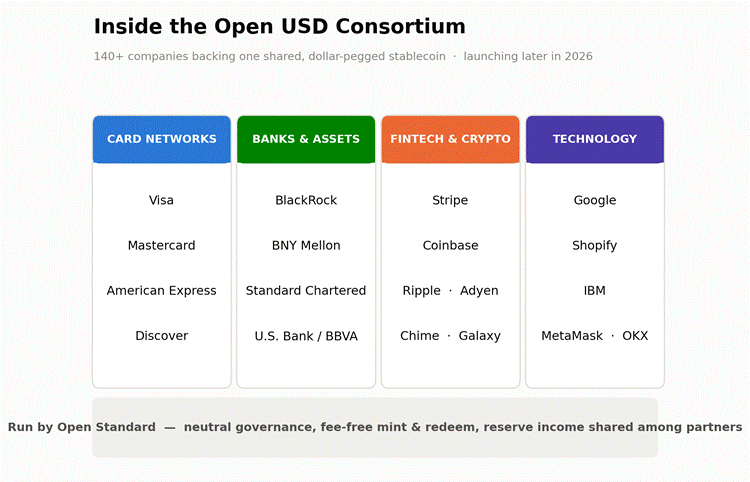
  • Personal Trainer
  • Yoga Studio
  • Physical Fitness Program
  • Weight Loss Service
  • Pilates Studio
  • Boot Camp

For Google, these sub-categories help to match your profile to more specific search interests.

4. Write a Business Description That Sounds Human

A description gives you the freedom to showcase your offerings in more detail. You should avoid stuffing your description with keywords. It should be genuine, real information about what you have to offer and how users can benefit from it.

A strong description should briefly explain:

  • who you help
  • What services do you offer?
  • What makes your gym different?
  • What area do you serve?

Here is one good example of the tone that you should follow while entering your description:

At [Gym Name], we help busy adults in [City] build strength, improve fitness, and stay consistent with expert coaching, modern equipment, and supportive group classes. Whether you’re looking for personal training, weight loss coaching, HIIT sessions, or a welcoming neighbourhood gym, our team is here to help you get started.
If you have noticed, the style doesn’t seem robotic or made up. Rather, it gives the information in a subtle and useful way. This really enhances the experience of your Google Business Profile for gyms without sounding artificial or forced.

5. Keep Your NAP Consistent Everywhere

NAP stands for Name, Address, and Phone number.

You should always maintain consistency across your website, social media profiles, directories, and Google listing. This is the core, foundational part of local SEO for gyms. Any good gym SEO expert will always highlight NAP consistency as one of the core local ranking practices for fitness businesses.
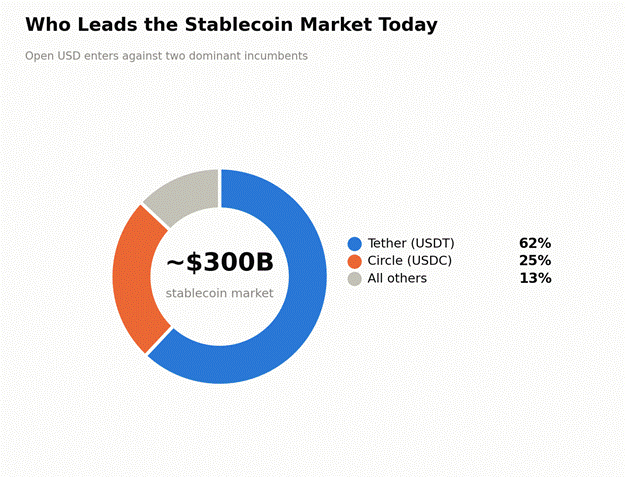
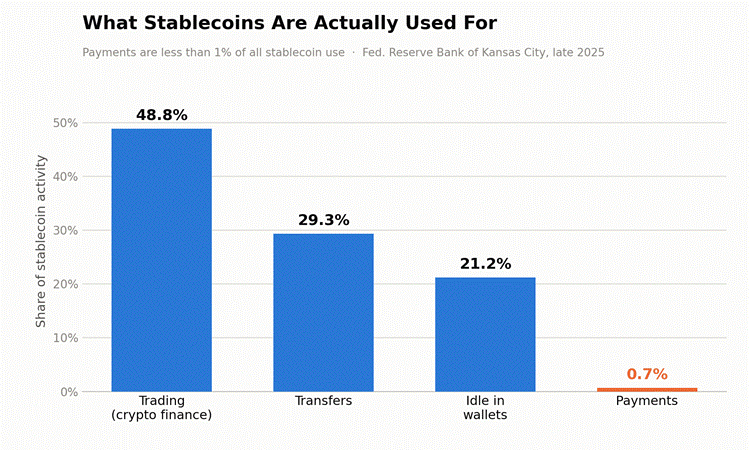
That means:

  • Use the same business name format everywhere.
  • Use the same street address formatting.
  • Use the same primary phone number.
  • Match your website contact page to your Google profile.

If there is no consistency, it can create confusion for both search engines and customers.

6. Add High-Quality Photos That Reflect the Real Experience

High-Quality Photos That Reflect the Real Experience

Visuals are an integral part of your gym promotion. People prefer gyms with better visuals and a better environment. Before users explore your membership plans, they want to see the ambiance of your gym. They want to know whether your space looks clean, modern, welcoming, and motivating.

Do not forget to upload real images of:

  • Your exterior and entrance
  • Front desk and lobby
  • Weight room
  • Cardio area
  • Studio rooms
  • Locker rooms
  • Trainers and coaches
  • Group classes
  • Branded signage
  • Happy members, if you have permission

If your profile is polished with current visuals and pictures, it tends to build more trust than your competitors’, who either didn’t post any pictures or posted blurry, low-quality photos.

7. Get More Reviews—and Respond to All of Them

It is human nature to ask other people about their experiences. Reviews are real-life experiences from people who use your services. Reviews are one of the strongest trust signals for a fitness centre or, for that matter, any business. A gym SEO expert will always recommend building a steady stream of reviews. They will also suggest that you respond to each and every review. This will positively influence your conversions and rankings.

Best practices:

  • Ask happy members for reviews shortly after a positive milestone.
  • Make it easy by sending a direct review link.
  • Encourage honest feedback, not scripted responses.
  • Respond to every review professionally.
  • Thank members by name when appropriate.
  • Address negative feedback calmly and constructively.

A profile with positive and encouraging reviews shows potential customers that your gym is active, credible, and engaged with its community.

8. Use Local Keywords Naturally

Use Local Keywords

If content is the king, the keyword is its soul. It should be natural rather than forced.

When you work on Google Business Profile optimization for gyms, be natural in explaining your services for the local area. Especially in your business description, website landing pages, or promotional pages, review generation strategies, and blog/article posts.

Here are some good examples of local keyword patterns.

  • gym in [city]
  • personal training in [city]
  • yoga studio near [neighbourhood]
  • HIIT classes in [city]
  • 24-hour gym in [location]

Industry guides for gym and fitness businesses recommend services and target location keywords. This aligns with how potential members actually search.

For any Google My Business for gym strategy, naturally produced content with keywords offers relevance, clarity, and local intent.

9. Publish Google Posts to Keep Your Listing Active

Always keep your listing active. May gym owners set up their profiles once and then forget about them. They do not bother to update their profiles. This is a big mistake that can kill your chances of growth.

Regular updates can help keep your profile fresh and useful. Post about:

  • new member offers
  • class launches
  • seasonal fitness programs
  • personal training packages
  • community events
  • holiday hours
  • transformation stories
  • challenges and workshops

Apart from Google algorithms catching and matching your business to the list, an active profile also shows that your business is active, current, and connected to real people and the community.

10. Add Products, Services, and Attributes Thoughtfully

If you have an array of products and services, then list them and update them regularly and clearly.

For example:

  • Personal Training
  • Small Group Training
  • Strength and Conditioning
  • Weight Loss Coaching
  • Yoga Classes
  • Pilates Classes
  • Open Gym Access
  • Nutrition Coaching

Also, keep updating any attributes that apply to your facility, such as accessibility features, women-led ownership, appointment options, or amenities.

The clearer you define your offer, the easier it is for potential customers to decide whether your gym is the best option among all the listings in a Google search.

11. Optimize Your Website Alongside Your Profile

Optimize Your Website

A modern website is an added advantage. Your profile cannot work on its own until you connect it to a modern, fast-loading website. You cannot explain many things in your business profile due to certain limitations. But your website can help you do that.

Gym SEO experts emphasize that Google Business Profile, local pages, on-page SEO, mobile usability, and reviews all work together to help you grow.

To support gym Google listing optimization, your website should include:

  • A clear contact page
  • Matching NAP details
  • Location-specific landing pages
  • Fast mobile performance
  • Click-to-call buttons
  • Service pages for key offers
  • Strong calls to action
  • Embedded map, where appropriate

Your Google listing helps people discover you. Your website helps convert them.

12. Create Location Pages if You Serve Multiple Areas

If your gym business has multiple locations, then one generic home page won’t suffice. You should always create dedicated profile pages for each location or branch. Each profile should be updated with:

  • Unique address and phone number
  • Specific class offerings
  • Local testimonials
  • Local trainer details
  • Photos from that location
  • Embedded map
  • Neighbourhood-specific copy

Fine SEO guides repeatedly recommend location-specific pages to improve local relevance and conversion rates.

13. Monitor Performance and Improve What Converts

Creating a Google Business Profile is not a one-time project. It requires consistent efforts to stay ahead of your competitors.

Track:

  • Calls from your listing
  • Website clicks
  • Direction requests
  • Review growth
  • Photo engagement
  • Branded search volume
  • Lead form submissions
  • Trial membership sign-ups

As a gym owner, you should always monitor and adjust your profile page rather than set it and forget it. Try to find what actually drives inquiries, then keep refining your profile, pages, offers, and messaging.

Common Mistakes Fitness Centres Make With Google Business Profile

Even good gyms lose visibility because of a few avoidable mistakes:

  • Using inconsistent business information across platforms
  • Choosing the wrong business category
  • Neglecting reviews
  • Uploading poor-quality or outdated photos
  • Leaving hours inaccurate
  • Keyword stuffing the business name
  • Linking to a weak or irrelevant landing page
  • Ignoring mobile experience
  • Failing to create location-specific pages for multiple branches

If your Google Business Profile for gyms is underperforming, one or two of these issues may be the reason.

Conclusion

Creating a Google profile and developing a Google My Business strategy for a gym are not complicated. It is consistent.

Consistency is what effective Google Business Profile optimization for gyms looks like in practice. And when combined with broader local seo for gyms, it can turn Google into one of your most reliable channels for attracting high-intent local members.

If your fitness centre depends on local foot traffic, membership trials, consultations, or class bookings, this is not optional housekeeping. It is core growth infrastructure.

TreviPay and VISA Partnership

VISA Partners with TreviPay to Bring B2B “Pay by Invoice” to Banks

Trillions of dollars in B2B payments are processed annually, yet their structure remains stuck in the 1990s, relying on checks or manual ACH processing. TreviPay conducted Murphy research on the same problem, and the results were shocking. Even in modern times, 26% of corporate payments are still made by checks or manual bank-to-bank transfers in the $58 trillion North American market alone. This does not point to an error of being stuck in old ways; it suggests a deeper problem: the structural failure of payment processing in the corporate world.

On January 20, 2026, TreviPay and Visa Partnership launched its “Pay By Invoice” solution for banks through Visa’s commercial payment infrastructure. TreviPay is a B2B invoicing and order-to-cash automation company established in 1978. The new “Pay By Invoice” feature, which they just launched in partnership with VISA, offers a simple pitch: the bank gives corporate clients the ability to pay suppliers on net terms via invoice using VISA credentials. All backend processing and payment automation will be handled by TreviPay. This is an attempt by the TreviPay and Visa partnership to bite into the largest untapped slice of the B2B solutions market.

Why Are B2B Payments Still Inefficient?

B2B Payments

Most B2B payments are very cumbersome even today. The buyer will place a large order, and the supplier will send an invoice to the buyer, which the buyer’s accounts team will manually enter into their database. The payment will be initiated via ACH or check. This whole process takes 45 to 90 days for the payment to actually be settled into the supplier’s account. All this while the cash is unusable by both parties, and since the data is entered manually, there is a high risk of human error.

Banks still haven’t solved this problem. Although they can cover a wide range of card transactions at the consumer level, corporate transactions are a bit more complex and involve hierarchies, multi-department approvals, and reconciliation requirements, serving as an extension of Visa’s commercial-payments stack.

According to TreviPay, the buyers are frustrated as well. Data showed that 61% of B2B buyers prefer to pay on net terms, and 78% buyers want to customize aspects of payment terms and invoicing workflows. Most banks today have not yet developed a viable, scalable solution to this problem.

Their tools fall short for invoice-based corporate purchases that large companies depend on. In such cases, multiple steps are involved in processing a single transaction, and each step must be managed efficiently. Businesses in the corporate sector have been constantly looking for a way to minimize the hassle and a solution that integrates and solves all their pain points in one place.

About TreviPay and VISA Partnership

TreviPay is an order-to-cash automation company based in Kansas that handles the back-end payments for clients such as Walmart, Lenovo, and United Airlines. They have over 40 years of experience and empower over $8 billion in global trade. TreviPay also serves major retail businesses, including Best Buy and Ace Hardware.

They are not just big companies for whom they manage day-to-day transactions; instead, they are live, scaled projects delivered at a massive scale. VISA, on the other hand, is a well-established card network. It is trusted by almost all businesses worldwide to accept customer transactions. Visa will bring commercial payment capabilities as it already has substantial B2B infrastructure, including the Visa Commercial Solutions Hub, Visa Commercial Pay, automated reconciliation features, and B2B supplier-payment capabilities.

The partnership between TreviPay and VISA aims to bridge the exact gap between the trust of a card-issuing network and the technological dominance of a corporate payment management player. VISA provides its dense card network to businesses and enables payments to be processed through it, while TreviPay provides businesses with ERP management, settlement rails, and efficient automation.

How Payments Actually Work?

How Payments Actually Work

Let us now understand the mechanics of how payments actually work in this partnership within the corporate system. It all starts when the issuing banks fund trade credit to the client organization, making the payment. The issuing banks retain responsibility for the credit assessment and client relationships, while TreviPay handles the supplier onboarding and receivables automation. The corporate buyer places an order with the supplier, and here is where things get interesting.

Earlier, the payment was initiated after the invoice was received; now, the client can choose to pay the supplier via the invoice using a card at net terms during checkout. TreviPay handles all the automation of creating the invoice, generating the payment link, and sending it to the buyer organization. However, it must be noted that the issuing bank decides who gets how much credit; TreviPay does not extend credit on its balance sheet.

The typical time to payment has been reduced to approximately 2 days from the date of invoicing. When the buyer eventually pays, the settlement flows through VISA’s commercial network and seamlessly integrates with the bank’s existing card processing system. This ease of payment and the cut-down in processing time between payment initiation and cash in hand are exactly what make this partnership a milestone in the history of financial payment infrastructure and B2B transactions.

What Banks Actually Get Out of This?

Banks

For banks, this system is very easy to integrate. They do not have to install any new software or overhaul existing IT systems to integrate these services. TreviPay is like a software plugin that banks can easily integrate into their existing IT systems to provide their customers with new services, without requiring architectural changes to the software they already use. The banks can continue their usual processing while TreviPay automates the messy work of invoice generation and automation handling.

Right now, large payments in the B2B space are processed via slow checks or bank-to-bank ACH transfers, and the bank earns nearly zero interchange fees on these transactions. Integrating the “Pay By Invoice” feature gives their customers the option to process transactions quickly, and at the same time, banks can earn higher interchange fees in exchange for providing enhanced transaction speeds.

Another big reason why legacy banks are readily adopting this feature is to compete with their new competitors, neobanks and digital wallets. With neobanks gobbling up market share, traditional banks need to leverage technology to attract customers and process a larger share of everyday payments. This option allows the bank to tap into the untapped B2B transaction market, where transaction amounts are large, and customer loyalty is of far greater value.

These features are already being used by retail and manufacturing giants, which proves that this partnership has been an operational and strategic success. Big companies such as Best Buy and Ace Hardware are already using these features to process their B2B payments. They are no longer relying solely on checkouts; they have built entire payment ecosystems that offer financing, exclusive tools, and daily workflows to support their clients. Walmart and Albertsons have adopted these tools to let schools, residential programs, and the government buy groceries on 30-day terms with instant credit checks.

Broader Implications for B2B Fintech

B2B Fintech

There is a massive shift in the B2B payment landscape, and this partnership could give TreviPay and VISA a significant first-mover advantage in the years to come. The consumer payments market has been highly saturated by cards and digital alternatives. Almost all fintech companies focus on consumer transactions because they are easier to manage and more voluminous.

The B2B payment market is largely untapped, as most of the transactions still happen offline through checks or ACH transfers, which, in other words, are mostly off-card. VISA is using this partnership to expand its customer base from consumers to businesses processing massive amounts by capturing the banking systems these businesses primarily rely on and offering never-before-seen convenience.

In the modern business world, speed is everything. The longer your cash flow is stuck in processing, the more your operations are delayed, and the greater the negative impact on cash flow. TreviPay, along with VISA, has reduced wait times to get cash in hand to mere days, making it a perfect choice for businesses looking to gain an edge in optimizing operations.

Competitors of TreviPay cannot secure this level of moat because of the extensive card network it has been granted through its strategic partnership with VISA. The chessboard is now dominated by an unfair advantage: an extensive card network and technologically advanced automation that will change the face of business transactions forever.

Conclusion

The magic here is not just the perfect combination of digital prowess and extensive distribution; it is about how the banks use it to their advantage. This partnership has removed the biggest friction points in the payment cycle: automation, trust, and billing speed. TreviPay provides relief from the operational problems of making invoices and sending them to clients. VISA has come in with its extensive distribution and established trust, and the biggest advantage is that the business does not have to move outside the banks. It is a convenient choice they can easily make within the banking system they previously operated in, and get a huge upside.

The estimated cost of the B2B market is $58 trillion. This is a pie whose piece no one wants to miss. The banks want to adopt these systems to entice more clients and improve turnover on interchange fees. But if these institutions drag their feet on adopting the technology, they may be leaving a huge piece right on the table for competitors to eat. The early-mover advantage has never been greater, and the revolution in business payments has just begun.

Frequently Asked Questions

  1. What is the “Pay By Invoice” feature?

    This is a new feature that lets you pay the invoice amount through bank credits, and then you can eventually settle the credit with the issuing bank. TreviPay released the feature in partnership with VISA to facilitate B2B transactions.

  2. Who takes on the credit risk in this model?

    The credit risk is taken by the issuer bank in this model. It is the issuer bank that decides who gets how much credit and holds all responsibility for credit assessment.

  3. Does a supplier need to install new software to integrate this system?

    The best part about this new system is that it is a plugin software that can be implemented directly into the existing banking infrastructure without the need to overhaul complete systems.

  4. How is this different from what virtual cards already do in B2B?

    Virtual cards can handle consumer transactions such as travel and purchases very efficiently. But in B2B payments involving ERPs, multi-department approvals, and hierarchies, these systems lack the technical infrastructure to process them.

  5. Is this product available globally or only in North America?

    The announcement specifically mentions the North American markets as the primary target, while TreviPay operates across 30+ countries. The global distribution of VISA cards makes international scale possible; current trends suggest a launch focused more on North American markets.