Refund Abuse in E-Commerce

Refund Abuse in E-Commerce: How to Spot Policy Exploitation Before It Hits Margin

Refund abuse in E-commerce is not a customer service annoyance; it is a severe, hidden drain on profitability and margins. The gradual reduction in gross profit margins, often hidden in operational costs such as returns, makes the business less profitable over time and is called margin erosion.

The normalization of returns is a trend in which customers now expect seamless, free return policies as standard in e-commerce, which unintentionally opens the door for bad actors to exploit these systems. Another concept you must understand is reverse logistics. It is the supply chain process of moving goods from the customer back to the seller, encompassing shipping, processing, and restocking.

There are many hidden operational costs. These are the compounding financial impacts of processing a return, including return shipping fees, warehouse labor, and repackaging materials, which severely erode the net profit from the original sale. You must understand that there is a difference between the cost of doing business and the active abuse of your policies. Understanding this is critical because legitimate returns involve friction, whereas refund abuse is a deliberate exploitation of policy that actively steals revenue from you.

The effects of refund abuse are not limited to fraud teams; it also affects teams from other departments. It inflates the customer support ticket times, creates warehouse bottlenecks, and skews marketing acquisition data. Proactive margin protection is important. It means you shift from reactive management and damage control to designing systems and policies that prevent abusive returns from being initiated in the first place.
What is Refund Abuse and How It Differs from Legitimate Returns

What is Refund Abuse and How It Differs from Legitimate Returns

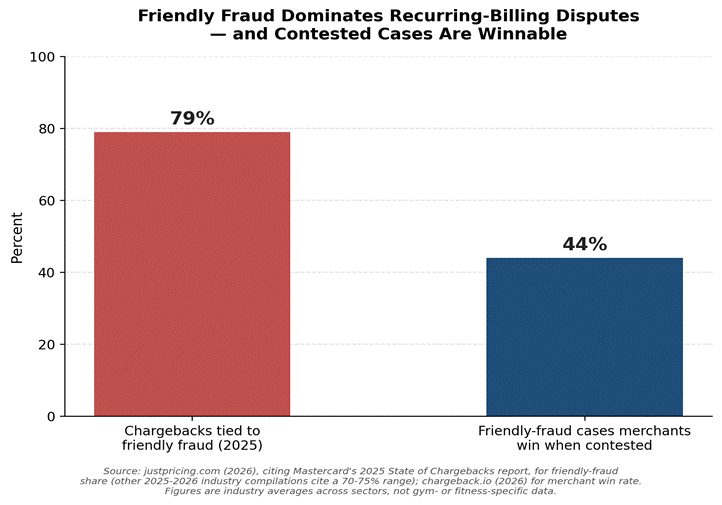
Refund abuse refers to the repeated, intentional exploitation of your return and refund policies for personal or financial gain. The worst part is that refund abuse often occurs without explicitly breaking the law, making it difficult to dispute them. Friendly fraud is often associated with refund abuse. It occurs when a legitimate customer uses the chargeback process to secure a refund for an item they received and kept, often claiming they did not authorize the purchase or did not receive the item.

Legitimate returns are driven by product mismatches and genuine problems; they mean a customer is returning an item because it did not fit the description, arrived damaged, or did not meet their expectations, which is a normal, healthy part of e-commerce.

Refund abuse is driven by intentional exploitation. This means that the customer purchases with the premeditated intent of keeping the item for free, using it once, and then returning it, or turning a transaction into theft. Soft fraud is a “gray area.” It happens when otherwise good customers exaggerate a claim, for example, saying a package was stolen, when it was just delayed, to bypass the return shipping fee. This makes it difficult for the merchants to detect without alienating real buyers.

You must also understand the vital distinction between chargebacks and policy abuse. Chargebacks occur when the buyer bypasses the merchant and goes directly to their bank to request a reversal of the fund transfer. On the other hand, policy abuse happens directly through the merchant’s customer service channels. The core differentiator between a legitimate and a fraudulent transaction is the intent. Legitimate returns seek to make the customer whole after a failed transaction; on the other hand, refund abuse seeks to enrich the customer at your expense.

Common Types of Refund Abuse in E-commerce

Common Types of Refund Abuse in E-commerce

Now, let us understand the common types of refund abuse in the e-commerce industry. Before that, you must understand what wardrobing and empty-box fraud are.

Wardrobing, also known as free renting, refers to the situation in which an item is purchased, used for a specific event, and then returned by the client, requesting a full refund. It is a form of refund abuse that creates hidden costs for the business; you can think of it simply as free credit extended to the customer. The customer uses the goods and then claims a refund, creating hidden costs from product depreciation and lost resale value.

Another common e-commerce fraud is item swapping, also known as brick-in-box fraud. It occurs when a buyer purchases a new item and returns the box filled with a counterfeit, an older model, or literal junk of the same weight, tricking the automated or rushed warehouse staff into issuing a refund.

On the other hand, empty box fraud occurs when a customer claims a package never arrived or arrived empty to secure a refund while still keeping the goods. It is also known as Did Not Arrive (DNA) fraud. It is effective because it forces merchants to issue refunds or replacements out of fear of negative reviews.

Cross-channel or receipt fraud involves buying an item at a deep discount or on clearance online, and then returning it to a physical store without a receipt, or sometimes with a forged one, to claim a refund for the full retail price, effectively stealing the price difference.

The last type of fraud we will discuss in our blog is promo code or gift card abuse. It happens when a user creates multiple accounts to exploit “buy one, get one” or first-time buyer discounts, then returns the paid item while keeping the free discounted item. They manipulate the cart logic to keep the gift.

Understanding various frauds is necessary to avoid becoming a target and to formulate policies and implement measures to counter them in your business.

The Rise of Refund Abuse

The Rise of Refund Abuse

After understanding the various types of refund abuse in the e-commerce industry, it is time to examine the macroeconomic and technological trends driving this behavior.

Professional refunding services, also known as Fraud-as-a-Service (FaaS), represent a massive shift in the fraud landscape. Every day, consumers hire experts via Telegram or Reddit to socially engineer a merchant’s customer service into issuing a refund for high-value goods, democratizing complex refunds.

The “Amazon Effect” has conditioned consumers to view the return process as a fundamental right, rather than a privilege. This has made it incredibly difficult for smaller brands to enforce strict policies without incurring severe public backlash or losing sales.

Soft fraud is driven by economic pressure and the high cost of living. Consumers who are financially stretched justify lying about a missing package or a defective item as a victimless crime against a faceless corporation. The shift to contactless deliveries during and after the pandemic eliminated the need for delivery signatures, creating an easily exploitable loophole. The buyer could simply claim a package was stolen from their porch with little to no burden of proof.

Another challenge businesses face is the normalization of refund abuse on social media. It occurs when users on platforms like TikTok share “hacks” for getting free items from brands by exploiting their specific customer service policies.

Rather than being just a temporary spike in the accounting charts, refund abuse is a growing systemic problem that requires active resolution.

Early Warning Signs and Red Flags

Refund abuse is a complex problem to navigate. However, there are a few warning signs you can look for to identify bad actors before they successfully process a fraudulent refund.

The first warning sign is high return velocity. Return velocity is the speed and frequency at which a single account or address initiates returns over a specific period. A customer buying and returning items at a rate far exceeding the average likely uses the store as a free rental service or tests the limits of the return policy.

Use of guest checkout and burner emails is a tactic used by professional abusers. Serial abusers use them to prevent you from tracking their lifetime return history. This makes it crucial for you to track abuse by shipping address or device ID, rather than just by user account.

Another indication of refund abuse is sudden deviations in the buyer behavior of an established buyer. It occurs when a loyal customer who has made regular purchases suddenly starts requesting refunds for high-value packages. This is an indication of a possible account takeover or a change in financial circumstances.

Another red flag you must watch out for is aggressive or rushed customer service interactions. It is a tactic used by social engineers, who attempt to pressure support staff by bullying, threatening with negative reviews, or rushing agents into issuing an immediate refund. This can be countered by empowering the staff to stay aligned with the SOPs, rather than acting under pressure.

Lastly, targeting specific, high-value items is common among professional fraudsters. They ignore the cheap goods and focus exclusively on purchasing and returning high-value items, such as flagship smartphones, designer sneakers, or cosmetics that can be easily resold on secondary markets.

The Financial Impact on Margins and Operations

Refunds initiate a cycle of reverse logistics for the business. A refunded item costs the merchant money in outbound shipping, return shipping, and warehouse labor. These costs compound, flipping a profitable sale into a negative transaction.

Product depreciation refers to the loss of value an item suffers once it leaves the warehouse, is handled by the customer, and is returned. This often renders the item unable to be sold at full price. Product depreciation and salvage values severely hurt profit margins. This is because returned items, such as seasonal apparel or opened electronics, often cannot be sold as brand-new, forcing the merchant to liquidate them at a fraction of their original cost.

When refund abusers are mistakenly categorized as high-value customers by marketing systems because of their initial purchase volume, this is called Customer Lifetime Value (CLV) distortion. This often leads to spending more ad dollars trying to acquire similar audiences, resulting in the business actively paying to acquire more fraudsters. Refunds also carry a huge opportunity cost for your business. The item cannot be resold while it is in the customer’s possession. For example, a 30-day return policy means you missed out on selling that exact item to a legitimate customer for 29 days while it was in season.

To top it all off, payment gateway and chargeback fees act as a double penalty; if an abuser initiates a chargeback, you lose the product revenue and incur an additional chargeback fee from your payment processor.

Conclusion

Refund abuse is not just a customer service nuisance, but a direct threat to gross margins. The foundation of a good defense lies in distinguishing between legitimate returns and deliberate policy exploitation. Technology, strict SOPs, and cross-departmental communication are required to combat modern fraud tactics like FaaS and wardrobing. Finally, proactive policy design and intelligent friction protect margins without sacrificing the loyalty of genuine customers.

Frequently Asked Questions

  1. What is the difference between refund abuse and a chargeback?

    Refund abuse happens when a customer exploits a merchant’s internal policies directly through the store. On the other hand, a chargeback is when the customer bypasses the merchant and directly requests a reversal of funds from the merchant account to their account.

  2. Is friendly fraud actually fraud?

    Yes, even if it is a mistake or an impulsive decision, keeping an item while lying to secure a refund is financial theft, regardless of how the consumer rationalizes it.

  3. How can I stop wardrobing without upsetting good customers?

    You must use visible, tamper-evident tags, such as large ribbons, on high-risk items. It must be stated clearly in your return policy that no returns will be processed if the tag is tampered with or detached from the item at the time of return.

  4. What is Fraud-as-a-Service (FaaS)?

    FaaS refers to organized groups operating on platforms like Telegram that offer to secure fraudulent refunds for everyday buyers.

  5. Should I charge restocking fees?

    Yes, charging restocking fees is an effective method to deter abusers from exploiting refund policies. However, you must explicitly state the restocking fees at checkout to avoid angering legitimate buyers.

Progress Billing

Progress Billing for Contractors: How to Invoice Deposits, Milestones, and Change Orders Cleanly

Irregular cash flow and billing disputes are the most common financial pain points in the construction business. To find a solution to this, contractors must understand cash flow crunches and front-loaded costs, and how to address them through progress billing.

A cash flow crunch is a situation in which a contractor must pay for labor and materials out of pocket before receiving payment from the client. On the other hand, front-loaded costs are a contractor’s business reality. Construction projects require significant spending at the beginning, such as permits and large material orders, before the bulk of the work is completed.

Construction is notorious for front-loaded costs, meaning contractors often have to pay for materials and labor long before the client pays the final bill. This creates a dangerous cash flow gap that can shut down an entire business. Traditional lump-sum billing meant the contractor would be paid a single lump sum at the end of the project. It often forces contractors to act as a bank, taking on all the financial risks if the client delays payment or disputes the finished work.

Irregular cash flow makes it impossible to confidently take on new jobs, pay subcontractors on time, or purchase necessary equipment — all of which can hinder business growth. Client disputes often arise at the end of the project when a single massive bill is sent. This happens because there is limited visibility into the day-to-day progress of the work.

The solution to all these problems is progress billing. It turns the massive invoice into a series of smaller, more predictable payments that are tied directly to verifiable work completed. This protects both the contractor’s bank account and the client’s peace of mind.

What is Progress Billing and How It Works

What is Progress Billing and How It Works

Progress billing refers to the method of invoicing for the exact percentage of work completed during a specific billing cycle. It is a method in which the client pays for the project in installments as work is completed, rather than upfront or at the end. This aligns contractor income with project expenses, allowing seamless cash flow.

A Schedule of Values (SOV) is the master list of all tasks in a project, with their associated costs, totaling the full contract price. A SOV acts as a foundational roadmap for progress billing. It breaks the entire project down into individual line items, for example, foundation, plumbing, and electrical. Every line item has a specific dollar value assigned to it.

Calculating a progress bill is often tricky. To calculate a progress bill, the contractor assesses the “percentage of completion” for each line item on the SOV and bills the exact amount. The benefit of using progress billing is that it creates transparency. For example, the client can literally look at the job site, see that the plumber is half finished, and confidently approve the invoice. They can rest assured that they are only paying for actual progress.

Progress billing standardizes the payment schedule, usually operating on a strict 30-day cycle. This means that the administrative team knows exactly when to submit the invoice and when to expect a check.

Deposits and Upfront Payments: Setting the Initial Foundation

Deposits and Upfront Payments

As a contract business owner, you must understand the legal and ethical ways to request money from your client before the work begins, so that you do not have to risk your own operational capital on a new prospect. Before that, you must understand three key concepts: upfront deposits, mobilization costs, and custom materials.

Upfront deposits are a percentage of the total contract price paid by the client before the project begins. The expenses required just to get the site ready, such as bringing in trailers, renting fencing, and pulling permits, require cash outlay. These costs are known as mobilization costs. Lastly, custom materials are the items ordered specifically for a job, such as custom windows. These items are specifically designed and cannot be returned.

Requesting an upfront deposit may seem daunting, but it is a standard and necessary practice for every contract business. This is because contractors must purchase custom materials and secure permits weeks before a shovel ever hits the ground. And these costs must not become out-of-pocket expenditures for your business.

Deposits protect the contractor from the risk of “flaking.” It filters out non-committed prospects from committed clients. If a client cancels the project at the last minute, the deposit is used to cover the non-refundable costs the contractor has already incurred.

A typical deposit ranges from 10% to 30% of the project’s total estimated cost. The amount of the deposit depends on state laws and the size of the project. The ultimate aim is to ensure that the contractor is not financing the client’s build with their own credit lines. On the other hand, mobilization costs should ideally be covered by this initial payment. This means the cost of moving heavy equipment to the site and setting up temporary facilities should not deplete your existing cash reserves.

An important point to keep in mind when invoicing the initial deposit is to clearly label it as an advance payment on the project total. This ensures that the client understands it will be credited against the final balance, not added as an extra fee.

Milestone Billing: Structuring Payments Across the Project Lifecycle

Milestone Billing

The next step in progress billing is to understand how to tie payments to tangible, verifiable stages of project completion rather than relying on arbitrary calendar dates. For this, it is crucial that you understand milestone billing and draw schedules. Milestone billing is a variation of progress billing in which payments are triggered by the completion of major, visible project phases. Milestone billing breaks the project into predefined stages, such as pouring the foundation, completing rough framing, or finishing drywall, and triggers invoices for each stage as it is completed. This strategy is very effective for residential and mid-sized commercial projects. It enables the client to physically see that the milestone is achieved, eliminating arguments over abstract estimates.

Draw schedules refer to the predetermined timeline agreed upon in the contract that dictates exactly when the contractor can request a payment, often called a “draw.” Creating a precise draw schedule in the initial contract prevents payment delays, as both parties agree in advance that an invoice will be generated upon achieving specified milestones.

Milestones must be defined very clearly. The criteria should be objective, rather than subject to interpretation. It must ensure there is no debate between the contractor and the client about whether the milestone was actually reached.

You must ensure that the payment tied to a milestone covers the costs incurred while achieving that milestone plus a plausible margin. This helps to keep your cash flow positive and prevents you from falling behind the project’s actual expenses.

Handling Change Orders Without Billing Confusion

Now that you know what progress billing is and how to implement milestones in your business, it is time to understand how to manage changes in project scope without letting them undermine your primary progress bills and schedules.

A change order (CO) is a formal, written amendment to the original contract that alters the scope of work, the schedule, or the total price. Change orders are the primary cause of billing disputes. This is because clients often request small upgrades, expecting them to be a favor from the contractor. But when you bill your client for these “small” upgrades, payment disputes arise. It is wiser to maintain proper proof and documentation of every change order in advance, so that you have a legitimate case in a future payment dispute.

A Change Order (CO) must be a written document, signed by the client. It must detail the exact new work and the exact additional cost. To guarantee payment, the CO must be signed by both parties before the new work begins. When executing progress billing, approved COs must be added to the Schedule of Values (SOV) as separate line items in the invoice, rather than adjusting costs by editing the original invoice.

You must also understand that scope creep is a bigger problem in contract businesses. When a client slowly requests minor additions or changes that aren’t in the original contract, they eventually add up to massive unpaid costs for the contractor. Keeping COs as separate line items provides a crystal-clear paper trail, which shows the client exactly what they are paying for. This helps them see separately what they were originally paying, and what they are paying for the new work.

If you perform extra work without signed COs, you risk legally forfeiting the right to bill for it. This turns what should have been profitable extra work into unnecessary operational overhead.

Avoiding Common Progress Billing Mistakes

Many contractors implement progress billing in their business, but make some of the most common mistakes, sabotaging their own payments. In this section, we will provide you with a list of some of the most common mistakes made by contractors while trying to implement progress billing, so that you can avoid accidentally losing money in the future.

Before we dive into the list, let us understand what front-loading means in contract billing. Front-loading refers to unfairly shifting the bulk of the project’s profit or costs to the first few billing cycles. Aggressive front-loading is a major mistake. If a contractor artificially inflates early invoices, clients and architects will eventually catch it, leading to loss of trust and credibility.

Failing to document stored materials properly often results in rejected bills. A client would never pay for expensive materials, such as HVAC units, unless they are assured they will be delivered securely to the job site. Another reason that your bills are rejected is calculation mistakes. Simple spreadsheet errors compound quickly and appear as massive blunders in the final invoices.

Submitting invoices late or missing the client’s strict monthly billing deadline means your invoices are pushed to the next 30-day cycle. This creates an unnecessary delay in cash flow. Finally, failing to adhere to the client’s required formatting or to attach required documentation results in invoices being rejected.

Conclusion

Progress billing is not just back-office administrative work; it is the frontline of your contracting business that ensures customer trust and satisfaction. Optimal progress billing is the lifeblood of a contractor’s cash flow and business survival. Clarity, objective milestones, and rigorous documentation with proper proof are the only ways to prevent end-of-project payment disputes. Implementing the progress billing strategies discussed in this blog will help your business thrive and increase customer trust and credibility. Additionally, it will reduce the mental stress caused by failed payments and empower you to work toward sustained growth.

Frequently Asked Questions

  1. What is the difference between progress billing and milestone billing?

    Progress billing usually bills the client on a strict calendar schedule. On the other hand, milestone billing is an objective method in which a payment is triggered on completion of predefined tasks.

  2. Can a contractor bill for materials that haven’t been installed yet?

    Yes, you can bill the client for “stored materials.” However, these invoices require proper proof that the materials are securely delivered to the job site, accompanied by timestamped photo and video evidence.

  3. How do I handle a change order in a progress bill?

    You should never alter the original contract line items. A signed, approved change order must be added to the bottom of your Schedule of Values as a new, separate line item so both parties can clearly track the new expenses.

  4. Do I need special software for progress billing?

    Although you can use spreadsheets, they are prone to errors. Using dedicated software ensures automated, error-free, and legally-compliant invoices that speed up approvals.

  5. Why was my application for payment rejected?

    The most common reasons for rejection include mathematical errors, missing mandatory documentation, or billing for change orders that were never formally signed by the client.

Donation Receipts

Donation Receipts and Tax Acknowledgments: How Nonprofits Can Automate Follow-Up Without Losing Trust

Balancing administrative efficiency with donor relationship-building is the biggest challenge for nonprofits. Automation is not about replacing human connection, but rather freeing up staff time to focus on high-value human interactions while ensuring compliance is handled flawlessly.

Donor attrition is the rate at which former donors stop giving to a nonprofit, often due to poor communication or a sense of unappreciation. This is often caused by transactional communication. When donation receipts and tax acknowledgment messages feel like cold retail purchases, for example, “Payment Received,” rather than warm philanthropic interactions, it makes the donor feel alienated. The dual expectations of modern donors mean that supporters expect instantaneous digital confirmation of their transaction for peace of mind. Not only that, but they also expect warm, personalized acknowledgments that validate their philanthropic choice.

The problem with manual receipting is that it creates unsustainable operational bottlenecks. It forces staff to spend hours copying and cross-referencing data between multiple spreadsheets, rather than building relationships with major donors. Another challenge with manual data entry is that humans are inevitably prone to making errors. This leads to compliance risks, IRS omissions, or sending the wrong receipts via email, which can invalidate the donor’s entire tax deduction and permanently damage their trust.

However, sending default payment gateway receipts is not optimal either. It shows a lack of appreciation for the donor because the receipts generated from payment gateways like Stripe or PayPal sound very transactional or cold. Strategic automation bridges this gap by utilizing dedicated software to instantly send legally compliant, highly customized, and emotionally resonant acknowledgments without requiring human intervention.

The Difference Between a Tax Acknowledgment and Standard Receipts

Difference Between a Tax Acknowledgment and Standard Receipts

Many nonprofit founders confuse standard receipts and acknowledgments with fundamental legal documentation. While it is true that all tax acknowledgments are receipts, not all receipts serve as legal tax acknowledgments for the IRS. It is crucial for you as a nonprofit manager to understand the legal complexities and basic policies that define what a basic, legally compliant tax document comprises.

There are two basic concepts you must understand: the 501(c)(3) status and the burden of proof. The 501(c)(3) status is the specific IRS tax exemption classification that allows a charitable organization’s donors to deduct its contributions from their taxable income. This is critical for the nonprofit to enable donors to claim tax deductions.

The legal responsibility for proving whether a contribution was charitable is called the burden of proof. The burden of proof often falls on the donor, not the nonprofit, to prove to the IRS that their charitable contribution is valid using documentation provided by the charity.

As stated above, a standard payment receipt simply proves the occurrence of a financial transaction. It straightforwardly tells that a credit card was charged and some money was transferred; it does not state the intent of the payment. Hence, while receipts may be beneficial for personal budgeting, they are rarely conclusive evidence of a charity. A formal tax acknowledgment is a specific, legally binding document issued by a registered 501(c)(3) that verifies that the gift was made to an eligible entity in compliance with IRS standards.

Now, you might wonder whether you can acknowledge payments via receipts and send emails later—what is the need for dedicated software? Sending receipts and acknowledgment emails separately could seem like a plausible solution on the surface. However, it has a fundamental flaw: during the tax season, it is a huge hassle for the donor to search their inbox, download the acknowledgment, and submit it to the IRS. It is highly likely that the donor will end up submitting the basic payment receipt to the IRS and have their tax deduction claim rejected, which could lead them to lose trust in your nonprofit.

This is why providing dual-purpose documents that serve as both receipts and legal acknowledgments is necessary. Automation ensures consistent legal language across all documents by hardcoding mandatory IRS phrasing into email templates. This ensures consistency and prevents inadvertent human errors that could lead to tax claim rejections.

IRS Compliance: Mandatory Elements Every Donation Receipt Must Include

Mandatory Elements Every Donation Receipt Must Include

Most nonprofits make this mistake in their initial email designs — they create “beautiful,” emotionally warm automated emails that often fail legal standards. Designing emails that make donors feel valued is important, but you must also remember that these emails serve as a legal acknowledgment. This means that, in addition to being appreciative of the donation, the email must also be legally sound.

Every nonprofit manager must understand Quid Pro Quo contributions and good-faith estimates. A quid pro quo contribution is like a transactional donation. The donor donates money and receives goods or services in exchange. For example, buying a $100 ticket to a charity dinner where the meal costs $40. The nonprofit calculates the value of the goods and services offered in exchange for the donation. Good-faith estimates are honest calculations of the fair market value of the goods and services offered to the donor in exchange for the gift.

You must be aware of all the details necessary for an acknowledgment to be legally compliant with IRS standards before designing automated email templates. The nonprofit’s full legal name and EIN (Employer Identification Number) must be explicitly stated, as this proves to the IRS that the receiving entity is a legitimate tax-exempt organization. The next important detail is the exact date of the contribution and the donor’s full legal name. It can be populated in the receipt via the CRM, ensuring the transaction is legally tied to a specific individual in a specific tax year.

The exact amount of the donation must also be mentioned in the receipt. In case there was no exchange of goods or services, it is mandatory to state that “No goods and services were provided in exchange for this transaction.” For quid pro quo gifts, the receipt must explicitly state the good-faith estimates of the goods or services provided.

IRS Publication 1771 states the rules regarding charitable contributions, substantiation, and disclosure requirements. It will help you create legally bulletproof documentation that you can integrate into your automated systems.

The Hidden Cost of Manual Donation Processing

Cost of Manual Donation Processing

Manual donation processing carries a huge opportunity cost. It is the potential value or revenue lost when a person chooses to spend time on a low-level administrative task instead of a high-value strategic task. Additionally, manual data entry drains staff morale by forcing mechanical entry rather than fostering better relationships with donors. It creates time delays and misses deadlines. Delayed gratification ruins the donor’s emotional high. When a nonprofit relies on manual processes and sends acknowledgments weeks after the donation, the donor has already forgotten the emotional impulse that prompted the donation in the first place.

The opportunity cost of manual receipting directly harms fundraisers, as every hour spent editing documents is an hour that could have been spent pitching the cause to more people. Manual processes naturally lead to poor data hygiene. Human errors are inevitable and can often lead to compliance and legal risks.

Investing in automation software is cheaper than hiring administrative staff and conducting data audits every two months. A monthly CRM subscription effectively acts as a tireless, error-free assistant that works 24/7, even on weekends and holidays.

Automating Donor Follow-Ups Without Sounding Like a Robot

The primary fear of every nonprofit manager is that automation will erode the “human touch.” Personalization is beyond just using a first name; it means automation software should be configured to pull in dynamic fields, such as the exact program they funded or the number of years they have been donating.

Dynamic fields, also known as merge tags, are small pieces of code in an email template, such as ({{First Name}}), that automatically pull specific data from the CRM and insert it into the message to personalize it.

Another thing you must understand is the sender alias. It is the name that appears in the “From” line of an email inbox, for example, using “Sarah at Hope Charity” instead of “[email protected].” You should replace the “No-Reply” email addresses with a real human sender name and a monitored reply-to address, which signals to the donor that two-way communication is welcome and encouraged, helping the email feel less dry, automated, and robotic.

You should integrate impact-based storytelling directly into the receipt, turning a dry administrative email into an emotional touchpoint. You should use photos, short videos, or quotes from beneficiaries to remind the donor exactly why their gift matters. You should start writing emails in a conversational, warm tone — using words like “you” and “we” rather than overly formal, passive institutional language. This hides the fact that emails are generated by automated scripts and makes the donor feel valued.

Updating the automated email template every quarter ensures that repeat donors don’t receive the exact same “thank you” message multiple times a year, which immediately breaks the illusion of personal communication.

Handling Complex Contributions: In-Kind Gifts, Event Tickets, and Year-End Summaries

Now, let us address the tricky edge cases of nonprofit receipting that standard payment gateways usually get wrong. For this, you will need to understand in-kind donations and fair market value. In-kind donations are gifts of physical goods, real estate, or professional services rather than cash, such as donating computers to a school. Fair market value is the price a property would sell for in the open market. This is crucial for determining tax deductions for non-cash gifts.

Automating in-kind donation receipts requires specialized templates because nonprofits are legally required to describe only the physical item(s) donated. You must never assign a dollar value to it, leaving valuation responsibility strictly to the donor and their accountant. Event ticket automation must cleanly separate the transaction into two distinct lines: the cost of admission and the leftover charitable contribution, ensuring the donor knows exactly what they can claim.

Year-end tax summaries require CRM systems that can automatically aggregate a donor’s entire giving history from January 1 to December 31. This generates a single comprehensive statement that can be emailed out in mid-January.

Having dedicated software can simplify stock and crypto donations. This helps financial teams by triggering asset liquidation at the right time to maximize the value of donations.

Conclusion

Nonprofit teams are constantly overworked, but donor trust is fragile. You should never leave these things to manual reporting and lousy processes — missing deadlines and delayed gratification are the biggest killers of customer trust and recurring donations. The only solution is to integrate payment gateways and CRMs to automate compliant, highly personalized acknowledgment sequences.

Automations should ruthlessly handle speed, accuracy, and legal compliance. The precise implementation helps human staff to reclaim their time and reserve energy for genuine relationship building and high-level stewardship.

Frequently Asked Questions

  1. When is a nonprofit legally required to issue a formal tax receipt?

    A nonprofit is legally required to issue written acknowledgments for every single contribution of $250 or more for the donor to claim a tax deduction. However, the best practice is to provide a receipt for every gift, regardless of the size.

  2. What should a nonprofit do if a donor loses their automated receipt?

    If the donor loses their receipt, the nonprofit can simply use the CRM, upon the donor’s request, to send a duplicate receipt. It is best practice to retain accurate donor records so these requests can be fulfilled quickly during hectic tax seasons.

  3. How do we receive a donor who bought a ticket to a fundraising gala?

    The receipt must explicitly separate the ticket amount into two parts: the fair market value of the goods and services offered, which is non-deductible, and the remaining amount, which is the tax-deductible contribution.

  4. Is it okay to use standard Stripe or PayPal receipts for our donors?

    Although standard payment receipts can confirm the success of a transaction, they often lack the mandatory legal elements required by the IRS to approve the tax deduction claim. You must use dedicated software that meets legal requirements to ensure the acknowledgment is legally acceptable.

  5. Can an email serve as a legal tax acknowledgment?

    Yes. The IRS fully accepts electronic receipts and emails as valid tax acknowledgments, provided they include all required elements, such as the organization’s EIN, date, amount, and the “no goods or services” statement.

Membership Freezes and Proration

Membership Freezes and Proration: Billing Rules Fitness Studios Need Before Problems Start

Front desk billing disputes and lost revenue are the biggest frustrations for any fitness studio. Most gym owners view billing as administrative drudgery, but that is the wrong mindset. Mishandled billing is the primary driver of member churn, resulting in membership freezes and proration, which is highly preventable. The most significant factors driving increased churn are subscription fatigue and involuntary churn.

The growing consumer frustration with recurring charges is called subscription fatigue. It is a real phenomenon: members are highly sensitive to billing errors and will most likely cancel their subscription at the first sign of unfairness.

Involuntary churn refers to the loss of a member not because they disliked the workout, but due to reasons beyond their control, such as payment failures, billing disputes, or rigid administrative policy.

Membership pauses and mid-month signups are inevitable realities of fitness operations. These must be managed properly, requiring airtight rules and documentation to prevent chaotic front-desk interactions and hidden revenue leaks. A lack of clear, proactive policies for subscription changes creates immediate friction between the staff and members.

The only effective solution to these problems is automating a gym’s billing system. When the underlying logic is sound, operations run smoothly, which means that the operators must carefully design rules before the software executes.

Manually resolving partial billing costs for fitness studios is a fortune; the loss of expensive administrative time and the severe damage to customer goodwill make proactive rules a critical cost-saving measure.

To protect the studio’s bottom line without damaging its reputation, you must establish firm freeze limits and fair prorated calculations that optimize business processes.

What are Membership Freezes and Proration?

What are Membership Freezes and Proration

Let us start by understanding what membership freezes and proration actually mean and how they affect your gym studio business. You must be wondering why this is important. It matters because front desk staff often get confused between a “freeze” and a “cancellation,” or a pro-rated charge without a refund.

Membership freezes, also known as membership holds, are a temporary suspension of a recurring subscription and facility access, allowing a member to maintain their current pricing tier without paying for time they cannot use. Typically, membership freezes are requested by customers when they are unable to use the studio facilities for an extended time period. Membership freezes stop regular recurring billing for a highly specific timeframe. It changes the account status to “suspended,” which blocks door access and class bookings.

An important concept associated with membership freezes is proration. It is the mathematical calculation used to charge a member only for the specific days they have active access to the facility during a partial billing cycle. Proration divides a standard monthly subscription fee by the number of days in the month to calculate a daily rate, ensuring customers are charged accurately for partial usage.

Billing cycles dictate the exact date charges occur, for example, the 1st of every month. This means that freezes or prorated charges must align mathematically with these dates to prevent double-charging. You should understand that a prorated charge bills a member for new access granted before their next full cycle. On the other hand, a prorated credit adjusts their next bill so that fewer days of access in a partial month do not disrupt the cycle.

You must aim to standardize these definitions across the entire staff. You might ask why this is necessary — because it prevents “policy shopping.” Members often question different staff members regarding the same policies until they find the one most favorable to them, which occurs due to a lack of uniform policy awareness.

Why Clear Billing Rules Prevent Revenue Leaks and Member Disputes

Clear Billing Rules Prevent Revenue Leaks

Revenue leakage is the silent, unnoticed loss of income your business suffers from inefficient front-desk processes, manual errors, or uncollected fees. Manual calculations for partial months force the front desk to calculate them on the fly. This makes the calculation susceptible to error, inevitably leading to human errors that either undercharge or overcharge the member. Both are harmful to business; one leads to revenue loss, while the other causes loss of customer trust and disputes.

Open-ended freeze memberships without mandatory return deadlines create “zombie accounts.” Your admin dashboard constantly manages these accounts without ever knowing whether the customer will return. Also, these zombie accounts distort the projected revenue and artificially inflate active member counts on performance reports.

Transparent, upfront billing policies serve as powerful sales tools. It builds deep trust with prospective members who feel reassured that their financial commitment is protected in the event of unforeseen life events. If members feel nickel-and-dimed by opaque or shifting billing practices, then they are highly likely to bypass the studio and initiate credit card chargebacks. Chargebacks are the forcible reverse transfer of funds from your merchant account back to the customer’s account, initiated upon request by the customer’s bank. Higher chargeback rates often trigger hefty penalties from payment processors, resulting in an overhead loss for the business.

The solution: documented rules. Having your rules documented removes the emotional burden from the front desk staff; they no longer have to play the “bad person” and can simply rely on signed agreements when denying refund requests.

How to Structure a Bulletproof Membership Freeze Policy

Structure a Bulletproof Membership Freeze Policy

Now that you understand freezes, proration, and the importance of clear billing rules, it is time to understand the steps to crafting a bulletproof membership freeze policy. Having an airtight membership freeze policy matters because vague freeze policies are the number one cause of paused accounts never returning to active, paying status.

Before diving into the exact steps of framing a membership freeze policy, you must know two key concepts: the freeze fee and maximum hold duration. A freeze fee, also known as a maintenance fee, is a small recurring monthly charge applied while an account is paused; it covers the administrative costs of maintaining the member’s locked-in rate. You cannot keep an account on hold forever; the absolute longest period a member is allowed to pause their account within a 12-month window before they must either return or officially cancel is the maximum hold duration.

To draft a bulletproof membership freeze policy, the first step is to charge an appropriate, nominal freeze fee that ensures the business does not incur the cost of maintaining the account during the dormant period.

The next important point is to ensure that mandatory minimums and maximums are enforced on freeze durations. A maximum freeze duration creates a psychological decision point, preventing indefinite holds; it prompts the member to decide whether to hold or cancel the subscription. On the other hand, a minimum mandatory freeze period prevents administrative nightmares caused by clients trying to micromanage subscriptions to save money.

You should also include a buffer period, i.e., a notice period, between the notification of the freeze and its actual enforcement. Typically, it should be around 7–14 days. Lastly, automate your reactivation workflows. The policy must explicitly state that regular billing resumes on the specified end date without requiring any further confirmation.

The Mechanics of Proration: Charging Fairly for Partial Months

Configuring proration calculations in your software is crucial. Incorrect proration either alienates new signups or causes the gym to forfeit days of earned revenue via chargebacks.

You must start with daily rate calculations. It is very simple to calculate — the total monthly membership fee is divided by the number of days in that specific plan, which establishes the exact cost of 24 hours of gym access. The daily rate serves as the basis for all fair partial charges.

An important concept you must understand here is true-up billing. It is the process of adjusting a member’s bill to align with a mid-month sign-up or change with the studio’s universal, standardized billing cycle. You must charge a new member for the remaining days of the month up front. It ensures their next billing cycle is clean and at a standard rate aligned with your studio.

Some studios use delayed proration — they charge a customer for the entire month at the time of signup. The next bill is adjusted based on the original signup date, and the billing eventually aligns with the standard from the third month.

Moving the entire studio to a standardized billing date heavily relies on automated proration to seamlessly align mid-month signups with the studio’s financial reporting calendar. This ensures that proration remains transparent and uniform, ensuring deep customer trust and efficient staff processes.

Compliance, Chargebacks, and Legal Considerations in Subscription Billing

Getting your subscription billing, membership freezes, and proration billing wrong poses severe legal and payment-processor risks for your studio business. It matters because ignoring compliance can result in massive fines, lost merchant accounts, and legal action.

Auto-Renewal Laws (ARLs) are state-level consumer protection regulations that govern exactly how subscriptions can be billed, paused, and canceled. Friendly fraud refers to when a consumer disputes a perfectly legitimate charge with their bank, either because they forgot about it or because they want to avoid paying. Understanding these concepts will help you better navigate the compliance and legal risks associated with subscription billing, membership freezes, and proration calculation.

Many states, such as California and New York, have incredibly strict Auto-Renewal Laws (ARLs). The ARLs in these states require explicit cancellation and pause terms to be stated in the contract between the business and the customer. Failing to provide these in plain language can result in crippling legal fines.

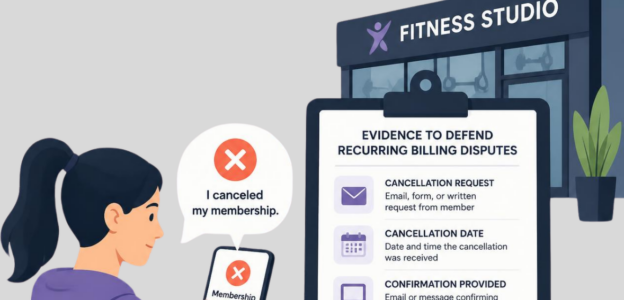
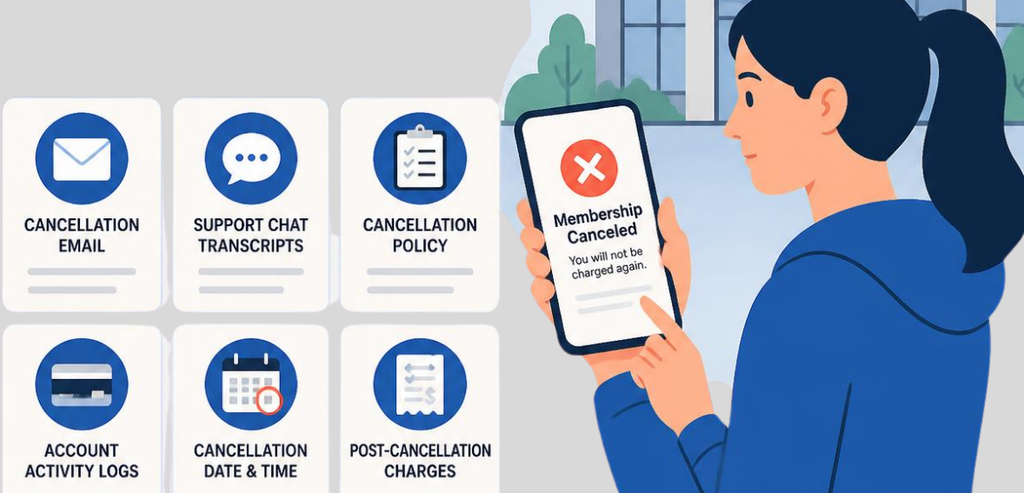
Friendly fraud occurs when a member forgets their freeze end date and panics when they see resumed membership charges being automatically deducted. This prompts them to issue a chargeback. The only way to win this dispute with the bank is to get a signed digital freeze agreement with an explicit end date. Failing to prorate correctly and overcharging a member, even by a few dollars, gives the consumer legal grounds to dispute the monthly charge, putting the complete payment at risk of reversal. Digital signatures capture all mid-cycle changes, such as upgrades, downgrades, or freezes, and are mandatory to prove payment authorization.

Maintaining compliance requires auditing the gym’s billing rules and software settings annually to ensure they align with updated payment processor terms of service regarding recurring transactions.

Conclusion

You have seen the necessity of software automation, of setting strict boundaries between need-based and convenience-driven decisions, and of proactive communication. Fixing billing leaks and establishing rules not only saves money but also prevents mental stress. This ensures sustained customer retention, reduced administrative chaos, and consistent growth for your fitness studio.

Frequently Asked Questions

  1. Can a member cancel their membership while their account is currently frozen?

    Generally, members can cancel their membership while their account is still frozen. However, standard cancellation policies and notice periods still must apply.

  2. How much should I charge for a membership freeze fee?

    A standard freeze fee usually ranges from $5 to $20 per month, depending on your base subscription price. The optimal amount covers administrative costs and doesn’t feel too high for the customer to cancel the membership altogether.

  3. How do I calculate a prorated membership?

    You can calculate prorated membership by dividing the total subscription amount by the number of days of gym access provided. This gives a 24-hour rate for gym access, which can be used for proration calculation.

  4. How do I stop members from abusing membership pauses?

    You must enforce minimum and maximum limits on the freeze period. Maximums will save you from having to manage accounts that are less likely to go “active” again. Minimum periods avoid administrative chaos by eliminating micromanagement by members.

  5. How long should a medical hold last compared to a regular freeze?

    Medical or emergency holds can reasonably last up to 6 months, provided the customer supplies proper documentation. On the other hand, standard freezes must be capped at 2 to 3 months at maximum.

Failed Bank Payments

ACH Returns for Landlords: How to Handle Failed Bank Payments, Retries, and Tenant Follow-Up

Failed rent payments are not just a source of frustration for the landlord. They result in a high-stakes loss, leading to cash flow disruption and wasted administrative time. To understand rent payments, you first need to understand the ACH system. The Automated Clearing House, or ACH, is an electronic network used by banks to transfer funds between accounts, which is how most online payments are processed.

Landlords commonly have a false sense of security in modern rent collection. When you see a payment marked as “Processing,” most people assume it is a secure transaction, only to be disheartened when the ACH failure occurs days later. A single bounced rent payment is not just money not credited; it has a domino effect on all operations. Failed payments force the landlord to reverse account entries, contact tenants, calculate late fees, and potentially risk delaying their own mortgage payments.

Apart from financial troubles, failed payments take an emotional toll on the landlord. Handling failed payments without a proper system creates unnecessary friction between landlords and tenants, turning administrative tasks into stressful confrontations.

You must transition from treating returns as emergency surprises to handling them through standardized processes. This will help maintain trust and sanity as a landlord.

What is an ACH Return and Why Does It Happen?

What is an ACH Return

To better understand how to deal with delayed banking events, such as failed ACH transfers, as a landlord, you should understand the mechanics of a failed bank transfer.

For this, you should be aware of what an ACH return is and who the originators are. An ACH return is a formal rejection of an electronic transaction by the tenant’s bank, which sends the request (and notice of the lack of funds) back to the landlord’s bank. The originator is the entity that initiates a request to withdraw funds from the tenant’s account. In this case, either the landlord or the rental manager software sent the request to withdraw the money.

Firstly, ACH transfers are significantly different from credit card transfers. When a credit card is swiped, the transaction is verified instantly. On the other hand, ACH requests the bank for funds, which means rejections can take days to travel back through the banking pipeline. This creates delayed hassles and administrative liabilities for the landlord.

The most common reason for an ACH return is “Insufficient Funds.” A vast majority of rent payments are returned because the tenant’s bank account does not have enough money on the day the ACH transfer was requested. This is a potential solution as well, which will be discussed further in the blog.

Another reason for failed ACH transfers is human error. There is always a possibility that the tenant might mistakenly enter a digit or two incorrectly when entering their account numbers on the rent registration platform. Such payments are set to fail in the future because they will inevitably be routed to the wrong accounts.

Additionally, closed or frozen accounts result in failed rent payments. Tenants may change their banks, experience identity theft, or have their accounts frozen due to credit card theft, which often results in hard failures that cannot be resolved in a few days. Requesting a payment during this time will result in failure.

And lastly, sometimes a tenant may request their bank to block ACH transfer requests from the landlord due to disputes or lease violations that require administrative attention.

Common ACH Return Codes

Common ACH Return Codes

Now that you understand the common reasons for ACH return and the mechanics of how an ACH return works, it is imperative to know the most common ACH return codes and ways to handle them.

A return code is a standard three-character code that is generated by the banking system. It explicitly states the reason for a payment being rejected. Reason codes always start with the letter ‘R.’ Here is a list of the most common ACH return codes.

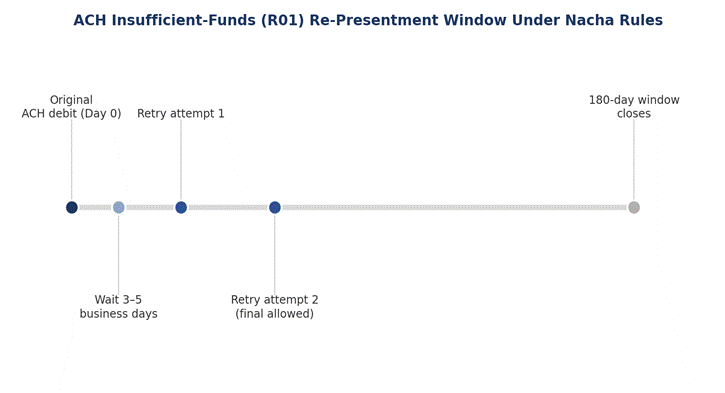
R01: Insufficient Funds

This means that the tenant does not have enough money in their bank account to cover the rent. It usually means that the landlord must wait for a few days and try to collect the money after payday.

R02: Account Closed

It means that the bank account used by the tenant no longer exists. This indicates that, regardless of how many times you try, the payment will always fail.

R03: No Account/Unable to Locate

It means the bank could not find any account associated with the requested account number. This means the tenant entered an incorrect account number on the rent management form.

R04: Invalid Account Number

It is very similar to the R03, which means the account number structure was fundamentally incorrect. For example, the wrong number of digits. It is also a human error made by the tenant while filling out their rent registration forms.

R08: Payment Stopped

This reason code indicates that the tenant explicitly told their bank not to allow this specific charge. The landlord must resolve the issue by contacting the tenant and clarifying any conflicts regarding term violations and payments.

R10: Customer Advises Not Authorized

Much in common with the R08, but the consequences are far more dangerous for the landlord. It means the tenant told their bank they did not approve this rent deduction. It is a serious violation that can threaten the landlord’s ability to process payments if it happens frequently.

How the ACH Payment Lifecycle Works

After having an overview of the most common reason codes associated with ACH returns, you must now understand the lifecycle of an ACH payment. It will help you understand the moving parts and the scope of optimizations as a landlord.

Before diving into the stages of an ACH payment lifecycle, you must understand the basic difference between ODFI and RDFI. An ODFI (Originating Depository Financial Institution) is the landlord’s bank or payment processor that starts the request to collect the rent. On the other hand, RDFI stands for Receiving Depository Financial Institution; it is the bank that receives the request and decides whether to return the money or a return code. In other words, the ODFI is the entity that requests money from the RDFI, which is the tenant’s bank account.

Now, let us move on to the various stages in an ACH payment lifecycle.

Day 0: The Initiation

At this stage, the tenant either clicks “Pay Rent” or an auto-pay is triggered, which causes the landlord’s payment processor to bundle this request and send it to the ODFI.

Day 1: Processing

The request will travel through the Federal Reserve or Clearing House network to the tenant’s bank. Usually, at this point, the software ledger shows the rent as “paid.”

Day 2: Settlement/Rejection

The tenant’s bank checks the account balance and, if the funds are available, routes the payment to the landlord; otherwise, the payment is rejected, and a return code is sent.

Day 3 to 5: The Return Window

If the payment fails, it will take additional time for the rejection notice to travel back through the network and raise an alert in the landlord’s software.

Another challenge is that the ACH network only operates on business days; this means that a payment initiated before a weekend or holiday might not show a return failure within 3–5 business days, and it may take longer.

What to Do Immediately After a Failed Payment

What to Do Immediately After a Failed Payment

A failed ACH payment requires an immediate ledger adjustment. It is an accounting action that reverses the previously credited rent payment so that the tenant’s balance accurately reflects that they still owe money. You must take the steps provided in this section in the event of a payment failure.

Start off by locking down the accounting immediately. You must reverse the payment in your property management software to ensure that you do not accidentally pay out the owners, vendors, or taxes with money that was never credited.

In the previous sections, we explained various return codes. Every return code stands for a different reason for payment failure. If the tenant has deliberately paused the payment, a late fee must be imposed. But if the return was due to a typo in the account number, imposing a late fee would be too harsh and could lead to disputes.

After taking the first steps, send out a standardized email or SMS to the tenant stating that the payment has failed and their rent is due. Cite the exact return code and provide a link to update the payment method. If the return code indicates a typo in the account number, such as an R03 or R04, then you should disable the tenant’s current auto-pay profile.

The last step is to draft a legal, state-mandated “Notice to Pay or Quit.” However, you must not send such notices immediately; allow the tenant some time to resolve the errors and pay the rent before the due date.

Tenant Communication and Follow-Up Systems

A payment failure is not the end of the world; however, you must ensure that the communication with the tenant remains professional, documented, and effective at recovering funds. A payment plan is a formalized, written agreement that allows a tenant to pay past-due rent in smaller, scheduled installments, rather than a single lump sum.

The first step in tenant follow-up is to remove the blame from your initial outreach. A single failed payment should not be grounds to question intent or deliberate holding of funds. The first message to the tenant must always be framed as a “banking error” or “system notice,” rather than accusing the tenant of bouncing the payment. If the tenant has deliberately refused funds, the first message should be an attempt at discussion aimed at resolving doubts regarding lease terms and violations.

People might ignore emails, but text messages have incredibly high open rates. You should utilize SMS services for urgent payment alerts. When a payment fails, use SMS to instantly notify a tenant of the failure with the specific return code. Additionally, you can include a link in the text message itself to update the payment method or make the payment.

You should not send out vague messages stating that the payment has failed. Instead, cite the exact reason code for the failure and link to the portal so that the tenant can update the user profile and make the payment, if needed. In the intimation message, clearly state the deadlines for replacing the funds, to be received before a formal eviction notice is served.

You should keep all text and email threads within your property management software rather than a personal device. This ensures a legal audit trail if legal action becomes necessary.

Conclusion

ACH returns are an inevitable mathematical reality of renting. However, they do not have to be an operational disaster. You can prevent ACH failures by setting up optimized systems and implementing fallback strategies to control damage.

Building strict, automated systems that provide tenants with clear, consistent communication is the key to handling ACH failures. Implementing the right systems, ensuring effective communication, and maintaining necessary documentation are what set a professional property manager apart from an amateur landlord. With the right systems, you can ensure fast resolution and sustained trust from both tenants and property owners.

Frequently Asked Questions

  1. Can a landlord charge a fee for a failed ACH payment?

    Yes, landlords can charge a fee for failed ACH payments that are rejected due to insufficient funds or other reasons. However, you must ensure that the fee amount is explicitly stated in the lease agreement and complies with state-mandated legal maximums.

  2. How long does an ACH return take to show up?

    It typically takes 2 to 5 business days from the moment the payment is initiated for the landlord to receive the official return notification, excluding weekends and bank holidays.

  3. Is it legal to retry a failed ACH payment?

    Yes, it is completely legal to retry a failed ACH payment. NACHA rules allow the originator to retry ACH payments that failed due to insufficient funds up to two times within 180 days. But, retrying invalid/closed accounts is prohibited.

  4. Should I accept partial payments after an ACH return?

    You can accept partial payments, but, in most states, it can halt evictions. This means you must accept partial payments only if you intend to keep the tenant. Otherwise, you should send out a notice to clear the dues in full and vacate the property.

  5. Why did the tenant’s portal say “paid” if the ACH failed?

    Tenant portals often mark payments as “processing” or “paid” the moment the transfer is initiated (Day 1) to prevent double-charging.

Multi-Location POS Reporting

Multi-Location POS Reporting: What Growing Retail and Restaurant Brands Need to See Daily

Has adding more locations to your business ever resulted in a loss of visibility and control? It’s a very specific pain point most business owners experience when scaling to multiple stores. There’s a gap between what’s actually happening at a specific store and what headquarters sees, and that gap is a huge operational blind spot. Another challenge is the chaotic, manual process of stitching together individual location reports at the end of every day.

More revenue and more locations often mean less operational clarity — that’s the paradox of business expansion. Relying on end-of-week or end-of-month P&L statements to make daily decisions is dangerous. Poor visibility masks underperforming stores behind the success of flagship locations. You need to transition from “managing by walking around” to “managing by dashboard,” which can be made possible with Multi-location POS reporting.

Imagine this: a regional manager frantically calling three different store managers at 9:00 PM to figure out why company-wide labor costs spiked that afternoon. Regional managers and analysts often spend a significant portion of their time on manual, repetitive reporting, with studies suggesting that 60–80% of analytics time goes to manual data preparation and compilation rather than strategic analysis. Effective multi-location POS reporting isn’t just about tracking sales — it’s a vital operational control system you need for survival and growth.

What Multi-Location POS Reporting Actually Means

What Multi Location POS Reporting Actually Means

Multi-location POS reporting is a centralized data architecture that automatically pulls, normalizes, and displays data from multiple point-of-sale terminals across different locations into a single dashboard. The whole point of a single dashboard is to give you a single source of truth — one centralized database where all stored data is accurate, current, and undisputed.

Fragmented systems lead to poor synchronization and ineffective inventory management. The goal is to close the gap between logging into a specific store’s POS and logging into the brand’s central portal.

Another advantage of using a centralized POS is that it eliminates data fragmentation. When your data is spread across multiple spreadsheets, it becomes harder to accurately track key metrics. On top of the time required, manual reconciliation also presents its own challenges, such as double entries and human error. Exporting multiple databases into one centralized system is not multi-location reporting. Multi-location reporting involves storing all data in a single, centralized master database, along with location data tied to each purchase.

On-premise servers often fail for multi-unit brands for exactly the reasons above. Your business needs a cloud-based server architecture that can update data in real time and sync data across multiple stores in different locations. In 2023, over 35% of all retailers (including large chains) operated using cloud-based POS solutions. Cloud-based architecture is shifting from a luxury to a baseline standard for data reporting in retail.

Cross-location data normalization is crucial. It ensures that every purchase item is tracked consistently across all stores.

Why Reporting Breaks Down Across Multiple Sites

You need to understand the root causes of reporting chaos as a business grows from 2 to 10 to 50 locations. The two big ones are data silos and catalog drift. When information is isolated within a specific store’s hardware or local system, that’s a data silo. Catalog drift — also known as menu drift — is what happens when different locations start creating their own custom items or modifiers in the POS.

One of the most common causes of reporting issues is inconsistent naming conventions. For example, if Store 1 names an item “Lrg Coke” and Store 2 names the same item “Soda Large,” compiling the data into a single master database creates confusion. Another reason for reporting chaos is the use of mismatched POS hardware or software, often the result of acquisitions or disconnects between franchisors and franchisees.

Data latency is another scalability problem. Waiting 24 hours for batch uploads to reflect yesterday’s performance slows decision-making. You also need to resolve permission tangles — for example, regional managers who can’t access specific store data without requesting owner overrides.

When store managers manually enter closing numbers, human error can creep into the final output. These errors compound and can present a completely different picture of operational health.

The Daily Sync: Core Metrics Every Operator Must See Every Day

Core Metrics Every Operator Must See Every Day

As a business owner or store manager, you need to know which metrics to track daily and how each affects your business’s health. Start with two main concepts: KPIs and exception reporting.

KPI stands for Key Performance Indicator. KPIs are the critical few metrics that indicate business health. Exception reporting, as the name suggests, refers to dashboards that surface only the data that falls outside normal parameters. Put simply, exception reporting reports the exceptions — for example, an unusually high number of voids in a particular week.

Now let’s look at the metrics you should track every day as a business owner or store manager.

Net Sales by Location

Rank net sales by location every day. Daily pacing against historical averages and targets is crucial — it tells you where you are, how far you’ve come, and which targets you’re still chasing.

Transaction Volumes and Average Order Values

Transaction volume tells you a number of things — which days’ sales spike, popular items, rush hours, and even credit card validation attacks when volumes jump unexpectedly. The other metric to watch is Average Order Value (AOV), which tells you how much a customer typically spends per visit. Together, these two metrics tell you whether you’re getting fewer customers or whether they’re choosing to spend less.

Refunds, Voids, and Comps

Tracking these helps you identify theft, training issues, or poor product or service quality at specific stores.

Labor Percentage to Sales

This is the most volatile intra-day metric. Tracking intra-day labor costs across the portfolio is crucial to monitoring staff productivity and operational efficiency.

Top/Bottom Selling Items by Region

Tracking this helps you spot whether a product is a hit or a miss in a specific market — say, an urban store versus a suburban one. Identifying customer buying habits by region lets you roll out targeted discounts and offers to increase sales, and it tells you which regions are statistically profitable for a new product launch.

Overtime Risk Alerts

Flag employees approaching overtime across multiple locations, especially if they float between stores. This lets you track payroll efficiently and accurately.

Macro vs. Micro: When to Aggregate and When to Drill Down

A critical part of being a business owner or store manager is knowing when to zoom out and when to zoom in. To do that effectively as you scale, you need to understand how aggregated reporting and location-level drill-downs work. Aggregated reporting means viewing the portfolio as one single entity to gauge brand health. Location-level drill-down isolates a specific store, register, or employee to identify the root cause of a metric.

Averages are a great way to judge overall performance. However, averages can be highly skewed. For example, two strong-performing flagship stores can hide several bleeding locations in an aggregated report. You should rely on aggregated data only for weekly trend analysis, marketing campaign ROI, and overall cash flow.

For daily operational fixes, investigating high labor costs, and tracking specific inventory discrepancies, drill down into the metrics to find the root cause. Compare locations to establish internal benchmarks. Another important step is evaluating staff performance across locations — for example, identifying top upsellers so you can pair them with struggling staff at other stores for training. Recognizing outstanding work fosters healthy competition and keeps team morale high.

The Speed of Insights: Real-Time Data vs. End-of-Day Reports

Real-Time Data vs. End-of-Day Reports

Delayed data leads to lost revenue, which is why real-time cloud syncing is non-negotiable as you scale. Real-time syncing is the process of pushing POS transactions to the central cloud dashboard. Making operational changes in the middle of a shift based on live data is what’s known as intra-day adjustments.

End-of-day reports tell you what you lost during the day. Real-time data lets you stop the bleeding while it’s happening. Real-time visibility also lets you adjust labor mid-shift. For example, if the 2:00 PM rush doesn’t materialize at three locations, regional managers can cut staff immediately to control labor costs.

Dynamic inventory management is also crucial for keeping customers happy and preventing lost sales. For example, catching an unexpected run on a specific product by noon and transferring stock from a slower store before the evening rush. Watching for weather and event impacts matters too — for example, tracking live sales drops during a storm and pivoting operations on the fly.

Turning POS Data into Operational Control

Reporting isn’t just for accountants — it’s the ultimate tool for operations managers. Replacing “gut-feeling” management with objective, metric-backed decisions is crucial. This is known as data-driven operations. Another term to know is the inventory depletion rate, which tracks how quickly specific goods sell so you can automate reordering.

To turn your POS data into operational control, focus on these areas.

Staffing

Align labor schedules with historical hourly transaction heat maps for each location.

Inventory Management

Ensuring multi-location inventory levels match multi-location sales trends prevents brand-wide over-ordering when only one store actually sells a specific item.

Promotion Tracking

A/B test before rolling out any discount brand-wide. For example, test a discount at two locations before rolling it out to all twenty.

Loss Prevention

Use your reports to identify suspicious patterns — for example, cash drawer overages or shortages that consistently align with a specific employee’s floating schedule.

Conclusion

Scaling blindly, without proper visibility and reporting, is a recipe for disaster. Multi-location POS reporting isn’t a back-office administrative task — it’s your primary control mechanism. It protects your business from margin erosion. Real-time data, standardized catalogs, and tracking the right daily metrics are crucial as you scale to multiple locations. With the right processes and reporting in place, you can grow without losing operational control or healthy cash flow.

Frequently Asked Questions

  1. What is the most important daily metric to track across multiple stores?

    The most important metric is labor cost as a percentage of sales. It’s the most volatile day-to-day metric and also the largest controllable expense.

  2. Can I use different POS systems at different locations and still get consolidated reporting?

    Yes, but it requires third-party middleware or advanced accounting software that uses API integrations to pull data from disparate systems into one normalized dashboard.

  3. How do I stop store managers from messing up my centralized reporting?

    Implement strict role-based permissions in the POS to prevent unauthorized access. Any change to the master catalog should require an override from the owner.

  4. How should a franchisee’s reporting access differ from a corporate manager’s?

    Using Role-Based Access Control (RBAC), a franchisee should only see deep, actionable data for the stores they own. Corporate managers need aggregated data across all franchise locations to track brand health and compliance.

  5. Should I track marketing ROI in my POS reporting?

    Yes, you should track ROI in POS reporting by setting up specific discounts or promos tied to marketing campaigns. This helps you identify the locations that drive the highest redemption rates and lets you adjust ad spend accordingly.

Gift Card Liability

Gift Card Liability and Breakage: What Retailers and Restaurants Need to Track

The biggest misconception about selling a gift card is that it creates instant profit — that’s not true. You need to understand the difference between cash flow and revenue. Cash in the register does not equal recognized revenue on the books.

The global gift card industry is rapidly expanding and is currently valued at $1 trillion. It is projected to exceed $3 trillion by 2030–2034. During holidays, every business experiences a huge surge in gift card sales. However, gift card sales do not directly translate into revenue. It may feel good to see a sudden spike in sales, but it is rarely direct profit. Gift cards are essentially zero-interest microloans extended by your customers.

Managing gift card liability and breakage is the difference between accurate financials and an audit nightmare. Imagine this: a restaurant celebrates massive December cash flow but realizes in January that it has to provide food and labor for “free” when the cards are redeemed. Gift card sales create a “phantom” revenue boost and increased cash flow — but the business still owes its customers the goods or services it is obligated to provide in exchange for the gift card when redeemed.

Understanding Gift Card Liability and Deferred Revenue

Gift Card Liability and Deferred Revenue

You need a clear understanding of the accounting mechanics of gift cards and deferred revenue. Deferred revenue is the money received for goods and services that have not yet been delivered. It is one of the most complex revenue streams to handle because you have to manage operational cash received today in a way that still covers the costs of services owed.

Now let’s look at gift card liability. The line item on a balance sheet representing the total outstanding value of unredeemed gift cards is called gift card liability. In other words, gift cards not yet redeemed by customers are potential debts that must be repaid unless they expire.

When a customer buys a $50 gift card, your cash increases by $50, but your revenue increase is $0. This is because the $50 will be repaid in goods or services when the customer returns and redeems the card. Revenue is only recognized when the “performance obligation” is fulfilled. A performance obligation is the handing over of goods or services promised in exchange for the money received.

You need to understand the dangers of using gift card cash flow to cover operational expenses before the cards are redeemed. It can push your cash flow into the negative and force you to take out short-term credit to cover operational costs once gift cards are redeemed. Additionally, investors and lenders scrutinize deferred revenue during M&A or funding rounds.

The Gift Card Financial Lifecycle

Gift Card Financial Lifecycle

Now that you have an overview of how gift cards work, the next step is to understand their financial lifecycle. You need to understand how a single gift card moves chronologically through your financial statements. To begin with, there are two important concepts to grasp: revenue recognition and the difference between the balance sheet and the income statement.

Revenue recognition is the accounting principle that determines when revenue is recognized. However similar they may sound, the balance sheet and the income statement are two very different documents. A balance sheet tracks what you owe, while the income statement tracks what you have earned.

Now let’s look at the financial cycle of a gift card across its various phases.

Phase 1: Activation

The customer buys a gift card. This is known as the activation phase. In this phase, both the cash account and the gift card liability increase. Only the balance sheet is updated, as no net income has been earned.

Phase 2: Partial Redemption

Let’s suppose the customer bought a $50 gift card. Partial redemption occurs when a customer redeems only a fraction of the gift card’s original value. Suppose that out of the $50 in the above example, the customer redeems only $30. In such cases, liability drops by the redeemed amount — $30 in this example. The $30 revenue increase is recognized. This recognized revenue is transferred from the balance sheet to the income statement. In this phase, the COGS (Cost of Goods Sold) is also recorded.

Phase 3: The Leftover Balance

After a partial redemption, some money remains on the gift card. In the above example, the leftover balance is $20. This leftover balance stays in the liability bucket of your business.

Phase 4: Breakage

In this phase, the final resolution of unspent funds happens.

Understanding the various phases in the financial lifecycle of gift cards is only half the work. Mapping this lifecycle is impossible without an integrated POS-to-accounting pipeline.

What is Breakage, and How to Recognize Unused Balances?

What is Breakage

After understanding the various phases of the gift card financial lifecycle, you need to understand how businesses can legally and accurately turn unredeemed liabilities back into recognizable revenue. For this, you need to understand breakage and proportional recognition in detail.

Breakage refers to the recognized revenue from gift cards that are expected to remain unredeemed. It is important to record breakage; otherwise, it ruins balance sheet figures and skews income statements. Recognizing breakage revenue in proportion to the pattern of actual redemptions is known as proportional recognition.

Breakage is not just “waiting for a long time and taking the cash.” It requires a methodical accounting approach, such as ASC 606 / IFRS 15. You need to understand the concept of “remote likelihood” to manage breakage revenue. It refers to determining the exact point at which a customer is highly unlikely to ever use that gift card. It is computed by analyzing historical customer behavior to determine the time period after which a gift card has the lowest probability of being redeemed. In simple terms, remote likelihood is the exact point at which gift card revenue is transferred to the income statement.

Proportional recognition is calculated by analyzing historical data. For example, if historical data shows 10% of cards are never used, you recognize a proportional fraction of breakage every time a card is legitimately redeemed.

You should use a “safe harbor” timeframe — for example, 24 months of inactivity, which is common, provided your state laws allow it. The financial impact of breakage is huge. Breakage is nearly 100% margin profit since there are no associated COGS.

Escheatment Laws: When Unused Cards Become State Property

You need to understand the critical legal risks of gift card programs and be able to distinguish between breakage and escheatment in order to avoid legal problems. Escheatment refers to the legal process of transferring unclaimed property, such as unused gift card balances, to the state. The CARD Act of 2009 is a federal law that restricts expiration dates and inactivity fees on gift cards.

The harsh reality of gift card escheatment is that you don’t always get to keep the breakage. Many states classify unredeemed gift cards as unclaimed property. You also need to understand the jurisdiction rules around escheatment. State laws vary wildly. You generally follow the laws of the state where the customer lives, or your state of incorporation — Delaware, for instance, is known for aggressive escheatment audits.

Another key detail to pay attention to is expiration dates. Federal law requires that cards not expire for at least 5 years, but many states ban expiration dates altogether. Inactivity or dormancy fees on gift cards are also a critical factor, heavily regulated. The dispute losses are huge and rarely worth the legal headaches, so most retailers choose to comply with these policies.

You should also be aware of audit risks associated with gift card programs. States actively audit multi-location brands for unclaimed property as a source of state revenue. As mentioned above, in most states, unredeemed gift cards are considered unclaimed property, which puts your business on the radar for a state audit.

Tracking Systems and Practical Implementation

A closed-loop system means gift cards that can only be redeemed at your specific brand or franchise. Put simply, if a gift card is redeemed only at a specific brand’s store, it is part of a closed-loop system. Another concept you need to understand is reconciliation. It is the process of matching POS data with the general ledger to ensure accuracy in your account books. The steps involved in tracking gift card data and the practical implementation of these systems are detailed below.

Step 1: Eliminating Manual Tracking

Manual tracking fails at scale because it is error-prone. Manual reconciliation often leads to double entries, data redundancy, and operational chaos. The solution is to ditch spreadsheets entirely and replace them with relational databases synced with real-time POS and account activity.

Step 2: POS Configuration

Make sure your POS system tags gift card sales as a liability, not as standard sales.

Step 3: Multi-location Clearinghouses

Suppose Store A sells the card and Store B redeems it — you need to make sure systems are in place to move and manage the funds internally.

Step 4: Reporting

Set up automated reporting for aging liabilities. The standard reporting periods are 30, 60, 90, and 365 days.

Step 5: Regular Audits

The finance team should reconcile the POS gift card liability report against the accounting software balance sheet on a monthly basis. This helps you stay under the radar during state audits and provides proof to defend gift card liabilities.

Common Mistakes and Hidden Risks

Now that you understand the liabilities associated with gift cards and how these liabilities must be managed in your accounts, it is imperative to be aware of the most common mistakes retail owners make when managing gift card revenue — mistakes that often cost them dearly. For this, you need to know what a sales tax error means. A sales tax error occurs when tax is applied at the wrong stage of the transaction.

We have compiled a list of the most common mistakes business owners make so you can stay aware and avoid repeating them.

  • Recognizing revenue at the point of purchase. Gift cards are recognized as revenue only when they are redeemed.
  • Charging sales tax when the card is purchased rather than when it is redeemed.
  • Failing to separate B2B bulk gift card sales (i.e., corporate gifts) from B2C consumer sales in reporting can lead to problems in future audits.
  • Losing historical POS data when migrating to a new POS system. This results in lost liability records and angry customers.

Conclusion

Gift cards are incredibly profitable, but only if the underlying financial tracking system is solid. You need to understand the difference between cash flow and revenue to better manage gift card sales. The first step is to stop viewing gift cards as “accounting headaches” and start viewing accurate gift card tracking as a sign of “financial maturity.”

With the right financial tracking systems and reporting, you can turn the financial obligation of gift cards into sustained growth for your business.

Frequently Asked Questions

  1. Do I have to pay sales tax when I sell a gift card?

    No. Gift cards are considered cash equivalent. You apply sales tax on gift cards only when they are redeemed, not when they are sold.

  2. What happens to gift card liability if I sell my business?

    Outstanding gift card liabilities are treated as business debt. The buyer will require you to deduct the liability from the purchase price of the business.

  3. How often should I reconcile my gift card accounts?

    The best practice is to reconcile your POS gift card reports with your accounting general ledger at least once a month to catch discrepancies before they compound.

  4. What is a franchise clearinghouse for gift cards?

    It is an internal financial system used by multi-location brands. It ensures that the specific location where a gift card is redeemed gets paid the revenue, even if a different location originally sold the card.

  5. If a customer loses their gift card, can I claim it as breakage?

    Yes, but you cannot claim it instantly. You have to wait until the statistical likelihood of the card being redeemed becomes “remote” according to your company’s historical data. After that period, you can claim breakage on the lost card.

POS Permissions

Staff Permissions in Your POS: How to Control Refunds, Voids, and Discounts Without Slowing Service

You would be surprised to learn that every day, seemingly harmless POS permissions, such as a quick discount, are the largest vectors of internal shrinkage. Your business suffers an unnoticed, incremental loss of profit through small daily actions. These losses constitute the revenue leakage of your business. Internal shrinkage is the loss of inventory or cash directly caused by employees.

Most business owners have this illusion of control. They buy expensive POS systems but leave out default permissions active. Internal fraud is rarely a grand heist; losses occur in small, trickling amounts. Implementing permission control is often complex because there is an ever-present tension between keeping the checkout line moving and protecting the bottom line.

Smart POS permissions are not an IT configuration — they are a core loss prevention strategy. About 29% of the total shrinkage in 2022 was due to internal shrinkage or employee theft, compared with 36% due to external shrinkage. Imagine a busy Friday night at a restaurant: a manager yells their override PIN across the counter to clear a line, completely compromising the system’s security for the rest of the shift. While this may seem like an inevitable step, it can have bigger consequences when unauthorized staff members gain access to the master database.

If you suspect your restaurant is losing money but cannot yet identify the cause, there is a high chance the problem is shrinkage, internal or external. This is your sign to review staff permissions for your POS, reassign access based on roles and responsibilities, and establish rules for future access grants.

Decoding POS Permissions: Moving Beyond Roles

Staff Permissions in Your POS

You must have employed cashiers and managers in your business, but moving beyond the cashier vs. manager debate is important for defining actual POS permissions. To understand the standard access hierarchy, you must be aware of POS permissions and role-based access control (RBAC).

POS permission or access control refers to the digital rules that restrict the actions specific users can perform on the POS register. And, RBAC is the method of assigning permissions based on job titles rather than individual user accounts. Both concepts are important for operating a retail business’s POS, but you must move beyond simply dividing staff permissions and start viewing distributions as consequence-based steps.

The standard 4-tier POS architecture consists of four levels of employees: cashier, supervisor or keyholder, store manager, and system administrator. Tying your permissions to roles, such as in RBAC, is infinitely more scalable than customizing individual employee profiles. It is more practical to configure the same rules in your POS system for the cashier role than to set permissions separately for each cashier you hire. It also saves your business crucial time because, with RBAC, you only need to assign the appropriate roles to new hires, and the system will be configured accordingly.

With RBAC, you can prevent “permission creep” — a situation where a promoted employee retains permissions they no longer need. Additionally, you can implement the rule of one user per login. This is critical to prevent shared generic access to registers and mixing permissions between roles. For example, a manager must not be able to log in to the cash register and the computer in their office at the same time.

The Revenue Leakage Trinity: Voids, Refunds, and Discounts

Revenue Leakage

The three most heavily abused POS functions are voids, refunds, and discounts. As a business owner, you must understand how they are abused and why they need strict gating to prevent shrinkage in your business.

For this, you must first understand three key concepts: post-sale voids and line voids, sweethearting, and ghost returns. Post-sale void, as the name suggests, refers to the deletion of the entire transaction after the tender, while line void refers to the deletion of the entire transaction before the tender. Sweethearting refers to giving unauthorized discounts or free items to friends or family. This may seem like small, harmless gestures, but if all staff members started doing this, it could lead to significant internal shrinkage. The last concept is ghost returns, which means processing a fake refund and pocketing cash from the till.

Refunds are a major source of potential fraud at your cash register. Cash refund fraud works by balancing the register, but in reality upsetting your operational cash. This happens when a cashier issues a fake refund and balances the cash register. They pocket the cash, but the inventory is skewed, which would lead to future problems.

Voids are the reversal of funds from the merchant account before they are settled. There is a difference between honest mistakes, such as line voids, and deliberate fraud, i.e., post-sale fraud, which is used to pocket a customer’s exact change cash payments. You can understand the “exact change void” scam by the following example. Suppose a customer buys a $4 coffee, pays exact cash, and leaves. The cashier voids the sale and pockets the $4. At the end of the day, the cash register is perfectly balanced, but your business has suffered a $4 loss. Small losses like these slowly eat into your operational cash, leading to fatal consequences for the business.

Balancing Security with Speed of Service

Speed of Service

You must be wondering that locking down the POS will stop the lines from moving, which would eventually result in customer dissatisfaction and abandonment. To address these fears, you must first understand how velocity limits work and what threshold approvals are.

Velocity limits are system caps on the number of times an action can be performed in an hour or shift. On the other hand, threshold approvals refer to permitting actions up to a certain dollar amount before requiring an override.

Managers spending half their shift walking to registers to swipe override cards could lead to “alert fatigue”. To prevent this, thresholds must be set based on historical data and practical limits, while accounting for the nature and standard thresholds for businesses of the same type. For example, as a general rule, you can allow cashiers to void up to $10 or 1 item without a manager’s override, but require overrides for voids exceeding those limits.

It is well known that friction and delays in the purchase process can lead to customer dissatisfaction and abandonment. You must be careful of every second that your security protocols add to the purchase process. Your aim must be designing painless manager overrides. For example, you can use mobile POS approvals, wearable RFID tags, and biometric scanners to eliminate PIN sharing at every register.

There is a distinction between using “soft stops” and “hard stops”. Soft stops prompt the cashier to enter reason codes for specific actions, while hard stops require the manager to be physically present at the cash register. Your alert system must be designed so that soft stops and hard stops are used appropriately — if not, it could lead to customer embarrassment and eventual abandonment.

Blueprinting Your Access Architecture

After understanding POS permissions and revenue leakage, it all boils down to designing a POS architecture that can be implemented in your business. The ultimate goal is to design an architecture that can be set up at the store level and easily propagated up the chain to multiple franchises, providing hassle-free scaling. This begins by understanding the difference between global and local permissions. Global permissions refer to settings controlled at corporate headquarters that are applied immediately across all franchises. Local permissions are implemented at the individual store level. For example, a discount tied to a local festival must be applied at a regional store, while Christmas offers must be applied across all franchises.

Franchise owners must block local managers from changing global permission hierarchies to prevent losses. For example, a discount that increases sales revenue in a certain region might be an unnecessary cut to global profit margins. Your goal must be to integrate POS permissions into broader loss prevention strategies, such as camera integration and cash-handling policies. As important as it is to provide the appropriate access to new hires, it is also crucial to revoke those permissions the moment an employee quits your organization.

Lastly, you must not rely on generic permissions and thresholds. Your policy must be based on your business’s requirements. POS permissions are not one-size-fits-all; they vary widely by business type and customers served. For example, fine dining requires different workflows than retail apparel.

Audit Trails and Exception Reporting

Permissions are the shield that protects your business from shrinkage, but audit trails are the radar that can help you detect potential losses. An audit trail, also known as an audit log, is a permanent, unalterable digital record of every button pressed, by whom, and when. Exception reporting refers to automated reports that highlight behavior that falls outside normal parameters.

Setting up permissions is only half the job; the other half is monitoring the data for anomalies. You must generate daily or weekly exception reports. For example, a report of all cashiers with a void rating above 5% of gross sales could indicate potential fraud. However, these figures are generic and might differ heavily from business to business.

Another strategy is to use reason codes. This forces the staff to select why they are voiding or discontinuing, making them accountable for their actions. This is a great way to reduce internal shrinkage, as staff are held accountable for every action. You can also integrate POS audit logs with CCTV text overlays, so you can watch a video recording of the exact moment a high-value void occurred.

You must trust your staff, but verifying their actions is equally necessary in order to maintain discipline and accountability. This will increase transparency and reduce internal shrinkage in your business.

Conclusion

The core triad of revenue leakage in a retail business is voids, refunds, and discounts. These must be regulated with consistent policies and explicit ground rules, integrated into your POS systems, to prevent internal corruption. There are three core values that define the ideal POS model: visibility, accountability, and control. Visibility ensures knowing who does what, accountability introduces answerability for every action performed on the POS, and control refers to smart thresholds and RBAC.

You must not view permissions as an annoying IT chore; instead, consider them your frontline profit protection tool. Every unearned discount granted through your POS is profit lost to poor permission architecture. Thus, having an efficient permission architecture and consistent audits is the way to ensure sustained business growth.

Frequently Asked Questions

  1. What are POS staff permissions?

    POS permissions are digital access controls that dictate the actions that an employee can perform on the register based on their specific job role.

  2. Why is it dangerous for staff to share a POS login PIN?

    Shared PINs destroy accountability. Your system tracks all actions on the POS using each user’s unique ID. If a PIN is shared, it could skew all actions to a single ID, increasing the risk of fraud.

  3. How do I stop employees from giving unauthorized discounts?

    You must remove open percentage discounts and replace them with preset discounts. This prevents unauthorized discounts and the losses associated with it.

  4. What is the difference between a line void and a post-sale void?

    A line void simply removes an item before the customer pays, usually correcting a typo. A post-sale void cancels a finalized transaction — a method used predominantly in cash theft schemes.

  5. How can I control refunds without slowing down the checkout line?

    Refunds can be controlled by implementing threshold limits. You can allow cashiers to process low-ticket refunds independently, up to $10. Any refund exceeding the limit must be verified by the manager’s physical RFID tag.

MCCs

Merchant Category Codes Explained: Why Your MCC Affects Fees, Risk, and Approval

MCCs are not just boring compliance trivia. It is the foundation of a transaction that dictates profitability, survivability, and scale. To understand the importance of MCC in your business, you must first understand what a Merchant Category Code (MCC) is. MCC is a four-digit number used by credit card networks to classify a business by the type of goods or services it provides.

The biggest mistake most founders make is that they fixate on processor markups but completely ignore the 4-digit code that drives the base cost. MCCs represent a vast, highly segmented system for classifying business types. MCCs are the silent variable in payment economics. They control fees, risk appetite, and approval logic for payments received by your business, making it crucial to select the correct MCC.

Misclassification of business is rampant in the payment industry. Most businesses end up registering under the wrong MCC and suffer unnecessary hassle, higher processing fees, and more declines. This is a simple error that can result in tens of thousands of dollars in inflated interchange fees or lead to sudden account closures.

As of 2024, the Visa Merchant Data Standard Manual had 887 unique four-digit MCCs. On the other hand, the Mastercard Quick Reference Booklet features 876 MCCs. There are many merchant categories, and classifying your business in the right one for maximum benefit may seem daunting.

Understanding your MCC shifts your payment strategy from reactive troubleshooting to proactive margin control. This shift helps you focus on revenue growth and the business rather than stressing over declined payments, fearing account closures, or running into negative operational cash flow.

Merchant Category Codes: The Controlling Authority of MCCs

Controlling Authority of MCCs

As a business owner, you might have wondered about the origin of the MCC. This section will explain the hierarchy of who creates these MCCs, who assigns them, and how standardization works across networks. In order to understand the origin and regulations of the MCC, you must understand a few key terms: ISO 18245, acquiring bank, and card networks.

ISO 18245 is the international standard that provides the framework for retail financial services merchant categories. The acquiring bank or acquirer is the financial institution that processes credit and debit card payments for a merchant and assigns the MCC. Card networks, such as Visa, Mastercard, and Amex, maintain master lists of MCCs and enforce their use.

The card networks, such as Visa and Mastercard, establish the codes. Acquiring banks, also known as acquirers, assign these codes to specific business categories. In some cases, payment processors acting on behalf of the acquirers can also assign MCCs. The assignment happens during underwriting based on the business’s primary revenue driver.

Now, let us understand what happens when a business sells multiple things, for example, a SaaS company that also sells hardware. In such cases where a company has multiple lines of products for sale, the MCC is determined on the basis of the “predominant business” rule.

The onboarding process at modern aggregators, such as Stripe or Square, differs from traditional merchant onboarding. However, regardless of the processor, onboarding often results in generic, poorly optimized MCC assignments. There is a difference between generic codes and hyper-specific ones. For example, a generic 5999 Miscellaneous and Specialty Retail code offers general features, while hyper-specific codes such as 5812 Eating Places and Restaurants offer more perks and discounts.

How Do MCCs Dictate Your Interchange Fees?

How Do MCCs Dictate Your Interchange Fees

An interchange fee is the wholesale cost of processing a credit card transaction, paid to the card-issuing bank and set primarily by the card network, card type, and the MCC. After learning about interchange pricing, you must understand the interchange-plus pricing model. Interchange plus pricing is a transparent pricing model that separates the base interchange, also known as the network cost, from the processor’s markup.

MCC is the primary modifier for interchange rate tables. Certain MCCs qualify for highly discounted rates, such as charities, utilities, supermarkets, B2B, and Level 3 data. Generic or miscellaneous MCCs almost always default to the highest possible interchange brackets. Now, this is very important for you as a business owner because operational cash is the backbone of any business, and having your business registered under the wrong MCC can lead to massive revenue leakage. You must proactively monitor your MCC code and register under the very specific category your business falls under to prevent unnecessary costs that could be easily avoided with an informed decision.

For example, a B2B software company can save millions annually by ensuring its MCC qualifies for Level 2 or Level 3 processing data rates, rather than being lumped into general retail by an automated onboarding process and a generic MCC registration.

The impact of MCCs on reward card processing costs is more than you realize. Premium cards often penalize certain categories more than others, which means you do not want your business lumped in with general retail and penalized for transactions that could have been easily avoided with the right MCC.

Understanding High-Risk vs. Low-Risk Classification

High-Risk vs. Low-Risk

This section will explain how MCCs serve as a proxy for risk, influencing underwriting decisions, reserve requirements, and monitoring. For that, you need to understand what high-risk MCC means and the concept of rolling reserves.

High-risk MCCs are categories that are statistically prone to high chargebacks, fraud, or regulatory scrutiny. Some examples of businesses that fall under the high-risk MCC category include travel, crypto, adult, and nutraceuticals. Rolling reserves are a percentage of processing volume held back by the acquirer to cover potential chargeback losses. This is a common practice for high-risk businesses given their high chargeback ratios. The acquirer holds a percentage of your funds as security; these funds are intended to cover possible chargebacks.

You might wonder why card networks even care about risk, since after all they are just intermediaries in the payment processing cycle. The answer to this question is brand reputation and financial liability. The card networks are always cautious about their brand reputation, as acquirers tend to tie up with them based on their history, and users also choose the card network that is more trusted and rewarding.

Another reason networks care is that it is a significant financial liability if things go wrong. For example, if the merchant goes bankrupt, the acquirer must absorb the chargeback liability, which is a significant loss. There is a difference between financial risk and reputational risk. For example, airlines selling tickets months in advance is a financial risk, but an acquirer processing payments for adult entertainment is a reputational risk.

Now, let us understand how processors use MCCs to set dynamic chargeback thresholds. The chargeback threshold for every business differs depending on the nature of the goods and services they sell. The chargeback threshold is not a one-size-fits-all number and must be calculated meticulously for each business. This is where your MCC comes into play. Different MCCs are assigned different thresholds by the processors, and having the right MCC becomes crucial to protect yourself from being unnecessarily penalized for exceeding the threshold in the wrong category. For example, a 1% chargeback rate might be fatal for a SaaS company, but normal for a subscription box.

Having the wrong MCC can subject you to damages exceeding the wrong thresholds. The MATCH list, formerly known as the Terminated Merchant File, is a confidential, non-public database maintained by Mastercard. It contains the names of merchant accounts that were revoked due to threshold failures. It serves as a blacklist of businesses whose accounts were revoked earlier for these reasons. This makes registering the right MCC crucial for your business.

Why Your MCC Dictates Payment Success

The authorization rate is the percentage of submitted transactions approved by the issuing bank. Another concept you must understand as a business owner is issuer risk models. These are automated algorithms used by the customer’s bank, such as Chase and Bank of America, to approve or decline a card swipe based on the likelihood of fraud.

Issuing banks rely heavily on the MCC and location data to train their anti-fraud models. Corporate cards, such as Brex, Ramp, and Amex Corporate, use MCCs to enforce spend controls on the businesses. For example, blocking MCC 5813 Bars/Taverns prevents employees from using the company card at these locations. Health Savings Account (HSA) and Flexible Spending Account (FSA) cards only work if the merchant has a specific medical or pharmaceutical MCC.

Apart from declines due to code mismatches, there are also some anomalies. Cards can also be declined if the user’s purchase behavior does not align with the historical demographic data for an MCC.

Misclassifications, Holds, and Shutdowns Due to Wrong MCCs

In this section, you will learn about the operational disasters a business could potentially face when the merchant’s actual business activities drift away from their assigned MCCs. This can be understood after knowing two main concepts: underwriting mismatch and transaction laundering.

An underwriting mismatch occurs when a business’s live processing volume and inventory do not match the MCC for which it was approved to sell. This can be understood as a “bait and switch” fraud. For example, an account was approved to sell coffee, a low-risk transaction averaging $5 to $20. An underwriting mismatch occurs when this business suddenly starts seeing average order values of $1,000, which is commonly the price of an average espresso machine. This mismatch puts you under the radar of a bank audit.

Another key concept to understand is transaction laundering. It refers to the illegal processing of payments for a hidden business under the MCC of a legitimate business. Payment processors run automated web crawlers and test transactions to ensure your business is MCC-compliant.

Usually, the immediate consequence of an MCC mismatch is a hold on the merchant’s account and freezing of the funds. This is because the acquirers face regulatory fines from card networks for miscategorizing merchants. Since the acquirer won’t absorb the loss, they freeze the merchant’s funds and use them to cover their losses.

Conclusion

After understanding how MCCs affect your business, you must have realized that they are not just a compliance checkbox. You should stop treating your MCC as an afterthought. It is the fulcrum of your payment economics — it dictates your wholesale costs, fraud thresholds, and your customer conversion or approval rates.

Payment processing is not just a utility you plug into; it is a strategic function. Understanding the network rules is how you protect your margins and scale without friction.

Frequently Asked Questions

  1. What is a Merchant Category Code (MCC)?

    An MCC is a four-digit number assigned by credit card networks, such as Visa and Mastercard, to classify a business based on its primary goods or services.

  2. Can I change my Merchant Category Code?

    Yes, but you cannot change it yourself. You must request a reclassification from your payment processor or acquiring bank, usually by providing evidence proving your primary business model has changed.

  3. Why does my MCC cause my payments to be declined?

    Issuing banks use MCCs in their automated fraud detection models. Having an MCC historically associated with high-risk business often results in higher decline rates.

  4. What is a high-risk MCC?

    A high-risk MCC is a category that card networks have identified as having statistically higher rates of chargebacks, fraud, or regulatory audits.

  5. Is it illegal to use the wrong MCC?

    Intentionally using an incorrect MCC to secure lower rates or bypass high-risk restrictions is known as transaction laundering or miscoding. It is a violation of network rules and will result in permanent bans and heavy fines.

Card Testing Attacks

Card Testing Attacks on E-Commerce Stores: How to Spot Them Before They Become Chargebacks

Card testing is not just a minor nuisance; it is a precursor to devastating financial loss and operational damage. Card testing attacks are automated processes where fraudsters use scripts to test the validity of stolen credit card numbers on a merchant’s payment gateway. Every transaction incurs a processing fee for your business. These charges, referred to as authorization fees, are the micro-costs incurred by payment processors each time a card is processed, whether the payment is approved or declined.

Most business owners buy into the false illusion of safety that zero chargebacks mean zero fraud. This is a myth. Zero chargebacks do not mean zero fraud; fraud can happen without chargebacks and cause massive revenue leakage. Card testing is the “reconnaissance phase” of the fraud cycle. Card testing causes dual bleeding for any business. Every card transaction that touches the business will incur a processor authorization fee. This is only one aspect of the danger. Every card that is tested and found to be working will eventually be used to make purchases from your business, resulting in chargebacks. Chargebacks cost your business the transaction fee and an additional chargeback fee, which are deducted from your operational cash.

Automated bots have commoditized these attacks. Earlier, hackers used to manually attack every business website one at a time. With advances in technology, automated bots can launch DoS and DDoS attacks at scale across multiple websites simultaneously. This means that even if you have a low transaction volume, your business is equally likely to be attacked. The probability may even be higher, since most small e-commerce stores lack enterprise-level security features.

Proactive detection is the only way to protect merchant accounts and profit margins. You should be aware of the latest cybersecurity developments and understand key concepts relevant to your business to ensure the security of your sensitive data.

What Are Card Testing Attacks?

What Are Card Testing Attacks

Now, let us understand the fundamentals of card testing attacks. You must first understand the two main concepts: carding forums and BIN attacks. Carding forums, or simply carding, refer to dark web communities where bulk stolen credit card data is bought and sold. Next, BIN (Bank Identification Number) attacks involve generating variations of card numbers based on the first six digits (the issuer code) to find valid combinations.

Card testing attacks are not meant to steal data or cause chargeback damages to your organization. The primary goal of any card attack is validation. The hacker wants to sort the “live” cards from the dead ones, from the list of card details they have.

Traditional fraud consisted of buying high-value goods from businesses and issuing chargebacks. Those were immediate losses that could be flagged easily based on purchase patterns. For example, the hacker would maximize the purchase amount. Modern fraud has evolved into a much subtler form of data theft. Unlike their traditional counterparts, they do not rely on the data of a single stolen card. Automated scripts and bulk-stolen data from card forums enable attackers to conduct multiple attacks against businesses simultaneously. Card testing validates the details of stolen card numbers by performing very small/zero-dollar checks to determine whether transactions are authorized.

Charities and digital goods merchants are historically the prime targets of these attacks. This is because these businesses have low-friction checkout pages and lower security, making them low-hanging fruit for attackers.

The Anatomy of Card Testing Attacks

This section aims to break down the attacker’s operational flow to show how easily these attacks can be scaled through automation. For this, we need to understand what botnets and scripting tools are. Botnets, as the name indicates, are networks of infected computers used to launch automated scripts from thousands of IP addresses. Scripting tools are software that automates filling out checkout forms and submitting payment requests at superhuman speeds.

Now, let us understand the various phases of a card attack on a business. The card attack begins with data acquisition. It includes sourcing raw, untested data from carding forums that must be validated during an attack. The next step involves target selection. Hackers scour the internet for small businesses or charities with low security barriers and frictionless, non-secure payment portals to execute the card attack. The third phase of a card attack is execution. In this step, distributed bots are deployed to cycle through cards at lightning-fast speeds. The last step of a card attack is harvesting. After processing thousands of card transactions, the details of cards that received a positive authorization response are collected.

Automated scripts and botnets have increased the speed of these attacks. While traditional attackers ran scripts on personal computers via VPNs and the dark web, the modern approach involves using infected computers to conduct these attacks on behalf of the hacker. The large number of these bots increases the number of cards that can be tested per minute, enabling much faster, stealthier attacks.

Why E-Commerce Stores Are Prime Targets

E-Commerce Stores Are Prime Targets

Let us now understand the systematic vulnerabilities an attacker looks to exploit in modern e-commerce platforms. The first thing you should understand is guest checkouts. Guest checkouts are purchasing flows that do not require account creation or email verification. While this is an important step to reduce friction for legitimate, first-time visitors, it also serves as a gift to attackers looking to exploit this vulnerability.

Next, you must understand what zero-auth or $1 auth transactions are. Zero auth refers to pre-authorization pings used to check whether a card is valid before charging the full amount.

Optimizing your websites for conversion means guiding visitors from product view to the checkout page in the fewest possible clicks. To minimize clicks, many e-commerce stores offer guest checkout. However, this inadvertently optimizes your website for fraud as well. Digital goods, such as SaaS, gift cards, and donations, are the easiest targets because they lack shipping address validation.

Another danger most e-commerce stores face is the use of custom checkout APIs. These APIs lack rate limiting, i.e., a cap on the number of requests processed per minute, making them an ideal target for attackers looking to exploit vulnerable networks. Having fragmented tech stacks, such as separate CMS, gateway, and processor components, creates security loopholes that are an open invitation for attackers to launch a card testing attack on your website.

Early Warning Signs of Card Testing Attacks

Early Warning Signs of Card Testing Attacks

In this section, we will provide a tactical checklist for fraud analysts and operators to spot attacks in real time. You must first understand velocity checks and AVS in order to better understand the symptoms of a card attack. Velocity checks monitor the speed and volume of transactions for a single user, IP address, or BIN. An Address Verification System (AVS) is a tool that verifies whether the billing address entered during checkout matches the cardholder’s bank file.

The first indication of a card testing attack is unusual spikes in checkout traffic without a corresponding marketing campaign. You should not ride high on the illusion of sudden overnight discovery, and proactively try to spot if the spikes indicate a card testing attack is underway. Higher volumes of micro-transactions, typically from $1 to $5, or identical cart values, are a major indication of a card testing attack on your website.

Another signal of a card testing attack is a dramatic increase in authorization failure rates. If you see high percentages of card transactions being declined, it is a strong signal that your website is under a card testing attack. In the previous sections, we discussed how hackers try various combinations of card numbers whose issuer code (the first six digits) is known. If you spot sequential card numbers being attempted in rapid succession, then your website has been compromised.

Another indication of a card testing attack is a single successful card transaction. An attacker has the “bingo” moment of successful transaction after multiple failed attempts. Card behavior anomalies, such as skipping product pages and hitting the checkout API directly, are almost a sure indication of a card testing attack on your website.

From Testing to Chargebacks: The Domino Effect

Chargebacks are a forced reversal of funds initiated by the legitimate cardholder’s bank due to unauthorized use. The MATCH (Member Alert to Control High-Risk Merchants) list is a blacklist for merchants terminated by processors for excessive fraud. This section explains how card testing attacks ultimately lead to chargebacks. When a card testing attack is executed on an e-commerce website, a list of card details is checked for payment authorization, and a list of cards that return a positive transaction response is returned. This data is then used for purchasing goods and subscriptions online. Since these cards are stolen, the legitimate owner of the card will issue a chargeback when they see unauthorized and unknown transactions on their bank statements.

Card testing attacks are a part of the “validation pipeline.” Once a card is validated on your site, it may be used for large fraudulent purchases immediately after the card details are validated. Chargebacks are not limited to reversing the sales amount from your bank accounts. It incurs additional costs for the business, such as a chargeback penalty that typically ranges from $15 to $35. This may seem like a small amount, but it is a massive operational cash leak on low-ticket sales.

You should proactively look for signs of card-testing attacks on your website, because exceeding thresholds has consequences. Exceeding the 0.9% to 1% chargeback ratio brings you into the radar of card networks. The penalties include higher processing charges and elevated subscription fees, and in rare cases, permanent revocation of a merchant account.

Conclusion

A card testing attack is an invisible leak that leads to chargeback floods and processor bans. E-commerce stores are low-hanging fruit for attackers, particularly because of optimizations to improve conversion rates, such as guest checkouts. Security should be viewed as an enabler of growth, not a cost center. Confident fraud prevention enables merchants to accept more legitimate orders. The cost of implementing proper friction, rate limits, and ML scoring is negligible compared to losing your merchant account altogether.

Frequently Asked Questions

  1. What is a card testing attack?

    A card testing attack occurs when fraudsters use automated bot scripts to rapidly test stolen credit card numbers on an e-commerce checkout page to see which ones are active and have available funds.

  2. How do card testing attacks affect my business?

    Even if transactions fail, merchants are charged non-refundable authorization fees for each attempt. When a card is validated, it is used to make purchases from your store, which eventually result in chargebacks.

  3. How can I block bots without hurting real customers?

    You can use invisible tools such as reCAPTCHA v3, device fingerprinting, and backend machine learning to assess risk silently.

  4. Is an AVS mismatch a guaranteed sign of card testing?

    This is not always true. Legitimate customers make typos or move without updating their bank. But thousands of AVS mismatches during sudden traffic spikes are almost a guarantee of a card testing attack.

  5. Why do fraudsters target e-commerce stores for card testing?

    These stores are optimized for increasing conversion rates. They implement strategies such as guest checkouts, which eliminate the need for email or mobile verification, making them an easy target for attackers.