
Posted: June 26, 2026 | Updated: June 26, 2026 at 3:15 PM
Picture this. Two businesses accept the same $50,000 in card payments every month. One pays a slightly lower processing rate and feels like the smart shopper. Yet at month-end, that same business burns hours matching payments to invoices by hand. The other pays a hair more per swipe but never touches a spreadsheet. So which one is actually cheaper?
This is the question most comparisons get wrong. They stop at the headline rate. They ignore the cost of reconciliation time. And reconciliation is where the real money quietly leaks out. This guide compares QuickBooks Payments against integrated merchant processing, the honest way: total cost of ownership, fees plus labor, after the books are closed.

All payment processors display something like: “2.9% + $0.30 per transaction” or a similar flat-fee pay-per-use advertisement. An invoice is provided for each service, along with a clearly visible expense. However, these advertisements do not take into account the cost incurred by the time an employee spends managing and accounting for settlements, fees, refunds, and chargebacks.
When a payment is settled, expense recognition occurs when the payment is matched to its respective service invoice. Ideally, the payment recognition process is automatic. The costs incurred by manual payment settlement can reach hundreds of dollars per year. A staff member (bookkeeper) who manually splits payment deposits and merchant fees and resolves mismatches is likely to take hours out of each workweek. It is estimated that matching payments by hand, even for just 30 minutes a week, amounts to about 26 hours over the course of a year.
The information is illustrated with a simple equation in the graphic below.
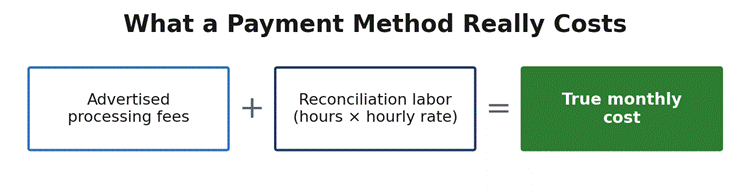
Figure 1. The advertised rate is only half the story. Reconciliation labor is the other half.
QuickBooks Payments is an Intuit payment processor. It integrates with both QuickBooks Online and QuickBooks Desktop. Customers using QuickBooks can pay invoices using a QuickBooks-generated link, and the rest of the process is automated. Payments do not require a separate dashboard or logins, and integrations with other software do not need to be managed.
QuickBooks Payments is attractive to many businesses for good reason: the automated payment reconciliation process. Payments received are automatically assigned to invoices and recorded as a bank deposit, with the processing fee expense recorded in QuickBooks. Intuit states that the majority of payments are matched with high accuracy. For businesses already using QuickBooks, this feature alone is very helpful.
Pricing is the largest disadvantage. Like most modern payment processing services, QuickBooks Payments uses a flat-rate model, and pricing is rarely competitive. As of 2026, invoiced (online) payments run about 2.9%, in-person payments about 2.4%, and manually keyed payments about 3.4% – 3.5%. QuickBooks Payments does offer lower fees for bank transfers: a flat 1% on ACH payments.
Note that Intuit removed the longstanding $10 ACH cap for accounts opened after September 2023, so on a newer account, that 1% is uncapped — a $5,000 ACH payment costs about $50, not $10. For businesses processing more than $2,500 a month, QuickBooks may offer discounts of up to 25%, narrowing the gap with other processors.

Integrated merchant processing uses a dedicated merchant account from a third-party processor that connects to QuickBooks. You use QuickBooks to continue with your accounting. You change the payment processor to one with better, less expensive pricing. A majority of these providers charge an interchange-plus pricing model, where pricing is more transparent and tends to be better.
Interchange-plus pricing is characterized by a clear distinction between the cost components. The first is interchange. Interchange is a wholesale fee set by the card networks (Visa, Mastercard, Discover, and American Express) and paid to the customer’s card-issuing bank. No processor can affect this fee. In the U.S., interchange is approximately 1.8%, with in-person card transactions being about 1.7% and online card transactions about 1.9%.
The second cost component is the processor’s markup, the only component of the price that is negotiable. In 2026, a competitive small-business markup is expected to be in the range of 0.15% to 0.40%, plus $0.08 to $0.10 per transaction. After your monthly transaction volume exceeds about $5,000, interchange-plus pricing is, on average, 20% to 30% lower than flat-rate pricing because you essentially pay the true cost plus a small markup.
You can integrate QuickBooks in three ways. The first option allows you to export your processor data as a CSV file and import it into QuickBooks. Unfortunately, this way is the most labor-intensive and has the most room for error. The second way uses a connector to run a batch sync one to two times a day, which diminishes the gap, but still requires a user to intervene. The third way posts payments to accounts receivable and the general ledger instantly. Using this method, invoices post as paid once the charge is approved, eliminating manual intervention. This way uses a true native integration and allows you to keep using QuickBooks for your bookkeeping while paying interchange-plus rates.
Host Merchant Services: Host Merchant Services is a dedicated merchant account provider built around wholesale interchange-plus pricing, with no monthly minimums and no early-termination fees. Its QuickBooks integration posts card and ACH payments to accounts receivable and the general ledger in real time, so invoices mark themselves paid the moment a charge is approved — across QuickBooks Online, Desktop, and Enterprise.
Helcim: Helcim has quickly become a very popular interchange-plus provider with no monthly fees, and as your business expands, the markup will decrease due to volume-discount pricing. As there are no contracts, this is ideal for companies that value pricing transparency.
Chase Payment Solutions: A merchant account with a Chase business bank account is as seamless as it sounds. Chase is known for its rapid funding with an automatic free end-of-day batch share to QuickBooks. Chase is a safe bet for daily reconciliation. That said, Chase will only show summary totals and will not post each line item as they occur.
EBizCharge: Since EBizCharge is designed for QuickBooks, this integrated solution will post instantly to both accounts receivable and the general ledger. EBizCharge is helpful for Level 2 and Level 3 data and, as a result, can lessen B2B and government interchange fees.
Both pricing models are shown in the table below. Remember that QuickBooks charges a flat rate per channel. Interchange-plus pricing varies based on card mix. The integrated figures displayed are usually effective rates and are not guaranteed.
| Payment type | QuickBooks Payments (flat rate) | Integrated processing (interchange-plus) | Who tends to win |
| Invoiced / online card | ~2.9% | ~2.2% – 2.5% effective | Integrated |
| Swiped / in-person card | ~2.4% | ~1.7% – 2.1% effective | Integrated |
| Keyed / manual entry | ~3.4% – 3.5% | ~2.4% – 2.8% effective | Integrated |
| ACH / bank transfer | 1% (no cap on newer accounts) | ~$0.25 – $1.50 flat | Depends on the ticket |
| Monthly account fee | $0 (added to QBO plan) | $0 – $25 typical | QuickBooks |
| Reconciliation labor | Near zero (automatic) | Varies by integration tier | QuickBooks |
Look at the pattern. Integrated processing almost always has the advantage over raw card fees. QuickBooks Payments offers the advantages of ease, no monthly fees, and reduced time and effort for reconciliation. At the end of the day, the decision to go with integrated processing or QuickBooks Payments is whether you value the savings from the fees more than the cost of the labor.
Here are three typical examples to see where the hard line goes. Each example uses a blended rate of $40 an hour for bookkeeping. To make the examples conservative, standard, non-discounted QuickBooks rates are used. The integrated column assumes a mid-tier connector that is likely to be used in most real-world examples and will require some manual cleanup.
A small service business that files 80 invoices a month at $8,000 each incurs about a $252 QuickBooks bill, with an additional almost-zero cost for reconciliations, for a total of about $272. One of QuickBooks’ integrated processors reduces costs to about $200, but at the expense of an additional 2 hours of monthly reconciliations, the total cost for this option is about $280. Given the size of the business, automatic reconciliations would make QuickBooks Payments a close tie or slim win.
For a growing B2B company with 200 invoices totaling $50,000 in processing, the QuickBooks fee is about $1,500. The interchange-plus fee would be about $1,185, with an additional three hours of reconciliation bringing the total cost to $1,305. Given the size of the business, integrated processing along with interchange-plus would be a clear win.
For a high-volume retailer with a mixed debit and card-present transaction volume of $150,000, QuickBooks flat rates would total about $3,660. Interchange-plus, with the addition of cheap regulated debit, reconciliations, and an additional four hours of work, would total about $2,735. The savings would be large, making the additional work negligible.
| Monthly cost component | Small service ($8K) | Growing B2B ($50K) | High-volume retail ($150K) |
| QuickBooks Payments | |||
| Processing fees | $252 | $1,500 | $3,600 |
| Reconciliation labor | $20 | $40 | $60 |
| Total (QuickBooks) | $272 | $1,540 | $3,660 |
| Integrated processing | |||
| Processing fees + monthly | $200 | $1,185 | $2,575 |
| Reconciliation labor | $80 | $120 | $160 |
| Total (integrated) | $280 | $1,305 | $2,735 |
| Cheaper after reconciliation | QuickBooks | Integrated | Integrated |
Table figures are illustrative and rounded. Your card mix, ticket size, and integration quality will move them.
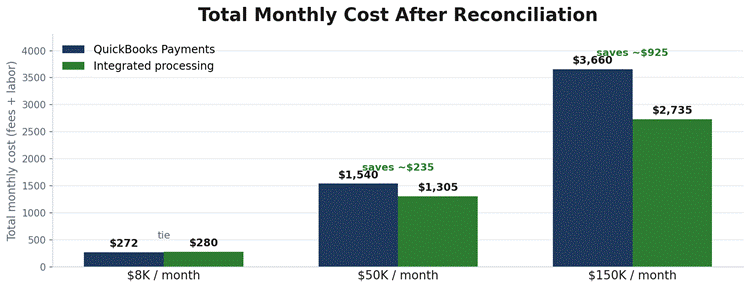
Figure 2. The fee advantage of integrated processing widens with volume, eventually outweighing the cost of reconciliation labor.
QuickBooks Payments works best for low-volume businesses that bill directly from QuickBooks and want to avoid reconciling transactions. It can also suit businesses that receive most of their revenue through ACH transactions, though that case is weaker than it used to be: Intuit removed the old $10 ACH cap for accounts opened after September 2023, so on a newer account, a $5,000 ACH payment costs about $50 (a flat 1%), not $10. It also makes sense for businesses that have payment volumes below $5,000 to use QuickBooks Payments. In most cases, automatic transaction matching will outweigh the costs of using QuickBooks Payments.
Integrated merchant processing is fueled by frequency of use. Once you are processing $5,000 to $10,000 a month in card transactions, your savings increasingly come from interchange-plus pricing rather than from reconciliation labor. The biggest advantage goes to card-present and debit transactions, B2B sellers who pass Level 2 and Level 3 data, and those with a high average sale. The biggest savings come from the integration itself. With a real-time, seamless connector running on interchange-plus pricing, integrated merchant processing is the option to beat, because it delivers the lowest effective rate while still keeping reconciliation automatic.
You don’t need any advanced skills for this exercise. First, pull three months of statements to analyze your card mix and average ticket. Next, estimate each side’s processing fees: multiply your QuickBooks flat rate by your monthly card volume, then multiply an interchange-plus estimate by that same volume. The gap between the two is your monthly fee savings.
Now put a cost on the labor. Estimate how many hours your team spends each month reconciling payments under each method, and multiply those hours by your bookkeeper’s hourly cost. Add each method’s labor cost to its processing cost, and choose the cheaper option based on the lower total. If the fee savings from interchange-plus outweigh the value of QuickBooks Payments’ automation, switch; if they don’t, stay with QuickBooks Payments.
There is no universally cheap solution. At best, there is a cheap solution that depends on the volume of your cards, your card mix, and your tolerance for bookkeeping. QuickBooks Payments is the cheapest option for low volume, considering the time you’ll save in the end. Integrated merchant processing is cheaper with savings that, at high volume, are significant, even once you pay someone to do the reconciliation.
When solving for the equation, “fees plus reconciliation time,” the real cost is what you derive from the answer. It will be much more valuable than any rate you see advertised.
QuickBooks Payments has flat-rate pricing, so quick comparisons using headline rates typically show it is more expensive than interchange-plus pricing for card transactions. QuickBooks Payments also offers built-in automated reconciliation, so users don’t have to factor in labor costs. Because of that automation, QuickBooks Payments can still be less expensive for low-volume small businesses once you account for the time it saves.
Yes, there are differences in quality. Some processors just export a CSV file for a user to import. Some do a daily batch sync. The better ones offer native integrations and real-time posting. This means an invoice is paid and marked as such when a charge is approved. Before you make the switch, you need to ask them how their integrations post payments, fees, and deposits. If you get a vague answer, you are being warned.
The break-even point typically falls somewhere between $5,000 and $10,000 in monthly card volume. Businesses in the lower range often prefer QuickBooks Payments for the convenience of automatic reconciliation. Businesses at the higher range tend to be debit-heavy and card-present, so the additional reconciliation cost is worth the savings they receive from interchange-plus. Be sure to find your own break-even point before deciding.
Companies that process more than $2,500 a month may qualify for up to 25% off the standard rates. This discount further closes the fee gap, making QuickBooks Payments more viable for mid-volume payment processing. If you are considering going with someone else, let Intuit know so they are ready to review your rates. Then check the discounted rates against interchange-plus pricing.
