Though E-Commerce is an important part of today’s world, it also comes with some risks. It is not unusual for something to go wrong in the area of payment processing. There are several red flags that indicate problems with credit card processing that everyone should be familiar with.
Providing merchant services is a process that should go smoothly, but doesn’t always. It can go wrong before anyone realizes what happened. One red flag to keep an eye out for is any hidden fees. There are two compelling reasons why hidden fees happen. One of them is a lack of understanding and clarity about pricing and the other one is deceptive salespersons. When reviewing statements search for anything that doesn’t seem right. Merchant services contracts should always be read in full before being entered into. It is best to avoid any contract which includes costs that seem unnecessary excessive.
Another red flag to be aware of with e-commerce payment processing is a lack of next-day funding. Any service that fails to offer this is passing a huge disadvantage to their clients. No next-day funding often leads to the efficiency and cash flow of any operation being affected in a negative way.
Reliable merchant services make it a point to answer any questions their clients pose to them. Questions which are asked but go unanswered are a red flag that simply cannot and should not be ignored. Business expenses can be quite costly and it never pays to be under-informed or misinformed.
Credit card processing can be adversely affected by those who don’t feel safe using a particular merchant. Security is a huge concern in today’s world and credit card processing is where this is most prevalent. If consumers don’t see any reassurance that the site they are using is secure they often come to distrust the site and may even choose to take their business somewhere else. This is evidenced by the fact that 29% of consumers in the United States won’t give their personal or financial information to any site that fails to display a trust mark.
These are the red flags to look out for when using e-commerce.
American Express has announced a fundamental change to its business model in a move that is designed to increase acceptance of American Express cards. Historically, Amex has attempted to position itself as a premium credit card issuer which has come with higher credit card processing fees than other card issuers. This was based on the logic that the company’s cardmembers typically have higher incomes and spending habits and therefore, merchants should be willing to pay more to accept their cards.
Of course, the high cost of American Express payment processing has led the company to lag behind Mastercard, Visa, and Discover when it comes to acceptance, especially outside the United States, where Amex cards are not commonly accepted. Due to the higher fees, Amex is accepted at 1.3 million fewer locations in the U.S. than Mastercard and Visa.
The company hopes to lower this acceptance gap between their credit cards and Mastercard and Visa by decreasing merchant fees by the greatest amount in 20 years. On average, Amex will lower average merchant fees by 5 to 6 basis points to 2.37%. According to the Financial Times, these lower fees will reduce profits by $585 million.
This isn’t the only step American Express has taken to become more competitive. In 2014, it introduced the OptBlue program, a new merchant acquisition program for small businesses in the United States. Businesses can qualify for lower pricing through OptBlue, which is open to businesses that process less than $1 million in Amex cards per year. Along with discounted interchange rates for smaller transaction volumes, the OptBlue program also offers transparent interchange fees with three flat-fee tiers based on transaction size.
Who Benefits from the Decision?
Typically, swipe fees at a credit card machine for Discover, Mastercard, and Visa range from 1.5% to 2.5%. Merchants generally pay more like 2.5% to 3.5% to accept American Express. By reducing their merchant fees, the company is hoping more merchants begin accepting their cards, especially small and medium-sized businesses that were normally priced out of the market.
American Express has always been separated from other card issuers in the credit card processing landscape with businesses forced to go through extra steps and paperwork to begin accepting their cards. Host Merchant Services makes it easy to begin accepting Amex cards just as you would accept other major cards with a streamlined process and just one contract. With the new business model, you’ll pay less than ever to get access to new customers and improve customer service.
The introduction of chip technology in credit cards in the United States was designed to increase information security and reduce credit card fraud. The US EMV (Europay, Mastercard, Visa) liability shift in 2015 was meant to encourage merchants to adopt the technology quickly and it means that merchants or credit card issuers who haven’t adopted chip technology can face liability for consumer fraud. It’s been two years since the shift and whether the introduction of chip technology has improved security has been a hotly debated topic in credit card processing.
Chip Technology Has Reduced Counterfeit Fraud
According to Visa, counterfeit fraud at chip-enabled credit card machines dropped 66% from June 2015 to June 2017. By the end of 2017, 55% of storefronts in the U.S. were accepting chip cards with more than 462 million chip-enabled cards issued to consumers.
CNP Fraud on the Rise
While physical POS fraud has dropped dramatically since the liability shift, card-not-present fraud has been on the rise. 2016 saw a 40% year-over-year increase in CNP fraud, which involves transactions in which the physical card is not presented such as online sales. One study estimated that the liability shift and rise of e-commerce will increase CNP fraud from $3.1 billion in 2015 to $6.4 billion in 2018. As credit card information becomes harder to steal through POS transactions, identity thieves look for easier targets such as the online sales market.
The United States was one of the last countries to shift to chip technology and data from other countries showed a similar increase in CNP fraud.
Benefits of Accepting Chip Cards
As a retailer, there are many good reasons to make the switch and begin accepting chip-enabled cards:
Builds customer trust. Consumers have become concerned with the growing number of data breaches at retailers, but more than 60% believe that chip technology improves security.
Improves customer experience. Chip payments are easy, secure, and result in a better customer experience at the POS.
Reduces fraud. A chip card generates a unique code with every transaction so data can’t be used to create counterfeit cards for in-store use.
Reduces your fraud chargeback risk. Retailers are more likely to be responsible for lost/stolen and fraudulent transactions in-store without chip technology compliance.
Accept contactless and mobile payments. By upgrading your POS system or switching service providers, you can begin accepting mobile and contactless payment methods like Apple Pay.
What Merchants Should Know
While it isn’t perfect, chip technology has been doing its job to reduce fraud at the physical POS. As chip acceptance grows among retailers, counterfeit card use is expected to continue its decline.
As a retailer, it’s essential that you are able to accept chip technology. If you cannot support EMV transactions, you are liable for fraudulent transactions. It isn’t enough to have a credit card machine that supports chip technology; you also need payment processing services through a merchant services provider that supports chip technology. Making the switch to chip technology doesn’t just improve customer service; it also reduces your liability in case of fraud.
Mobile wallets have rapidly gained in popularity since the introduction of Apple Pay in 2014. Also known as mobile payment platforms, services like Apple Pay, Google Pay, and Samsung Pay work by allowing you to pay for services in-person at a credit card machine or online with your smartphone without your physical card. Mobile payment platforms offer plenty of advantages for consumers and merchants, including faster transactions and greater security, although each platform comes with its own benefits and limitations.
How NFC Works
All three popular mobile payment platforms use NFC technology, which uses a tiny chip in the smartphone that senses when it’s in close proximity with another chip and instantly transmits information between the two. NFC-enabled terminals can handle transactions using this contactless technology without swiping a card.
What Is Google Pay?
In January 2017, Android Pay and Google Wallet were merged into Google Pay, which uses payment information saved in your Google account for easier payments. Users can add gift cards, debit cards, credit cards, and even loyalty cards to the app, which uses NFC payment processing technology in-store to communicate with a compatible credit card machine. Google does not charge credit card processing fees to consumers for purchases through Google Pay.
What Is Apple Pay?
Apple Pay is only available for iPhone, iPad, and Apple Watch devices and it offers private, easy mobile payment services. Consumers can add debit, prepaid, and credit cards to their Wallet and make mobile payments in-store or online. Like Google Pay, Apple Pay allows consumers to continue earning loyalty points and rewards from credit cards and loyalty programs.
When a purchase is made, the receipt will be stored in the Wallet app but the transaction information is not stored anywhere. Card information is never passed to the merchant or stored on Apple servers.
What Is Samsung Pay?
Launched in 2015, Samsung Pay is a mobile wallet compatible with the Samsung Galaxy S6 and later models. Because it only works with newer Samsung smartphones and smartwatches, Samsung Pay is more limited than Apple Pay and Google Pay.
Samsung Pay is unique because it uses NFC contactless technology but it can also work with older magnetic stripe POS readers. Merchants who have not updated to new card readers can still accept Samsung Pay because the app emits a magnetic signal that allows the phone to be used like a magnetic stripe card. This mobile wallet also offers its own rewards program, earning consumers Samsung Rewards for every purchase with Samsung Pay.
All three mobile wallets are accepted by most banks and credit card issuers and all simply require close proximity to an NFC-enabled credit card terminal and some form of authentication, such as a PIN or fingerprint ID, to complete transactions.
For merchants, there are clear advantages to accepting mobile payments like Apple Pay and Samsung Pay. These services do not charge additional payment processing fees, which means merchants pay the current fees through their merchant services provider on digital wallet transactions. These transactions are more secure than traditional card payments because the merchant never has more than a transaction ID.
Accepting mobile payments can increase sales, convenience, and security — and it’s not difficult at all. To accept mobile payments, a merchant only needs a POS credit card terminal that accepts contactless payments.
In April, credit card signatures will become a thing of the past. American Express, Discover, Visa, and Mastercard have all announced they will end the signature requirement for in-store credit card machine purchases. For Discover, Mastercard, and American Express, the end date was April 13. Visa will end the signature requirement later in the month.
Most credit card companies ended their requirement for signatures on smaller transactions up to eight years ago. Depending on the card issuer, a signature was necessary for any transaction exceeding $25 or $50.
It’s important to understand that the credit card signature is not being completely ended. Major credit card issuers are only ending the requirement that merchants get a signature; restaurants and retail establishments can still decide whether they will use signatures.
Some major retailers like Walmart and Target have announced they will end signatures this month although other companies like Square, which offers credit card readers for small merchants, will still require signatures. Users of Apple Pay, Samsung Pay, and Google Pay will also be able to complete in-person transactions without a signature.
Each credit card company is ending its signature requirement in different ways. American Express is ending the signature requirement across the globe but Visa is only giving North American merchants the option if they have chip credit card machines. Mastercard’s decision is limited to Canada and the United States and Discover’s requirement is ending in the U.S., Canada, Mexico, and the Caribbean. Most countries outside of the United States have already switched to chip and PIN authentication and do not use signatures in transactions, however.
Better security is the primary reason for abandoning credit card signatures, which were never effective at preventing fraud, anyway. EMV chip cards have been required since 2015 and they generate a unique code with every transaction. Contactless payments like Apple Pay also use unique codes to reduce fraud. Since EMV chip cards were launched just 2 years ago, payment processing fraud has declined 66% in the United States.
The decision is a smart move that will benefit merchants and consumers with faster and cheaper in-store transactions. Consumers will save time and check-out and merchants will save the expense of storing signatures and presenting them back to issuers.
Consumers won’t see the change right away at many establishments, however, because the signature requirement is built into payment processing terminals. Merchants must take steps to actually eliminate this requirement, which may not be easy. Many retailers will also want to keep signatures, especially if they sell expensive items or their workers are paid based on tips, such as restaurant workers.
Mobile pay continues to rise in popularity with a number of options like Android Pay, Google Wallet, and Apple Pay that make it easy to pay with your phone. Walmart recently entered the credit card processing field with its own mobile payment processing solution called Walmart Pay.
Walmart Pay is available in over 4,600 Walmart locations around the world and it’s different than any other payment system available today. It only works at Walmart locations and basically works like a QR code reader. Here’s what you should know about this new way to pay at your local Walmart.How Does Walmart Pay Work?
Walmart Pay isn’t a separate payment processing system; it’s a feature in the Walmart app that allows you to make secure payments with a mobile device at Walmart. The app works with Android and iOS devices. After setting up an account with your preferred payment method, you can launch the Walmart app and use Walmart Pay to complete your payment at checkout.A unique QR code will be displayed on the credit card machine at checkout. After launching Walmart Pay through the app, you will need to enter your PIN or biometric ID for additional security. Hold your phone over the QR code on the self-checkout screen or card reader to sync with Apple Pay.
What Does Walmart Pay Have to Offer?
With so many payment options available today, what makes Walmart Pay stand out? It actually offers a few perks that may encourage Walmart shoppers to use the app for more than refilling prescriptions, comparing prices, and checking in-store inventory.
One perk of Walmart Pay is it automatically sends an eReceipt to the app. You can review your itemized eReceipts through the app under your account’s purchase history. This makes it easy to track your spending, return purchases, or store receipts for tax purposes without worrying about losing the paper copy.
You can even submit your eReceipts to Savings Checker right after you use Walmart Pay. If a local competitor has a lower advertised price for something you bought at Walmart, you will get an eGift card that you can redeem on your next trip to Walmart. Your Savings Catcher rewards will be automatically redeemed the next time you pay with Walmart Pay.
Walmart Pay can also be linked with many payment methods. While you can’t directly link a checking account, you can link major credit and debit cards, Walmart gift cards, prepaid cards, and Chase Pay.
According to Walmart, there are already 20 million Walmart Pay users, almost 90% of which are repeat users of the payment app. Walmart Pay is an interesting addition to the mobile payment line-up, but it won’t remain the only proprietary payment platform for long. Target is also developing its own mobile payment app that will be released within the next year.
This new payment option also comes after the mobile payment service CurrentC was dropped. The payment service, backed by Walmart, Target, and other retailers, was designed as a competitor to Apple Pay but never got off the ground. Retailers had hoped that CurrentC would help them avoid transaction fees associated with merchant services as the app allowed transactions to bypass Mastercard, Visa, and American Express networks.
Google Pay and Apple Pay offer a convenient and secure way to pay for goods and services with nothing more than your smartphone. But, how to find stores that accept Apple Pay and Google Pay in 2023?
If it’s been a while since you gave them much thought, you’ll be surprised to learn they are both accepted at thousands of stores from major retailers and websites to smaller businesses. If you’re looking to accept Apple Pay for your business you can get started here.
Before you leave your wallet behind, it’s a good idea to double-check that the store will actually accept one of these payment options. Here’s how to easily find stores that accept Apple Pay and Google Pay.
How to Find Stores That Accept Apple Pay And Google Pay
Using Apple Pay To use Apple Pay, you will simply need to hold your iPhone up to a wireless credit card machine at the store and use Touch ID to complete the transaction. You don’t need to launch the Wallet app or even wake up your iPhone — it will happen automatically when it’s in range of the wireless terminal – this is called contactless payments.
Apple Pay is accepted in so many places, it’s hard to maintain a complete list. You can use this payment system in boutique stores, hotels, grocery stores, retailers, many apps, and participating websites with supporting merchant services.
A sample of stores that accept the payment include:
Restaurant and fast food chains such as Jamba Juice, Jersey Mike’s, Jimmy John’s, Baskin Robbins, McDonald’s, and White Castle
Target accepts Apple Pay in the US at all locations.
Retailers like Gamestop, Disney Store, Best Buy, Kohls, Five Below, Petco, and Petsmart
Office supply retailers Staples, Office Depot, and OfficeMax accept Apple Pay
Gas stations such as Chevron, Texaco, and ExxonMobil
Major drug stores including CVS and Walgreens
Grocery stores like Publix, Meijer, Albertsons, Trader Joe’s, and Whole Foods
Costco accepts Apple Pay but only Visa and Visa Debit cards linked to the Apple Pay wallet.
Notably, Walmart still does NOT accept Apple Pay and is unlikely to accept it in the future. Major discounters such as Dollar Tree and Dollar General DO NOT accept Apple Pay. Home improvement stores Home Depot and Lowes also do not take Apple Pay as of 2021. Kroger is another notable major retailer that does not accept Apple Pay in 2021.
The Apple Pay payment system is now accepted in 21 countries and it is supported by dozens of U.S. banks, credit unions, and credit card issuers.
Finding Stores That Accept Apple Pay Unfortunately, locating stores near you that accept this payment system still isn’t straightforward. Aside from looking for the Apple icon on a drive-through or store window, there are two main options available.
The first is to open the Apple Maps app on your iPhone and search for a store. After tapping on the store’s name, you can bring up more information. The Useful to Know section usually displays the Apple icon if the store accepts the payment method.
Another option is the Pay Finders app which uses crowd-sourced data from users of the payment system and information provided by business owners. You can view nearby stores on a map or search their database.
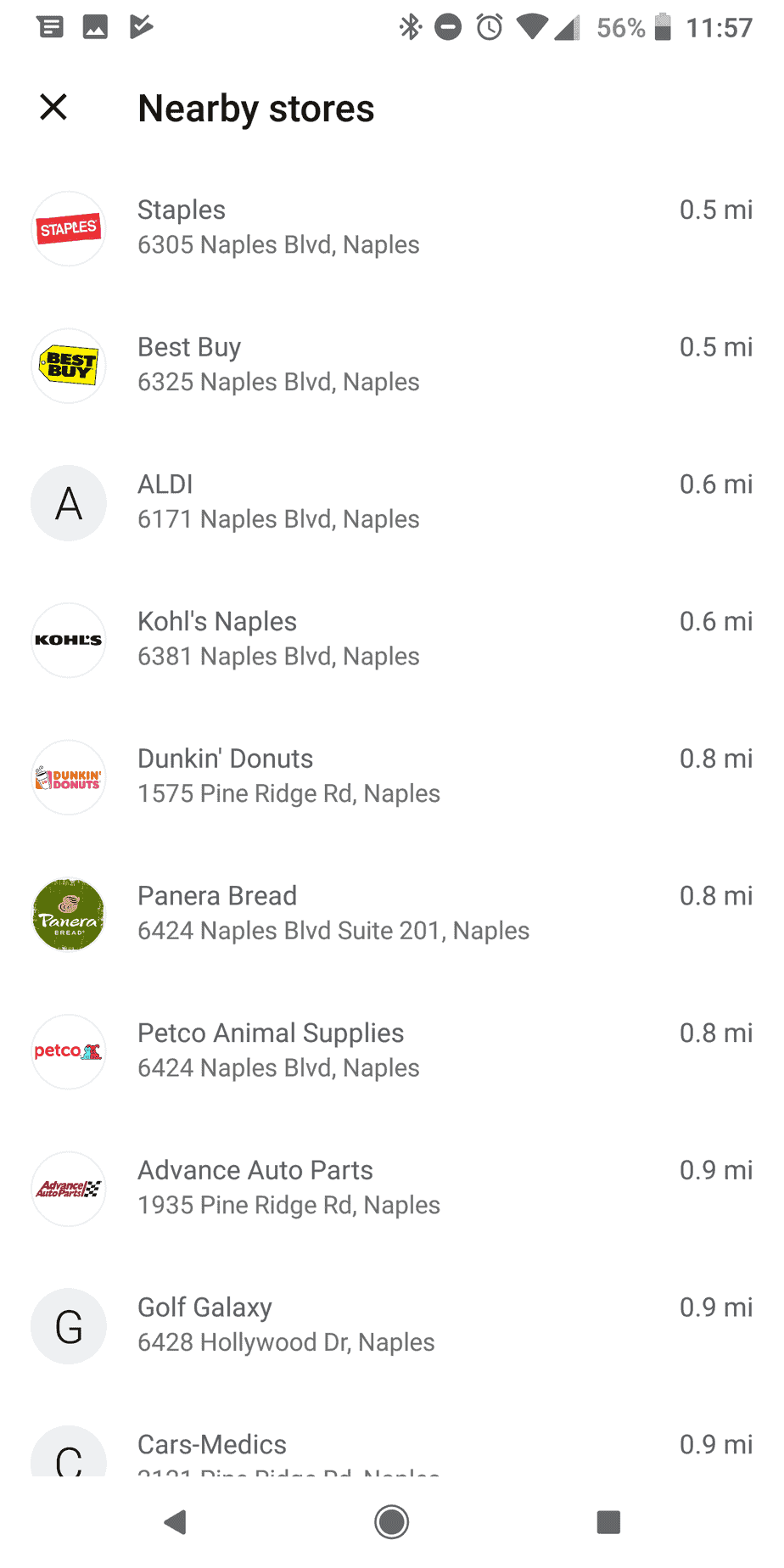
Finding Stores That Accept Google Pay Google Pay has now replaced Android Pay which a redesigned app that makes it easier than ever to find stores nearby that let you checkout with your phone. Once you have cards added to your account, you can find nearby retailers from the Home tab of the app. When you reach the list of cards, pay attention to the last two.
The second-to-last card is an informational card with the NFC payment icon that allows you to use your phone as a digital wallet when Google Pay isn’t accepted. The last card is labeled “Use Google Pay Nearby.” When you select this option, it will automatically show the three closest stores that accept the payment method. You can also choose “See More” for a longer list. The list will include everything from fast food chains and retailers to gas stations and grocery stores.
An ever-growing number of retailers are adopting NFC-compatible payment technology to improve customer convenience and credit card processing security. With greater efficiency, shorter lines, convenience, and security, mobile payments are certainly here to stay with benefits for customers and merchants alike. And it is not difficult anymore to find stores that accept Apple Pay and Google Pay.
Obtaining a Firearm Merchant Account
Firearms are a big ticket item. The ability to process credit card payments can make or break a firearms business. However, securing merchant services like credit card processing can be challenging for firearms dealers because this type of operation is considered high risk from the perspective of potential merchant partners. “High risk” simply means that, in terms of merchant services, this type of business tends to generate more chargebacks, and experience a higher volume of credit card fraud than a business considered to be low risk. Being high risk does not mean that it will be impossible to find an outfit to provide payment processing services. Understanding how to shop for these services for a high-risk operation is crucial to finding the right fit for your own unique business. Following are eight important items to put on your checklist when looking for a payment processing partner:
#1. Specialization – Does the company specialize in working with businesses like yours? Companies that specialize are likely easier to work with. Host Merchant Services has a firearm sales division specializing in gun shop merchants.
#2. Types of Sales – Do you plan to engage in internet sales? Some payment processors are not able to accommodate this. Internet Sales are very different from face to face sales for guns. It takes experience and know-how to get some of these accounts approved. We have the ability to process in person and online, and with years of experience, we know how to get you set up.
#3. Rates – Is the quote clear? Does it explain how the rate is calculated, how close to the wholesale rate it is, and whether it is flat or tiered? Will those rates change at the end of a certain period of time, or are they guaranteed for the duration of your relationship with that credit card processing company? This part can be challenging and deserves close attention.
#4. Fees – Are there fees–hidden or otherwise? Fees should be divulged on the quote and it should be noted that hidden fees are never assessed.
#5. Term Commitment – Does the company require that you commit to their company for a certain length of time? If so, you may face penalties for trying to take your business elsewhere before that term is up.
#6. Customer Service – Are they open when your business is open? Are they as committed to good customer service as you are?
#7. Additional Services – Offering additional services like credit card machines, or point of sale software and equipment could save you tons of time. Do you want to locate a processor, and then hunt down a credit card machine?
#8. Reputation – How is the company rated by entities like the Better Business Bureau and Consumer Affairs? A solid company works hard at maintaining a solid reputation.
This seems daunting, but the field will narrow quickly. You will likely find that most companies will not make it past the third or fourth point on your checklist. Host Merchant Services can certainly help!
A POS system, or point of sale, offered by merchant services providers, refers to a combination of hardware and software that enables merchants to centralize business operations. An up to date point of sale system, such as Bonsai Point of Sale workstation simplifies day to day functions.
It is designed with speed and efficiency in mind so it makes work faster and easier. It is operated by the main computer and linked to several checkout terminals. Here are four tips on how a point of sale can improve your business;
1. Inventory Management
Proper management of your inventory ensures few lost items and enables you to keep track of the items sales while monitoring how fast or slow an item is selling. Point of sale system is a step up from the use of cash registers in the case of inventory management.
With POS, you don’t have to be worried about how much inventory you have as it keeps track of all the inventory in all business locations. Access this system from anywhere in the world with an internet connection.
2. Integrated system
An up to date integrated point of sale system enables business owners to go mobile. The owner can, therefore, work from home and even work when the internet is down. With an integrated system, all locations sync to a centralized database. This ensures all your information is in one place, secure, and up to date. An integrated POS reduces human error and therefore increases accuracy ultimately making business easier.
3. Payroll management and time tracking
A POS system is essential to an employer in payment processing and tracking their employees’ working hours in order to pay them accordingly. Using POS, time clocks are regulated such that an employee clocks in and out using a secured pin allowing the employer to keep track of the exact working hours thus making payments easier. It calculates the hours worked, the rates and the employee’s deduction, giving the ability to process each employee’s payslips easily.
4. Reporting
The point of sale system allows the employer to monitor the trends in the business. It provides custom reports on sales, employees’ time, and inventory among others. See trends, averages, and comparisons giving you the tools you need to optimize your business. Restaurant analytics include table seating data, table turnover times, rush analysis and real-time operating costs vs real time profits.
Reporting is important as it enables the business owner to improve their business, prevent future mistakes, proactively avoid problems, save time, and cut out unnecessary operation costs and thus improving the business. Reporting also provides the owner with daily reports on revenue.
For more information about point of sale tips and leaders in the market simply contact us today. We offer full-time support for all your needs.
Accepting credit cards is essential for today’s businesses: over 90% of U.S. adults carry a credit or debit card, and many customers expect to pay by card or mobile wallet. However, processing card payments comes with fees and security requirements that can cut into profits if not managed carefully.
When you have a complete understanding of the pricing structures, you avoid hidden costs, maintain strong security, and, by leveraging modern payment technology, businesses can streamline their card payments and save money. Below are five key credit card processing tips to help your company optimize.
Credit Card Processing Tips: Best 5 For Businesses To Use
1. Compare and Understand All Pricing Components
Credit card processing involves multiple fee types. Before choosing a processor, review pricing examples to see exactly what you’ll pay. Standard charges include interchange and transaction fees, monthly or statement fees, and one-time costs.
Interchange fees (paid to card issuers) typically run about 2 to 3% of each sale, and processors often add a fixed per-transaction fee on top. There may also be monthly account fees, PCI compliance fees, or gateway fees, regardless of sales volume.
Interchange and transaction fees: These are usually a percentage of the sale amount plus a small flat fee. Rates vary by card type (credit vs. debit) and how it’s processed (swiped, keyed, or online).
Monthly and statement fees: Processors often charge a monthly account fee or a fee for paper statements. Some impose a monthly minimum fee (typically $10–$25) if you don’t reach a sales threshold. Look for providers that waive these if you qualify.
Equipment and setup fees: One-time costs can include setup fees and the price or lease of card readers and terminals. In general, buying your own POS terminals (often around $200-$300 each) avoids the extra cost of leasing.
Chargeback fees: If customers dispute transactions, the processor may charge a chargeback fee. Review how these are handled to avoid surprises.
You should always ask potential processors for a sample monthly statement or fee schedule when evaluating options. This lets you see all line-item costs, ensuring no hidden charges slip through.
Compare pricing models directly – interchange-plus (pass-through) pricing tends to be most transparent, while flat or tiered rates can obscure true costs. Whenever possible, negotiate rates or ask to have fees waived as your sales volume grows.
2. Avoid Long-Term Contracts and Hidden Costs
Contracts can easily lock businesses into unfavorable terms, mainly when processors rely on multi-year agreements with hidden penalties. To maintain flexibility and control costs, it’s best to seek arrangements that avoid long-term commitments. A month-to-month contract or one that clearly permits cancellation with minimal notice generally offers the most protection. Before agreeing to anything, read the contract closely for auto-renewal clauses and high early-termination fees. Some providers renew automatically at higher rates if you miss a cancellation deadline, so it’s important to track those dates.
Choosing flexible terms is essential, and processors that avoid locking you in are typically the safest option. It’s critical to compare fee structures, contract terms, and available features, and to prioritize no-contract or short-term agreements whenever possible. Early termination fees also deserve careful attention, as they can reach thousands of dollars. While some companies may waive penalties if asked, it’s better to choose providers known for short or no-commitment terms rather than rely on exceptions.
Another area to review is equipment leases. Hardware offered as “free” in a contract is often paid for indirectly through higher rates or added fees. It is recommended to purchase your own terminals whenever possible, since a reliable EMV terminal can cost around $250 and often saves money compared with leasing.
Overall, negotiation is key. Ask directly about cancellation and renegotiation policies, and if a provider insists on a long-term contract, make sure rates are stable and the agreement has no hidden surprises. A processor that lets you exit or adjust your plan without punitive fees will protect you from being stuck in a costly arrangement later.
3. Strengthen Security and Compliance
Protecting customer data is both legally required and good business. All merchants must comply with PCI DSS standards for handling payment data. Ensure your processor handles the heavy lifting of PCI compliance (such as network scans and validation), but remember that some responsibility remains with you (such as using secure equipment and training staff).
Use a processor that keeps customer card data encrypted from the moment of swipe or entry (point-to-point encryption) and tokenizes information in your systems. This guards against breaches: even if hackers intercept data, encrypted numbers and tokens are useless without the decryption key.
Encryption and tokenization: Verify that your point-of-sale (POS) system encrypts card data immediately and that the processor uses tokenization. This means that once a card is read, the actual card number is never stored or transmitted in plain text.
Fraud prevention tools: Use AVS (Address Verification Service) and CVV checks for card-not-present (online or phone) transactions. AVS compares the billing ZIP or address to the card issuer’s record to catch mismatches. Also, enable any fraud filters, velocity checks, or AI-based tools offered by your processor. These can flag unusual patterns (like very high ticket sales or foreign usage) before you process bad transactions.
PCI compliance: Stay up to date with PCI requirements. This includes using compliant card readers and terminals, applying software updates, and undergoing any required quarterly scans. Non-compliance can lead to fines and even liability for fraud losses.
Staff training: Human error is often the weakest link in security. Train your employees on secure payment handling: ensure they never leave unattended receipts with card data, they use strong passwords and two-factor authentication for systems, and they recognize phishing or social-engineering attempts. A breach not only costs in fines but can also drive away customers – as one high-profile retailer learned: a security lapse dramatically hurt its sales and reputation.
Regularly audit your security. Confirm that all payment processing devices are up to date and that your team understands safe procedures.
Providing staff education on handling customer data can help prevent breaches caused by even well-intentioned employees. Making security a priority saves money by reducing fraud losses and compliance costs.
4. Accept Many Payment Methods and Integrate Systems
Modern customers expect to pay however they prefer, so your business should support all major card brands along with popular digital payment methods. Many shoppers are relying on digital wallets more frequently, and offering contactless tap-to-pay and mobile wallet options such as Apple Pay. Google Pay can significantly improve satisfaction and checkout speed.
A good payment processor should enable these features without added complexity. It’s equally important to align your in-store and online systems by integrating your e-commerce checkout with the same merchant account to create a consistent, seamless experience.
Taking payments across multiple channels strengthens convenience and efficiency. Accepting transactions in person, online, and on the go through a single provider unifies POS terminals, e-commerce gateways, and mobile readers under a single system, reducing vendor management and controlling costs. Digital wallets and contactless payments should be standard, since tap-to-pay shortens wait times and uses dynamic security codes for stronger protection.
Your payment setup should also connect smoothly with your accounting or ERP software. Many processors and POS platforms can sync sales data directly to systems like QuickBooks or Xero, eliminating manual entry and reducing errors. Beyond basic processing, advanced features such as detailed reporting and analytics offer valuable insights. Comprehensive transaction data can reveal which products perform best, when traffic peaks, and how inventory moves, helping you make better operational decisions.
Regularly evaluate whether you are providing the payment options your customers prefer. For retail locations, ensure your terminals support NFC. For online sales, confirm that your checkout gateway is PCI compliant and optimized for mobile users. Consider adding features such as buy now, pay later or invoicing tools, as these options continue to grow in popularity. A modern, flexible payment stack not only increases sales but also reduces friction and improves accuracy across your operations.
5. Optimize Operations with Analytics and Maintenance
A well-tuned payment system dashes, improves customer satisfaction, and saves money. Outdated equipment or sluggish checkout flows can frustrate customers and even lead to lost sales. Keeping your hardware and software up to date is essential: use modern POS terminals, ensure you have a stable internet connection, and streamline the checkout process by removing unnecessary prompts. These improvements not only make the customer experience smoother but also help increase throughput during busy periods.
Regular maintenance plays a significant role in performance. Update payment terminal firmware and POS software on a routine schedule, and verify that your routers and network configuration are not slowing transactions. A practical guideline is simple: if your checkout ever feels sluggish, it’s time to upgrade your equipment or internet service.
Your system’s data is another valuable resource. Built-in reporting tools can reveal patterns such as which locations or product categories generate the most revenue, when peak purchasing times occur, or where fraud risks may be emerging. Using these insights allows you to optimize inventory, tailor marketing efforts, and adjust staffing to match demand.
Monitoring chargebacks is equally essential. Rising dispute rates may indicate fraud issues or customer dissatisfaction, and resolving them quickly helps prevent unnecessary fees while protecting your revenue. Explicit billing descriptors and responsive customer communication can also reduce disputes.
Continuous improvement keeps your payment stack aligned with your business needs. As your transaction volume increases, it may be time to renegotiate for better rates. If your current provider lacks essential features such as strong mobile payment support or robust analytics, consider alternatives that can scale with you and adapt to new payment methods.
Conduct a complete payment processing audit at least once a year. Compare your fees with competitive offerings, gather staff feedback on system pain points, and determine whether any hardware or software updates are needed. Combine your processor’s analytics with your accounting data to confirm that you’re getting real value. Ongoing optimization ensures your checkout process stays efficient, fast, and cost-effective.
Conclusion
By following these five tips—understanding all fees, avoiding bad contracts, securing transactions, embracing modern payment channels, and continuously optimizing- you’ll keep credit card processing costs in check and provide a smooth experience for customers.
Careful management of your merchant services boosts your bottom line and helps your business grow.
Cookie Consent
We use cookies to enhance your browsing experience, analyze site traffic, and support our marketing.You can accept all cookies, reject non-essential ones, or manage your preferences below. Learn more in our Privacy Policy.
Cookie Preferences
Manage your cookie preferences below:
Essential cookies enable basic functions and are necessary for the proper function of the website.
Name
Description
Duration
Cookie Preferences
This cookie is used to store the user's cookie consent preferences.
180 days
These cookies are needed for adding comments on this website.
Name
Description
Duration
comment_author_email
Used to track the user across multiple sessions.
Session
comment_author_url
Used to track the user across multiple sessions.
Session
comment_author
Used to track the user across multiple sessions.
Session
Google Tag Manager simplifies the management of marketing tags on your website without code changes.
Name
Description
Duration
cookiePreferences
Registers cookie preferences of a user
2 years
td
Registers statistical data on users' behaviour on the website. Used for internal analytics by the website operator.
session
These cookies are used for managing login functionality on this website.
Name
Description
Duration
wordpress_logged_in
Used to store logged-in users.
Persistent
wordpress_sec
Used to track the user across multiple sessions.
15 days
wordpress_test_cookie
Used to determine if cookies are enabled.
Session
Statistics cookies collect information anonymously. This information helps us understand how visitors use our website.
Google Analytics is a powerful tool that tracks and analyzes website traffic for informed marketing decisions.
Contains information related to marketing campaigns of the user. These are shared with Google AdWords / Google Ads when the Google Ads and Google Analytics accounts are linked together.
90 days
__utma
ID used to identify users and sessions
2 years after last activity
__utmt
Used to monitor number of Google Analytics server requests
10 minutes
__utmb
Used to distinguish new sessions and visits. This cookie is set when the GA.js javascript library is loaded and there is no existing __utmb cookie. The cookie is updated every time data is sent to the Google Analytics server.
30 minutes after last activity
__utmc
Used only with old Urchin versions of Google Analytics and not with GA.js. Was used to distinguish between new sessions and visits at the end of a session.
End of session (browser)
__utmz
Contains information about the traffic source or campaign that directed user to the website. The cookie is set when the GA.js javascript is loaded and updated when data is sent to the Google Anaytics server
6 months after last activity
__utmv
Contains custom information set by the web developer via the _setCustomVar method in Google Analytics. This cookie is updated every time new data is sent to the Google Analytics server.
2 years after last activity
__utmx
Used to determine whether a user is included in an A / B or Multivariate test.
18 months
_ga
ID used to identify users
2 years
_gali
Used by Google Analytics to determine which links on a page are being clicked
30 seconds
_ga_
ID used to identify users
2 years
_gid
ID used to identify users for 24 hours after last activity
24 hours
_gat
Used to monitor number of Google Analytics server requests when using Google Tag Manager
1 minute
Marketing cookies are used to follow visitors to websites. The intention is to show ads that are relevant and engaging to the individual user.
Facebook Pixel is a web analytics service that tracks and reports website traffic.










 Finding Stores That Accept Google Pay
 Pay Nearby.” When you select this option, it will automatically show the three closest stores that accept the payment method. You can also choose “See More” for a longer list. The list will include everything from fast food chains and retailers to gas stations and grocery stores.