
Posted: May 11, 2026 | Updated: October 07, 2026 at 11:30 AM
Manual invoicing relies entirely on the parent’s memory and motivation to pay; there is no external trigger apart from staff intervention. This often leads to late payments, creating a gap between when the services are rendered and when the studio actually receives the money to pay the instructors.
To prevent it from eating into your operational cash and credit lines, you must transition to a strict auto-pay setup for dance studio payments immediately to stabilize cash flow. According to industry benchmarks, studios that use dance studio auto-pay collect ~95% of expected revenue on the first attempt, whereas studios that rely entirely on manual processes secure only 70%.
Moreover, the psychological burden of debt collection takes its toll on studio owners and admin staff. This is a huge blow to their passion for the work — being forced to shake down parents for overdue fees, rather than focusing purely on teaching dance.
Imagine two scenarios: in the first, the owner has to pull their best dancer out from the upcoming competition because the fee wasn’t paid on time. This creates deep resentment and embarrassment. Now, contrast this with auto-pay-enabled fee collection — the system automatically pulls funds from the parent’s auto-pay account, ensuring the fee is received on time and avoiding future embarrassment.
Most dance studio owners fear parental pushback, which prevents them from implementing automation in their administrative and fee-collection processes. Most of them operate under the false assumption that enforcing digital payments will cause families to quit; however, the reality is quite the opposite. Most customers prefer online payment methods and auto-pay because they eliminate the hassle of opening an invoice, clicking a link, and then completing the payment. Most studio owners fail to recognize this, letting a minority of parents dictate studio policy, which leads to administrative backlogs.
The true cost of a late payment is far more than just the loss of funds. It takes up the admin workers’ time. On the other hand, your business regularly pays late fees because it lacks auto-pay features. Awkward pickup conversations can damage the client-owner relationship, creating feelings of resentment and embarrassment.
Manual tracking also leads to revenue leakage, increasing your administrative overhead, a cost that could be easily prevented by putting automated systems in place.
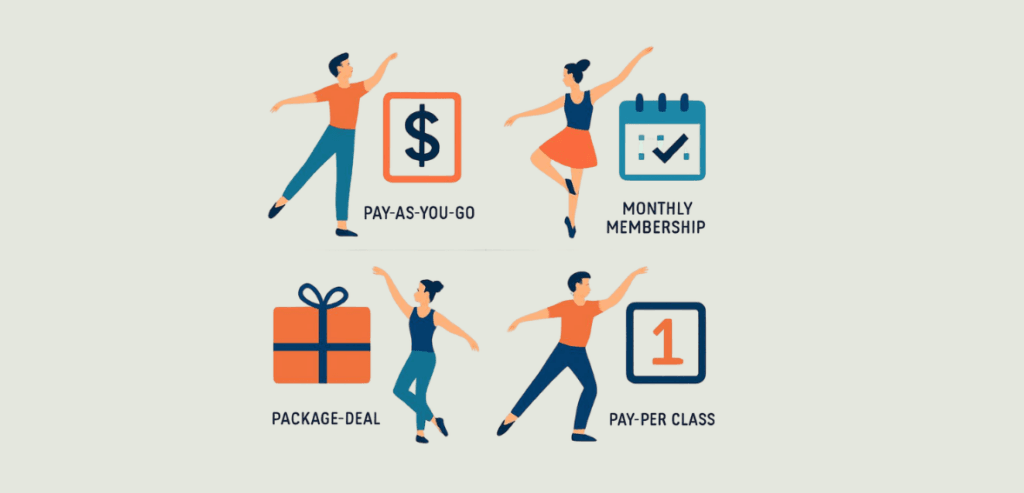
After understanding the challenges manual processes create for your business and how auto-pay solves them, it’s essential to know the most common billing models used by dance studios. Dance studios commonly use one of the four models presented in this blog.
The first model is the 10-month tuition. This model is best suited for parents who want their children to commit long-term. It divides the total cost of the dance season, which usually runs from September to June, into equal monthly installments over 10 months, regardless of the number of weeks in each month. This secures consistent cash flow for the business and, at the same time, ensures parents are not forced to argue about charges in months such as December, when the dance studio is closed for two weeks.
Another common billing strategy is the 12-month flat-rate billing. In this pricing model, the cash flow is secured for months extending into the summer. This stabilizes the studio’s operational cash during historically dead months. On the other hand, it also spreads out an even budget for parents year-round, reducing the hassle of budgeting and rebudgeting after payment breaks.
For clients looking for short-term commitments, by-session billing is preferred. By-session billing requires customers to enter their credit card information every 6 to 8 weeks to re-register. You might wonder why this method is not applicable to hesitant customers with a potentially long-term commitment in mind. The answer lies in the customer’s payment psychology. Pulling out the credit card and re-registering every few weeks forces the customer to make a conscious decision—a buying choice—which drastically increases drop-off rates because the friction of payment eventually overcomes the impulse to purchase the membership. However, this billing method is very useful for short, specific blocks of classes. For example, a 6-week “Intro to Ballet” autumn session.
The last of the big four billing models for dance studios is the monthly drop-in model. It is a pay-as-you-go model where a student can buy access to a single class or multiple classes without a long-term commitment. While this is great for prospective customers looking to try out your studio, you must limit the number of classes you offer with this pricing model. This is because this revenue model undermines revenue predictability, as attendance depends on students’ daily moods, making it impossible to automate your processes.
The solution is to transition to a flat-rate pricing model, such as a 10- or 12-month pack, to increase predictability and ensure sustained cash flow. Predictability enables you to automate background processes, optimize operations, and free up staff to focus on customer acquisition and business growth.
Now you might be wondering what the best time is to introduce these changes, because you certainly do not want to lose paying customers during the busy season. The announcement for policy changes regarding payment processes should be made between seasons. The months of May or June are ideal for introducing changes in payment terms. This ensures that parents do not feel cheated, because introducing drastic changes to the payment policy in the middle of an active season would be seen as bait-and-switch, alienating paying customers.
The ideal strategy is to “soft-launch” the new payment methods with your most loyal, tech-savvy parents and obtain their feedback. This will help your admin team to resolve the software bugs before rolling them out to the entire client base. Now the question arises: how do you get more customers to adopt the new payment method? You can offer early-bird discounts, incentives, and waived registration fees for parents who opt for auto-pay. This motivates hesitant parents to switch voluntarily, converting a “demand” into a “reward.”
To solidify cash flow predictability, you need strict policies, such as defaulting to autopay after the first year, or incentives to upgrade to flat-rate billing after a fixed number of classes on the monthly drop-in model.
While implementing these payment methods, be extra careful regarding the security and compliance of your payment software. Ensuring PCI-DSS compliance and bank-level security is critical when requesting stored credential payments. Parents need reassurance that their data is encrypted safely, rather than in vulnerable spreadsheets on office computers.
Stripe is an excellent platform for accepting business payments, but it is not ideal for scaling your dance studio. This is because although it is useful for standard business payments, it lacks dance-studio-specific features such as family-level proration, sibling discounts, and customized offers that incentivize your customers.
Generic tools, such as basic Stripe or PayPal subscriptions, fail dance studios because they treat every recurring charge as a separate subscription. This makes it impossible to offer crucial offers such as sibling discounts to your customers. On the other hand, dedicated dance studio billing software enables you to create linked profiles, thereby incentivizing increased participation. It enables you to create “Family Accounts”, which allow the system to calculate total weekly hours across multiple children and automatically apply discounts before running auto-pay requests.
After sibling discounts, proration is the next-largest factor to implement to reduce involuntary churn. You should allow your customers to pause their billing cycle mid-month if needed, or allow syncing billing cycles to the standard first of every month for customers joining mid-month. Additionally, dedicated software allows you to offer scholarships and financial aid through manual overrides, ensuring auto-pay runs without human intervention.
Setting up auto-pay is only half the battle; the task is complete only when funds are settled in your bank account. This means that after setting up auto-pay, you must have guardrails and fallback mechanisms for handling failed payments. For this, you must understand dunning, account updates, and ACH routing.
Credit cards expire, get lost, or get replaced due to fraud every few years; this means that a studio with around 300 cards on file is expected to experience dozens of credit card failures every month.
Without a proper fallback, this could mean lost revenue. Using smart dunning algorithms to retry payments on days when the probability of payment approval is statistically higher ensures cash is received in your account.
However, not every declined payment can be recovered by dunning. Sometimes, the user blocks the credit card, making it useless to retry the card. Hence, when dunning fails due to expired or blocked credit cards, the system must send preset emails to the parent requesting that they update their auto-pay methods.
Credit card payments are expensive, charging around 2.5% to 3% of the payment amount. To avoid revenue loss from processing fees, you must allow ACH transfers on autopay, as they cost less per payment and reduce revenue loss from payment retries.
With multiple competitions coming up during the active seasons, costume and recital fees are unavoidable. You must never mix these with the tuition fees. This is because costume and recital fees are variable charges, whereas tuition fees are recurring payments. An optimal strategy is to shift these payments by a week or a fortnight from the monthly auto-pay for tuition fees.
There is a challenge with pulling these charges via auto-pay — if the parent does not recognize them, they may issue a chargeback, which will cost your business money. A safe practice is to send emails with the details of the charges “well before” the funds are pulled, allowing enough time for the parent to approve or decline the charge and protecting you from potential chargebacks.
Separate charging creates accounting complexity. Most modern dance studios are now opting for a single, all-inclusive fee that covers tuition, costumes, and recital payments, combined into a flat rate.
Automating your tuition payments is a necessary survival strategy. The slightest amount of friction in payments could mean the customer abandoning the studio forever. Setting up auto-pay requires flat-rate pricing models that provide strong revenue predictability, which in turn helps you manage operational cash reserves more effectively. You should start by implementing dedicated software to ensure predictable cash flow and sustained growth for your dance studio.
Fitness and Gym Payment Resources covers automating dance studio tuition alongside membership billing, declines and disputes, all in one place.
Yes, they can refuse, but only if your policy allows it. Most established dance studios make credit card registration mandatory at the time of admission, allowing parents to switch to ACH transfers afterward.
You must still allow cash payments. To encourage more parents to adopt auto-pay, offer discounts and incentives to motivate hesitant parents to opt for online payments.
In most US states, you can legally pass credit card processing fees to parents, but you must explicitly mention the fee on your invoice. Without it, you may face chargeback risk. A few states, such as Connecticut and Massachusetts, still restrict credit card surcharges, so check your local laws before implementing.
An account updater is an automated background service that updates lost/expired credit cards before payments are declined on auto-pay requests. You need it because it helps you secure cash flow and prevents revenue leakage from processing fees on failed payments.
The niche software solutions for dance studios include Jackrabbit Dance, DanceStudio-Pro, and Studio Director. Unlike generic software, these tools contain features specifically designed for dance studios, helping you streamline operations and ensuring predictable cash flow.
