
Posted: October 28, 2025 | Updated: October 07, 2026 at 11:30 AM
Accepting payments on the job site immediately is a game-changer for independent contractors and construction businesses. Moving away from old-school methods like checks and cash to mobile payment solutions can significantly speed up cash flow and improve client satisfaction.
This blog explores why going mobile matters for contractors, highlights the top on-site mobile payment options (from plug-and-play card readers to all-in-one payment apps), and provides best practices for integrating these tools into your workflow. With mobile payments, contractors can eliminate the post-project payment chase, appear more professional to clients, and maintain a healthier cash flow.
For decades, contractors have relied on checks, cash, or invoices sent after a job is done. These traditional payment methods often lead to delayed payments and strained cash flow. A client might take days or weeks to mail a check, or you might have to drive to pick up a payment. During that waiting period, you’re essentially financing the project out of your own pocket, paying for materials and labor while your money is tied up. This delay can be painful for small businesses that need steady cash flow for day-to-day expenses.
Mobile payment technology changes the game. With the ability to accept payment on-site (for example, the moment you finish a repair or remodel), you get paid immediately. This means no more waiting for checks to clear or chasing down clients for money. The impact on cash flow is significant; you can have funds in your account the same or next day, which you can reinvest in your business or use to pay suppliers and employees on time.
Client preferences are another big reason to go mobile. Modern homeowners are increasingly comfortable with digital payments and often prefer them. Recent consumer surveys suggest that roughly two-thirds of homeowners would like to pay for home services by credit or debit card rather than cash or check. Many people no longer keep a checkbook handy, and they appreciate the convenience (and sometimes rewards points) of using a card.
If your contracting business can’t take cards or mobile payments, you may inconvenience customers or even lose jobs to competitors who do. On the flip side, offering on-site credit card payments can boost your professionalism and customer service image—it shows you’re keeping up with the times and making things easy for clients.
Statistics from the field service and construction industries underscore this trend. The adoption of digital payments among field service contractors has surged by around 40% in the last two years as businesses move to streamline their operations. Contractors are recognizing that getting paid faster and more reliably is well worth the small transaction fees that mobile payments usually entail.
In fact, many find that the 2-3% processing fee is trivial compared to the value of eliminating a 30+ day wait for a check. Additionally, when clients can pay on the spot with a card, there’s no risk of bounced checks or lost invoices. The payment is authorized immediately, giving both you and the customer peace of mind.
Cash flow improvement cannot be overstated as well. A steady cash flow is the lifeblood of contracting businesses. By using mobile payments, contractors maintain healthier cash flow and reduce their accounts receivable. You finish a job and get the money right away – that liquidity can be used to start the next project sooner or cover your overhead without taking on debt. It also reduces administrative work: fewer bills to mail out and fewer trips to the bank.
Contractors have more options than ever to accept payments in the field. From simple card-swipe gadgets that plug into your phone to full-featured apps that handle invoicing and bank transfers, there’s a mobile payment solution to fit every business.
The best solution for you depends on your needs – whether you value simplicity, low fees, integration with accounting software, or the ability to work offline in remote areas. Here we break down the major categories of mobile payment solutions and what to consider for each:
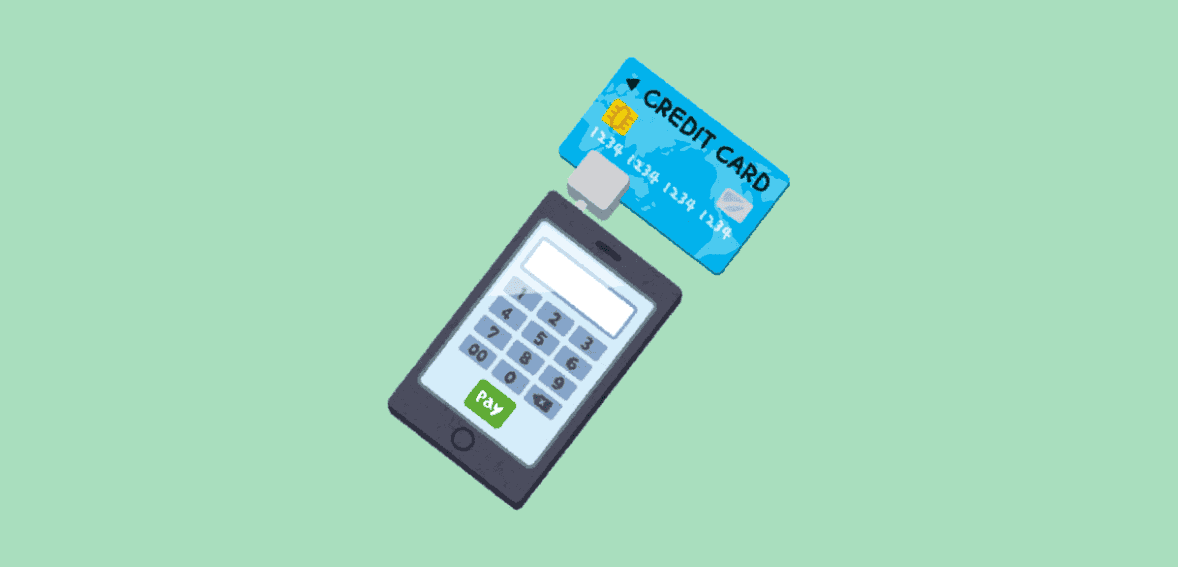
One of the most popular on-site payment solutions is the mobile credit card reader. These are small devices (often a dongle or a wireless reader) that connect to your smartphone or tablet and allow you to swipe, dip, or tap customer credit cards for instant payment. Well-known examples include Square, PayPal, Zettle, Clover Go, and QuickBooks GoPayment card readers, among others.
Mobile card readers are designed to be highly user-friendly. Typically, you download a companion app, pair the reader via Bluetooth, and you’re ready to take payments within minutes. For instance, with Square, you can sign up and start accepting card payments on your phone almost immediately. The app’s interface guides you through charging the card, adding a description, and even collecting a digital signature or a customer email for the receipt. These solutions require minimal setup and no special technical knowledge – if you can use a smartphone, you can use a mobile card reader.
Also, some mobile payment apps (like Square) offer an offline mode that lets you swipe cards and securely store the transaction, then process it once you regain connectivity. There is a slight risk if a card is declined later, but it’s a valuable feature when working in areas with spotty reception. Other card readers may require an active connection during payment.
If you frequently work in remote areas, be sure to choose a solution that either supports offline transactions or has an option to capture payment info for later processing. Another approach is to use a mobile hotspot or the phone’s cellular data to run the transaction – make sure to test the setup before relying on it in the field.
Most plug-and-play readers offer a basic service with no monthly fee. You pay a transaction fee for each payment, usually around 2.5% to 3% of the amount (sometimes plus a small fixed charge like $0.10). If you charge a $1,000 invoice on a credit card, a 3% fee means ~$30 goes to the payment provider. While contractors might initially cringe at losing a few percent to fees, remember the benefits: you get guaranteed funds right away, and you may be gaining business you’d otherwise miss.
Some providers (like certain merchant account services or high-volume plans) offer lower percentage rates in exchange for a monthly subscription or a fixed monthly fee, which can be worth it if your transaction volume is high. But for many small contractors, a pay-as-you-go plan is simplest. Hardware costs for readers are usually low as well – basic magstripe readers might be free or $10, while chip-and-tap readers range from about $50 to $100. These one-time costs quickly pay for themselves by enabling you to accept more payment methods.
Beyond simple card reader + app combos, there are all-in-one payment solutions that handle more than just swipes. These are apps or platforms (often tailored for small businesses or contractors) that let you generate invoices, send them to clients, and accept multiple payment methods, including credit cards, debit cards, and ACH bank transfers. Examples include QuickBooks with its GoPayment feature, Joist, Jobber, or other field-service management software with built-in payments. Even Square and PayPal have invoicing capabilities in their apps, blurring the line between pure payment apps and invoicing systems.
The significant advantage of all-in-one apps is that they integrate payment acceptance with your workflow. You can create a professional invoice or billing statement on your phone or tablet — often right at the job site — then take payment against it immediately. The app will automatically mark the invoice as paid and record the transaction details. This dramatically simplifies bookkeeping – no need to reconcile a separate credit card charge with an invoice later, because the system does it in one go.
Also, for contractors who already use accounting software like QuickBooks, using the same company’s payment solution is convenient: all your transactions sync to your books. Some contractor-specific apps (for example, Joist or Housecall Pro) not only allow on-site payments but also support estimates, scheduling, and client management, providing a comprehensive business solution. Choosing a platform like this can streamline your whole operation, not just payments.
All-in-one apps often support multiple payment methods. Credit and debit cards are standard, but many also let customers pay via ACH (bank transfer) or other methods. ACH payments (sometimes called eChecks or bank drafts) are pulled directly from the client’s bank account. They tend to have much lower fees (often a flat fee of $1 or a tiny percentage) than credit cards, which can save you money on large invoices. The trade-off is that ACH is slower (funds may take a few days to clear), and it doesn’t provide instant verification like a card swipe.
However, offering ACH can be great for clients who are averse to paying hefty credit card fees or who don’t use credit. The all-in-one app will typically give them the choice to enter their card info or their bank routing/account info for ACH when you send the invoice or payment link.
While these comprehensive apps offer many features, they are usually designed to be contractor-friendly, with simple interfaces. You might spend a bit of time upfront customizing your invoice template or connecting your bank account, but day-to-day use is straightforward. On a job site, you could pull out your tablet, open the app, add any final line items to the invoice (for example, any last-minute materials or change orders), and then present the client with a pay now option.
In some cases, you might hand them your phone or tablet to swipe their card, or you might email/text them a payment link on the spot, which they can open on their own device to pay (this is useful if the client isn’t physically present or if they’d rather not read their card number aloud). The flexibility is high, as you can accept payment in person by card swipe or chip, or remotely via a link, all through one system.
If your all-in-one app uses a card reader (for card-present transactions), it may have the same offline mode considerations described earlier. If it uses mainly emailed links or an online portal, you’ll need connectivity at least to send the invoice or process the card. In scenarios without internet, a workaround is to use a simple card reader offline or to use a phone’s hotspot to get your tablet online briefly.
Planning for how to take payment in a no-signal zone is wise – even if it’s as low-tech as writing down the card details with the client’s permission to run later (or using an imprint slip as backup), though most prefer not to handle sensitive data that way. Ideally, stick with secure apps that can function in low-connectivity environments.
The fees for integrated apps are often comparable to those of stand-alone card processors – around 2.9% for cards is standard, while ACH may be a nominal flat fee. Some apps do have a monthly subscription cost, especially if they offer a suite of features (e.g., Jobber or ServiceTitan software subscriptions). Still, those often come with more robust business tools beyond just payments. If you’re purely looking at payment collection, many options (like QuickBooks or PayPal invoicing) have no monthly fee and just charge per transaction. Be sure to review pricing for each method (card vs ACH) and any monthly minimum charges.
One neat feature some contractor-oriented apps provide is the ability to add the processing fee onto the client’s invoice (sometimes called a convenience fee or surcharge) or offer a cash discount. This can help offset fees if done in a way that complies with any relevant laws and is communicated to the customer. Always be transparent if you choose to pass on processing costs – many clients will still choose the convenience of card payment even if it costs a bit more, but you don’t want to surprise them.
In addition to the above, some contractors also use peer-to-peer payment apps or direct bank payment methods, especially for smaller jobs or informal arrangements. Apps like Venmo, Cash App, or Zelle fall into this category. These allow customers to send money directly to your account via a smartphone app, and often no fees are charged to either party for basic transfers (except for business profiles or when using a credit card to fund a Venmo payment). A handyman doing a quick $150 repair might find it easy if the client Venmoses them the money.
While these apps are very convenient, there are a few caveats for professional use. First, they are not integrated with any invoicing or record-keeping system, so you need to record the payment manually in your bookkeeping. Second, using personal payment apps for business transactions can violate the app’s terms of service unless you set up an official business account (which Venmo and Cash App offer with applicable fees). And third, they don’t offer the same level of buyer/seller protection as credit card processing.
Still, for trusted repeat clients or tiny jobs, these methods can work in a pinch. Zelle, in particular, is essentially a direct bank transfer and is fast and free – it can be a good option if both you and the customer have it available through your banks. Just remember, with Zelle or cash-transfer apps, money sent is money received – there’s no easy refund mechanism if something goes wrong, and no credit card company to mediate disputes.
Overall, peer-to-peer payments are a handy supplement but probably shouldn’t be your primary on-site solution if you’re aiming to appear professional and organized. They lack features like receipt printing, formal confirmation, or the ability to handle credit cards (Venmo does allow users to pay by credit card in-app, but it charges the sender a fee, which most customers will avoid). Most serious contractors stick to a dedicated mobile payment system for the bulk of their work and might use these methods only by special request.
Adopting mobile payments is not just about the technology – it’s also about how you incorporate it into your business process. Here are some best practices to ensure a smooth experience for you and your clients:
Before you head out to a job relying on a new payment system, practice with it. Set up your account, run a couple of small test transactions (even if it’s just charging $1 on your own credit card) to familiarize yourself with the steps.
Make sure any employees who will use it (e.g. your foreman or crew leader who handles customer checkout) know how it works. This prevents fumbling in front of the client when it’s time to get paid.
Include your payment options in your proposals, contracts, or pre-job communications. When you’re quoting a project, you might mention, “Payment can be made by credit card, debit card, or bank transfer upon completion.” This prepares the customer and removes any uncertainty about how they can pay.
Many will be pleasantly surprised to know they can use a card. It also sets the expectation that payment is due upon completion (if that’s your policy), since they know a convenient method will be available.
When using mobile devices for payments, keep customer trust in mind. Use only reputable, PCI-compliant payment apps and devices so that card data is encrypted and handled safely. Make sure your phone or tablet is secured with a passcode or biometrics, and avoid letting the device out of your sight during a transaction.
It’s wise to email or text the receipt to the customer immediately through the app – this not only provides proof of payment but also reinforces that the transaction was recorded and legitimate. If you have a company email address, set it as the sender for e-receipts, if possible. Little touches like having your business name on the receipt and maybe a brief “Thank you for your business!” in the message go a long way toward showing professionalism.
Even with the best preparation, you may occasionally run into weak signals or technology hiccups (such as your phone battery dying at the wrong moment)—plan for this. Keep a portable charger in your truck so your payment device stays powered. Know how to enable offline mode if your app has it.
In a worst-case scenario where the app isn’t cooperating, be ready to politely ask the customer if you can take a card imprint or have them call in a payment to your office later. Most clients will understand if tech fails, but do your best to minimize those instances by keeping your hardware/software up to date and tested.
If your mobile payments aren’t automatically syncing with an accounting system, set up a routine to record them. For instance, if you use a standalone card reader like Square but do your bookkeeping in QuickBooks, make sure each payment gets logged in QuickBooks as a sales receipt or invoice payment.
Many systems offer integrations or at least the ability to export data. Keeping accurate records is crucial for tax purposes and also helps you track how much you’re paying in processing fees (which are deductible business expenses). Reconciliation is much easier when you don’t have loose payments floating around outside your books.
Use your ability to accept on-site payments as a marketing selling point. It can set you apart. Mention on your website or business cards that you accept major credit cards and digital payments. When you finish a job, instead of awkwardly asking, “Can you write me a check?”, you can confidently say, “I can take a card or electronic payment right now, whatever is easiest for you.”
This confident approach makes clients feel like they’re dealing with a modern, competent professional. It can even lead to more referrals – people tend to remember a smooth, hassle-free payment experience, especially in industries where that isn’t yet the norm.
While you shouldn’t shy away from mobile payments due to fees, you should be aware of them. Decide whether you will absorb the processing fees as a cost of doing business (most contractors do, and factor it into their pricing) or offer a small discount for cash/check to encourage those methods. Be careful with surcharges – in some jurisdictions, adding a credit card surcharge is regulated or must be clearly disclosed.
If you do use a feature to pass on fees, make sure it’s done transparently and complies with any applicable laws. Also, ensure you account for processing time – even though you get instant confirmation, the money might not hit your bank until the next business day or two. This is still far faster than waiting for a check in the mail, but you should know your provider’s deposit schedule for cash flow planning.
Going mobile with payments is a win-win. You get faster, more reliable payments and reduced administrative hassle. Your clients get flexibility and convenience in how they pay. The tools to enable this are readily available and easier to use than ever, whether you opt for a simple card reader or a comprehensive app that handles your invoicing too. With a bit of upfront effort to set up the right solution and implement best practices, you can modernize your payment process almost overnight.
For U.S.-based contractors, especially, where digital payments are now ubiquitous in everyday life, adopting on-site mobile payments is a smart business move. It ends the waiting game, strengthens your cash flow, and projects a professional image. So equip your smartphone or tablet with the right payment app, and say goodbye to the days of “cash or check only.” By accepting mobile payments on-site, you’ll streamline your operations and let your business build on a foundation of prompt, hassle-free payments – all while delighting your customers with greater convenience.
For more on mobile payments on-site and other contractor payment questions, see Contractor Payment Resources.
Checks and cash often delay payments and require extra paperwork. Mobile payments let contractors get paid instantly on-site, improving cash flow and professionalism while offering clients the convenience they expect.
Contractors can use card readers like Square or PayPal Zettle for quick in-person payments, all-in-one apps like Jobber or QuickBooks for invoicing and tracking, or peer-to-peer apps like Venmo Business for small jobs.
Most platforms charge 2.5% to 3% per card payment, with low-cost ACH options available. Basic readers cost around $10 to $100, and many apps are free unless you upgrade to premium tools.
Yes, reputable providers like Square and PayPal use encryption and comply with PCI security standards. Keep your device secure, use trusted apps, and always send digital receipts for added protection.
Test your system before jobs, inform clients about accepted payment methods, and keep a backup plan for low-signal areas. Linking your payment app to accounting software also makes it easier to track income.
