After EMV Banner 1

After EMV – Was it Successful?

After EMV – Was it Successful?

The introduction of chip technology in credit cards in the United States was designed to increase information security and reduce credit card fraud. The US EMV (Europay, Mastercard, Visa) liability shift in 2015 was meant to encourage merchants to adopt the technology quickly and it means that merchants or credit card issuers who haven’t adopted chip technology can face liability for consumer fraud. It’s been two years since the shift and whether the introduction of chip technology has improved security has been a hotly debated topic in credit card processing.

Chip Technology Has Reduced Counterfeit Fraud
According to Visa, counterfeit fraud at chip-enabled credit card machines dropped 66% from June 2015 to June 2017. By the end of 2017, 55% of storefronts in the U.S. were accepting chip cards with more than 462 million chip-enabled cards issued to consumers.

CNP Fraud on the Rise
While physical POS fraud has dropped dramatically since the liability shift, card-not-present fraud has been on the rise. 2016 saw a 40% year-over-year increase in CNP fraud, which involves transactions in which the physical card is not presented such as online sales. One study estimated that the liability shift and rise of e-commerce will increase CNP fraud from $3.1 billion in 2015 to $6.4 billion in 2018. As credit card information becomes harder to steal through POS transactions, identity thieves look for easier targets such as the online sales market.

The United States was one of the last countries to shift to chip technology and data from other countries showed a similar increase in CNP fraud.

Benefits of Accepting Chip Cards
As a retailer, there are many good reasons to make the switch and begin accepting chip-enabled cards:

  • Builds customer trust. Consumers have become concerned with the growing number of data breaches at retailers, but more than 60% believe that chip technology improves security.
  • Improves customer experience. Chip payments are easy, secure, and result in a better customer experience at the POS.
  • Reduces fraud. A chip card generates a unique code with every transaction so data can’t be used to create counterfeit cards for in-store use.
  • Reduces your fraud chargeback risk. Retailers are more likely to be responsible for lost/stolen and fraudulent transactions in-store without chip technology compliance.
  • Accept contactless and mobile payments. By upgrading your POS system or switching service providers, you can begin accepting mobile and contactless payment methods like Apple Pay.

What Merchants Should Know
While it isn’t perfect, chip technology has been doing its job to reduce fraud at the physical POS. As chip acceptance grows among retailers, counterfeit card use is expected to continue its decline.

As a retailer, it’s essential that you are able to accept chip technology. If you cannot support EMV transactions, you are liable for fraudulent transactions. It isn’t enough to have a credit card machine that supports chip technology; you also need payment processing services through a merchant services provider that supports chip technology. Making the switch to chip technology doesn’t just improve customer service; it also reduces your liability in case of fraud.


Modern Payment Processing 1

Modern Payment Processing: Apple Pay, Google Pay, Samsung Pay

 Mobile wallets have rapidly gained in popularity since the introduction of Apple Pay in 2014. Also known as mobile payment platforms, services like Apple Pay, Google Pay, and Samsung Pay work by allowing you to pay for services in-person at a credit card machine or online with your smartphone without your physical card. Mobile payment platforms offer plenty of advantages for consumers and merchants, including faster transactions and greater security, although each platform comes with its own benefits and limitations.

How NFC Works
All three popular mobile payment platforms use NFC technology, which uses a tiny chip in the smartphone that senses when it’s in close proximity with another chip and instantly transmits information between the two. NFC-enabled terminals can handle transactions using this contactless technology without swiping a card.

What Is Google Pay?
In January 2017, Android Pay and Google Wallet were merged into Google Pay, which uses payment information saved in your Google account for easier payments. Users can add gift cards, debit cards, credit cards, and even loyalty cards to the app, which uses NFC payment processing technology in-store to communicate with a compatible credit card machine. Google does not charge credit card processing fees to consumers for purchases through Google Pay.

What Is Apple Pay?
Apple Pay is only available for iPhone, iPad, and Apple Watch devices and it offers private, easy mobile payment services. Consumers can add debit, prepaid, and credit cards to their Wallet and make mobile payments in-store or online. Like Google Pay, Apple Pay allows consumers to continue earning loyalty points and rewards from credit cards and loyalty programs.

When a purchase is made, the receipt will be stored in the Wallet app but the transaction information is not stored anywhere. Card information is never passed to the merchant or stored on Apple servers.

What Is Samsung Pay?
Launched in 2015, Samsung Pay is a mobile wallet compatible with the Samsung Galaxy S6 and later models. Because it only works with newer Samsung smartphones and smartwatches, Samsung Pay is more limited than Apple Pay and Google Pay.

Samsung Pay is unique because it uses NFC contactless technology but it can also work with older magnetic stripe POS readers. Merchants who have not updated to new card readers can still accept Samsung Pay because the app emits a magnetic signal that allows the phone to be used like a magnetic stripe card. This mobile wallet also offers its own rewards program, earning consumers Samsung Rewards for every purchase with Samsung Pay.

All three mobile wallets are accepted by most banks and credit card issuers and all simply require close proximity to an NFC-enabled credit card terminal and some form of authentication, such as a PIN or fingerprint ID, to complete transactions.

For merchants, there are clear advantages to accepting mobile payments like Apple Pay and Samsung Pay. These services do not charge additional payment processing fees, which means merchants pay the current fees through their merchant services provider on digital wallet transactions. These transactions are more secure than traditional card payments because the merchant never has more than a transaction ID.

Accepting mobile payments can increase sales, convenience, and security — and it’s not difficult at all. To accept mobile payments, a merchant only needs a POS credit card terminal that accepts contactless payments.

The end of required credit card signatures 1

The End of Required Credit Card Signatures

In April, credit card signatures will become a thing of the past. American Express, Discover, Visa, and Mastercard have all announced they will end the signature requirement for in-store credit card machine purchases. For Discover, Mastercard, and American Express, the end date was April 13. Visa will end the signature requirement later in the month.

Most credit card companies ended their requirement for signatures on smaller transactions up to eight years ago. Depending on the card issuer, a signature was necessary for any transaction exceeding $25 or $50.

It’s important to understand that the credit card signature is not being completely ended. Major credit card issuers are only ending the requirement that merchants get a signature; restaurants and retail establishments can still decide whether they will use signatures.

Some major retailers like Walmart and Target have announced they will end signatures this month although other companies like Square, which offers credit card readers for small merchants, will still require signatures. Users of Apple Pay, Samsung Pay, and Google Pay will also be able to complete in-person transactions without a signature.

Each credit card company is ending its signature requirement in different ways. American Express is ending the signature requirement across the globe but Visa is only giving North American merchants the option if they have chip credit card machines. Mastercard’s decision is limited to Canada and the United States and Discover’s requirement is ending in the U.S., Canada, Mexico, and the Caribbean. Most countries outside of the United States have already switched to chip and PIN authentication and do not use signatures in transactions, however.

Better security is the primary reason for abandoning credit card signatures, which were never effective at preventing fraud, anyway. EMV chip cards have been required since 2015 and they generate a unique code with every transaction. Contactless payments like Apple Pay also use unique codes to reduce fraud. Since EMV chip cards were launched just 2 years ago, payment processing fraud has declined 66% in the United States.

The decision is a smart move that will benefit merchants and consumers with faster and cheaper in-store transactions. Consumers will save time and check-out and merchants will save the expense of storing signatures and presenting them back to issuers.

Consumers won’t see the change right away at many establishments, however, because the signature requirement is built into payment processing terminals. Merchants must take steps to actually eliminate this requirement, which may not be easy. Many retailers will also want to keep signatures, especially if they sell expensive items or their workers are paid based on tips, such as restaurant workers.

What is Walmart Pay 1

What Is Walmart Pay?

Mobile pay continues to rise in popularity with a number of options like Android Pay, Google Wallet, and Apple Pay that make it easy to pay with your phone. Walmart recently entered the credit card processing field with its own mobile payment processing solution called Walmart Pay.
Walmart Pay is available in over 4,600 Walmart locations around the world and it’s different than any other payment system available today. It only works at Walmart locations and basically works like a QR code reader. Here’s what you should know about this new way to pay at your local Walmart.How Does Walmart Pay Work?
Walmart Pay isn’t a separate payment processing system; it’s a feature in the Walmart app that allows you to make secure payments with a mobile device at Walmart. The app works with Android and iOS devices. After setting up an account with your preferred payment method, you can launch the Walmart app and use Walmart Pay to complete your payment at checkout.A unique QR code will be displayed on the credit card machine at checkout. After launching Walmart Pay through the app, you will need to enter your PIN or biometric ID for additional security. Hold your phone over the QR code on the self-checkout screen or card reader to sync with Apple Pay.

What Does Walmart Pay Have to Offer?
With so many payment options available today, what makes Walmart Pay stand out? It actually offers a few perks that may encourage Walmart shoppers to use the app for more than refilling prescriptions, comparing prices, and checking in-store inventory.

One perk of Walmart Pay is it automatically sends an eReceipt to the app. You can review your itemized eReceipts through the app under your account’s purchase history. This makes it easy to track your spending, return purchases, or store receipts for tax purposes without worrying about losing the paper copy.

You can even submit your eReceipts to Savings Checker right after you use Walmart Pay. If a local competitor has a lower advertised price for something you bought at Walmart, you will get an eGift card that you can redeem on your next trip to Walmart. Your Savings Catcher rewards will be automatically redeemed the next time you pay with Walmart Pay.

Walmart Pay can also be linked with many payment methods. While you can’t directly link a checking account, you can link major credit and debit cards, Walmart gift cards, prepaid cards, and Chase Pay.

According to Walmart, there are already 20 million Walmart Pay users, almost 90% of which are repeat users of the payment app. Walmart Pay is an interesting addition to the mobile payment line-up, but it won’t remain the only proprietary payment platform for long. Target is also developing its own mobile payment app that will be released within the next year.

This new payment option also comes after the mobile payment service CurrentC was dropped. The payment service, backed by Walmart, Target, and other retailers, was designed as a competitor to Apple Pay but never got off the ground. Retailers had hoped that CurrentC would help them avoid transaction fees associated with merchant services as the app allowed transactions to bypass Mastercard, Visa, and American Express networks.

Apple Pay And Google Pay Icons 145949978

How to find stores that accept Apple Pay, Google Pay [2023 Update]

Google Pay and Apple Pay offer a convenient and secure way to pay for goods and services with nothing more than your smartphone. But, how to find stores that accept Apple Pay and Google Pay in 2023?

If it’s been a while since you gave them much thought, you’ll be surprised to learn they are both accepted at thousands of stores from major retailers and websites to smaller businesses.  If you’re looking to accept Apple Pay for your business you can get started here.

Invest In Crypto. Get A $10 Bonus17670891786953a41aa9aeb
Before you leave your wallet behind, it’s a good idea to double-check that the store will actually accept one of these payment options. Here’s how to easily find stores that accept Apple Pay and Google Pay.
 
How to Find Stores That Accept Apple Pay And Google Pay

find stores that accept apple pay and google pay

apple pay symbols

  Invest In Crypto. Get A $10 Bonus17670891786953a41aa9aeb

Using Apple Pay
To use Apple Pay, you will simply need to hold your iPhone up to a wireless credit card machine at the store and use Touch ID to complete the transaction. You don’t need to launch the Wallet app or even wake up your iPhone — it will happen automatically when it’s in range of the wireless terminal – this is called contactless payments.

Apple Pay is accepted in so many places, it’s hard to maintain a complete list. You can use this payment system in boutique stores, hotels, grocery stores, retailers, many apps, and participating websites with supporting merchant services.

A sample of stores that accept the payment include:

  • Restaurant and fast food chains such as Jamba Juice, Jersey Mike’s, Jimmy John’s, Baskin Robbins, McDonald’s, and White Castle
  • Target accepts Apple Pay in the US at all locations.
  • Retailers like Gamestop, Disney Store, Best Buy, Kohls, Five Below, Petco, and Petsmart
  • Office supply retailers Staples, Office Depot, and OfficeMax accept Apple Pay
  • Gas stations such as Chevron, Texaco, and ExxonMobil
  • Major drug stores including CVS and Walgreens
  • Grocery stores like Publix, Meijer, Albertsons, Trader Joe’s, and Whole Foods
  • Costco accepts Apple Pay but only Visa and Visa Debit cards linked to the Apple Pay wallet.


665203117670891796953a41be0567


Notably, Walmart still does NOT accept Apple Pay and is unlikely to accept it in the future. Major discounters such as Dollar Tree and Dollar General DO NOT accept Apple Pay.  Home improvement stores Home Depot and Lowes also do not take Apple Pay as of 2021.  Kroger is another notable major retailer that does not accept Apple Pay in 2021.

The Apple Pay payment system is now accepted in 21 countries and it is supported by dozens of U.S. banks, credit unions, and credit card issuers.

Finding Stores That Accept Apple Pay
Unfortunately, locating stores near you that accept this payment system still isn’t straightforward. Aside from looking for the Apple icon on a drive-through or store window, there are two main options available.

The first is to open the Apple Maps app on your iPhone and search for a store. After tapping on the store’s name, you can bring up more information. The Useful to Know section usually displays the Apple icon if the store accepts the payment method.

Another option is the Pay Finders app which uses crowd-sourced data from users of the payment system and information provided by business owners. You can view nearby stores on a map or search their database.

google pay symbolFinding Stores That Accept Google Pay
Google Pay has now replaced Android Pay which a redesigned app that makes it easier than ever to find stores nearby that let you checkout with your phone. Once you have cards added to your account, you can find nearby retailers from the Home tab of the app. When you reach the list of cards, pay attention to the last two.

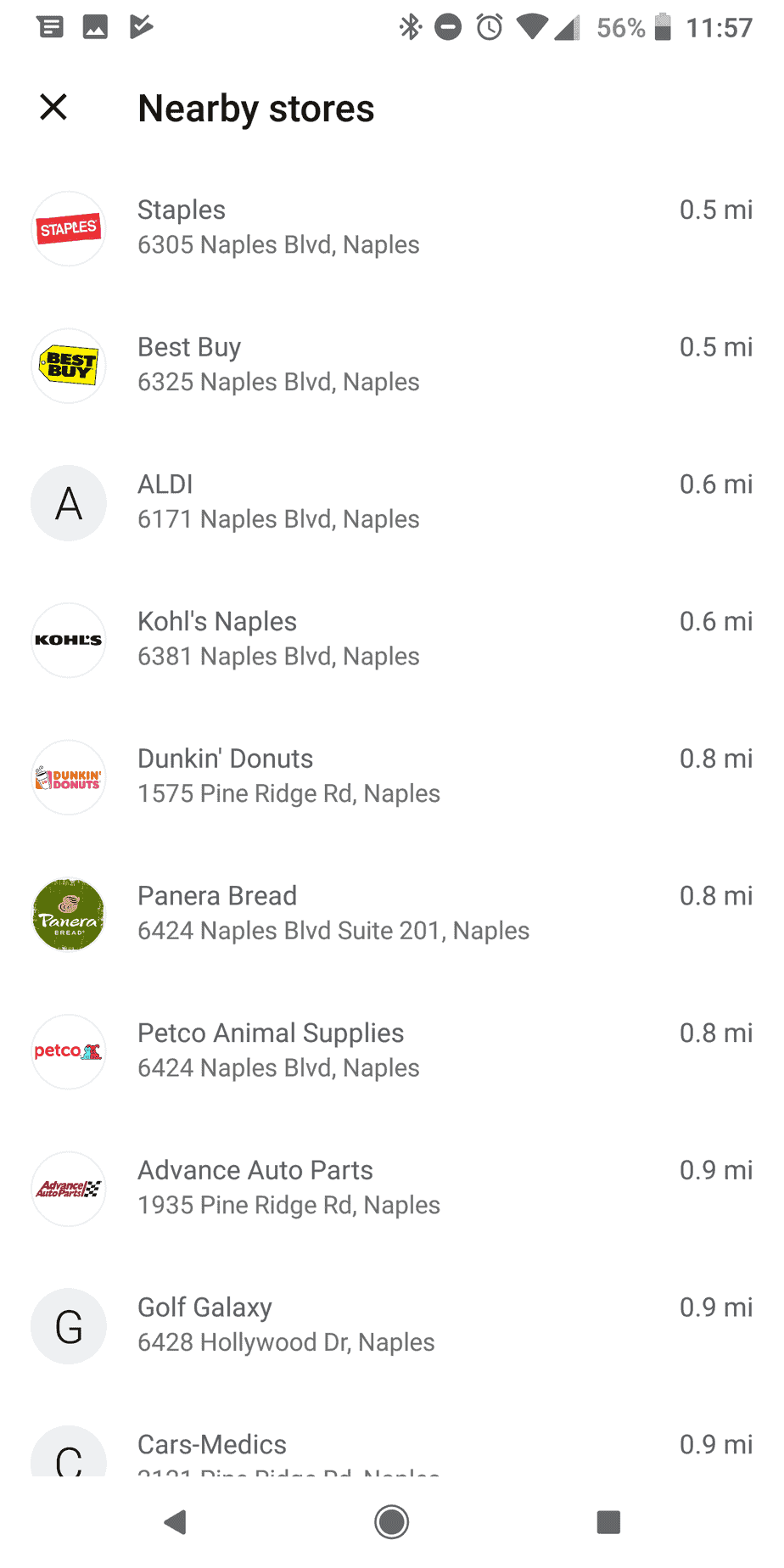
The second-to-last card is an informational card with the NFC payment icon that allows you to use your phone as a digital wallet when Google Pay isn’t accepted. The last card is labeled “Use Google Universal Contactless Payment Symbol logoPay Nearby.” When you select this option, it will automatically show the three closest stores that accept the payment method. You can also choose “See More” for a longer list. The list will include everything from fast food chains and retailers to gas stations and grocery stores.
An ever-growing number of retailers are adopting NFC-compatible payment technology to improve customer convenience and credit card processing security. With greater efficiency, shorter lines, convenience, and security, mobile payments are certainly here to stay with benefits for customers and merchants alike. And it is not difficult anymore to find stores that accept Apple Pay and Google Pay. 

 
Google Pay Nearby Location Tool
Google pay locations list
 
image 1760738 15367653 167299409200017670891816953a41d4b96f

665285217670891826953a41e0ecf8

Firearm what you need to know 1

Firearm Merchant Accounts – What You Need to Know

Firearm Merchant Accounts - What you need to know

Obtaining a Firearm Merchant Account
Firearms are a big ticket item. The ability to process credit card payments can make or break a firearms business. However, securing merchant services like credit card processing can be challenging for firearms dealers because this type of operation is considered high risk from the perspective of potential merchant partners. “High risk” simply means that, in terms of merchant services, this type of business tends to generate more chargebacks, and experience a higher volume of credit card fraud than a business considered to be low risk. Being high risk does not mean that it will be impossible to find an outfit to provide payment processing services. Understanding how to shop for these services for a high-risk operation is crucial to finding the right fit for your own unique business. Following are eight important items to put on your checklist when looking for a payment processing partner:

#1. Specialization – Does the company specialize in working with businesses like yours? Companies that specialize are likely easier to work with. Host Merchant Services has a firearm sales division specializing in gun shop merchants.

#2. Types of Sales – Do you plan to engage in internet sales? Some payment processors are not able to accommodate this. Internet Sales are very different from face to face sales for guns. It takes experience and know-how to get some of these accounts approved. We have the ability to process in person and online, and with years of experience, we know how to get you set up.

#3. Rates – Is the quote clear? Does it explain how the rate is calculated, how close to the wholesale rate it is, and whether it is flat or tiered? Will those rates change at the end of a certain period of time, or are they guaranteed for the duration of your relationship with that credit card processing company? This part can be challenging and deserves close attention.

#4. Fees – Are there fees–hidden or otherwise? Fees should be divulged on the quote and it should be noted that hidden fees are never assessed.

#5. Term Commitment – Does the company require that you commit to their company for a certain length of time? If so, you may face penalties for trying to take your business elsewhere before that term is up.

#6. Customer Service – Are they open when your business is open? Are they as committed to good customer service as you are?

#7. Additional Services – Offering additional services like credit card machines, or point of sale software and equipment could save you tons of time. Do you want to locate a processor, and then hunt down a credit card machine?

#8. Reputation – How is the company rated by entities like the Better Business Bureau and Consumer Affairs? A solid company works hard at maintaining a solid reputation.

This seems daunting, but the field will narrow quickly. You will likely find that most companies will not make it past the third or fourth point on your checklist. Host Merchant Services can certainly help!

cash disc vs surcharge whats the difference 1

Surcharge vs Cash Discount – What’s the Difference?

Surcharge vs Cash Discount – How They Differ

There has been a lot of talk about cash discount programs and surcharging recently. Though these two payment processing programs have similarities they are not the same. Here is how the two differ.

What are credit card surcharges?

A credit card surcharge is a fee that is assessed at the time a credit card is charged. The small fee is usually added to an existing tax at checkout. This fee is only applied because the transaction was completed with a credit card and is used to pass the cost of the transaction on to the customer. With this program, only credit and transactions see a surcharge and that charge is specifically for processing that card. Problem is with surcharging you are not allowed to apply fees to debit cards and surcharging credit cards is not allowed in all states. Only 40 of our 50 states allow for credit card surcharges.

What are cash discounts?

Cash discount programs apply a “service fee” to all transactions (rather than just credit cards). When a customer pays in cash the fee is discounted. The federal government has ruled that it is illegal to not allow merchants to give a discount for using cash. So in this program, not only is it available in every state, but it is also able to apply the service charge to debit card transactions as well. The fee is usually around 3.5% and covers the cost of the transaction. With cash discount, the merchant receives 100% revenue from their sales. Since the customers pay the cost of their own transactions the merchant pays nothing for transaction costs. The only cost to the merchant using the cash discount program is a small monthly fee for the processing account. The resulting savings for the merchant are considerable.

Conclusion

Both the cash discount program and surcharging result in the customer paying their own credit card transaction fees. Surcharging is not allowed everywhere and only credit cards can be surcharged. The cash discount program is federally recognized and legal everywhere. It also allows the merchant to apply the service fee to debit cards as well as credit cards. Utilizing the cash discount program, merchants can receive up to 100% of their revenue and only pay a small flat fee for the merchant account each month. The cash discount program is by far the least costly merchant account available.
Reduce Costs with Cash Discount Program 1

Reduce Your Merchant Services Cost With Cash Discount Program

reduce merchant services costs with cash discount program

Reduce Your Merchant Services Cost With Cash Discount Program.

Most people are paperless. In fact, many have become so accustomed to paying for goods and services in this manner, it has become a necessity for merchants to have credit card processing solutions. If the merchant wants to do business, he or she must have a merchant solution in place. How do merchants offset the costs associated with card payments? Cash card payments just make sense for most business owners.

Reasons to implement a cash discount program

Cutting costs where it won’t affect the quality of service is good business. If your business has been getting rave reviews and you are pleased with how well you service your clients, then cutting costs there wouldn’t make much sense. Implementing a cash discount program is harmless and won’t affect the quality of the service you provide.

Customers embrace easy ways to save money, and they appreciate you being considerate about their wallet. When you encourage customers to pay in cash, they may be on the fence about doing so. When you tell them you want them to save their hard-earned dollars by switching to cash, it becomes palatable in that this directly benefits them.

Cash discount programs don’t require tracking. Promo codes and loyalty cards all come with added responsibilities. There may be an extra card to punch. If the programs change, the person has to swap out the discount card and push people to download the new app. With a cash discount program, the process is automated by merchant services, and there are no additional maintenance steps required once fully implemented.

Cash discount programs are commonplace, so there is no adjustment to be made. Cash discount programs are commonplace. Most customers who purchase gas have seen these programs in action. There won’t be much resistance or opposition to a system that has become the norm at most convenience stores. Government agencies even have cash discount programs in place.

Collect 100 percent of your revenue with cash discount programs, and avoid jacking up the prices on customers. Getting a merchant service discount program in place will reduce your operating costs, and keep your business competitive among its peers. Implement a discount program today for cash paying customers, and protect your revenue.

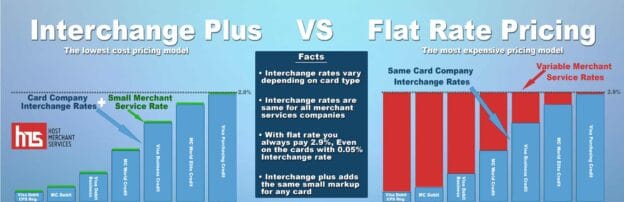
interchange plus vs flat rates

Interchange Plus vs Flat Rate Pricing

Two of the most common payment processing pricing models you will encounter today are flat rate pricing and interchange plus pricing. Here’s how they compare and why interchange plus pricing is the superior choice for most merchants.

Choosing the right credit card processor can be a difficult task when you consider there are several types of pricing models the processor can offer — some more transparent than others. This means looking for the lowest rate is probably not going to come with the lowest cost.

Understanding Interchange Rates

Understanding Interchange Rates

Interchange rates are payment processing fees set by credit card associations like Visa, Mastercard, and Discover. These interchange fees are paid to the bank that issues the credit card. There are hundreds of different interchange fees based on the type of card (such as Gold, Platinum, or rewards), whether the card is present or not present, and more.

Flat Rate Pricing

Flat Rate Pricing

Many popular processors today advertise great flat rates with no fees or hassles but this comes at a price: the fee is probably much higher than you would pay with a different pricing system.

It’s easy to see the appeal of flat-rate pricing. While many merchant services come with a long list of fees and different rates for different transactions, a flat-rate provider gives you just one rate to worry about. You always know what you’re going to pay for every transaction.

Of course, flat-rate credit card processing companies have to cover the same fees as other processors. This is how they come up with their rates: they’re high enough to include a huge profit margin.

There’s a very good chance that most of the transactions you process would qualify for a much lower rate with a different pricing model. If you are a small- to medium-sized retailer, for example, most of your transactions are probably debit cards swiped at a credit card machine. These transactions have the lowest interchange rates available. With an interchange plus or cost-plus pricing model, you could be paying 0.50% to 1% — far lower than the 2.75% rate advertised with a flat rate model.

Interchange Plus Pricing

Interchange Plus Pricing

Interchange plus pricing, also known as cost plus, is a transparent pricing model that helps you understand the real cost of credit card processing to get the lowest possible rate. Cost-plus pricing is based on the actual interchange rate “plus” a markup the processor charges. The “plus” component of interchange plus pricing may be a percentage or a flat fee per transaction.

With interchange plus pricing, you can better understand the true cost of merchant services. This pricing method is simple and shows you how much of your processing fee goes toward interchange fees and how much goes to your payment processor. The only drawback to cost-plus pricing is it can make your statements a bit more confusing until you understand the different rates you pay for different transactions.

In the past, cost plus processing was only offered to high-volume merchants but it’s now available to even new and small businesses. With only two rates to consider and transparent pricing, interchange plus is the clear choice for most businesses.

Interchange Plus VS Tiered Pricing Banner 1

Interchange Plus vs Tiered Pricing

Interchange Plus vs Tiered Pricing

Interchange Plus vs Tiered Pricing

No one wants to pay more than necessary for credit card processing, which can already eat into profits. When comparing merchant services, it’s important to understand how different pricing systems work. Many merchant account providers advertise very low fees as a teaser, even though most transactions do not qualify for these rates.

There are two common pricing models used for payment processing: tiered pricing and interchange plus pricing. Here’s how they compare.

Tiered Pricing
Tiered pricing is probably the most common pricing model for merchant services. While it’s advertised as an easy pricing method that makes statements simpler, the truth is it merely lumps hundreds of interchange rates into just three tiers or buckets. The processor may advertise the rate of the lowest tier, but most transactions will fall into tiers with a much higher rate. A debit card, which usually has the lowest interchange rate, can be billed using the same high rate as a rewards credit card, for example.

There are no set guidelines that determine which cards go in which category which leads to massive overcharging to merchants. Some payment processors have an incentive to downgrade transactions into a lower tier to boost profits. Transactions can be downgraded for any number of reasons, including using terminal software that isn’t updated, tips and tax that aren’t entered separately, or batches that aren’t settled within 48 hours. Not all of these factors are in your control.

As a merchant, you will have no way to predict which rate you will pay for transactions or how much you are being charged above the set interchange rate. You can’t even effectively compare tiered pricing quotes between payment processors because you don’t know what the mid- or non-qualified rates are — just the lowest available rate — and you won’t know the criteria the processor uses to categorize transactions.

Interchange Plus Pricing
Rather than using tiers, the interchange plus pricing model passes the set interchange rates directly to the merchant “plus” a small markup. Because the interchange rates are not changed or lumped into arbitrary categories, you can predict your payment processing costs and know what you are paying above interchange.

The only downside of interchange plus pricing is it does take time to understand the different rates you will pay for different types of transactions and credit cards. Your statements will be longer, but with greater clarity and transparency.

In the not so distant past, interchange plus pricing was only available to merchants with high credit card volume of $25,000 or more. Today, interchange plus credit card processing can be available to small and even new businesses. Interchange plus pricing is a smart choice with only two rates to consider: the transaction fee and the interchange markup fee. This pricing model is the safe and transparent choice with no arbitrary criteria you must meet.